Draftsight / Geomtry help

Thread Starter

spinnaker

Joined Oct 29, 2009
7,830
I was going to post this on the Draftsight form but.... I don't know if anyone has been there before but the forum is HORRIBLE! I mean way beyond HORRIBLE! All the posts are sort of all mashed together. Very difficult to follow what is going on. Posting here in case someone might be able to help. anyway.

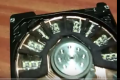
What I am looking to do is sort of divide a semicircle up into equal 10 equal compartments. A crude start of what I want to do is shown below. I want to have 10 of those compartments all evenly spaced. All of the 10 compartments will occupy the space of half of the 3.5" diameter circle. Or in other words only occupy the space in the semicircle.

What I did below was to take a best guess at the size of one of the "compartments". I then copied it and used the rotate feature to tilt the next one. As you may see the first copy went sort of OK but as I added more compartments the problem got worse.

Any idea of a better way I might do this? Also help on the optimum size of the compartment considering a 3,5" diameter and I would guess about .25" between compartments.

What I can't figure out is how to see the length of an arc in Draftsight. Perhaps it is because I am not a draftsperson but the software seems to be very difficult to figure out what is what.

upload_2018-1-27_21-56-28.png
 

Thread Starter

spinnaker

Joined Oct 29, 2009
7,830
Here is what I am looking to improve on. He used some kind of foam he cut out by hand. I wand to cut form a piece of MDF on my router.


upload_2018-1-27_22-20-30.png
 

ElectricSpidey

Joined Dec 2, 2017
3,335
I can't help you with the CAD program, but maybe I can draw the shape you need.

Take this and use a drawing program to resize one of the slices, place it where you need, and I can try to fix up the original.

Ring.jpg
 

WBahn

Joined Mar 31, 2012
32,832
I was going to post this on the Draftsight form but.... I don't know if anyone has been there before but the forum is HORRIBLE! I mean way beyond HORRIBLE! All the posts are sort of all mashed together. Very difficult to follow what is going on. Posting here in case someone might be able to help. anyway.

What I am looking to do is sort of divide a semicircle up into equal 10 equal compartments. A crude start of what I want to do is shown below. I want to have 10 of those compartments all evenly spaced. All of the 10 compartments will occupy the space of half of the 3.5" diameter circle. Or in other words only occupy the space in the semicircle.

What I did below was to take a best guess at the size of one of the "compartments". I then copied it and used the rotate feature to tilt the next one. As you may see the first copy went sort of OK but as I added more compartments the problem got worse.

Any idea of a better way I might do this? Also help on the optimum size of the compartment considering a 3,5" diameter and I would guess about .25" between compartments.

What I can't figure out is how to see the length of an arc in Draftsight. Perhaps it is because I am not a draftsperson but the software seems to be very difficult to figure out what is what.
It pretty hard to figure out what you want, although the picture helps.

If you want ten compartments in the half circle and you want there to be 0.25" between compartments, then even if they extend all the way to the full edge of the 3.5" diameter circle each compartment is only going to be 0.3" wide at the rim. Are you sure that's what you want?

There's no way to even attempt to help you on determining the optimum size of the compartment because you give no clue as to what the purpose of the compartments is or what possible metric should be used to determine whether one compartment size is better than another.
 

wayneh

Joined Sep 9, 2010
18,104
If you want 10 pieces to span 180 degrees, each unit needs to span 18 degrees or 1/20th of the circumference. That’s true for the outer circumference as well as the inner, so you should be able to calculate both edges. In your drawing program you should be able to duplicate and rotate about a point. It’s easier to set the origin of the drawing st the center of the circle and then rotate around that.

If you can provide the details, I can draw it up for you. Easy peasy.
 

Thread Starter

spinnaker

Joined Oct 29, 2009
7,830
I can't help you with the CAD program, but maybe I can draw the shape you need.

Take this and use a drawing program to resize one of the slices, place it where you need, and I can try to fix up the original.

View attachment 144545

How did you do this? Pretty much want I want except I need 8 pieces in half a circle. Plus I need space between the compartments like in my photo. Plus I need something compatible with Draftsight like a dwg file.

P.S. I can use almost any drafting or drawing program that creates a file that can be converted to G code.
 

Thread Starter

spinnaker

Joined Oct 29, 2009
7,830
It pretty hard to figure out what you want, although the picture helps.

If you want ten compartments in the half circle and you want there to be 0.25" between compartments, then even if they extend all the way to the full edge of the 3.5" diameter circle each compartment is only going to be 0.3" wide at the rim. Are you sure that's what you want?

There's no way to even attempt to help you on determining the optimum size of the compartment because you give no clue as to what the purpose of the compartments is or what possible metric should be used to determine whether one compartment size is better than another.

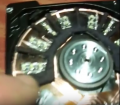
I grabbed a better screen shot. How big so you thing they are? That is a "laptop" hard drive. I imagine it is at most 3.5" drive? Looks to me like 8 "compartments".

I would like to be able to cut that out of a piece of MDF with my little Chinese CNC machine so I would need this at least in DXF format so I can convert to G-Code.

upload_2018-1-28_6-35-5.png


See the full video here.


Alec_t

Joined Sep 17, 2013
15,119
Have you tried to make the shape in Blender? I think that generates g-code (perhaps with an add-on).
Edit: Scrub that. Further research suggests there is no off-the-shelf conversion software available.

Edit 2: If you can export your design as .svg then open-source converters from .svg to g-code are available. LibreCAD can export as .svg.
 
Last edited:

Thread Starter

spinnaker

Joined Oct 29, 2009
7,830
Have you tried to make the shape in Blender? I think that generates g-code (perhaps with an add-on).
Edit: Scrub that. Further research suggests there is no off-the-shelf conversion software available.

Edit 2: If you can export your design as .svg then open-source converters from .svg to g-code are available. LibreCAD can export as .svg.
Thanks I think I got the gcode part handled or at least I hope. But I am going to lookup LibreCAD, it might be easier than Draftsight.
 

Thread Starter

spinnaker

Joined Oct 29, 2009
7,830
I use CorelDraw.

How's this?

View attachment 144579

I can provide the file in DXF format.
Please. But how did you do it?

Just one favor. Can you make a separation between them? Maybe 1/4" to 1/8"? The CNC will need to follow the lines to cut those things out. So each share needs to be more of an outline. As it is it would end up cutting it out in one big semicircle. See my crude example in my first post or the screen capture above of what I need.
 

Alec_t

Joined Sep 17, 2013
15,119
But I am going to lookup LibreCAD, it might be easier than DraftSight.
I used to have Draftsight on my PC, but, after a year or so, continued use required a subscription; so I dumped it and now use LibreCAD instead. Still trying to get to grips with that, but it looks a tad more friendly than DS.
 

ElectricSpidey

Joined Dec 2, 2017
3,335
I'm sorry I just never used a CNC, so I don't really know what exactly you need.

So the bit follows the center of the lines not the edges?

Something like this then?

Ring_2.jpg

Explaining how I did it in CorelDraw probably wont do you any good in a CAD program, but basically you take a circle, convert it to a pie, then reduce to the proper degrees, move the rotating point, dupe the shapes and rotate them the proper distance.

What is the diameter of your bit?
 

Thread Starter

spinnaker

Joined Oct 29, 2009
7,830
Yep that is exactly it. I would need to have that outside circle 3.5".

I am looking at a set of .8mm 30 degree bits right now. It can be as wide as 3mm depending on the depth. I think I might invest in some endmills.
 

cmartinez

Joined Jan 17, 2007
8,761
Please. But how did you do it?

Just one favor. Can you make a separation between them? Maybe 1/4" to 1/8"? The CNC will need to follow the lines to cut those things out. So each share needs to be more of an outline. As it is it would end up cutting it out in one big semicircle. See my crude example in my first post or the screen capture above of what I need.
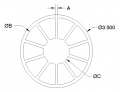
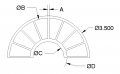
You can do this sort of thing in AutoCAD quite easily. Just answer this question: What are the values for dimensions A, B and C?

upload_2018-1-28_12-20-27.png
 

Thread Starter

spinnaker

Joined Oct 29, 2009
7,830
The space between them might me a little narrower with the compartments being a little bigger if it is not too much trouble.
 

Thread Starter

spinnaker

Joined Oct 29, 2009
7,830
You can do this sort of thing in AutoCAD quite easily. Just answer this question: What are the values for dimensions A, B and C?


All are a guess except for A. A would be maybe .25" or 6.35mm. The outside diameter is 3.5" or 88.9mm. So to answer OB as big as possible. To answer OC , the answer would be to have a .75 to 1 inch character height.
 

cmartinez

Joined Jan 17, 2007
8,761
All are a guess except for A. A would be maybe .25" or 6.35mm. The outside diameter is 3.5" or 88.9mm. So to answer OB as big as possible. To answer OC , the answer would be to have a .75 to 1 inch character height.
What thickness MDF are you planning to use?
 
Top