Draftsight / Autocad place lines equidistant?

Thread Starter

spinnaker

Joined Oct 29, 2009
7,830
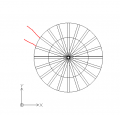
I have Draftsight but I know most people don't use it rather Autocad. I am pretty sure they are very similar. How would I place a line equidistant between two other lines.

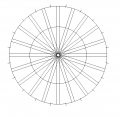
In the drawing below, I want to place a "tick" mark equidistant from the two lines marked with red.
upload_2018-11-6_22-15-2.png
 

MaxHeadRoom

Joined Jul 18, 2013
30,658
There are a few ways in Acad, one is if you know the angle of a line drawn through centre to the tick location, draw a temporary line at that angle then place a Point or Node at the circle circumference then delete the line.
Max.
 

jpanhalt

Joined Jan 18, 2008
11,087
My CAD is Graphite (Ashlar-Vellum) -- a very old version (6). For something like that I can just use a "divide" command and enter the number of segments needed. Then draw the line and trim.

When you first mentioned the protractor subject, I figured the easiest path including labels would be to work on a segment (say 10°) then copy, rotate, and finally edit text. That would avoid having to arrange each degree label on an arc.

My native format is "VC6," but I can export and import DXF.
 

Alec_t

Joined Sep 17, 2013
15,118
I'm not familiar with either program, but do you have the facility to rotate an object by a specified angle (in this case 9° or 18°) about a specified point at a specified radius?
 

Ian Rogers

Joined Dec 12, 2012
1,136
As Alec said.. Draw a short line at the quadrant at 90 degrees then rotate it 27 degrees about the center...

You have 20 segments ( 18 degrees each ) 18 + half = 27.
 

jpanhalt

Joined Jan 18, 2008
11,087
If you only want one tick, which seems to be the question, and if you can't divide the arc as i suggested. Do simple geometry.
Option 1: Draw a straight line between the two marks and divide it into 2 segments. Draw line from middle to center and extend to perimeter or simply to perimeter (if your program indicates when intersections are perpendicular). Trim.
Option 2: Draw an arc of fixed radius (radius >1/2 the distance between the marks) at each endpoint. Then from the intersection of the arcs, draw a line to the center. Trim as needed.
 

Thread Starter

spinnaker

Joined Oct 29, 2009
7,830
If you only want one tick, which seems to be the question, and if you can't divide the arc as i suggested. Do simple geometry.
Option 1: Draw a straight line between the two marks and divide it into 2 segments. Draw line from middle to center and extend to perimeter or simply to perimeter (if your program indicates when intersections are perpendicular). Trim.
Option 2: Draw an arc of fixed radius (radius >1/2 the distance between the marks) at each endpoint. Then from the intersection of the arcs, draw a line to the center. Trim as needed.

Not sure I understand all of that but I got the basic idea. I drew a temporary line then used the snap feature from the center. Thanks for the help everyone.

upload_2018-11-7_7-26-5.png
 

Thread Starter

spinnaker

Joined Oct 29, 2009
7,830
Yo... spinnaker, I'm an AutoCAD expert. Next time you have a question, feel free to tag me and I'll be more than happy to help you out.

OK How would you have done this? Was there a better way?

Also is there a free version of AutoCAD other than the educational version? I am not seeing it on their site if there is.
 

Thread Starter

spinnaker

Joined Oct 29, 2009
7,830
Yo... spinnaker, I'm an AutoCAD expert. Next time you have a question, feel free to tag me and I'll be more than happy to help you out.

OK here is one for you. You helped me with this one here.

https://forum.allaboutcircuits.com/threads/draftsight-geomtry-help.144826/page-2#post-1229367

I got everything replicated except the angles of the compartments aren't matching up.

Here is the original.
upload_2018-11-7_10-21-50.png

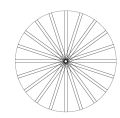
I am trying to make a 360 degree template so I can put numbers in a circle with the same spacing as the "compartments".

This is what I came up with but again the angles don't match.

upload_2018-11-7_10-24-53.png


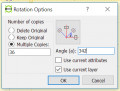
Here is how I copied the line. I think my angle is off but the number of lines appear to be right.

upload_2018-11-7_10-21-9.png


I went a different route and got it done but I would sure like to know how I built it in the first place.

What I did was to copy the top and flip it.

upload_2018-11-7_10-27-34.png
 

Alec_t

Joined Sep 17, 2013
15,118
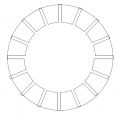
I've just had a play with LibreCAD and got this
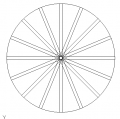
Array.PNG
by the process of
1) Drawing a rectangle (the top element of the array),
2) Selecting it,
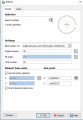
3) Using the Rotate function with a suitable Rotation point set as per the prompt at the foot of the screen, the Reference point set as the centre of the base of the rectangle, and the following parameters
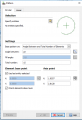
ArraySettings.PNG

Edit: Don't know why I chose angle=342; must have had a previous play on the brain.
 
Last edited:

Thread Starter

spinnaker

Joined Oct 29, 2009
7,830
Hey thanks. I was wondering how to do that in LibreCAD. Right now I am using both Draftsight and Libre CAD during the transition. Good to know there is another LibreCAD user around here.

What is good about Draftsight is it seems to be pretty much an ACAD clon.

Are you using any free CAM software that is as good as LibreCAD?
 

Thread Starter

spinnaker

Joined Oct 29, 2009
7,830
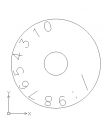
The finished product. The idea is for the numbers here

upload_2018-11-7_18-55-57.png

fit inside here.

upload_2018-11-7_18-56-44.png

Note: Two drawings not to scale.

Thanks for the advice everyone!
 

jpanhalt

Joined Jan 18, 2008
11,087
Some of your numbers to not look like they are on radiuses. "6" is particularly obvious. Did you line them up by sight or use geometry to get then aligned from a horizontal.
 

Thread Starter

spinnaker

Joined Oct 29, 2009
7,830
Some of your numbers to not look like they are on radiuses. "6" is particularly obvious. Did you line them up by sight or use geometry to get then aligned from a horizontal.

Rats I just noticed that now. Yes I did it by sight. Any suggestions on improving it? I was going to make an inner circle to get the tops of the numbers lined up.
 
Top