Panelizing PCB in Autocad LT

Thread Starter

Vishakha Dakhane

Joined Apr 15, 2025
23
Hi everyone!

Has anyone tried to create panel for PCBs in Autocad LT? Any tutorials available for this?
I could not see any videos on youtube.
I know that we can panelize PCB's in Altium Designer.

Thanks! Please let me know.
 

panic mode

Joined Oct 10, 2011
4,867
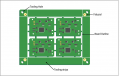
i assume your design is multilayer 2D drawing and board is rectangular. you have two options - use Vscore or routing (using mouse bites). if design is not rectangular, you will need mouse bites. and make sure to check if and what your board manufacturer accepts, along with sizes of the panel - that would be the frame or tooling strips (can be complete frame for better support).

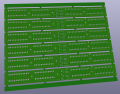
as for making panel, it is really not much to it. for Vscore clone your design in a tightly packed grid and add on the long sides 10mm or so for handling/fiducials etc. the simplest way is to save your drawing as a new file called "panel_xxxxx.dwg". select all design layers and make them a block. then you can easily copy paste the block and create tiled area. this can also be done without block but if you accidentally move something you can ruin design. when doing Vscore, create lines that along grid where Vscore is to be created and put them in a separate layer.

if doing design with mouse bites, create new block and call it "mouse bite". attach it strategically to your design (PCB block). then you can select both and tile as before. in AutoCad i usually use "Copy with Reference Point" to make sure things snap where i want them. but you can also use Grid etc. this type provides boards with very clean and smooth edges - except places where mouse bites are.

many many moons ago i was doing the same i chose to get some mouse bites from internet. that turned out to be absolutely horrible...
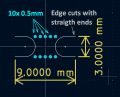
first of all holes were not close enough so when trying to separate boards, bending would cause stress to components. and doing panelizing was not so easy as KiCad was expecting EXACT values of edges - with segments joining perfectly. and it did not help that back then (i hope this is fixed by now), snapping to an end point of an arc was beyond difficult. so i extended the end-points by short straight segments and - that was a game changer.

i chose 3mm gap, 9mm long mouse bite. notice the straight ends beyond circular arcs. the holes are 5mm diameter, 0.75mm center to center. This provided pretty easy separation and edge itself is quite clean.
1758045861721.png

1758045606601.png

1758046217445.png
 
Last edited:

panic mode

Joined Oct 10, 2011
4,867
i do not know your setup. if i was to do it in AutoCad, i would be mindful of creating everything on separate layers just like EDA software so that PCB shop can tell what layer is what:
front copper
back copper
drill holes
silkscreen
...

in that case just hide other layers and keep drill layer visible, select all and delete. if the holes are part of block, you can explode the block then remove individual features. sometimes there are blocks inside blocks inside blocks....

perhaps post your file.
 
Top