Draftsight / Autocad place lines equidistant?

jpanhalt

Joined Jan 18, 2008
11,087
My suggestion is same as before. Construct a segment in the normal orientation, then rotate it. I would create "blank" text (i.e., place holders) copy, paste and edit (alternatively: copy, edit, rotate, paste), but I am not familiar with your specific program. I think most CAD programs allow that.
 

Thread Starter

spinnaker

Joined Oct 29, 2009
7,830
My suggestion is same as before. Construct a segment in the normal orientation, then rotate it. I would create "blank" text (i.e., place holders) copy, paste and edit (alternatively: copy, edit, rotate, paste), but I am not familiar with your specific program. I think most CAD programs allow that.

Sort of like Alec in post #16? Might be a better idea. I could place one number. Put a box around it then copy the box in a circle.
 

Thread Starter

spinnaker

Joined Oct 29, 2009
7,830
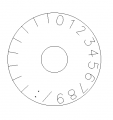
I think this is looking better. The tick marks on the left are to act as timing marks for calibration. I am trying to figure a way they can be uniquely identified. Perhaps a series of drill holes along them?

I still need to mirror it.

upload_2018-11-8_0-2-59.png
 

jpanhalt

Joined Jan 18, 2008
11,087
Sort of like Alec in post #16? Might be a better idea. I could place one number. Put a box around it then copy the box in a circle.
My CAD program puts all text in a "text box." That can be manipulated like any other element. You can group/ungroup elements at will or select elements individually that you want to manipulate. The problem with selecting individual elements in a more complex structure is that it is too easy to miss something. With a grouped element, one click does it. I typically have several layers of grouped elements.

My program is quite old and lacks modern conveniences. For example, if you move a group and any lines are congruent to a previous group, they will look like just one line, but printers and CNC will likely seen them as double and retrace or cut twice. I need to plan ahead or go back, ungroup everything, then delete lines to see of there are duplicates underneath. Obviously, planning ahead is easier. Don't know about your program, but it is something to be aware of for CNC. Newer programs can look for such overlaps.

The text box on my version of Graphite is archaic. It is set to what you make it, not what the text requires. Thus, an overly long text box can cause difficulties when manipulating the text's position. Newer versions and other programs like Solidworks are more advanced.
 

Thread Starter

spinnaker

Joined Oct 29, 2009
7,830
LibreCAD and Draftsight do something similar. But it is a lot harder to do in Draftsight. One issue I saw is they don't play well together on text. The font will change between them. More important the position changes. I think that was my issue above. Draftsight seems to throw the position of text off. I guess it is best to first explode into polylines before moving over.

Currently I am using both apps for the same project. Some things are easier in one app over the other.
 
Top