Dont quite understand ltspice

Audioguru

Joined Dec 20, 2007
11,248
The datasheet for the TDA2050 shows a recommended schematic. The output power is 7W into 8 ohms or 13W into 4 ohms with a 24V single supply or a plus and minus 12V supply. Just build it like shown in the datasheet, you do not need to simulate it.

An ordinary modern bridged car amplifier (TDA7396) produces 9W into 8 ohms or 15W into 4 ohms with a single 12V battery or two 6V batteries. Its parts are fewer than a TDA2050. Its datasheet lists all its spec's and a recommended pcb layout.
 

Thread Starter

ConstructionK88

Joined Jul 25, 2018
282
The datasheet for the TDA2050 shows a recommended schematic. The output power is 7W into 8 ohms or 13W into 4 ohms with a 24V single supply or a plus and minus 12V supply. Just build it like shown in the datasheet, you do not need to simulate it.

An ordinary modern bridged car amplifier (TDA7396) produces 9W into 8 ohms or 15W into 4 ohms with a single 12V battery or two 6V batteries. Its parts are fewer than a TDA2050. Its datasheet lists all its spec's and a recommended pcb layout.
Ive already bought 20 TDA2050s. Quite a while ago. I did build it to specs for single supply(assuming a battery is single supply) at 12volts and it sounded horrible through a 10watt speaker, then i upped it to the recommended 22v and it sounded great. So i figured it had to be the values of the caps and resistors. since it recommends 22v then thats what the data sheet is set up for. I changed around cap and resistor values till it worked on 12v and i finally got it to sound great and a loud enough volume for my needs. Unfortunately, I have a precocious child.....My proto was destroyed and i dont remember all that i changed. So i wanted ti ltspice it so i didnt have to trial and error all over again.
 

Audioguru

Joined Dec 20, 2007
11,248
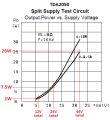
View attachment 170012The datasheet for the TDA2050 shows that its output power before clipping distortion is almost nothing with a 12V supply, is 7.5W with a 24V supply and is 26W with a 44V supply, when the speaker is 8 ohms.
Only the supply voltage and speaker impedance changes its maximum undistorted output power. The values of the parts have nothing to do with it.

Of course the single supply circuit needs two resistors more than the split supply circuit.
 

Attachments

Thread Starter

ConstructionK88

Joined Jul 25, 2018
282
View attachment 170012The datasheet for the TDA2050 shows that its output power before clipping distortion is almost nothing with a 12V supply, is 7.5W with a 24V supply and is 26W with a 44V supply, when the speaker is 8 ohms.
Only the supply voltage and speaker impedance changes its maximum undistorted output power. The values of the parts have nothing to do with it.

Of course the single supply circuit needs two resistors more than the split supply circuit.
That could have been it then. Oddly it didnt clip at all at full input. I think the speaker was 4ohm. I have found spice models for it but i cant figure out how to add it. ive tried many times but it doesnt show up in lt. Points become moot. Ill find a use for LTSpice eventually but i dont mind copying schematics and just tuning them to my needs. Was simply looking for a way to spice it so i could learn its functions
 

wayneh

Joined Sep 9, 2010
18,121
That could have been it then. Oddly it didnt clip at all at full input. I think the speaker was 4ohm. I have found spice models for it but i cant figure out how to add it. ive tried many times but it doesnt show up in lt. Points become moot. Ill find a use for LTSpice eventually but i dont mind copying schematics and just tuning them to my needs. Was simply looking for a way to spice it so i could learn its functions
Have you used the “include” directive to your schematic? This tells LTspice to include the model and where to find it.
 

Thread Starter

ConstructionK88

Joined Jul 25, 2018
282
Have you used the “include” directive to your schematic? This tells LTspice to include the model and where to find it.
I did see that in the instructions but I couldn't figure out how to change it. Only one part of the file that I could tell was similar to ltspice and that was only the .lib part. The other files had different targets and I didn't know which was which
 

wayneh

Joined Sep 9, 2010
18,121
I did see that in the instructions but I couldn't figure out how to change it. Only one part of the file that I could tell was similar to ltspice and that was only the .lib part. The other files had different targets and I didn't know which was which
In my most recent LTspice project, I have added the following directives:
.include irf540n.spi
.include LM258 PSPICE MODEL.MOD
.include 2SC1815.txt
.tran 100m​
In the same folder as my LTspice schematic in which these directives appear, there are files named exactly as given in the ".include" statements. Those files are models I have found online for the parts I'm using.

You can see that the file extension is not critical (but obviously must be correct) and that different types of files can work. I believe you can also use file path information to navigate into folders, but it's easier to just put the external models in the folder with your schematic. Then you can zip the entire folder and your project is portable.

To use the model, place a generic part such as NMOS for the IRF540 MOSFET or NPN for the transistor. Then edit the name of the placed component to match the name of the included model. For my NPN that was QC1815 and for my MOSFET that was irf540n. You need to open the model (in a text editor) and read what the name is.
 
Last edited:

Thread Starter

ConstructionK88

Joined Jul 25, 2018
282
In my most recent LTspice project, I have added the following directives:
.include irf540n.spi
.include LM258 PSPICE MODEL.MOD
.include 2SC1815.txt
.tran 100m​
In the same folder as my LTspice schematic in which these directives appear, there are files named exactly as given in the ".include" statements. Those files are models I have found online for the parts I'm using.

You can see that the file extension is not critical (but obviously must be correct) and that different types of files can work. I believe you can also use file path information to navigate into folders, but it's easier to just put the external models in the folder with your schematic. Then you can zip the entire folder and your project is portable.

To use the model, place a generic part such as NMOS for the IRF540 MOSFET or NPN for the transistor. Then edit the name of the placed component to match the name of the included model. For my NPN that was QC1815 and for my MOSFET that was irf540n. You need to open the model (in a text editor) and read what the name is.
I did find just one spice model and it opened automatically in ltspice but it doesnt function even though it was made for ltspice. Is there a way to create the tda2050 in ltspice just as per its datasheet or close to it?
 

eetech00

Joined Jun 8, 2013
4,709
I did find just one spice model and it opened automatically in ltspice but it doesnt function even though it was made for ltspice. Is there a way to create the tda2050 in ltspice just as per its datasheet or close to it?
Hi

What do you want to get out of the simulation?
It may be something you can only get by breadboarding...

eT
 

wayneh

Joined Sep 9, 2010
18,121
I did find just one spice model and it opened automatically in ltspice but it doesnt function even though it was made for ltspice. Is there a way to create the tda2050 in ltspice just as per its datasheet or close to it?
Did you add the TDA2050 model into your schematic? Post your schematic file and the model you found zipped together and the pros around here can help get you going.
 

Uilnaydar

Joined Jan 30, 2008
118
I did find just one spice model and it opened automatically in ltspice but it doesnt function even though it was made for ltspice. Is there a way to create the tda2050 in ltspice just as per its datasheet or close to it?
Read the post above yours if you have the tda2050 model from Yahoo, that needs to be included in your LTSpice file.

Of course, you need a part made that has the pins called out in the correct order that is named the same as the .SUBCKT in the .mod file (LM1875 in this case).

I was going to google "adding models to ltspice" and post the link but I think you can handle that.
 

Alec_t

Joined Sep 17, 2013
15,120
Is there a way to create the tda2050 in ltspice just as per its datasheet or close to it?
There is, but it's a fairly tortuous process. The datasheet doesn't give details of component values within the IC schematic, so you'd have to guestimate those. At the end of the day you would be unsure how close the model was to the real-world IC, so you might just as well pick an existing workable model of a roughly similar amplifier.
 

Thread Starter

ConstructionK88

Joined Jul 25, 2018
282
Hi

What do you want to get out of the simulation?
It may be something you can only get by breadboarding...

eT
Its to help narrow down what i had to change when i breadboarded it using a 12v battery supply. The standard schematic for single supply didnt work on 12volts so i had to change up a bit but i dont remember all i changed. I figured spice would speed things up in steal of manually cherry picking through all the parts again.
 

Thread Starter

ConstructionK88

Joined Jul 25, 2018
282
Did you add the TDA2050 model into your schematic? Post your schematic file and the model you found zipped together and the pros around here can help get you going.
https://groups.yahoo.com/neo/groups/ltspice/search/files?query=tda2050 this is the only site i could find referencing it for a spice model. the first choice downloaded as a video file and the second worked immediately with ltspice when extracted but id didnt seem to do anything. Also it was no a standard audio schematic as it is in the 2050s pdf. Sorry im not yet sure how to actually upload it on to here
 

Thread Starter

ConstructionK88

Joined Jul 25, 2018
282
Read the post above yours if you have the tda2050 model from Yahoo, that needs to be included in your LTSpice file.

Of course, you need a part made that has the pins called out in the correct order that is named the same as the .SUBCKT in the .mod file (LM1875 in this case).

I was going to google "adding models to ltspice" and post the link but I think you can handle that.
That im doing now. Though it seems to have been made for ltspice. when i clicked it, it opened in ltspice. That i dont know why.
 

BobTPH

Joined Jun 5, 2013
11,556
Neither of the files you have posted is a spice model. The first is an LTSPICE schematic. The second is an LTSPICE symbol, which is just an op amp symbol.

Normally, models have a .lib or .sub extension.

Bob
 

wayneh

Joined Sep 9, 2010
18,121
https://groups.yahoo.com/neo/groups/ltspice/search/files?query=tda2050 this is the only site i could find referencing it for a spice model. the first choice downloaded as a video file and the second worked immediately with ltspice when extracted but id didnt seem to do anything. Also it was no a standard audio schematic as it is in the 2050s pdf. Sorry im not yet sure how to actually upload it on to here
You need to make your own schematic and place the modeled component into your schematic. The model file I found there on Yahoo might be the LM1875 model - that’s the name of the subcircuit in the file. Perhaps it’s been tweaked to behave more like the TDA2050? You might compare it to the LM1875 model to see if it’s any different.

The .asy file might provide a good symbol for the IC. You can select to apply that .asy to the component you’ve placed into your schematic.

Confused yet?
 

Audioguru

Joined Dec 20, 2007
11,248
Its to help narrow down what i had to change when i breadboarded it using a 12v battery supply. The standard schematic for single supply didnt work on 12volts so i had to change up a bit but i dont remember all i changed. I figured spice would speed things up in steal of manually cherry picking through all the parts again.
Don't you trust the datasheet from the company who designed it but you trust the guesses in a simulation for a different amplifier?

The datasheet for the TDA2050 shows that its minimum supply is 9V or plus and minus 4.5V. A graph shows its fairly low output power using a plus and minus 5V supply and it will work the same when it is biased for a single 10V supply. The supply voltage changes but all the parts values stay the same.

A simulation is simply many guesses and with lots of important spec's missing. I have simulated many amplifiers using little transistors with currents and temperatures much higher than allowed. They simulate fine but blow up in a circuit.
 
Top