Custom Flight Controller Board design - Suggestions and Criticisms

Thread Starter

TommasoB

Joined Nov 26, 2023
27
Hi T,
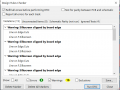
Do you get this result when you run the DRC?
C
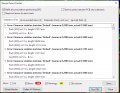
I do not get any error, just warnings related to silkscreen cutting. I updated the net class looking at the manufacturer reference data. You can have a look at PCBway manufacturing capabilities or follow my net class screenshot
 

Attachments

camerart

Joined Feb 25, 2013
3,842
I do not get any error, just warnings related to silkscreen cutting. I updated the net class looking at the manufacturer reference data. You can have a look at PCBway manufacturing capabilities or follow my net class screenshot
Hi T,
I get this: but I'm sure you have a clearer view than mine, being your PCB.
Anyway as you've checked each track, I'm sure it's fine.
Remind me what error you are getting?
C
 

Attachments

Thread Starter

TommasoB

Joined Nov 26, 2023
27
Hi T,
I get this: but I'm sure you have a clearer view than mine, being your PCB.
Anyway as you've checked each track, I'm sure it's fine.
Remind me what error you are getting?
C
Hi T,
I get this: but I'm sure you have a clearer view than mine, being your PCB.
Anyway as you've checked each track, I'm sure it's fine.
Remind me what error you are getting?
C
Yep the layout is fine, I had doubts about EMI or particular design errors. Actually, I am more afraid about the schematic
 

camerart

Joined Feb 25, 2013
3,842
Yep the layout is fine, I had doubts about EMI or particular design errors. Actually, I am more afraid about the schematic
Hi T,
I think you do your SCH in a more professional way to me, as I'm an amateur, and need a more visual view.
Here's how I do mine.
C
 

Attachments

camerart

Joined Feb 25, 2013
3,842
Hi T,
Earlier you mentioned the soldering temperature, which I think was under 200°, I think this is too low, I use 330 to 400, when I'm soldering.
C
 

Thread Starter

TommasoB

Joined Nov 26, 2023
27
Hi T,
Earlier you mentioned the soldering temperature, which I think was under 200°, I think this is too low, I use 330 to 400, when I'm soldering.
C
There are a lot of soldering paste for hot plate soldering that have a melting temperature around 138°C, which make them useful to prevent damage to other components, but that are not suitable for high temperature applications
 

camerart

Joined Feb 25, 2013
3,842
There are a lot of soldering paste for hot plate soldering that have a melting temperature around 138°C, which make them useful to prevent damage to other components, but that are not suitable for high temperature applications
H T,
Ok.
Am I correct that your 2x PCBs are stacked for space saving, and what would go into a craft?
In this case, are you using a computer, via USB to send control DATA?

I also use 2x PCBs, but one is BASE and the other REMOTE, where control is sent via radio, between them.
C
 

Thread Starter

TommasoB

Joined Nov 26, 2023
27
H T,
Ok.
Am I correct that your 2x PCBs are stacked for space saving, and what would go into a craft?
In this case, are you using a computer, via USB to send control DATA?

I also use 2x PCBs, but one is BASE and the other REMOTE, where control is sent via radio, between them.
C
Board are not stuck just because of space. In this layout I have 3 boards, and each one is doing something specific:

1) PDB Power distribution board: responsible for voltage regulation from 3s-4s battery to 5V and 12V.

2) CPU board: programmable board that has some GPIO output connected to the 32 pin connector: this board can be programmed depending on the needs.

3) Sensor board specific for each project: for this drone I have some sensors, for another project I may design a different board with different sensors, to be connected to the CPU board (2nd board)..

The CPU board has its own 2.4GHz Antenna (See ESP32 WROOM UE) which guarantees a 1Mbps communication with another ESP 32 board via ESP NOW communication protocol -> It means that I can create a robust communication between a remote controller and the drone board and I may also find a way to bring those data to my computer.

How?
The remote controller communicates with the drone via its antenna but can also send data via Serial if connected to the laptop.

Remote controller will be 3D printed. It will include a 5.8GHz board for FPV camera, it will have 4 buttons, 4 toggle switches, 2 potentiometers and an LCD screen. The LCD screen will print the telemetry data, whereas the FPV video will be displayed on a smartphone screen.

Remote is currently being designed, I am waiting for some components to design its PCB
 

Attachments

camerart

Joined Feb 25, 2013
3,842
Board are not stuck just because of space. In this layout I have 3 boards, and each one is doing something specific:

1) PDB Power distribution board: responsible for voltage regulation from 3s-4s battery to 5V and 12V.

2) CPU board: programmable board that has some GPIO output connected to the 32 pin connector: this board can be programmed depending on the needs.

3) Sensor board specific for each project: for this drone I have some sensors, for another project I may design a different board with different sensors, to be connected to the CPU board (2nd board)..

The CPU board has its own 2.4GHz Antenna (See ESP32 WROOM UE) which guarantees a 1Mbps communication with another ESP 32 board via ESP NOW communication protocol -> It means that I can create a robust communication between a remote controller and the drone board and I may also find a way to bring those data to my computer.

How?
The remote controller communicates with the drone via its antenna but can also send data via Serial if connected to the laptop.

Remote controller will be 3D printed. It will include a 5.8GHz board for FPV camera, it will have 4 buttons, 4 toggle switches, 2 potentiometers and an LCD screen. The LCD screen will print the telemetry data, whereas the FPV video will be displayed on a smartphone screen.

Remote is currently being designed, I am waiting for some components to design its PCB
Hi T,
Well done, it makes me look like a tortoise :0
C
 

camerart

Joined Feb 25, 2013
3,842
Hi T,
Have you been able to get your boards working?

When testing PINS, do you also check that 2x PINs aren't connected together?

I use PICs and have one simple test where I switch all of the ports ON wait 1sec switch all of the ports OFF wait 1sec, then check with an analoge voltmeter, or logic analyser, or Oscilloscope. I recall you saying that you were going to buy an oscilloscope, but the other tests are cheaper.
Cheers, C
 
Last edited:

Thread Starter

TommasoB

Joined Nov 26, 2023
27
Updates 17/12/2023:

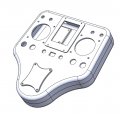
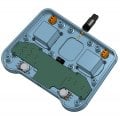
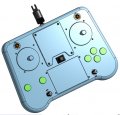
Due to the Christmas period I am waiting to sent the PCBs to production , it is always a mess with packages. I took this month to work on the remote controller and its PCB... Picture attached. I will probably send to production all the PCBs together and I expect to receive them around the end of January. I am currently thinking about keeping track of this project, and others I have in mind, on my website.

Cheers and happy Christmas :)
 

Attachments

camerart

Joined Feb 25, 2013
3,842
Updates 17/12/2023:

Due to the Christmas period I am waiting to sent the PCBs to production , it is always a mess with packages. I took this month to work on the remote controller and its PCB... Picture attached. I will probably send to production all the PCBs together and I expect to receive them around the end of January. I am currently thinking about keeping track of this project, and others I have in mind, on my website.

Cheers and happy Christmas :)
Hi T,
Your controller looks good! I don't have a 3D printer, or the skills to make one, so I am using an old stripped out controller to fit my PCB into.
Merry Christmas.
C.
 

Thread Starter

TommasoB

Joined Nov 26, 2023
27
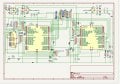
Attached the remote controller board schematic, maybe someone is interested and he/she would have a look. Here the ESP32 pin description to understand why there are 4 pull down resistor for toggle switches. Buttons use internal pull up resistors. Feedback about the MCP73831 wiring would be appreciated, in particular the connection to both VIN and +BATT (connected to the 3.3V linear regulator and to the battery itself).
 

Attachments

Top