Hello. I just bought a DS1102E and as far as I could tell (after reading the entire PDF manual) the trace colors cannot be changed. The only thing close I found, was the INVERT function (and I couldn't make it work). I gather it reverses the back ground and trace colors (maybe only in the saved waveform?).
BTW, do you notice digital noise riding on the waveform of your scope? I posted about this earlier today. Thanx!
1) I don't think you can change the trace color for the different channels. They are painted on the enclosure.
2) "Invert" probably inverts the signal. That's what it does on my unit.
3) @Mickey: Have you read the part about never pressing "Auto?" It is not in the manual. If you are adventuresome, press it.
1) I don't think you can change the trace color for the different channels. They are painted on the enclosure.
2) "Invert" probably inverts the signal. That's what it does on my unit.
3) @Mickey: Have you read the part about never pressing "Auto?" It is not in the manual. If you are adventuresome, press it.
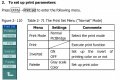
I think the OP was referring to the color of the trace on the display. Yes, it does seem to be linked to the color on the input BNC legends. Thanx for pointing that out, I had missed that. The INVERT I was referring to was a PRINT function in the UTILITY menu. From the DS1000 series user guide:
The OP had asked about colors, which was why I mentioned this. The scope (like most) does indeed had an invert function for the displayed waveform too.
As for the AUTO button, it is a pretty neat function. Why would you not want to push it?
Mikey

 Facebook
 Google
 GitHub
 Linkedin