Can't make 4 bit 16x2 LCD interface with ATmega32

Thread Starter

etech7

Joined Jun 9, 2015
46
Hi there!
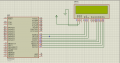
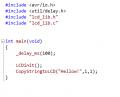
I've been trying a long time to interface my TM162A-3 16x2 LCD module with ATmega32 in 4 bit mode using a library (also tried my own library) and failed untill now. Please suggest me a solution. The library was from this link: http://winavr.scienceprog.com/sites/default/files/storyfiles/AVR-LCD4b.zip
I tried compile my code without including "lcd_lib.c" and compiler showed error message "Undefined reference to LCDinit()" "Undefined reference to CopyStringtoLCD()". Including "lcd_lib.c" in main C file solved the issue. Which was unfamiliar to me... I'm using AVRstudio 5. But still nothing as you can see in simulation. What's wrong with my code? :(

Thanks in advance!
 

Attachments

philba

Joined Aug 17, 2017
959
Just a guess, the LCD pins don't connect to the ones specified in the library header file. So, you could change your hardware or change the header file but which ever way you go, you have to make sure they agree.

In addition, you need to hook up Vee to get the display to show anything. See your display's datasheet or find examples on the web. Usually, it requires a potentiometer that forms a voltage divider between Vcc and Gnd, the wiper connects to Vee. I'd try a 10K but anything between 2K and 20K should be ok.
 
Last edited:

AlbertHall

Joined Jun 4, 2014
12,625
In addition, you need to hook up Vee to get the display to show anything. See your display's datasheet or find examples on the web. Usually, it requires a potentiometer that forms a voltage divider between Vcc and Gnd, the wiper connects to Vee. I'd try a 10K but anything between 2K and 20K should be ok.
Yes, and before even considering what the code is doing, adjust that pot and you should see, on the top line of the display, a line of boxes. Leave the pot set so the boxes are only just visible. Otherwise the display may show nothing even if the code is perfectly correct.
 

Thread Starter

etech7

Joined Jun 9, 2015
46
Just a guess, the LCD pins don't connect to the ones specified in the library header file. So, you could change your hardware or change the header file but which ever way you go, you have to make sure they agree.

In addition, you need to hook up Vee to get the display to show anything. See your display's datasheet or find examples on the web. Usually, it requires a potentiometer that forms a voltage divider between Vcc and Gnd, the wiper connects to Vee. I'd try a 10K but anything between 2K and 20K should be ok.
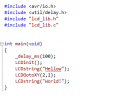
I tried your solution. Yes it was program definition and wiring mismatch. Quit silly! Now simulation is running good but still after uploading to ATmega32, the printed message is not correctly positioned. It starts from 2,1 character. I tried altering the program to make it 1,1 but still it is printed at 1,2. Then I realized it is also happening in the simulator. 2nd line message is shifted one character right. Now what?
 

Attachments

Thread Starter

etech7

Joined Jun 9, 2015
46
Yes, and before even considering what the code is doing, adjust that pot and you should see, on the top line of the display, a line of boxes. Leave the pot set so the boxes are only just visible. Otherwise the display may show nothing even if the code is perfectly correct.
I don't think it's an issue 'coz 8bit interface works fine without using Vee pin. Thanks!
 

Thread Starter

etech7

Joined Jun 9, 2015
46
on the simulator? in the real world it's required.[/QOUTE] Finally it worked. The problem was - definition for LCDgoto(x,y) function was different that of 8bit library I used before. to print string from 1st line, 1st character position, the argument is to be (0,0), whether in prior library it was (1,1). and in the LCDinit() function, LCDclr() is not called so my first string missing or started from different character position. Although it was supposed to be reset on power on and character position should be 1,1... Whatever, it feels good now. relaxing...
Thanks for your reply.
 
Last edited by a moderator:

Thread Starter

etech7

Joined Jun 9, 2015
46
Have you tried the char at "0,0"
The positions generally start at 0, not 1. That may be the problem.
Yes. I used (1,1) to define 1st line 1st character. But I got it I was wrong. That's why the string position was not as intended.
 
Top