Bug with a 4bits UP/DOWN counter : 74HC193.

Thread Starter

Alkanium

Joined Aug 6, 2024
5
Hello Everyone,

I tried to use a 74HC193 in a circuit to use only 2 outputs (Q0 and Q1) to have a 2bits counter (I only need 4 positions). To be sure that everything is working, I tested all 4 output to see if it count from 0000 to 1111 and come back to 0000.

The bug is : When I turn on the circuit, I have random result in Output, I guess it's maybe normal. So I reset using the pin 14 with a +5V connected to a knob. Then, with an other knob inversed (On all the time and Off when you click on it), I do UP and it goes from 0000 to 1111, passing these 16 steps. Then, instead to come back to 0000, it goes to 0001. And even if I make new cycles, it always make 1110 -> 1111 -> 0001 -> 0010 and so on. I don't know why and I would like to understand if it's normal or not, and if it exist a way to go like 1110 -> 1111 -> 0000 -> 0001-> 0010 ...

Thank you so much for your precious help and have a good day !
 

Thread Starter

Alkanium

Joined Aug 6, 2024
5
Thank you for your fast reply !
I exactly made this circuit because I had some problems with bounced knob parasites, and now looks like I don't have parasites, but still doesn't go to 0000:(
 

dl324

Joined Mar 30, 2015
18,220
A schematic would be helpful.
The bug is : When I turn on the circuit, I have random result in Output, I guess it's maybe normal.
It's normal. If you want it to come up in a certain state, you need to add circuitry to do that.
So I reset using the pin 14 with a +5V connected to a knob.
What knob? Is the knob connected to something?
Then, with an other knob inversed (On all the time and Off when you click on it)
What knob?
 

MrChips

Joined Oct 2, 2009
34,628
1) Make sure that MR pin-14 has a pull-down resistor. 10k Ω will do.
2) Make sure that there is 1 μF - 10 μF between Vcc and GND.
3) Make sure that there is 0.1 μF between Vcc and GND close to the 74HC193 Vcc and GND pins.
 

Thread Starter

Alkanium

Joined Aug 6, 2024
5
A schematic would be helpful.
It's normal. If you want it to come up in a certain state, you need to add circuitry to do that.
What knob? Is the knob connected to something?
What knob?
Hello ! I will do the schematic tomorrow. I followed my draft and I need to correct it now, so I will clean everything tomorrow to have a clear one. At least, we will see my mistakes :DThanks for the answer !
 

Thread Starter

Alkanium

Joined Aug 6, 2024
5
1) Make sure that MR pin-14 has a pull-down resistor. 10k Ω will do.
2) Make sure that there is 1 μF - 10 μF between Vcc and GND.
3) Make sure that there is 0.1 μF between Vcc and GND close to the 74HC193 Vcc and GND pins.
I did the 2 and the 3, I will test the 1 tomorrow. Thank you ! :D
 

Thread Starter

Alkanium

Joined Aug 6, 2024
5
Even your draft would be better than nothing.
Hello dl324,
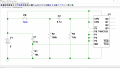
There is my draft corrected with my actual circuit, sorry if it's a bit messy :

Capture d'écran 2024-08-07 111758.png
My power source doesn't give me directly a +5V DC so I had to convert it with a L7805 and a couple of capacitors, and it makes the job perfectly. I also don't have a NO button or inverted button so I made one with a BC547 transistor, a few resistors and it also makes the job perfectly. LEDS are connected with a 330 Ohm resistor for each, I forgot to update the values.

Also, the pin 11 of the 74HC193 is connected to the +5V. I forgot to connect it in the schematics.

I am a rookie in electronics, I have barely no knowledge about it and I went to this result reading datasheets and a few researches on internet. I use KiCad to make schematics, and I use the IEC norm for my drawings because in France I used to read schematics like this, but I also understand the ANSI norm.

I wish you a good day, and thank you so much for your help !;)
 

sarahMCML

Joined May 11, 2019
695
Hello dl324,
There is my draft corrected with my actual circuit, sorry if it's a bit messy :

View attachment 328726
My power source doesn't give me directly a +5V DC so I had to convert it with a L7805 and a couple of capacitors, and it makes the job perfectly. I also don't have a NO button or inverted button so I made one with a BC547 transistor, a few resistors and it also makes the job perfectly. LEDS are connected with a 330 Ohm resistor for each, I forgot to update the values.

Also, the pin 11 of the 74HC193 is connected to the +5V. I forgot to connect it in the schematics.

I am a rookie in electronics, I have barely no knowledge about it and I went to this result reading datasheets and a few researches on internet. I use KiCad to make schematics, and I use the IEC norm for my drawings because in France I used to read schematics like this, but I also understand the ANSI norm.

I wish you a good day, and thank you so much for your help !;)
Your transistor is the wrong way round, swap collector and emitter, and remove C5, and make R2 about 1K, they are both slowing down the rise time of the input clock of the counter.
You also need a pull-down resistor on pin 14, otherwise it's floating!
 

ScottWang

Joined Aug 23, 2012
7,498
Your transistor is the wrong way round, swap collector and emitter, and remove C5, and make R2 about 1K, they are both slowing down the rise time of the input clock of the counter.
You also need a pull-down resistor on pin 14, otherwise it's floating!
And P.11(/Load) should be connected to +5V.
 

dl324

Joined Mar 30, 2015
18,220
There is my draft corrected with my actual circuit, sorry if it's a bit messy
Most prefer for schematic flow to be primarily left-to-right and top-to-bottom, with components drawn vertically unless horizontal makes more sense.

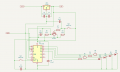
Here's a redraw that's easier to read:
1723044021565.png
I made the load connection to 5V, corrected Q1 connections, and added a pull-down resistor on CLR.

You don't need the transistor; just the switches would be sufficient. You should put caps across the switches for switch bounce.

Don't see anything that would account for the behavior you're seeing.

The counter will power on to 0 with the capacitor across S1 for debounce.

I use KiCad to make schematics
I use Eagle. It uses silly colors too. I print to B&W PDF to avoid embarrassment.
 
Last edited:
Top