Facebook
 Google
 GitHub
 Linkedin

Hello all,
I'm trying to replace a broken USB type B port on a Vestax VCI-400 mixer. This is the first time I'm working PCB so it's pretty messed up.
So at first, I'm trying to desolder the broken port, and ended up doing it a lil-too rough which makes the pad's hole (VIA/rivet?) to chip off. i didn't realize it at first so I went soldered the port replacement's lead with the help of flux, and ended up with this:
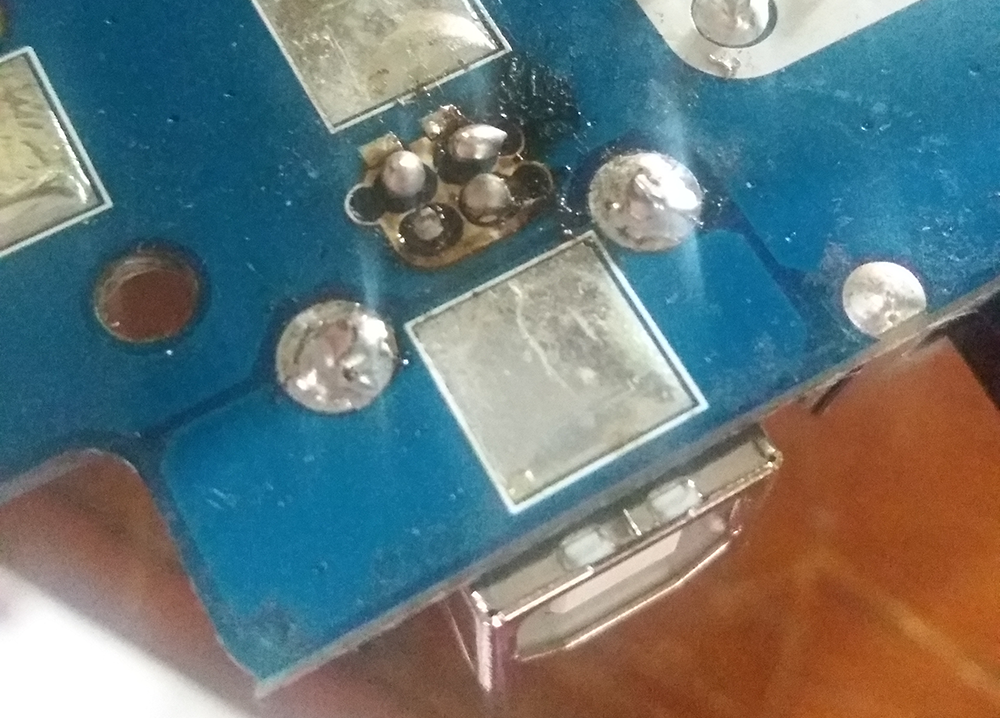
I tried to connect it to my PC and didn't get any connection from the USB.
So I desolder it again, and tried to put a solder on the board because I thought at first VIA/rivet is just a solder sticking on PCB. Of course it won't work, so my smartass brain thought it will be a good idea to add some solder on the USB port's lead like it was a Nutella & Go snack, ensuring there will be connection to the board path by melting the solder on the lead around the hole's wall, even though the VIA/rivet has chipped off. Unfortunately, it doesn't make any connection either.
I don't get it. Isn't the solder that I put on the lead, which then melted and grip tightly onto the hole's wall supposedly able to act the same way as VIA/rivets?
Because it didn't work, I desolder it again but since I spread some solder on the port's lead, it's pretty rough to took it off from its hole, and I ended up make more mess. Behold my masterpiece so far:
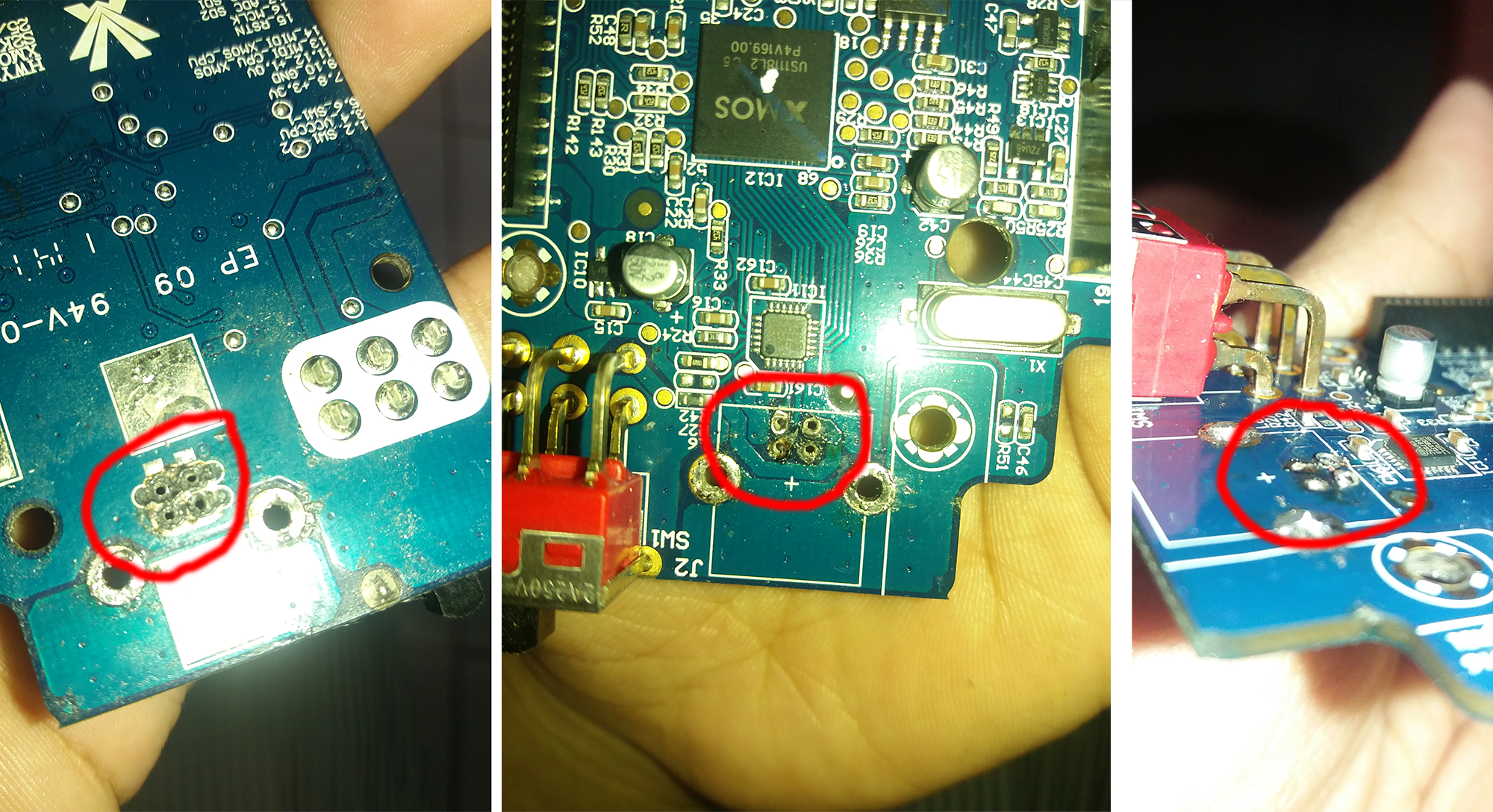
Now the holes become more messed up, and some of the surface near the hole (on the top side of the board, also looks like it have a circuit path on it) is almost scrapped off.
I haven't try anything else at this point, I'm afraid it will bust the whole thing (or is it already busted?). Should I just take this thing off to repair guy or can I fix it myself despite being amateur?
Note: on this device, there are 2 lights indicating if there is power via DC, and USB connection from PC. The DC port located on another PCB, but the power goes to this PCB with power switch and USB port that I'm working on (above pics), and then goes back to previous board. When connected to both power source and PC, the light indicating power is lighten up while the light for USB doesn't. So I'm sure, the problem is still around USB connection to the board and other components on the board is not broken.
I'm trying to replace a broken USB type B port on a Vestax VCI-400 mixer. This is the first time I'm working PCB so it's pretty messed up.
So at first, I'm trying to desolder the broken port, and ended up doing it a lil-too rough which makes the pad's hole (VIA/rivet?) to chip off. i didn't realize it at first so I went soldered the port replacement's lead with the help of flux, and ended up with this:
I tried to connect it to my PC and didn't get any connection from the USB.
So I desolder it again, and tried to put a solder on the board because I thought at first VIA/rivet is just a solder sticking on PCB
. Of course it won't work, so my smartass brain thought it will be a good idea to add some solder on the USB port's lead like it was a Nutella & Go snack, ensuring there will be connection to the board path by melting the solder on the lead around the hole's wall, even though the VIA/rivet has chipped off. Unfortunately, it doesn't make any connection either.I don't get it. Isn't the solder that I put on the lead, which then melted and grip tightly onto the hole's wall supposedly able to act the same way as VIA/rivets?
Because it didn't work, I desolder it again but since I spread some solder on the port's lead, it's pretty rough to took it off from its hole, and I ended up make more mess. Behold my masterpiece so far:
Now the holes become more messed up, and some of the surface near the hole (on the top side of the board, also looks like it have a circuit path on it) is almost scrapped off.
I haven't try anything else at this point, I'm afraid it will bust the whole thing (or is it already busted?). Should I just take this thing off to repair guy or can I fix it myself despite being amateur?
Note: on this device, there are 2 lights indicating if there is power via DC, and USB connection from PC. The DC port located on another PCB, but the power goes to this PCB with power switch and USB port that I'm working on (above pics), and then goes back to previous board. When connected to both power source and PC, the light indicating power is lighten up while the light for USB doesn't. So I'm sure, the problem is still around USB connection to the board and other components on the board is not broken.