Basic oscilloscope for newbie to troubleshoot a circuit

Thread Starter

Doctor_Ed

Joined Feb 10, 2022
72
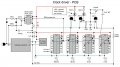
I made a clock driver that counts pulses from 120VAC. It doesn't work well, it runs very fast. It seems to be getting spurious pulses from somewhere.

I want to investigate and fix the driver and am thinking an oscilloscope should be able to tell me what is going on with my device.

I don't own a scope and have never used one. So I want to ask, am I on the right track? Will a scope show me 60 Hz 1 volt pulses together with (probably) the presence of extra random pulses? Will I be able to figure out how to use the scope in a reasonable time?

And I'm wondering if the cheap scopes on Amazon (couple hundred dollars) might be OK for a task like this.

I tinker with electronics but have been a newbie for the last 60 years. Always willing to learn.
 

BobTPH

Joined Jun 5, 2013
11,463
I made a clock driver that counts pulses from 120VAC. It doesn't work well, it runs very fast. It seems to be getting spurious pulses from somewhere.

I want to investigate and fix the driver and am thinking an oscilloscope should be able to tell me what is going on with my device.

I don't own a scope and have never used one. So I want to ask, am I on the right track? Will a scope show me 60 Hz 1 volt pulses together with (probably) the presence of extra random pulses? Will I be able to figure out how to use the scope in a reasonable time?

And I'm wondering if the cheap scopes on Amazon (couple hundred dollars) might be OK for a task like this.

I tinker with electronics but have been a newbie for the last 60 years. Always willing to learn.
Any scope could handle this. An old analog scope is far easier to use for a beginner, but digital storage scopes can do things an analog scope never imagined, like capturing one time events.
 

twohats

Joined Oct 28, 2015
606
Hi,
If it worked OK on a breadboard, you have made a mistake on your PCB.
Please show us some detailed pictures, both sides of your PCB.
Defense rests............
 

Thread Starter

Doctor_Ed

Joined Feb 10, 2022
72
Hi,
If it worked OK on a breadboard, you have made a mistake on your PCB.
Please show us some detailed pictures, both sides of your PCB.
Defense rests............
Yes, agreed. But I am too bashful to show you my crappy soldering. Also I don't think I could show the details well enough to be sufficiently diagnostic. I have gone over it myself several times with a magnifier, and made new circuit diagrams off the PCB, and checked for agreement with the original circuit diagram. No revelations so far.

One strategy is to make a second one....

But using a scope might work. Could be useful too if a component has failed.
 

MrChips

Joined Oct 2, 2009
34,628
Yes, agreed. But I am too bashful to show you my crappy soldering. Also I don't think I could show the details well enough to be sufficiently diagnostic. I have gone over it myself several times with a magnifier, and made new circuit diagrams off the PCB, and checked for agreement with the original circuit diagram. No revelations so far.

One strategy is to make a second one....

But using a scope might work. Could be useful too if a component has failed.
Being bashful on AAC costs you nothing.
Many a problem has been solved on AAC forums by just showing a photograph of your circuit and board.
 

Thread Starter

Doctor_Ed

Joined Feb 10, 2022
72
Isn't this the same schematic from your railway clock?
I thought you had that working.
Correct. It's working, but not working right. It cycles in around 40 seconds instead of 1 minute. The pulses also seem to be inconsistent. It speeds up when the load is activated. Those are some rough observations. I need better gear to know what it is actually doing.

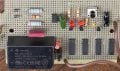
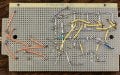
The breadboard worked exactly right, but not the PCB. So there is a wiring error or short or maybe a bad part.
 

Thread Starter

Doctor_Ed

Joined Feb 10, 2022
72
Was that 24 volt module also located on the breadboard when working correctly?
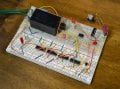
The power supply? Yes. Here is a pic of the breadboard.

PXL_20251221_142140257.jpg
I took several detailed closeup pics of the breadboard to make sure I could go back and see how everything was connected. As far as I can tell, the PCB is wired the same.
 
Last edited:
Top