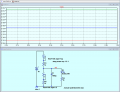
Basic circuit and Everycircuit alternative.

Thread Starter

agag

Joined Aug 29, 2024
2
Dear all,

I am new to electronics and would greatly appreciate your assistance with the following:
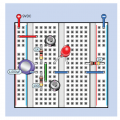
  1. Are there any applications or software similar to EveryCircuit that can be used to create breadboard schematics and run simulations? I want to simulate both voltage and current flow. I’ve tried a few tools like Tinkercad, Fritzing, and MultiSim, but I couldn’t find an option to display voltage flow in an animated form.

  2. Could someone please create a circuit similar to the one below on EveryCircuit, so I can learn from an example? I’m struggling to build it myself as I’m still learning how to design schematic circuits. I find TInkercad easy but I am unable to animated the electrical flow.
Thank you in advance for your help!


1724934790222.png
MOD NOTE: Links removed.
 
Last edited by a moderator:

WBahn

Joined Mar 31, 2012
32,746
Those eye-candy tools are not how real work is done. Learn to use a real simulator, such as LTSpice, which is free. There's a learning curve, but for basic simulation it is pretty tame (an hour-ish).
 

crutschow

Joined Mar 14, 2008
38,389
The free LTspice from Analog Devices is used by several on this forum.
It's a Spice type simulator used by many serious analog designers.
It doesn't "animate" the schematic but plots the results for the circuit voltages, current, power, etc.
There are tutorials and example circuits to help you learn it, and we can help with any questions you may have.
 

Thread Starter

agag

Joined Aug 29, 2024
2
The free LTspice from Analog Devices is used by several on this forum.
It's a Spice type simulator used by many serious analog designers.
It doesn't "animate" the schematic but plots the results for the circuit voltages, current, power, etc.
There are tutorials and example circuits to help you learn it, and we can help with any questions you may have.

Thanks . Noted . Will do so .
 

ElectricSpidey

Joined Dec 2, 2017
3,317
I was thinking those round thingies were push buttons not pots...

The upper one turns on the LED and charges the cap.
The lower one discharges the cap.
 

ericgibbs

Joined Jan 29, 2010
21,413
Hi,
They could be push switches or pots???

Perhaps the TS could advise.

If pots they could be used to adjust the LED brightness???

E
 

MrChips

Joined Oct 2, 2009
34,690
Real engineers don't use animated voltage and current flow apps. I don't know of any such app.
Circuit simulators will show DC operating currents and voltages as well as circuit response to AC signals in time and frequency plots.
 

ElectricSpidey

Joined Dec 2, 2017
3,317
If they are pots I don't see how they could be configured as VRs in that image.

I guess they could be some kind of pot I'm not aware of.

I guess if the wiper is not in the usual place....
 
Last edited:

dl324

Joined Mar 30, 2015
18,260
I couldn’t find an option to display voltage flow in an animated form.
Why do you think you need animation? I find it to be an unnecessary distraction. If you understand how things work, you don't need animation.

Can't offer any suggestions. For analog, I prefer to use the simulator between my ears. I use a logic simulator because I'm lazy.
 

MrChips

Joined Oct 2, 2009
34,690
I think that you need to understand that most of the regular respondents here on AAC are retired technicians, scientists, and engineers with 60 years or more experience and who frown on animated comic strips of voltage and current. We understand the underlying physics of electronic devices and circuits and we don't need some Mickey Mouse cartoon as a substitute for the real thing.

Learn basic physics and mathematics and you can't go wrong.
 
Top