Arduino Uno Illogical Operation With an SD Card

Thread Starter

mamech

Joined Nov 3, 2010
27
hello everyone

I have a weird problem. I am trying to interface an Arduino Uno with an SD card. The code is made to produce a new file every timer interval. The logic seemed simple to me, but the results are not logical at all!
this is the code:
Code:
#include <SPI.h>  //SPI communication protocol library
#include <SD.h>  //SD card interface library

double File_name_counter=1;
String Fixed_File_Name = "ex";
String Variable_File_Name = "";
String Extension = ".txt";
char temp[9] = "ex.txt";
int i=0;
int soft_counter =0;
void setup()
{
  // Open serial communications:
  Serial.begin(9600);
 
  Serial.print("Initializing SD card...");
  pinMode(10, OUTPUT);  // Comment from Arduino page: This can be the hardware SS pin - pin 10 (on most Arduino boards) or
                        // pin 53 (on the Mega) - or another pin specified in the call to SD.begin(). Note that
                        // even if you don't use the hardware SS pin, it must be left as an output or the SD library won't work.

  if (!SD.begin(4))  // begin SD proces, and make the SS/CS pin to be on pin 4, and check if it returns true or false
  {
    Serial.println("initialization failed!");
    return;
  }
  Serial.println("initialization done.");

  delay(3000);

}


void loop()
{
 
  File myFile;
  myFile = SD.open(temp, FILE_WRITE);
if (myFile) {
    Serial.println("Writing to the file");
    i++;
    myFile.println(i);
    myFile.close();
    Serial.println("done.");
  } else {
    // if the file didn't open, print an error:
    Serial.println("error opening file");
  }
  delay(1000);      //delay
 
  soft_counter++;
  if(soft_counter>30)
  {
    Variable_File_Name= Fixed_File_Name+File_name_counter+Extension;  // construct new file name
    Variable_File_Name.toCharArray(temp,9) ;   // convert file name from String to CharArray

    File_name_counter++;
    soft_counter=0;
  }
}
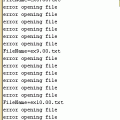
This code writes only one file with incrementing numbers in it, and when the part after delay function begins , the serial monitor gives several times :
error opening file
error opening file
error opening file


can any one tells me what is the problem in this code? I made numerous modifications nut no logical response.
 

be80be

Joined Jul 5, 2008
2,395
myFile = SD.open(temp, FILE_WRITE);
change that to this
myFile = SD.open("temp", FILE_WRITE);

If you look at the sample you'll see your doing it kind of wrong
Code:
#include <SPI.h>
#include <SD.h>

File myFile;

void setup() {
  // Open serial communications and wait for port to open:
  Serial.begin(9600);
  while (!Serial) {
    ; // wait for serial port to connect. Needed for native USB port only
  }


  Serial.print("Initializing SD card...");

  if (!SD.begin(4)) {
    Serial.println("initialization failed!");
    return;
  }
  Serial.println("initialization done.");

  // open the file. note that only one file can be open at a time,
  // so you have to close this one before opening another.
  myFile = SD.open("test.txt", FILE_WRITE);

  // if the file opened okay, write to it:
  if (myFile) {
    Serial.print("Writing to test.txt...");
    myFile.println("testing 1, 2, 3.");
    // close the file:
    myFile.close();
    Serial.println("done.");
  } else {
    // if the file didn't open, print an error:
    Serial.println("error opening test.txt");
  }

  // re-open the file for reading:
  myFile = SD.open("test.txt");
  if (myFile) {
    Serial.println("test.txt:");

    // read from the file until there's nothing else in it:
    while (myFile.available()) {
      Serial.write(myFile.read());
    }
    // close the file:
    myFile.close();
  } else {
    // if the file didn't open, print an error:
    Serial.println("error opening test.txt");
  }
}

void loop() {
  // nothing happens after setup
}
 

Thread Starter

mamech

Joined Nov 3, 2010
27
myFile = SD.open(temp, FILE_WRITE);
change that to this
myFile = SD.open("temp", FILE_WRITE);

If you look at the sample you'll see your doing it kind of wrong

thanks for your reply, but actually what you explained is not what I want to do. I do not want that it make a file named "temp.txt".
"temp" here is variable that contains a varying name of the file as shown in my code. The code is made to produce a new file every certain time interval. I already tried the sample sd card example, and it worked fine.
 

be80be

Joined Jul 5, 2008
2,395
You have to make a txt file to hold each write that takes ("temp", FILE_WRITE);
without the "xxxx" it doesn't no where to write
just like your computer you have to make a file.text to hold text.
You would have to make new files text1 text2 and so on and open and close each for each write.
 
Last edited:

Thread Starter

mamech

Joined Nov 3, 2010
27
but actually, I tried making the name of file to be in char array instead of passing it directly within double quotes, and it worked, and if the file is not there it creates it. my problem appears when the name changes with time as my application needs.
 

be80be

Joined Jul 5, 2008
2,395
This isn't what you have the file only made one and then wrote the count to it the file name is EX.TXT
myFile = SD.open(temp, FILE_WRITE);
 

Raymond Genovese

Joined Mar 5, 2016
1,653
hello everyone

I have a weird problem. I am trying to interface an Arduino Uno with an SD card. The code is made to produce a new file every timer interval. The logic seemed simple to me, but the results are not logical at all!
this is the code:
/---
---/
can any one tells me what is the problem in this code? I made numerous modifications nut no logical response.
The problem in your code is that you are forming an illegal file name every time you attempt to produce a new file. If you print out temp immediately before and after you form a new filename, you will see what is happening.

The code below has been modified to get what, I believe, you want: a new file name (ex1.txt-exnnn.txt). All I have done is:

declare another String - FNC
convert your double file counter to a String with 0 post decimal point places
trim that string
then add it into the new filename.

This is not done cleanly, I am just showing you how to fix it so it works the way you want.
Code:
#include <SD.h>  //SD card interface library


double File_name_counter = 1;
String Fixed_File_Name = "ex";
String Variable_File_Name = "";
String Extension = ".txt";
String FNC; // <-- used to form a String from double and then trim
char temp[9] = "ex.txt";
int i = 0;
int soft_counter = 0;
void setup()
{
  // Open serial communications:
  Serial.begin(9600);

  Serial.print("Initializing SD card...");
  pinMode(10, OUTPUT);  // Comment from Arduino page: This can be the hardware SS pin - pin 10 (on most Arduino boards) or
  // pin 53 (on the Mega) - or another pin specified in the call to SD.begin(). Note that
  // even if you don't use the hardware SS pin, it must be left as an output or the SD library won't work.

  if (!SD.begin(4))  // begin SD proces, and make the SS/CS pin to be on pin 4, and check if it returns true or false
  {
    Serial.println("initialization failed!");
    return;
  }
  Serial.println("initialization done.");

  delay(3000);

}


void loop()
{
  File myFile;

  myFile = SD.open(temp, FILE_WRITE);
  if (myFile) {
    Serial.println("Writing to the file");
    i++;
    myFile.println(i);
    myFile.close();
    Serial.println("done.");
  } else {
    // if the file didn't open, print an error:
    Serial.println("error opening file");
  }
  delay(1000);      //delay

  soft_counter++;
  if (soft_counter > 30)
  {
    FNC = String(File_name_counter, 0);
    FNC.trim();
    Variable_File_Name = Fixed_File_Name + FNC + Extension; // construct new file name
    Variable_File_Name.toCharArray(temp, 9) ;  // convert file name from String to CharArray

    File_name_counter++;
    soft_counter = 0;
  }
}
 

ebeowulf17

Joined Aug 12, 2014
3,307
Couldn't you just change the declaration for File_name_counter from double to int and get valid file names out of the original code?

Seems like it's the floating point variable type that's not playing well with string concetation and/or generating invalid file names.
 

ericgibbs

Joined Jan 29, 2010
21,485
hi,
The OP's problem was solved on another Sites Forum.
The file counter was using a Double, which added '.00' to count increment, so the file name was ext01.00.txt , which is invalid due to the two decimal points in the name.
We changed the increment to Long and this cured the problem, ext01.txt
E
 

Attachments

djsfantasi

Joined Apr 11, 2010
9,237
hi,
The OP's problem was solved on another Sites Forum.
The file counter was using a Double, which added '.00' to count increment, so the file name was ext01.00.txt , which is invalid due to the two decimal points in the name.
We changed the increment to Long and this cured the problem, ext01.txt
E
Good catch! I missed that declaration when reading his code.
 
Top