arduino , old or new

Thread Starter

drjohsmith

Joined Dec 13, 2021
1,601
my daughter in her 20s ,
not at all computer literate ,
but heavily into art / design / models
is looking to add some anamatronics to her reporiate.
totaly for fun / " comi con"

my background , heavy duty computing , asic design, fpga, lots of 'C' driveres
and a good few arduino teenseys used in my god daughteres sip / puff sail boat
and a good few pic in work projects.

so thought ,
Arduino , has always been for makeres / artists

low power so great with batteries she wants
standard C like interface
easy to learn , get things running
lots of good tutorials, i.e. she can learn at her own speed, let me catch up on sleep !

but

omg
not looked for few years,
the Arduino serms to be having an identity crissis !
bunch of new libraries
power / program size seems to have jumped in wrong direction
lots of AI add ons !

is Arduino still the way for makers to go ?
is c the language or is python the way !
 

Jon Chandler

Joined Jun 12, 2008
1,595
You might look at Annex RDS – it's a powerful interpreted BASIC for ESP8266 and ESP32 modules.

I just learned about it from an article in Elektor Magazine, and it was tough to find the current website, but it was worth the trouble.

There's a web flasher to install it on ESPs. Programming is done directly on/to the ESP, accessed by a web browser. Numerous displays are supported with high-level functions, and commands to support many of the sensor/modules you might want to connect are built in.

I get frustrated when coding Arduinos in C – too much punctuation required and trying to find stuff hidden in include files makes it difficult to figure out why things don't work as expected sometimes.

Did I mention it's totally free, and the browser interface is only to access the ESP directly? Files are stored on the ESP (and should be saved on your computer), but nothing is going to the cloud.

I find it especially nice to use – want to make a change? Open the editor web page (on the ESP), make the change, save the file and hit run. Changes literally take seconds.

Take a look at the massive online documentation/help file:

Online Annex32 documentation and help

And the support forum:

https://www.cicciocb.com/forum/
 
Last edited:

dl324

Joined Mar 30, 2015
18,326
I think Arduino Uno is still fine for non-programmers. I'd stick with the C interface.

For what the Uno costs, I prefer the Raspberry Pi Zero 2 W for $15. It has a real OS and has WiFi/BT. But some programming and Linux experience comes in handy.
 

Futurist

Joined Apr 8, 2025
748
You might look at Annex RDS – it's a powerful interpreted BASIC for ESP8266 and ESP32 modules.

I just learned about it from an article in Elektor Magazine, and it was tough to find the current website, but it was worth the trouble.

There's a web flasher to install it on ESPs. Programming is done directly on/to the ESP, accessed by a web browser. Numerous displays are supported with high-level functions, and commands to support many of the sensor/modules you might want to connect are built in.

I get frustrated when coding Arduinos in C – too much punctuation required and trying to find stuff hidden in include files makes it difficult to figure out why things don't work as expected sometimes.

Did I mention it's totally free, and the browser interface is only to access the ESP directly? Files are stored on the ESP (and should be saved on your computer), but nothing is going to the cloud.

I find it especially nice to use – want to make a change? Open the editor web page (on the ESP), make the change, save the file and hit run. Changes literally take seconds.

Take a look at the massive online documentation/help file:

Online Annex32 documentation and help

And the support forum:

https://www.cicciocb.com/forum/
Looks like different way to do all this, very interesting, very refreshing!
 

panic mode

Joined Oct 10, 2011
4,974
i do not know what makers favour but if you have tools and skills, you should be able to help and guide your daughter so that choices are meeting the needs.

things that used to be strong points for arduino have eventually soured as the variety of boards have exploded so one need to watch closely the revision level and dig deep, check GPIO voltage levels, if and what is included etc. i think the newbs would prefer something more of a straight forward platform with fewer options (C64 kind of thing). also Arduino is just too pricey. $30-40 for a basic 8-bit mcu and few kb or memory is insane when one can get 32-bit alternatives with way more memory and speed - for fraction of the cost. that would not be so bad if Arduino had tons of built in peripherals which it does not: you want LCD - there is a shield for it, you want Ethernet, there is a shield for it, you want bluetooth, there is a module for it, you want SD card... so if you go that route, consider getting a kit.

Good kits with excellent tutorials are available from Freenove for example (can buy them on Amazon etc.). even if you already got the hardware from someone else, their tutorials are all downloadable from their website. i suggest to check them out:
https://freenove.com/tutorial

personally, unless there is a particular need for a low power product, i am steering away from Arduino and such and looking at something with more bang for a buck. my next project is most likely going to use CYD since powerful, low cost, abundant and many functions are built in, nice form factor to easily install it into enclosure etc.
 
Last edited:

Jon Chandler

Joined Jun 12, 2008
1,595
I can't say any are necessarily better, and I'm not sure how you can tell them apart.

One difference I know – the "speaker" connector may be driven directly by a port pin, may have an amplifier or may be an I2S output.

Display sizes can differ, and some have capacitive rather than resistive touch.
 

panic mode

Joined Oct 10, 2011
4,974
as far as i can see, the most obvious difference is display size:

  • 1.9 inches (170 x 320 pixels)
  • 2.8 inches (240 x 320 pixels) - The most common original size
  • 3.2 inches
  • 3.5 inches (320 x 480 pixels)
  • 3.97 inches (800 x 480 pixels)
  • 7.0 inches (e.g., model ESP32-8048S070)

i did not check but the controller is probably the same.

also unless one really spells out the full product name, the original variant with 2.8" display is assumed.
the four digits after ESP32 indicate resolution "2430" = 240x320 ; "8048" = 800x480 etc
the value after that seem to indicate display size... "S070" = 7 inch display etc.
the last part is most likely touch option (R = resistive)

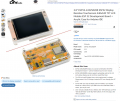
For example, here is the standard/original CYD with addition of "case".


1767136580872.png
 
Last edited:

panic mode

Joined Oct 10, 2011
4,974
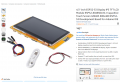
for comparison, here is a model with larger display, capacitive touch and IPS display.
from what i gather, the displays are using either ILI9484 or ST7796 so one need to use correct library.
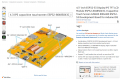
boards with larger display tend to use "S3" variant of the ESP32 which is a newer generation, computationally more efficient compared to WROOM and also has PSRAM making it better suited for intense graphics. PSRAM is type of DRAM (capacitor type cell) that allows low cost high volume storage but unlike other DRAM types, refresh logic is built in.

1767136814733.png
1767136897255.png


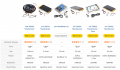
originally touch was resistive but nowadays versions with capacitive touch are easy to find. there is a round display variant too.
1767137400204.png
 
Last edited:

Thread Starter

drjohsmith

Joined Dec 13, 2021
1,601
Thank you for that .
As mentioned were after low power , animatronic things ,
So not seeing a big need for the display ,
But low power is essential
 
There is no doubt that the Arduino UNO R3 is still a good choice and the fact that there are now so many libraries and other processor variants which use the same IDE is testament to its popularity. Even though it can seem overwhelming there are so many examples you can follow online that self learning is comparatively easy. For animatronics the UNO has about 20 I/O pins of which 6 can be used for analog input and several for quasi analog output with PWM. If you can get by with just 5 I/O pins including 2 A/D then the ATtiny85 is brilliant. It’s nice because it runs ok from about 3V to 6V where most processors need 3.3V. If you use the Digispark ATtiny85 module it can literally be plugged into the USB port of a PC. For a compact solution with around 13 I/O pins, one of which is a genuine DAC, consider the Seeeduino XIAO which can be powered with 5V but I/O is all 3.3V. In summary I recommend sticking with the Arduino IDE and selecting a processor board which fulfills your project I/O needs.
 

SamR

Joined Mar 19, 2019
5,487
We seem to have forgotten just what the Arduino is, a development platform for the AVR class microprocessors. Starting from the ubiquitous Atmel and Microchip Technologies ATtiny. Which, I assume, in part due to the Arduino popularity has evolved as well to include internally most (if not all) of the peripherals that the Arduino platform provided. Such as internal clock, timers, serial port USART, Serial Peripheral Interface (SPI), Two-Wire Interface (TWI), Philips I2C, Analog Comparator, Analog-to-Digital Converter (ADC), Digital-to-Analog Converter (DAC), Multiple voltage references (VREF), and many other internal enhancements. Pretty much everything the development platform provided previously. While the Arduino itself continued to be reduced in footprint to the Nano and smaller. But for those who are not able to design circuits and build the boards to support them they have served their purpose and filled a niche that is still growing. And the Arduino AVR In System Programmer application has also evolved to include directly programming the AVR chips.

ATtiny212/214/412/414/416
Atmel AVRISP MkII
 
Last edited:

Thread Starter

drjohsmith

Joined Dec 13, 2021
1,601
We seem to have forgotten just what the Arduino is, a development platform for the AVR class microprocessors. Starting from the ubiquitous Atmel and Microchip Technologies ATtiny. Which, I assume, in part due to the Arduino popularity has evolved as well to include internally most (if not all) of the peripherals that the Arduino platform provided. Such as internal clock, timers, serial port USART, Serial Peripheral Interface (SPI), Two-Wire Interface (TWI), Philips I2C, Analog Comparator, Analog-to-Digital Converter (ADC), Digital-to-Analog Converter (DAC), Multiple voltage references (VREF), and many other internal enhancements. Pretty much everything the development platform provided previously. While the Arduino itself continued to be reduced in footprint to the Nano and smaller. But for those who are not able to design circuits and build the boards to support them they have served their purpose and filled a niche that is still growing. And the Arduino AVR In System Programmer application has also evolved to include directly programming the AVR chips.

ATtiny212/214/412/414/416
Atmel AVRISP MkII
As I mentioned , I've used the teensy arm from pjrc,
.small and low power ARM based Arduino
.was just wondering when I looked at the Arduino site if Arduino are leaving makers , and wanted re assurance,
Thank you guys .
 
Top