Advice on beginner PCB layout

philba

Joined Aug 17, 2017
959
You should put enough text on the copper layers that it is obvious if the layers are backwards. This applies both when you make the board yourself and when a PCB house makes it. A board can be made wrong 2 ways. One is by having the layer(s) mirrored by exposing the photoresist with the negative upside down. The other is caused by swapping the 2 layers.

Very frustrating when you have a board that is otherwise correct but made reversed. I have etched boards like this myself. I have also received a reversed board from a board house with this mistake -- even with the text on the PCB.

edit: You can add the name of the board for some of the text.
That's a good point.

Definitely a good idea with home made boards. With board houses, I use a gerber viewer to make sure. The more common problem is messed up drills (the whole excellon format was so poorly thought out) but most board houses are aware of that and have checks in place to reject designs that won't work. OSHPark gives you images of the different layers including "finished board, top and bottom" which make it pretty easy to "proof" before fabbing.
 

RichardO

Joined May 4, 2013
2,270
OSHPark gives you images of the different layers including "finished board, top and bottom" which make it pretty easy to "proof" before fabbing.
I don't know where the error happened on my bad boards. I think it was at the board house but maybe it was caused by my accidentally labeling the board layers wrong and not catching it myself. The board house did make good on it but I missed a deadline because of the error.
 

SLK001

Joined Nov 29, 2011
1,549
The more common problem is messed up drills (the whole excellon format was so poorly thought out)...
How can something accurate to 5 or more decimal places be "poorly thought out"? I believe that the Eagle processor is the bad element here. I've been using Eagle since the DOS version and I had problem with the Eagle post processor for the drills. This caused me to create a couple of ULPs (plus a generator program) to generate my own Excellon format drill file. The newer versions of Eagle have fixed the problem, so I no longer use them. However, I always use a free gerber viewer like gerbview, or Graphicode to check to see that everything is in its correct place, which includes the drills
 

philba

Joined Aug 17, 2017
959
Because previous versions are hard to distinguish from later versions. Leading zeros, trailing zeros,4 vs 5 places. Board houses have to guess at what representation is being used. They can get it right with extra effort. It isn't just eagle.
 

SLK001

Joined Nov 29, 2011
1,549
Because previous versions are hard to distinguish from later versions. Leading zeros, trailing zeros,4 vs 5 places. Board houses have to guess at what representation is being used. They can get it right with extra effort. It isn't just eagle.
The header of the Excellon file spells out the format used. I guess that the problem lies in the board houses stripping out all that "useless" information and discarding it.
 

philba

Joined Aug 17, 2017
959
Actually, a lot of houses don't even take an excellon file and a number of pcb packages don't generate them. it's a real mishmash out there. Same thing with board outline - a lot of houses determine it from other layers though seeed requires it. Not sure why that is. Maybe legacy sw system/processes. It sort of works, most of the time.
 

Thread Starter

ajk48n

Joined Aug 19, 2017
11
  1. Soldering will be easier if use elongated pads for all pads.
  2. Assembly will be easier if you align the headers and use an appropriate length 2x header. That will save you a quarter inch in the Y dimension.
  3. You can save another half inch in the Y dimension by using bussed resistor networks for the current limit resistors. That will also let you avoid the routing between the pins for your SBC.
  4. The connections to pin 1 of the darlington arrays are unnecessarily close to the pad for pin 2 and have 90 degree bends.
  5. You could use a smaller package for the decoupling caps. At the very minimum, align them with the chip the same way and move them out of the critical cut in the X dimension.
  6. You could reduce horizontal space between the IC's. That and #5 will probably shave more than an inch from the X dimension.
  7. You could align the switches and make the layout of them and the associated resistors symmetrical.
  8. R22 is in the critical cut in the X dimension. If you rotate it, you can shave more tenths from the X dimension.
  9. I'd make the routing to pin 9 of U1 and U2 look similar.
  10. I'd widen the narrow traces just to make them not seem so narrow compared to power.
  11. I'd align the two rows of chips (power pins or ground pins). It makes the routing a little more complex, but will make component placement look neater.
Style also matters in PCB design...
1. What's the point of elongating pads? Doesn't the solder still have to be put in the center of them where the component goes through the hole?
2. What do you mean by an "appropriate length 2x header"?
4. If I get this made at a fab house, does it matter if they trace is close to another pad as long as they aren't touching? Or do I need to worry about tolerances in space from the fab house?
5. What do you mean, aligning them in the same way? All 3 caps are rotated the same way compared to the chips.
What is the "critical cut in the X dimension"?

I would have aligned the headers for the LEDs - using 2x8 pinheaders. If you use "dupont" (2x1 female) connectors to attach the LEDs the pinheaders being in line actually makes it easier to plug in.

I would hook up the gnd pins on the arduino header near H5. Not the end of the world but the gnd is there. might as well hook it up.

are those the smallest TH resistors you could find? they seem kind of big. same thing on the bypass caps.

I don't recall if this has been said but you should run design rules checking (DRC) on your board. If your fab house has a set for eagle, down load them. OSHpark and Seeed both have them. Use the sparkfun DRC rules for PCBWay (my current favorite fab house). If you don't you risk getting an unusable board back.
I haven't used these before. Do I solder a pin into the hole. Then attach the connector to the pin. And then plug the LED into the other end of the connector?

Do you mean hook up the GND connectors into the ground plane?

They aren't the smallest resistors, just regular 4 band ones. And I already have a lot of spare ones around.

I downloaded those design rules and am making sure to run them. Everything checks out at this stage.
 

philba

Joined Aug 17, 2017
959
1. What's the point of elongating pads? Doesn't the solder still have to be put in the center of them where the component goes through the hole?
2. What do you mean by an "appropriate length 2x header"?
4. If I get this made at a fab house, does it matter if they trace is close to another pad as long as they aren't touching? Or do I need to worry about tolerances in space from the fab house?
5. What do you mean, aligning them in the same way? All 3 caps are rotated the same way compared to the chips.
What is the "critical cut in the X dimension"?


I haven't used these before. Do I solder a pin into the hole. Then attach the connector to the pin. And then plug the LED into the other end of the connector?

Do you mean hook up the GND connectors into the ground plane?

They aren't the smallest resistors, just regular 4 band ones. And I already have a lot of spare ones around.

I downloaded those design rules and am making sure to run them. Everything checks out at this stage.
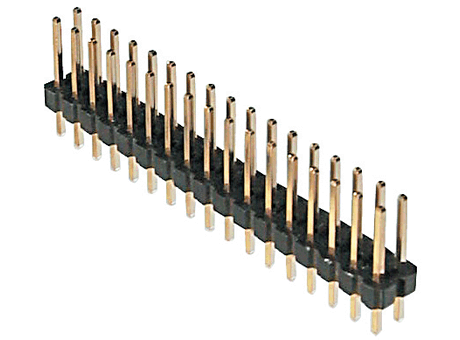
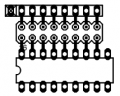
Pin headers:

You attach these:

and solder them to what ever external device you have. Makes assembly of your final clock a lot easier than if you solder wires into the holes.

If you passed design rules check (DRC) then you are good - no traces are too close to other traces. DRC exists so you can have confidence the board is manufacturable. It will flag things like gaps less than the minimum clearances, too small drill holes, crossed traces and things too close to the board edge.

Yes, connect the two other arduino gnd pins to ground. They will automatically connect to the ground plane.

Elongated pads will give you greater mechanical strength but it's more of a personal preference. I like to keep my pads on the small side.
 

dl324

Joined Mar 30, 2015
18,326
1. What's the point of elongating pads? Doesn't the solder still have to be put in the center of them where the component goes through the hole?
When you solder, you need the tip of the iron to heat both the pad and component lead before applying solder. A smaller pad makes it more difficult to make good contact.

When desoldering, smaller pads are more easily overheated and lifted.
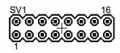
2. What do you mean by an "appropriate length 2x header"?
upload_2017-9-3_6-36-1.png
4. If I get this made at a fab house, does it matter if they trace is close to another pad as long as they aren't touching? Or do I need to worry about tolerances in space from the fab house?
Why crowd things unnecessarily?
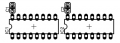
5. What do you mean, aligning them in the same way? All 3 caps are rotated the same way compared to the chips.
C1 is not aligned the same way as C2 and C3. This placement will save space in the X dimension.
upload_2017-9-3_6-42-37.png
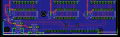
What is the "critical cut in the X dimension"?
It's the stack up of components that prevents further compression.
upload_2017-9-3_10-29-12.png
The SBC, switches, and R22 limit how much the X dimension can be reduced (orange bars). If you rotate R22, that saves space. Rotating and/or repositioning/relocating the switches will save you more.

With a bussed resistor network and a 2x8 header, a driver, led, resistor grouping could be laid out like this:
upload_2017-9-3_9-57-42.png
 
Last edited:
Top