Advice on beginner PCB layout

Thread Starter

ajk48n

Joined Aug 19, 2017
11
Hi everyone,

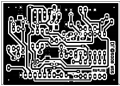
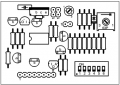
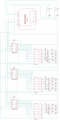
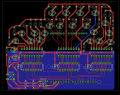
I'm making my first electronics project that includes a pcb design. It's an LED clock powered and controlled through an Arduino. I have dawn up the schematic and pcb layout in Eagle. Having never designed a pcb before, I would like some advice on the layout and a second (or third) set of eyes to check and see of I've missed something obvious.

Essentially the board is 3 74HC595s daisy chained together, with the logic output flowing into 3 ULN2803s. These hook up to the LEDs and resistors in series. There's a also a couple switches to help set the time.

Thanks for any suggestions and advice on the board.

Also, if this post is in the wrong thread, please let me know.
 

Attachments

*synonymous*

Joined Nov 29, 2013
35
Hi everyone,

I'm making my first electronics project that includes a pcb design. It's an LED clock powered and controlled through an Arduino. I have dawn up the schematic and pcb layout in Eagle. Having never designed a pcb before, I would like some advice on the layout and a second (or third) set of eyes to check and see of I've missed something obvious.

Essentially the board is 3 74HC595s daisy chained together, with the logic output flowing into 3 ULN2803s. These hook up to the LEDs and resistors in series. There's a also a couple switches to help set the time.

Thanks for any suggestions and advice on the board.

Also, if this post is in the wrong thread, please let me know.

Mounting holes?
Ground Planes?
I prefer larger traces when space permits so that there's less chance of breaking while soldering..
Is your board square? looks like the left side is angled very slightly.
I also like to align my parts so that they are all oriented the same to make mistakes less likely.
The fab shop will usually have a few questions for you if there's an issue, you may have to make changes and go back and forth with them a few times before it gets cleared to go.

You'll get better every time.
 

JohnInTX

Joined Jun 26, 2012
4,787
Welcome to AAC! Nice effort.
Be sure to run the ERC and DRC and fix any issues.
I'd increase the width of the power traces on all of the IC's and LED supplies. Consider copper pours for these using the polygon function. You can't have enough copper carrying your power.
The mounting hole is a little close to the SCL pin on the header, the screw head will interfere. Check the others, too.
Be sure to check the hole sizes on the Eagle library components to ensure they fit your particular parts.
Arduino RESET/ connected somewhere?
Where does the power connect? On the Arduino, I suppose. I would add a couple of 1uF tantalum caps maybe near C1 and C3 to stiffen the busses a bit.
Just my observations..
Good luck!

EDIT synonymous beat me in. Good points there too.
 

Thread Starter

ajk48n

Joined Aug 19, 2017
11
Thanks for the quick advice.

The mounting holes visible (4 of them) are based off an Arduino template. The bottom-right mounting hole is very close to the SCL pin on the Arduino itself, and I wasn't planning on using it. I'll move the rest of the parts a bit farther away from the other 3 mounting holes.

The board doesn't seem to be diagonal as far as I can tell, but I'll take a closer look.

Good point about the orientation. That would just go for the LEDs and the ICs, correct? It shouldn't matter for the resistors as far as I'm aware.

I've already checked a printout of the board with the actual parts I have and everything fits.

I'm using 10 mil traces for everything now. What size traces would you recommend for the power? Would the copper fill just be a big polygon that connects the positive of all the resistors? Or have it run the full size of the board?

As for the ground plane, that leads me to a question about the decoupling caps. Does the entire negative hole of the cap attach to the ground plane? Or just a cross going through it?

I hadn't used the reset on the Arduino before, that's a good idea to hook that up, thanks.

The power connects on the Arduino, which in this case is on the far right of the pcb. The idea is for this pcb to sit on top of the Arduino. I've made sure to not have any part of the board go over the edge of the Arduino, so it should be easy to connect the power.

JohnlnTX, you mentioned "I would add a couple of 1uF tantalum caps maybe near C1 and C3 to stiffen the busses a bit."
Can you explain that a bit? I don''t have too much knowledge about capacitors. I've got the decoupling caps for the 74HC595s and it's been running pretty solidly on my breadboard. What's the purpose of the tantalum caps?
 

*synonymous*

Joined Nov 29, 2013
35
Thanks for the quick advice.

The board doesn't seem to be diagonal as far as I can tell, but I'll take a closer look.

Good point about the orientation. That would just go for the LEDs and the ICs, correct? It shouldn't matter for the resistors as far as I'm aware.

I'm using 10 mil traces for everything now. What size traces would you recommend for the power? Would the copper fill just be a big polygon that connects the positive of all the resistors? Or have it run the full size of the board?

As for the ground plane, that leads me to a question about the decoupling caps. Does the entire negative hole of the cap attach to the ground plane? Or just a cross going through it?
Thanks for the quick advice.

The mounting holes visible (4 of them) are based off an Arduino template. The bottom-right mounting hole is very close to the SCL pin on the Arduino itself, and I wasn't planning on using it. I'll move the rest of the parts a bit farther away from the other 3 mounting holes.

The board doesn't seem to be diagonal as far as I can tell, but I'll take a closer look.

Good point about the orientation. That would just go for the LEDs and the ICs, correct? It shouldn't matter for the resistors as far as I'm aware.

I've already checked a printout of the board with the actual parts I have and everything fits.

I'm using 10 mil traces for everything now. What size traces would you recommend for the power? Would the copper fill just be a big polygon that connects the positive of all the resistors? Or have it run the full size of the board?

As for the ground plane, that leads me to a question about the decoupling caps. Does the entire negative hole of the cap attach to the ground plane? Or just a cross going through it?

I hadn't used the reset on the Arduino before, that's a good idea to hook that up, thanks.

The power connects on the Arduino, which in this case is on the far right of the pcb. The idea is for this pcb to sit on top of the Arduino. I've made sure to not have any part of the board go over the edge of the Arduino, so it should be easy to connect the power.

JohnlnTX, you mentioned "I would add a couple of 1uF tantalum caps maybe near C1 and C3 to stiffen the busses a bit."
Can you explain that a bit? I don''t have too much knowledge about capacitors. I've got the decoupling caps for the 74HC595s and it's been running pretty solidly on my breadboard. What's the purpose of the tantalum caps?
I like to add mounting holes if theres space permitting (even if I don't need them immediately) for unseen or future purposes.

I like to orient as much as possible, especially devices with polarity.. For you, the LEDs would be nice that way.

I like to use trace widths @50 mil for DIL of your type,, for the power traces at least. You can generally use the device pad dimension as a general recommendation for your widths.

If you do a ground pour, check for what is called a thermal relief on each of the pads that connect to that plane. It can be near impossible to solder those without thermal reliefs because the copper soaks the heat from the iron.
If you do a power plane, make sure that you have a good antipad clearance to avoid shorts.

When you have worked it enough, let it sit for another day and come back to it. When things look clear and good enough, call it good and - rev 1.0 send it and step away.
You can spend lots and lots of time perfecting to little advantages. Let the next one be better.
 

JohnInTX

Joined Jun 26, 2012
4,787
The .1 caps near the chips provide a ready supply of current to supply the chips when switching. They should be located as you have them, near the chips power pins (and with thick traces). The tantalums are there to recharge the .1 caps. Keep in mind that digital switching results in short, high power (relatively) currents that have to be supplied over the busses. Thin traces are more inductive and at high frequencies can have high impedances that momentarily starve the switching device - like putting a resistor in the power line. So big traces, pours etc. as well as short runs help to keep those inductive impedances low. Nothing's perfect, though, so it's common to supply some local power stored in those .1 caps at each IC as a quick source of power for switching. After use, those caps are a little discharged so they get recharged by the bigger tantalums. Those in turn get recharged by the power supply over what is hopefully a l0w impedance path. If the board is a ways from the power supply, you'll frequently see an aluminum electrolytic of some larger value at the power connector. It's job is the same, provide a local source of ready electrons to keep those other caps charged at switching frequencies. Note that different cap types have different combinations of speed vs. capacity. That's why you usually see different types on a power distribution layout.

There's lots more on the subject and more formal treatments but those are the basics. A good scope on the power pons can identify issues in the layout and help on component selection. I know some hard-core analog guys that do spectrum analysis on power busses on mixed signal boards to determine decoupling values. But for most simple digital stuff, you can get away with a general approach as described.
 
Last edited:

Thread Starter

ajk48n

Joined Aug 19, 2017
11
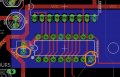
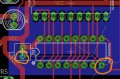
I've got a specific question about the decoupling cap and the ground plane. I'm not sure how the trace between the negative side of the cap and the IC is supposed to interact with the ground plane.

Does the negative pin on the IC need to be isolated from the ground plane, and only interact directly with the cap? Or should they both be connected to the plane?

Both the cap and IC connected to ground plane:
clock-brd-ground_plane.jpg

Only the cap connected to the ground plane, with an isolated trace to the negative pin on the IC:
clock-brd-ground_plane-separate.jpg

Thanks for any help
 

*synonymous*

Joined Nov 29, 2013
35
I've got a specific question about the decoupling cap and the ground plane. I'm not sure how the trace between the negative side of the cap and the IC is supposed to interact with the ground plane.

Does the negative pin on the IC need to be isolated from the ground plane, and only interact directly with the cap? Or should they both be connected to the plane?

Both the cap and IC connected to ground plane:
View attachment 133328

Only the cap connected to the ground plane, with an isolated trace to the negative pin on the IC:
View attachment 133329

Thanks for any help
Planes most often work best in that they can function as the "high quality" ground terminal. If you look into audio circuits, you can see how important it can be to make good ground connections in your designs. If you use one whole side of the board for a ground, with no, to very few traces of any length, you have the best ground you can get. The ground plane itself can also function as a capacitor in relation to other planes and traces, provide a shielding property and other various benefits including heatsinking. Most often the intention is to have the least amount of impedance (resistance) in the ground, omitting that trace between ground pins. What you want is to have and focus on your VCC trace, keeping it as short as possible between the capacitor and the power pin of the IC that it's protecting. Some IC use sockets that allow the capacitor to be placed underneath the IC, and if necessary, you can sometimes use the other side of the board for the capacitor. Yours is looking ok and sometimes it is good to be on the side of giving a little space to work with until you hash out a few builds and refine your parts selections. So, short answer, omit the trace. Side note, research part documents. Most often you will find that they provide you with the best methods for using each device.
 

SLK001

Joined Nov 29, 2011
1,549
In the future, please post your board and schematics in an image format. A .pdf file can be a vector for many nasty things that can infect, or damage a computer. Many people won't open a .pdf from the wild, wild web.
 

dl324

Joined Mar 30, 2015
18,326
Thanks for any suggestions and advice on the board.
You'll find that assembly and rework will be easier if you enlarge pads.

This was done in eagle. I used a modified resistor to get elongated pads. Where possible for other pads, I overlayed a trace over the pad to elongate:
upload_2017-8-20_8-30-58.png
I make my boards using toner transfer, so I avoid tight spacing whenever possible.

Your board will be more aesthetically pleasing if you try to align components.
upload_2017-8-20_8-31-59.png
 

dl324

Joined Mar 30, 2015
18,326
Here's my updated layout as image files instead of pdfs.
You could save some board area by using bussed resistor networks instead of discrete resistors.

You have the traces for most of the LEDs greatly oversized. Is the placement of the LEDs significant?

Again, you'll find assembly and future rework easier if you don't use the default pad sizes.
 

SLK001

Joined Nov 29, 2011
1,549
Do not use 90° bends in traces. Instead, use two 45° bends. Also, always intersect another trace at a right angle (make a "T").

Is there a reason why the placement of the LEDs appears random?

You might have some problems with the traces going between what look like a pair of connectors. Is there enough clearance? If so, use the same size trace as the other LEDs, except only neck down the trace to fit through the gaps.

When you grab a screenshot, turn off the layer called "DRILLS", because it adds nothing to the image (except confusion).

I also second the suggestion to put mountings holes at each corner, even if you don't plan on using them right now.
 

ronsoy2

Joined Sep 25, 2013
71
In the future, please post your board and schematics in an image format. A .pdf file can be a vector for many nasty things that can infect, or damage a computer. Many people won't open a .pdf from the wild, wild web.
What kind of antique junk software are you using to open your .pdf? Get a modern up-to-date reader! Infection from a .pdf should be virtually impossible now days!
 

SLK001

Joined Nov 29, 2011
1,549
Infection from a .pdf should be virtually impossible now days!
You just keep telling yourself that. A .PDF file can be programmed to send information, or to download and execute a file to/from any site. They can even run Javascript (the most secure program in the world). Even your "modern up-to-date readers" have these options.
 

dl324

Joined Mar 30, 2015
18,326
Even your "modern up-to-date readers" have these options.
Foxit Reader has options to disable Javascript, a safe reading mode (that disables URL connections and launching external files). You can enable/disable internet access for specific websites.
 
Top