Facebook
 Google
 GitHub
 Linkedin

I know all this. My point is that "Infection from a .pdf should be virtually impossible now days!" is not only foolish to believe, but false. If the user hasn't taken the necessary steps to disable all these "features", then there is quite the possibility of infection.Foxit Reader has options to disable Javascript, a safe reading mode (that disables URL connections and launching external files). You can enable/disable internet access for specific websites.
Advice on beginner PCB layout
- Thread starter ajk48n
- Start date
Scroll to continue with content

You can lead a horse to water but you can't make them drink...If the user hasn't taken the necessary steps to disable all these "features", then there is quite the possibility of infection.
A late to this game but some thoughts and questions.
- ULN8903 - I don't see them in findchips.com or various distis. Maybe you mean ULN2803 or similar
- on the 595s, I've had current surge issues on startup (which blows the 595). would suggest putting 1K resistors on the inputs.
- 10 mil traces will carry more than enough current for the kind of LEDs you are using (>400 mA). use a pcb trace width calculator in the future. I'd probably go for 12 mil just to be safe and make it easier for home brew boards. Every board house out there can handle 10 mil just fine.
- you've gotten good advice on trace angles and such.
- on groundplanes. it's easy in eagle - just draw a polygon on the top and bottom and name it GND. It's the first thing I do after component placement.
- do you need the arduino uno (or similar)? I'd take a look at the nano - cheaper, smaller and exact same code.
- on eagle libraries - DO NOT TRUST ANY LIBRARY PARTS. print a 1 to 1 image of the board and test the parts for fit. Look at the drill hole sizes (use the editor) - there are lots of library parts floating around that are just plain wrong. Nothing more disheartening than to get a board back after waiting a week (or making your own) only to find your parts don't fit.
- a corollary point, don't commit to your final layout without having any new (to you) parts on hand and measuring them. I've made the mistake of reading the datasheet, designing the parts and then concurrently ordering the parts and sending the layout to the board house. Then, of course, Murphy rides again...
- how are you going to get your board made? I've done lots of toner transfer PCBs but stopped because professionally made high quality PCBs are cheap and relatively quick these days. Plus, you get plated through holes, good silkscreen and solder mask that makes assembly a LOT easier.
- if you are making the boards at home, figure out how to use SMDs - the fewer holes, the better. Though, I've gotten to the point where SMDs are actually a lot easier than TH stuff.
- Finally, think about the mechanical aspects. are you going to use a case? How will you get USB to the arduino? access to the buttons. Power connection? For example, on your board you have LEDs and the arduino in the same location, It's ok if the arduino goes on the back side of the board. These may seem secondary but bad choices on any of those will be a constant reminder to take them more seriously in the future!
Last edited:
Thanks for all the advice.
The LEDs are going to be just connected with wires, not actually fitted into the board. I guess that means I could space them even closer together. With the smaller traces, nothing seems to overlap the green sections on the parts, so I assume that means there is enough clearance.
Good point about the mounting holes. This will be going inside a case eventually, so I'll do that.
Which input of the 595s are you suggesting 1k resistors for?
The nano is a good idea, I'll have to look into that.
I've already printed out the board and made sure all the parts fit. Good idea in any case.
I'm probably going to get a shop to make the board. I could probably figure out how to do it myself, but I'm going with the easy route on this one.
The USB and power connections of the Arduino should line up with the side of pcb board, which should make it easy to connect. And yes, I'm planning on the Arduino going on the back side of the board.
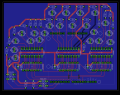
And here's my updated board layout with some of the changes implemented
I've brought all the LED traces smaller. Is there any need to have any traces besides VCC bigger than 10 mil?You have the traces for most of the LEDs greatly oversized. Is the placement of the LEDs significant?
I saw this page about 90 degree traces, which is why I was using them: https://electronics.stackexchange.com/questions/226582/pcb-90-degree-anglesDo not use 90° bends in traces. Instead, use two 45° bends. Also, always intersect another trace at a right angle (make a "T").
Is there a reason why the placement of the LEDs appears random?
You might have some problems with the traces going between what look like a pair of connectors. Is there enough clearance? If so, use the same size trace as the other LEDs, except only neck down the trace to fit through the gaps.
When you grab a screenshot, turn off the layer called "DRILLS", because it adds nothing to the image (except confusion).
I also second the suggestion to put mountings holes at each corner, even if you don't plan on using them right now.
The LEDs are going to be just connected with wires, not actually fitted into the board. I guess that means I could space them even closer together. With the smaller traces, nothing seems to overlap the green sections on the parts, so I assume that means there is enough clearance.
Good point about the mounting holes. This will be going inside a case eventually, so I'll do that.
On the schematic, the decoupling capacitors are connected to pin 8 of the 595s, which is also connected to ground. Is this incorrect? I thought on the schematic itself it didn't really matter how all the grounds were connected up. Everything will be using a ground plane anyway.On both schematics, two of the decoupling capacitors are not connected to GND.
ak
The power is coming from the Arudino's 5v output. Should that be specified a different way?On both schematics, two of the decoupling capacitors are not connected to GND.
ak
Yes, I mean ULN2803. I hadn't realized I labeled them wrong in the schematic.A late to this game but some thoughts and questions.
- ULN8903 - I don't see them in findchips.com or various distis. Maybe you mean ULN2803 or similar
- on the 595s, I've had current surge issues on startup (which blows the 595). would suggest putting 1K resistors on the inputs.
- 10 mil traces will carry more than enough current for the kind of LEDs you are using (>400 mA). use a pcb trace width calculator in the future. I'd probably go for 12 mil just to be safe and make it easier for home brew boards. Every board house out there can handle 10 mil just fine.
- you've gotten good advice on trace angles and such.
- on groundplanes. it's easy in eagle - just draw a polygon on the top and bottom and name it GND. It's the first thing I do after component placement.
- do you need the arduino uno (or similar)? I'd take a look at the nano - cheaper, smaller and exact same code.
- on eagle libraries - DO NOT TRUST ANY LIBRARY PARTS. print a 1 to 1 image of the board and test the parts for fit. Look at the drill hole sizes (use the editor) - there are lots of library parts floating around that are just plain wrong. Nothing more disheartening than to get a board back after waiting a week (or making your own) only to find your parts don't fit.
- a corollary point, don't commit to your final layout without having any new (to you) parts on hand and measuring them. I've made the mistake of reading the datasheet, designing the parts and then concurrently ordering the parts and sending the layout to the board house. Then, of course, Murphy rides again...
- how are you going to get your board made? I've done lots of toner transfer PCBs but stopped because professionally made high quality PCBs are cheap and relatively quick these days. Plus, you get plated through holes, good silkscreen and solder mask that makes assembly a LOT easier.
- if you are making the boards at home, figure out how to use SMDs - the fewer holes, the better. Though, I've gotten to the point where SMDs are actually a lot easier than TH stuff.
- Finally, think about the mechanical aspects. are you going to use a case? How will you get USB to the arduino? access to the buttons. Power connection? For example, on your board you have LEDs and the arduino in the same location, It's ok if the arduino goes on the back side of the board. These may seem secondary but bad choices on any of those will be a constant reminder to take them more seriously in the future!
Which input of the 595s are you suggesting 1k resistors for?
The nano is a good idea, I'll have to look into that.
I've already printed out the board and made sure all the parts fit. Good idea in any case.
I'm probably going to get a shop to make the board. I could probably figure out how to do it myself, but I'm going with the easy route on this one.
The USB and power connections of the Arduino should line up with the side of pcb board, which should make it easy to connect. And yes, I'm planning on the Arduino going on the back side of the board.
And here's my updated board layout with some of the changes implemented
Attachments
-
 918 KB Views: 8

The image is so small I didn't see the connection on the far left. The connections look ok. One way to remove clutter from a schematic is to use a ground symbol wherever a ground connection is needed. For example, connect together the ground pin and all signal pins that are grounded for each chip, and have one ground symbol per chip. Same for Vcc connections. This removes a lot of crossing lines. For the layout software to interpret this correctly, the symbol has the net name GND associated with it. Then, when you assign that net name to the plane, the software will know which pins to connect. The same can be done for any net name, but usually this is done only for power rails and ground.On the schematic, the decoupling capacitors are connected to pin 8 of the 595s, which is also connected to ground. Is this incorrect? I thought on the schematic itself it didn't really matter how all the grounds were connected up. Everything will be using a ground plane anyway.
ak
Not in this case. Current carrying capacity also depends on copper thickness, trace separation, trace location (inner vs outer), ...I've brought all the LED traces smaller. Is there any need to have any traces besides VCC bigger than 10 mil?
I'd use something more definitive than stackexchange [EDIT - Including AAC; do your own research when you get conflicting opinions or opinions you don't like/believe]. Current carrying capacity is dependent on the resistance of the trace. You'll get more current crowding in sharper bends. The only 90 degree angles generally accepted are for 'T' junctions.I saw this page about 90 degree traces, which is why I was using them: https://electronics.stackexchange.com/questions/226582/pcb-90-degree-angles
I used some 90 degree bends in the example layout I posted. I decided the benefit of not using 90's was outweighed by other considerations.
Wiring will be simplified if you aligned the LED pads. Then you could consider using male/female connectors for solderless connections.The LEDs are going to be just connected with wires, not actually fitted into the board. I guess that means I could space them even closer together.
Last edited:
It looks like you are making good progress!
The main reason to go bigger than 10 mil is if you are making a board at home (and especially via toner transfer). When you are the board house, a forgiving design is a good idea. For professional board houses though 10 mil is plenty. Standard 1 oz copper allows more than 400 mA of current in a 10 mil trace with minimal heating. Still, I usually make my power traces 16 mil just because...
On 595 inputs, I put a 1K resistor on serial data in and also pulled it low with a 100K. That fixed my problem with blowing the chips. I did that design 13 years ago and relooked at it. I was using the 595s to directly drive the LEDs (they have enough current spec'd) so the pull down resistor may have been the key point. The 595 does seem to have errant behavior during power-up. It's always a good idea to keep your inputs "tidy" until the processor gets around to setting them.
If your LEDs are off board, why not use pin headers? (eagle pinhead library) Then you can place them near the outputs of the drivers and not have to run traces very far at all. Your layout will look a lot cleaner and more professional. Also, you could significantly reduce the board size. If you use OSHPark (they'll take an Eagle .brd file) as your board house, you'll save a lot of money over your current board size. I'm guessing that you current board is around 12 square inches which is $60 at OSHPark. You could easily cut the size in half. (using a Nano, you could get it down even more). Smaller board means cheaper case, as well.
Speaking of cases, a hard lesson I learned is that you should probably pick your case BEFORE you complete your board design. A lot of the case makers even have board outlines for their cases that you can start from. I've spent way too much time trying to find a case for a board I made where I didn't think about it up front. (Of course, that could just be a good reason to get a 3D printer...). Anyway, I tend to start my projects from the case, figure out where the connectors need to be and then do my board layout. Makes for a very satisfying final assembly process.
And, as long as I'm here, you might want to take a look at using SMDs. SOICs and 1206s are ridiculously easy to hand solder. You could significantly reduce your board size. Frankly, I find SMDs easier to use than TH stuff. No more bending and clipping wires. Soldering is really fast. And, the end result looks like it isn't from the 1970s.
The main reason to go bigger than 10 mil is if you are making a board at home (and especially via toner transfer). When you are the board house, a forgiving design is a good idea. For professional board houses though 10 mil is plenty. Standard 1 oz copper allows more than 400 mA of current in a 10 mil trace with minimal heating. Still, I usually make my power traces 16 mil just because...
On 595 inputs, I put a 1K resistor on serial data in and also pulled it low with a 100K. That fixed my problem with blowing the chips. I did that design 13 years ago and relooked at it. I was using the 595s to directly drive the LEDs (they have enough current spec'd) so the pull down resistor may have been the key point. The 595 does seem to have errant behavior during power-up. It's always a good idea to keep your inputs "tidy" until the processor gets around to setting them.
If your LEDs are off board, why not use pin headers? (eagle pinhead library) Then you can place them near the outputs of the drivers and not have to run traces very far at all. Your layout will look a lot cleaner and more professional. Also, you could significantly reduce the board size. If you use OSHPark (they'll take an Eagle .brd file) as your board house, you'll save a lot of money over your current board size. I'm guessing that you current board is around 12 square inches which is $60 at OSHPark. You could easily cut the size in half. (using a Nano, you could get it down even more). Smaller board means cheaper case, as well.
Speaking of cases, a hard lesson I learned is that you should probably pick your case BEFORE you complete your board design. A lot of the case makers even have board outlines for their cases that you can start from. I've spent way too much time trying to find a case for a board I made where I didn't think about it up front. (Of course, that could just be a good reason to get a 3D printer...). Anyway, I tend to start my projects from the case, figure out where the connectors need to be and then do my board layout. Makes for a very satisfying final assembly process.
And, as long as I'm here, you might want to take a look at using SMDs. SOICs and 1206s are ridiculously easy to hand solder. You could significantly reduce your board size. Frankly, I find SMDs easier to use than TH stuff. No more bending and clipping wires. Soldering is really fast. And, the end result looks like it isn't from the 1970s.
Perhaps you could elaborate on why?For general purpose signal routing, I never go below 20 mil without a specific reason.
ak
Why go thinner?
Thinner traces are more delicate.
There is a greater chance of damaging one when installing/removing the board by bumping it with tools or fasteners.
There is a greater chance of damaging one when removing and replacing a component.
Undercutting caused by over-etching removes a greater percentage of the total trace mass.
A component failure of assembly error easily can increase the current in a trace by 10x before the problem is found. This could cause a narrow trace to blow like a fuse before the problem is found.
Take a hint from very high volume/low cost boards designed for some consumer products and toys. In them, the absolute minimum amount of copper is etched away, which means a) the etching chemistry lasts longer and that reduces costs; and b) you can gouge the board with a screwdriver and not damage its operation.
ak
Thinner traces are more delicate.
There is a greater chance of damaging one when installing/removing the board by bumping it with tools or fasteners.
There is a greater chance of damaging one when removing and replacing a component.
Undercutting caused by over-etching removes a greater percentage of the total trace mass.
A component failure of assembly error easily can increase the current in a trace by 10x before the problem is found. This could cause a narrow trace to blow like a fuse before the problem is found.
Take a hint from very high volume/low cost boards designed for some consumer products and toys. In them, the absolute minimum amount of copper is etched away, which means a) the etching chemistry lasts longer and that reduces costs; and b) you can gouge the board with a screwdriver and not damage its operation.
ak
I guess we have different perspectives.
10 mil is considered a wide trace in the industry. I've built plenty of boards both home made via toner transfer and professional board houses. With home made boards, I use 12 mil as my minimum and have had good success. There isn't board house out there that doesn't allow down to 6 mil, 10 mils is way conservative. Never had undercutting with professional boards. With home made, usually it's bad etch resist that is the culprit.
Lifting/damaging traces - I had as bad luck with wide (32 mil) as narrow traces. pads usually get lifted long before traces anyway and they are way more area than any traces. Usually if there is a lifted trace, you'll find a pad involved. If you treat your boards carefully, this usually isn't a problem.
This is a good blog on the trace width question.
10 mil is considered a wide trace in the industry. I've built plenty of boards both home made via toner transfer and professional board houses. With home made boards, I use 12 mil as my minimum and have had good success. There isn't board house out there that doesn't allow down to 6 mil, 10 mils is way conservative. Never had undercutting with professional boards. With home made, usually it's bad etch resist that is the culprit.
Lifting/damaging traces - I had as bad luck with wide (32 mil) as narrow traces. pads usually get lifted long before traces anyway and they are way more area than any traces. Usually if there is a lifted trace, you'll find a pad involved. If you treat your boards carefully, this usually isn't a problem.
This is a good blog on the trace width question.
Why go thinner?
Thinner traces are more delicate.
There is a greater chance of damaging one when installing/removing the board by bumping it with tools or fasteners.
There is a greater chance of damaging one when removing and replacing a component.
Undercutting caused by over-etching removes a greater percentage of the total trace mass.
A component failure of assembly error easily can increase the current in a trace by 10x before the problem is found. This could cause a narrow trace to blow like a fuse before the problem is found.
Take a hint from very high volume/low cost boards designed for some consumer products and toys. In them, the absolute minimum amount of copper is etched away, which means a) the etching chemistry lasts longer and that reduces costs; and b) you can gouge the board with a screwdriver and not damage its operation.
ak
Why go thinner?
We've lost sight of the fact that the wide traces I pointed out were on the order of 50 mils and 4-5 times larger than other traces.I guess we have different perspectives.
10 mil is considered a wide trace in the industry.
Board houses shouldn't have any problems with 10 mil traces. But outside 90 degree corners are more likely to overetch.
I agree with many of the points made by @AnalogKid. For homemade boards, wider traces are less affected by overetching. Etching less copper make for faster etching and less load on the etching chemicals.
If the OP oversized all of the traces to 50 mils, we wouldn't be having this discussion.
If making boards at home, yeah wider makes sense. For me, 12 mil has worked well. Each to his own. But I don't understand why people think that thinner = more etching. When designing any board, I leave as much copper as possible. Usually as a ground plane. With that approach the amount of copper to etch away is pretty much the same for any trace width and depends more on the clearance specified in the design rules. IIRC, I leave 12 mil clearance in my "non-plated-through design rules" that I use for home made boards. This clearance seems to etch just fine. For commercial board houses, I use 6 mil clearance and never had a problem.
I have to admit, after making a lot of them, I have given up on home made boards. When you can get multiple copies with excellent quality and 1 week turn around for <$30, it just doesn't make sense to make my own boards. To me, anyway. And having to deal with non-plated through holes is a huge PITA for anything but the simplest of designs.
And, 50 mil traces are a bad idea because they won't pass between 100 mil pitch pins and even small sized pads. This point would have definitely come up even with all the traces being 50 mils. If you look at the spacing between 100 mil pitch pins, you wind up with 40 mils of pad to pad clearance. This for a 40 mil drill and a 10 mil ring for the pad. You can shrink the drill a tiny bit but 10 mill ring is pretty much as low as I would go. So that leaves you 40 mils. A 20 mil trace would leave 10 mils of clearance on either side which I'm ok with but for home board etching, there is a chance of bridges. Dividing the 40 mil space by 3 gives 13.333 mils. That's a weird number so I use 12mils. 13 or 14 would be ok, too.
I have to admit, after making a lot of them, I have given up on home made boards. When you can get multiple copies with excellent quality and 1 week turn around for <$30, it just doesn't make sense to make my own boards. To me, anyway. And having to deal with non-plated through holes is a huge PITA for anything but the simplest of designs.
And, 50 mil traces are a bad idea because they won't pass between 100 mil pitch pins and even small sized pads. This point would have definitely come up even with all the traces being 50 mils. If you look at the spacing between 100 mil pitch pins, you wind up with 40 mils of pad to pad clearance. This for a 40 mil drill and a 10 mil ring for the pad. You can shrink the drill a tiny bit but 10 mill ring is pretty much as low as I would go. So that leaves you 40 mils. A 20 mil trace would leave 10 mils of clearance on either side which I'm ok with but for home board etching, there is a chance of bridges. Dividing the 40 mil space by 3 gives 13.333 mils. That's a weird number so I use 12mils. 13 or 14 would be ok, too.
Depends on the industry.10 mil is considered a wide trace in the industry.
ak
Thanks for the help everyone. I think I've just about finished the layout. I switched over to use jumpers instead of LEDs since they won't be sitting on the board. I've also added holes and put in the ground plane. If anything else looks very off about this, please let me know.
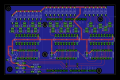
If anything else looks very off about this, please let me know.
- Soldering will be easier if use elongated pads for all pads.
- Assembly will be easier if you align the headers and use an appropriate length 2x header. That will save you a quarter inch in the Y dimension.
- You can save another half inch in the Y dimension by using bussed resistor networks for the current limit resistors. That will also let you avoid the routing between the pins for your SBC.
- The connections to pin 1 of the darlington arrays are unnecessarily close to the pad for pin 2 and have 90 degree bends.
- You could use a smaller package for the decoupling caps. At the very minimum, align them with the chip the same way and move them out of the critical cut in the X dimension.
- You could reduce horizontal space between the IC's. That and #5 will probably shave more than an inch from the X dimension.
- You could align the switches and make the layout of them and the associated resistors symmetrical.
- R22 is in the critical cut in the X dimension. If you rotate it, you can shave more tenths from the X dimension.
- I'd make the routing to pin 9 of U1 and U2 look similar.
- I'd widen the narrow traces just to make them not seem so narrow compared to power.
- I'd align the two rows of chips (power pins or ground pins). It makes the routing a little more complex, but will make component placement look neater.
Looks a lot better! You are making good strides. Having to route around the Arduino footprint is kind of PITA (that's what the analog input on the silk layer is from).
You still have right angles on your traces. Not the end of the world but as has been mentioned 2 45s is cleaner.
I would have aligned the headers for the LEDs - using 2x8 pinheaders. If you use "dupont" (2x1 female) connectors to attach the LEDs the pinheaders being in line actually makes it easier to plug in.
I didn't realize it before but you basically have a single sided PCB. If you are doing home made it make sense. if you are having it made professionally no need to stick to one side.
I would hook up the gnd pins on the arduino header near H5. Not the end of the world but the gnd is there. might as well hook it up.
are those the smallest TH resistors you could find? they seem kind of big. same thing on the bypass caps.
You can also pack the board a lot tighter. Currently there is lots of space between the ICs. R22 was pointed out earlier. The pin headers can be 100 mil on center (see above comment). The resistors can be packed closer. Not the end of the world but I try to keep my boards small for cost reasons I stated in an earlier post. There is a point of diminishing returns and too tight makes it harder to assemble but you're a long way from that.
Put a version number on your silk screen. If you ever make changes and do a second one, you will want to be able to know exactly which schematic to look at.
I don't recall if this has been said but you should run design rules checking (DRC) on your board. If your fab house has a set for eagle, down load them. OSHpark and Seeed both have them. Use the sparkfun DRC rules for PCBWay (my current favorite fab house). If you don't you risk getting an unusable board back.
Aesthetics (i.e. more for appearance)
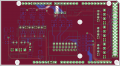
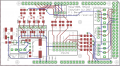
Here is a board I made recently to illustrate some of my points. See the aligned pin headers. Labels aligned. The arduino mega labels were removed except for the one bank on the bottom to quick debug access. Vector fonts everywhere (except on the arduino mega part - I should go in and do that). I've attached images both with and without the ground plane visible. 10 mil traces for the most part, 16 mil power - this board fabbed perfectly and is running in my CNC machine. SMDs in a lot of places. (and for what it's worth, I intend to release it to open source at some point when I stop tinkering with it.)
You still have right angles on your traces. Not the end of the world but as has been mentioned 2 45s is cleaner.
I would have aligned the headers for the LEDs - using 2x8 pinheaders. If you use "dupont" (2x1 female) connectors to attach the LEDs the pinheaders being in line actually makes it easier to plug in.
I didn't realize it before but you basically have a single sided PCB. If you are doing home made it make sense. if you are having it made professionally no need to stick to one side.
I would hook up the gnd pins on the arduino header near H5. Not the end of the world but the gnd is there. might as well hook it up.
are those the smallest TH resistors you could find? they seem kind of big. same thing on the bypass caps.
You can also pack the board a lot tighter. Currently there is lots of space between the ICs. R22 was pointed out earlier. The pin headers can be 100 mil on center (see above comment). The resistors can be packed closer. Not the end of the world but I try to keep my boards small for cost reasons I stated in an earlier post. There is a point of diminishing returns and too tight makes it harder to assemble but you're a long way from that.
Put a version number on your silk screen. If you ever make changes and do a second one, you will want to be able to know exactly which schematic to look at.
I don't recall if this has been said but you should run design rules checking (DRC) on your board. If your fab house has a set for eagle, down load them. OSHpark and Seeed both have them. Use the sparkfun DRC rules for PCBWay (my current favorite fab house). If you don't you risk getting an unusable board back.
Aesthetics (i.e. more for appearance)
- align the two switches
- vertically align the 3 set of 8 x resistors.
- for a smaller board you could vertically mount the resistors.
- I would edit the arduino uno library part and get rid of all the text labels of the pins. It's useful for a generic shield but not so much in this case.
- use vector fonts for all your silk screen text. the eagle proportional fonts get changed in production (the text gets a lot longer and winds up not being at all what you expect). You can select the change/fonts tool to switch them quickly. Use smash tool get access to part names.
- I don't bother with values on my silk screen as it clutters unnecessarily. I wold also dump the JP names. Pretty obvious what those are about.
- if you use 2x8 headers for all your JPs, you can line up the Mxx and Hxx labels to make it really nice and clean looking.
Here is a board I made recently to illustrate some of my points. See the aligned pin headers. Labels aligned. The arduino mega labels were removed except for the one bank on the bottom to quick debug access. Vector fonts everywhere (except on the arduino mega part - I should go in and do that). I've attached images both with and without the ground plane visible. 10 mil traces for the most part, 16 mil power - this board fabbed perfectly and is running in my CNC machine. SMDs in a lot of places. (and for what it's worth, I intend to release it to open source at some point when I stop tinkering with it.)
Last edited:

You should put enough text on the copper layers that it is obvious if the layers are backwards. This applies both when you make the board yourself and when a PCB house makes it. A board can be made wrong 2 ways. One is by having the layer(s) mirrored by exposing the photoresist with the negative upside down. The other is caused by swapping the 2 layers.Put a version number on your silk screen. If you ever make changes and do a second one, you will want to be able to know exactly which schematic to look at.
Very frustrating when you have a board that is otherwise correct but made reversed. I have etched boards like this myself. I have also received a reversed board from a board house with this mistake -- even with the text on the PCB.
edit: You can add the name of the board for some of the text.