AC-DC Power supply failure

Thread Starter

cparke

Joined Aug 28, 2017
79
Where was the -ve end of the capacitor connected? What is the PSU output voltage in that situation?
You can see the gray stripe of the top of the capacitor in the photo. The diode was connected to the positive side of the capacitor, since obviously we're sending positive voltage across the diode.

The output voltage of the PSU is 29.7VDC or so even in green mode at 4.7kHz. The output spec for the device is to be at 30VDC at all times, up to 500mA.

You could also try with the diode connected direct to pin 5 of the transformer/R7 and the -ve of the capacitor/load resistor to J2 or the heatsink, in case Q2 is actually faulty.
I can do that tonight if you want to see it.

I would expect it to be same frequency as on Q2...

It just isn't ramping up when on-load. But why?
The frequency change across the transformer at Pin 8 is odd to me as well. It's more than double the frequency at the primary! Unless I should be using Pin 6/7 as the other pole rather than the heatsink for the frequency measurement?

I wouldn't say that this device isn't ramping up when a load is applied. I have no measurements currently of exactly what happens at that moment when the load is applied and the frequency increases. The printer does actually come on, which means it is drawing at least 200mA. It's just when the print head starts to move, causing a surge to 500mA or greater, the overcurrent protection mechanism kicks in and shuts everything down, I guess by simply stopping the switching and leaving the MOSFET in 'off' position.

Would it help if I can find a more stable load and figure out at exactly what resistance the IC switches out of green mode, and if it can even run in regular mode (full frequency) up to a certain amperage?

I still believe that the SENSE circuit is responsible for the shut down, and I'll remind you that I found yesterday that the R19 in that circuit appears to be bad and reading too low in ohms.
 
Last edited:

Irving

Joined Jan 30, 2016
5,137
The frequency change across the transformer at Pin 8 is odd to me as well. It's more than double the frequency at the primary! Unless I should be using Pin 6/7 as the other pole rather than the heatsink for the frequency measurement?
Argh... the heatsink is reference ground ONLY FOR VHT-side measurements; don't use it for anything on the DC side. The reference point there is pins 6 & 7 on the transformer or the - side of the output capacitor C52.

I still believe that the SENSE circuit is responsible for the shut down, and I'll remind you that I found yesterday that the R19 in that circuit appears to be bad and reading too low in ohms.
SENSE only cuts the ON-portion of the cycle down when the voltage across the sense resistor R10 (and therefore the current through it) exceeds some threshold - it changes (reduces) the duty-cycle, not the frequency. R19 100k is in parallel with the input impedance of the sense pin 4 (10k according to datasheet) plus the 1k of R9 plus the internal circuit to the drive pin 5. I'm surprised its measuring as high as 41k. I doubt there is an issue with R19.

When its idling on no load and the output voltage is 30v, what are the voltages at A, B and C relative to the DC reference.
1653484152657.png

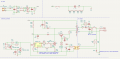
Latest version of circuit
1653483058120.png
 

Thread Starter

cparke

Joined Aug 28, 2017
79
Argh... the heatsink is reference ground ONLY FOR VHT-side measurements; don't use it for anything on the DC side. The reference point there is pins 6 & 7 on the transformer or the - side of the output capacitor C52.
When its idling on no load and the output voltage is 30v, what are the voltages at A, B and C relative to the DC reference
Guess that's the kind of reason why we have all these safety standards like CAT III and GFCI...

Ok, I'll have to re-do the DC side measurements tonight, plus these three new points, and also I'll check frequency and voltage with the test circuit at transformer pin 5 too!

Q: Given that we're testing at a frequency of 4.7kHz rather than 70kHz, should I be using a different capacitor? My voltage reading under the test circuit is floating up and down along the sine wave maybe because the smoothing capacitance isn't enough for the slower frequency?

BTW - The circuit diagram looks great, I am even starting to understand many of the symbols!

SENSE only cuts the ON-portion of the cycle down when the voltage across the sense resistor R10 (and therefore the current through it) exceeds some threshold - it changes (reduces) the duty-cycle, not the frequency. R19 100k is in parallel with the input impedance of the sense pin 4 (10k according to datasheet) plus the 1k of R9 plus the internal circuit to the drive pin 5. I'm surprised its measuring as high as 41k. I doubt there is an issue with R19.
Isn't duty cycle and frequency the same thing? I don't know, it seems to me that if the sensor's resistance is off due to a bad resistor in the SENSE circuit, a premature overcurrent protection shutdown like what we're seeing may be the result. But you don't seem to think so ...
 

Irving

Joined Jan 30, 2016
5,137
Isn't duty cycle and frequency the same thing?
No they are not. Thinking about a digital signal, frequency is how many times a second it goes from off to on, duty cycle is the ratio of on time to off time. So a 1kHz square wave has a cycle time of 1/1000sec = 1milliSecond (mS) and is on and off for 0.5mS giving a duty cycle of 50%. A signal that is on for 0.1mS and off for 0.9mS has a duty cycle of 10%, but is still a 1kHz signal as the cycle time is still 1mS. Mathematically:

F = 1/(Ton + Toff) Hz
D = Ton/(Ton+Toff) %


if the sensor's resistance is off due to a bad resistor in the SENSE circuit, a premature overcurrent protection shutdown like what we're seeing may be the result.
The sense circuit measures the voltage across R10, which is 0.43ohm. R19 is many times larger than that so has zero impact on the sense circuit operation. R19's sole purpose is to ensure the MOSFET stays off in the event the thermal trip opens. It prevents any induced or static charges turning the MOSFET on.

Now, you are right in the sense that if the sense resistor was open circuit or a bigger value than expected then the system would misbehave, as it would if the sense circuitry in the chip was damaged. Unfortunately, without an oscilloscope, there's no real way to assess that. And there's no evidence to suggest otherwise.

Q: Given that we're testing at a frequency of 4.7kHz rather than 70kHz, should I be using a different capacitor? My voltage reading under the test circuit is floating up and down along the sine wave maybe because the smoothing capacitance isn't enough for the slower frequency?
10u is used at C5 for VDD smoothing and experiences the same frequency range, so I'd say its fine, but by all means try something larger.
 

Thread Starter

cparke

Joined Aug 28, 2017
79
No they are not. Thinking about a digital signal, frequency is how many times a second it goes from off to on, duty cycle is the ratio of on time to off time.
Thanks, that explanation helps a lot. It turns out, and I didn't realize it until now, this meter's frequency setting also has a duty cycle reading too! So while we don't have an oscilloscope, we have some more wave data!

I went to test this unit more tonight, as I said that I would do. And this time I added duty cycle readings at the connections too. So here's the new results:

Green mode, 30VDC out:

Q2: 4.8kHz, duty 0.7% (yes, less than 1%), voltage 2.5V - 6.5V.

Transformer Pin 4: 5.4kHz, duty 99.3%, voltage 170V (note, I got a medium spark when I tried to check voltage here, and this fried the diode on my testing add-on circuit - direct DC voltage measurement good enough!)

Transformer Pin 5: 5.4kHz, duty 0.7% (yes, less than 1%), voltage 10V -12V.

Transformer Pin 8: 3.1kHz, voltage 17.5V - 21V, duty 0.6% (yes, less than 1%). (small spark here, but nothing damaged)

R53/R54 and R52/FL51 (point A): 0Hz, 0% duty, 29.7VDC (same as V-out)

IC1 and R54 (point B): 60Hz (AC-in freq), 100% duty, 28VDC

IC1 and R53 (point C): 0Hz, 0% duty, 29VDC

Testing for frequency and duty at one of the points A/B/C seems to trigger the IC to go into an overload shutdown mode, and V-out upon this scenario drops to 11VDC.


After applying printer start-up load and power supply shuts down V-out drops to 6VDC:

Q2: 60Hz, duty 50% (same as when only connected to ground and red not touching anything), voltage 0V.

Transformer Pin 5: 0Hz, duty 0%, voltage 0V.

Transformer Pin 8: 0Hz, duty 0%, voltage 0V.

R53/R54 and R52/FL51 (point A): 6VDC (same as V-out)

IC1 and R54 (point B): 6VDC

IC1 and R53 (point C): 6VDC

10u is used at C5 for VDD smoothing and experiences the same frequency range, so I'd say its fine, but by all means try something larger.
I did try a 22 micro-farad and a 1000 micro-farad, but all that really did was make the voltage reading drift more slowly, but it still drifted. The 1000 micro-farad was so slow to rise that I never could see if the voltage would ever come downwards.
 
Last edited:

Thread Starter

cparke

Joined Aug 28, 2017
79
R53/R54 and R52/FL51 (point A): 6VDC (same as V-out)

IC1 and R54 (point B): 6VDC

IC1 and R53 (point C): 6VDC
Small addendum, these were done via direct DC measurement, without using the add-on test circuit to smooth any oscillations that may be happening at this point.

I mention this because I find it puzzling where this shutdown voltage is coming from? And why does it vary from time to time? It's like the projection of a ghost. I've seen it at 1V, 4V, 6V, and 11V now. With 0V coming out of the transformer at the same time, maybe there is some variable amount of switched current coming in from somewhere else? Probably has something to do with how 20V out of the transformer gets raised to 30VDC by the time it gets through IC1 (PC123).
 
Last edited:

Irving

Joined Jan 30, 2016
5,137
Off-load

Q2: 4.8kHz, duty 0.7% (yes, less than 1%), voltage 2.5V - 6.5V.
As expected in green mode

Transformer Pin 4: 5.4kHz, duty 99.3%, voltage (unknown) (I got a medium spark when I tried to check voltage here, and this fried the diode on my testing add-on circuit - not sure why this happened)
Not surprisingly, this is at 170v pulsed! The duty cycle is the inverse of what you'll see at pins 5 and 8 because it is the 'off' part that where the magnetic field in the core collapses that generates the 'on' energy in the secondary windings.

Transformer Pin 5: 5.4kHz, duty 0.7% (yes, less than 1%), voltage 10V -12V.
This about right, enough to generate a small voltage at Q2 but not enough for the controller to be fully on.

Transformer Pin 8: 3.1kHz, voltage 17.5V - 21V, duty 0.6% (yes, less than 1%). (small spark here, but nothing damaged)
What reference point were you using for this measurement?

The value is about right. The frequency shift might be because you are loading the circuit a bit more. Later versions of the 6848 eg 6858, 6860 and some 'copies' eg RS2051have the lowest frequency fixed at 22kHz to make startup after a short/overload more reliable.

R53/R54 and R52/FL51 (point A): 0Hz, 0% duty, 29.7VDC (same as V-out)

IC1 and R54 (point B): 60Hz (AC-in freq), 100% duty, 28VDC

IC1 and R53 (point C): 0Hz, 0% duty, 29VDC
All good and much as expected. Can you measure the voltage at idle/off-load across pins 3 and 4 of the opto-coupler IC1 (black to 3, red to 4, opposite #1, top of PCB). Will be <5v probably.

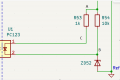
The higher the output voltage above 28v - ZD52's zener voltage - the more current flows in the diode of the opto-coupler and therefore in the transistor output of the opto-coupler. If the output current is low the output voltage rises > 30v, then that currrent is greater than a certain amount, so the system identifies that state as off-load and reduces the PWM frequency and duty cycle accordingly. Below that current feedback limit the system varies the duty cycle relative to the voltage level above 28v to maintain an on-load voltage around 29v.

On-load
Transformer Pin 5: 0Hz, duty 0%, voltage 0V.
Sort of expected if transformer loaded but chip not responding - probably too small to measure with test jig.

Transformer Pin 8: 0Hz, duty 0%, voltage 0V.
Would expect something here, seeing as getting 6v out. Was this with test jig or not? What reference point were you using for this measurement?

R53/R54 and R52/FL51 (point A): 6VDC (same as V-out)

IC1 and R54 (point B): 6VDC

IC1 and R53 (point C): 6VDC
All as expected with 6v out, ZD52 is not conducting so no current flowing in R53 or R54 therefore all points at same voltage.

Probably has something to do with how 20V out of the transformer gets raised to 30VDC
20v measured at pin 8 of the transformer with your test jig and a small capacitor is closer to the root mean square (rms) voltage (sort of like an average) rather than the peak voltage which it would approach on no load with a bigger capacitor.
 

Thread Starter

cparke

Joined Aug 28, 2017
79
Transformer Pin 4: 5.4kHz, duty 99.3%, voltage (unknown) (I got a medium spark when I tried to check voltage here, and this fried the diode on my testing add-on circuit - not sure why this happened)
Not surprisingly, this is at 170v pulsed!
Maybe we tested that before and I forgot. Still, at 99.3% duty, I should have had a clue that the testing rig might not be needed. Re-tested using just the meter directly, and yes, I get 168V at pin 4 of the transformer (MOSFET drain). I will update prior post, as voltage is not unknown.

What reference point were you using for this measurement?
The reference point for DC side is pins 6 & 7 on the transformer, like you said yesterday.

Transformer Pin 8: 0Hz, duty 0%, voltage 0V.
Would expect something here, seeing as getting 6v out. Was this with test jig or not? What reference point were you using for this measurement?
Yes, I used the test jig here for voltage check because we know the current is still high frequency coming out of the DC side of the transformer. However, for frequency and duty cycle, no test jig ever used.

Looking at the circuit diagram, I notice that the opto-coupler (IC1) (PC123) is not connected to the high frequency current going into the transformer on the VHT side, so maybe somehow the combination of outputs on the DC side after overload shutdown creates some potential difference between the two while still 0V with ground?

Can you measure the voltage at idle/off-load across pins 3 and 4 of the opto-coupler IC1 (black to 3, red to 4, opposite #1, top of PCB). Will be <5v probably.
Initially, at IC1 pin 4, I got 0VDC (actually 0.100VDC) using just the meter. Then I attached the smoothing rig and tried again, and this time got a floating value between 0.70V and 1V. Switching to the frequency meter, I found 3.6Hz (yes, not even 4 times a second) and 5.4% duty at IC1 pin 4. Furthermore, although IC1 pin 3 is connected directly to the VHT ground and heatsink (which is what I actually used for reference since I prefer to clip the negative so no using 2 hands or slipping), nevertheless at this location the meter reads 35Hz and 99.9% duty at IC1 pin 3 relative to heatsink, which sounds almost impossible! (should be 60Hz and 50% duty from sensing AC-in's neutral current)

After shutdown due to connecting the printer, using the aid of the diode-capacitor tester jig, I get 0.001V (1mV) at IC1 pin 4, but still 6.8VDC out on the switching power supply.


All above tests with full 30VDC output active are under green mode, because I have not found a stable small load to connect to this device that might induce wake up without triggering overload. The printer is my only load, and it shuts the unit down as soon as the printhead starts to move. Do you think this is a limitation that needs to be overcome?

What's next to test?
 
Last edited:

Irving

Joined Jan 30, 2016
5,137
Arrrghhh - wrote a long reply yesterday and AAC binned it; trying again...

Looking at the circuit diagram, I notice that the opto-coupler (IC1) (PC123) is not connected to the high frequency current going into the transformer on the VHT side, so maybe somehow the combination of outputs on the DC side after overload shutdown creates some potential difference between the two while still 0V with ground?
Not sure what your point is. The opto-coupler translates the forward current through the diode \( I_f \) into the collector current of the output transistor \( I_c \), depending on a parameter CTR, the current transfer ratio, while maintaining galvanic isolation between input and output ie the input and output can be up to 1500v difference.. A CTR of 100% means \( I_c = I_f \) . Unfortunately the CTR of a basic PC123 is between 25 and 200% though they do provide versions with narrower ranges eg 100 - 200%, but the part as marked is just the basic one - maybe they select values of R53 on test to tune that variation out.

The control current flowing out of the FB terminal on the chip sets the duty cycle and frequency of the SG6848. The current in the opto-coupler diode is set by the output voltage, so as this increases the duty cycle reduces, dropping the voltage, thus maintaining regulation. The duty cycle ranges from 80% at 0.3mA to 1% at approx 1mA. Above 1mA the duty cycle remains around 1% but the frequency drops down approx 300Hz per uA to approx 10kHz. I suspect your meter reads lower because its not catching every cycle, its a very non-linear waveform.

My suspicion is that Q3/Q4/ZD1 add another current path on FB to progressively change the behavior on input voltages >120vAC, but I'm still not clear how exactly - we may not have the full circuit diagram in this area yet. Or its some kind of lockout latch that forces idle mode under some fault condition that can only be reset by switching it off and on again - in which case this could be the culprit - disabling it by removing D9 might prove that.

Initially, at IC1 pin 4, I got 0VDC (actually 0.100VDC) using just the meter. Then I attached the smoothing rig and tried again, and this time got a floating value between 0.70V and 1V. Switching to the frequency meter, I found 3.6Hz (yes, not even 4 times a second) and 5.4% duty at IC1 pin 4. Furthermore, although IC1 pin 3 is connected directly to the VHT ground and heatsink (which is what I actually used for reference since I prefer to clip the negative so no using 2 hands or slipping), nevertheless at this location the meter reads 35Hz and 99.9% duty at IC1 pin 3 relative to heatsink, which sounds almost impossible! (should be 60Hz and 50% duty from sensing AC-in's neutral current)

After shutdown due to connecting the printer, using the aid of the diode-capacitor tester jig, I get 0.001V (1mV) at IC1 pin 4, but still 6.8VDC out on the switching power supply.
I'm not sure your freq meter readings or test jig reading will make sense here as they are likely to be affecting the operating conditions. The FB pin is pulled up to 4.5v internally to the chip but we don't know the value of the internal resistor so its hard to equate the voltage at FB with the actual current, however anything <0.3v suggests we're in idle/shut down mode.

With output voltage < 28v the opto-coupler diode and therefore the output transistor should be off and FB should be closer to 3v or so. This suggests either the chip is faulty, the opto-coupler is faulty or the Q3/Q4 circuit is holding the controller in idle mode.

Measure the voltages, using normal test meter, on the following points:
- collector (pin 3) of Q3
- collector (pin 3) of Q4
- +end (bar) of ZD1
- -end of ZD1

all relative to heatsink...

All above tests with full 30VDC output active are under green mode, because I have not found a stable small load to connect to this device that might induce wake up without triggering overload. The printer is my only load, and it shuts the unit down as soon as the printhead starts to move. Do you think this is a limitation that needs to be overcome?
I would use an electronic load that allows you to dial in a specific current. You can buy them quite cheaply on eBay, but its a bit overkill. Do you have any opamps and MOSFETs in your box of bits or can liberate them from a board? If so, and they are suitable parts, I could show you how to cobble something together that would do the job.
 

Thread Starter

cparke

Joined Aug 28, 2017
79
Do you have any opamps and MOSFETs in your box of bits or can liberate them from a board? If so, and they are suitable parts, I could show you how to cobble something together that would do the job.
I am removing parts from a broken garage door opener control board. As such, it has two adjuster dials labeled VR1 and VR2, each with three pins, which is the closest thing I can think of to an "op-amp". The part # on them is 50K827M by Piher (Spain). It also has a MOSFET part #F1010N. Will this work for what you're thinking of building for further diagnosis?

Measure the voltages, using normal test meter, on the following points:
- collector (pin 3) of Q3
- collector (pin 3) of Q4
- +end (bar) of ZD1
- -end of ZD1
all relative to heatsink...
- collector (pin 3) of Q3: 3.5VDC (at C9/R13)
- collector (pin 3) of Q4: 0VDC (at R17/D9)
- +end (bar) of ZD1: 3.5VDC (at R13)
- -end of ZD1: 4.15VDC (at R15/R17)
 
Last edited:

Irving

Joined Jan 30, 2016
5,137
I am removing parts from a broken garage door opener control board. As such, it has two adjuster dials labeled VR1 and VR2, each with three pins, which is the closest thing I can think of to an "op-amp". The part # on them is 50K827M by Piher (Spain). It also has a MOSFET part #F1010N. Will this work for what you're thinking of building for further diagnosis?
The F1010N is perfect for this. The VRx devices are variable resistors value 50k. You'll need one of them. But they aren't op-amps. Look for a small 8 or 16 legged device... or a 5-legged device that looks like the SG6848.
 
Last edited:

Thread Starter

cparke

Joined Aug 28, 2017
79
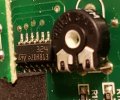
Actually, there is a14-pin chip on this board tright next the VR1, labeled "U5" and it has "324" printed on it, which seems awfully close to it being a LM324...

20220528_221247.jpg

Looking closer, the VR1 and VR2 are also wired into this 324, and the center top pin (seen above) does go to ground, so looks like we have an op amp if I can get this component out of the board safely.

Not sure if I'll be able to plug this into the breadboard though, the pins seem to bent sideways so they don't go through the board. Maybe they can be bent straight without breaking?
 
Last edited:

Irving

Joined Jan 30, 2016
5,137
Yes, that's likely to be a LM324 and would certainly be suitable, we're not looking for mV accuracy here. That looks like its in a SOIC14 package, the pin spacing is not 0.1" but 0.05" so won't fit a breadboard directly even if you did straighten the pins. But you don't need a breadboard; if you are careful you can solder it directly as a 'rats nest'.

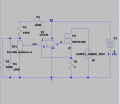
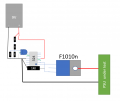
Here is the circuit and a suggested layout just hanging the LM324 on the pins of the F1010N. Note that the 1R resistor needs to be at least 0.5W device as it will dissipate 0.25W at 500mA test current (and will get quite warm) and the F1010N dissipates 15w at 30V & 0.5A so needs a heatsink with a thermal resistance better than 6°C/W (or about 100mm x 100mm of 2mm ally sheet). All powered by a 9v battery to make things easier. The combination of the 100k resistors R2 through R5 is just to put the range of VR1 somewhere useful. Basically the circuit is a constant current load. The opamp turns the MOSFET on just enough so that the current through R1 generates a feedback voltage (fb) equivalent to the control voltage (ctrl) and since R1 is 1 ohm, 0.5v at ctrl = 500mA load, 0.1v = 100mA load. You should be able to go down to 50mA, maybe lower, but it'll be a bit touchy as the input offset voltage error from the opamp will be a significant percentage of the feedback voltage - the LM324 is a pretty poor opamp at low levels.

1653836103145.png1653840981393.png
 

Thread Starter

cparke

Joined Aug 28, 2017
79
Here is the circuit and a suggested layout just hanging the LM324 on the pins of the F1010N. Note that the 1R resistor needs to be at least 0.5W
You mean the R1 resistor or is that some special notation? At any rate, not sure I have 100k ohm resistors, and as I've never built something this complicated, so it may take me a few days to put this together. But it certainly looks interesting!

You should be able to go down to 50mA, maybe lower, but it'll be a bit touchy as the input offset voltage error from the opamp will be a significant percentage of the feedback voltage - the LM324 is a pretty poor opamp at low levels.
Not sure if it's too obvious to notice, but a resistor alone can provide a constant current load, can't it? I already have tried small loads in the <10 mA range using 10k resistors, but it looks like that is enough current to get the power supply out of green mode.
 

Irving

Joined Jan 30, 2016
5,137
You mean the R1 resistor or is that some special notation? At any rate, not sure I have 100k ohm resistors, and as I've never built something this complicated, so it may take me a few days to put this together. But it certainly looks interesting!
Yes I did, pure coincidence R1 = 1R0 (1 ohm)! You may find 100k (104) resistors on your boards, its a common value on such boards. The values aren't too critical, 4 similar high-value resistors will probably work ok.

I don't recommend you do this on a breadboard as they are not good with currents more than a few tens of milliamps.

Not sure if it's too obvious to notice, but a resistor alone can provide a constant current load, can't it? I already have tried small loads in the <10 mA range using 10k resistors, but it looks like that is enough current to get the power supply out of green mode.
Yes, to a point. But its not constant - so I always = V/R, and if V isn't constant nor is I. If what we're trying to do is figure out what is not working we need I to be independent of V at the point where things start going wrong. So a 1500ohm resistor will draw 20mA at 30v (and will dissipate 0.6W so will be getting quite warm quite quickly) and a 1k, 30mA (0.9W). Obviously 10 off 10k resistors in parallel will only dissipate 0.1W each so can be made from smaller parts. However its hard to fine tune that to hit the inflection point as current and voltage are interlinked.
 

Thread Starter

cparke

Joined Aug 28, 2017
79
Yes, that's likely to be a LM324 and would certainly be suitable, we're not looking for mV accuracy here. That looks like its in a SOIC14 package, the pin spacing is not 0.1" but 0.05" so won't fit a breadboard directly even if you did straighten the pins. But you don't need a breadboard; if you are careful you can solder it directly as a 'rats nest'
Ok, as I had to order 100k resistors and a heatsink for the MOSFET in order to build this contraption, while I was at it I also got a new, regular sized LM324 as the one on my old board was hard to remove without a puller tool, and SOIC14 is too small for a breadboard and hard to solder wires so small reliably. I also needed another breadboard and jumpers and terminal plugs, as I've never build a sample circuit this complex.

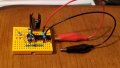
The result is this:
20220604_104948.jpg

This took me a while to put together, as I found the various pin definitions confusing, for example the POT pins aren't marked. I had a scare too, as I almost fried my POT while trying to test it by accidentally connecting the 9V battery to pins 1 and 2 while it was set to 0 resistance, but it seems that I disconnected it just quick enough, after noticing it light up, that it seems to be still okay. On the MOSFET, convention is that the body pin is fused with the source pin (on the end), but my tests (as well as your simplified drawing) indicate it is fused with the center pin (drain pin I believe), or am I missing something here?

So, I understand this is a constant current test circuit, and the MOSFET is expected to heat up and probably not safe to keep plugged into the breadboard during the test. Fine, but I hope the rest of the circuit (OP AMP, POT, resistors) don't have the same issue of over-wattage.

I think I'm ready to connect this thing up to the power supply, but is there a good way to test this jig with battery power and an ammeter first? Need to figure out which way to set the POT initially so that current flow starts low and increases as I dial it up.
 
Last edited:

Irving

Joined Jan 30, 2016
5,137
On the MOSFET, convention is that the body pin is fused with the source pin (on the end), but my tests (as well as your simplified drawing) indicate it is fused with the center pin (drain pin I believe), or am I missing something here?
Not sure where you got that 'convention' from, but TO220 and similar-cased devices are always Drain (pin 2) = tab (sometimes called pin 4)

So, I understand this is a constant current test circuit, and the MOSFET is expected to heat up and probably not safe to keep plugged into the breadboard during the test. Fine, but I hope the rest of the circuit (OP AMP, POT, resistors) don't have the same issue of over-wattage
The only thing, apart from the MOSFET to get warm is the 1ohm resistor. everything else will stay cool... but yes, the MOSFET Drain pin might need to be removed from the breadboard - or it'll need to be on an umbilical!

I'm assuming the crocs clips are for the 9v battery. I don't see anything for the psu under test connections yet.

The parallel resistors R4/R5 - I can see one end goes to 0v via the green jumper but the other ends are in the column 1 position to the right of pin 1 of the POT (left hand pin in pic) and I can't see a link to the POT. I think they need to go left 1 column.

I'm not 100% sure either of the wiring to the opamp. I can see the 1ohm resistor goes to pin 6 (-in) and the centre of the pot to pin 5 (+in) via a yellow jumper, and therefore I think pin 7 is going to the gate pin of the MOSFET and I think there's an orange jumper from pin 6 to the source pin but its hard to see. If thats correct then all's well...

I think I'm ready to connect this thing up to the power supply, but is there a good way to test this jig with battery power and an ammeter first? Need to figure out which way to set the POT initially so that current flow starts low and increases as I dial it up.
First put your multimeter on the DC amps range in line with the red connector to the 9v battery. If all is well there should be negligible current draw, probably < 1mA. Return multimeter to DC volts mode.

For 0A out the pot as seen in the photo should be fully clockwise - the centre pin will then be 0v wrt the black DC connection and will increase to approx 1v as you move it to the other end - you can test that with just the 9v battery connected.

If that's good, return the pot to 0, put your multimeter on a low ohms range and red to the Drain/TAB of the mosfet, black to 0v. Resistance should be very large (Mohms). As you turn pot anticlockwise resistance should drop to near zero. Since your multimeter can only source a few mA at a couple of volts or so the change may be quite sudden, but you should get some change... A second multimeter across the 1 ohm resistor set to mV range will read 1mV per mA of current, so you'll maybe see 10 - 20mV?

If that's all ok, then you're ready to try a proper test with a real power supply, whatever you can find that you can easily connect to in the 5 - 12v, <1A region would be good... failing that, find an old USB cable and cut the B-end off to expose the red and black wires - instant 5v @ 0.5A supply from a PC USB port.

Start with pot at fully clockwise (0) position. Put one multimeter across Drain/Tab and 0v - that's input volts and the other across 1ohm resistor as before. To start input volts will be highest, say 5.2v on a USB, and the other will read 0mV = 0mA. As you slowly turn pot anticlockwise the current will rise and the input volts will start to fall. at a current of 0.5A (0.5v across resistor) the input volts should not be below 4.95v if your USB output is good. At that point the resistor is dissipating 025W so should be warm but touchable (just) and the MOSFET 0.5 * 4.5 = 2.25W. Not sure of the spec of the heatsink but i'd guess the heatsink temperature will be around 70C in that test - as will the drain pin, so watch for melting of the breadboard if you go much higher...

You won't be able to do the full 30v @ 0.5A on that heatsink as its not big enough, though a small ducted (cardboard chamber) PC fan on it will help. If the heatsink temp goes much over 100C your MOSFET is not long for this world... but it should survive long enough to see whats happening in the PSU as i guess we're not even getting close to 100mA output before that dies.
 

Thread Starter

cparke

Joined Aug 28, 2017
79
Not sure where you got that 'convention' from, but TO220 and similar-cased devices are always Drain (pin 2) = tab (sometimes called pin 4)
It starts with the circuit diagram symbols itself, which show the source pin 3 and substrate/base pin 4 connected to each other permanently. However, that seems to be wrong, because yes, the center pin seems to always be bonded to the substrate on a TO-220.

The only thing, apart from the MOSFET to get warm is the 1ohm resistor. everything else will stay cool... but yes, the MOSFET Drain pin might need to be removed from the breadboard - or it'll need to be on an umbilical!

I'm assuming the crocs clips are for the 9v battery. I don't see anything for the psu under test connections yet.
I was planning three umbilical cords. But ok, are you saying that I could even leave the MOSFET on the breadboard if it doesn't get too hot and the only pin that needs an umbilical is the drain pin 2 (which is to be connected directly to the power supply +, which is why you don't see anything connected to it right now)

The parallel resistors R4/R5 - I can see one end goes to 0v via the green jumper but the other ends are in the column 1 position to the right of pin 1 of the POT (left hand pin in pic) and I can't see a link to the POT. I think they need to go left 1 column.

I'm not 100% sure either of the wiring to the opamp. I can see the 1ohm resistor goes to pin 6 (-in) and the centre of the pot to pin 5 (+in) via a yellow jumper, and therefore I think pin 7 is going to the gate pin of the MOSFET and I think there's an orange jumper from pin 6 to the source pin but its hard to see. If thats correct then all's well...
I wasn't planning for you to critique the whole circuit from that photo, but certainly appreciate you trying! I'm using channel 2 of the OP-AMP, which is on the back end of photo. The parallel resistors are off by one column intentionally, because this is a mini-breadboard and there is no room; what you can't see is a jumper under the POT connecting this (otherwise) open column to the adjacent one which connects to pin 3 of the POT, so they are actually connected properly.


I'll move forward with the tests as you suggest later tonight hopefully. Thanks!
 
Last edited:

Thread Starter

cparke

Joined Aug 28, 2017
79
First put your multimeter on the DC amps range in line with the red connector to the 9v battery. If all is well there should be negligible current draw, probably < 1mA. Return multimeter to DC volts mode
This checks out - .683mA

For 0A out the pot as seen in the photo should be fully clockwise - the centre pin will then be 0v wrt the black DC connection and will increase to approx 1v as you move it to the other end - you can test that with just the 9v battery connected
This checks out as well, it rises from 0V to .90V for me.

If that's good, return the pot to 0, put your multimeter on a low ohms range and red to the Drain/TAB of the mosfet, black to 0v. Resistance should be very large (Mohms). As you turn pot anticlockwise resistance should drop to near zero. Since your multimeter can only source a few mA at a couple of volts or so the change may be quite sudden, but you should get some change... A second multimeter across the 1 ohm resistor set to mV range will read 1mV per mA of current, so you'll maybe see 10 - 20mV?
Not seeing quite this. With the 9V battery disconnected, Drain-to-ground resistance reads Overload (OL) at all times as I turn the potentiometer and 0V across the 1 ohm resistor. Upon connecting the 9V battery, I get overload initially, but upon a slight turn of potentiometer drops to 2 ohms at all times as I turn the potentiometer the rest of the way up. On the second meter, getting 1mV across the 1 ohm resistor at all times as I turn the potentiometer with the 9V battery connected.

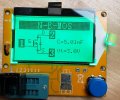
Based on that last test, not sure if the rig passes and I should proceed nevertheless with connecting USB power anyway, or if something might be wrong with my tester circuit. I actually also got a cheap IC tester unit too, and the MOSFET does seem to check out:

20220605_142322.jpg

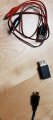
For the USB power for the test, most power supplies are rated for 1A or more, but I happen to have an old micro-USB power supply that is rated at only 550mA. I also have adapters already to connect it cleanly:

20220605_142838.jpg

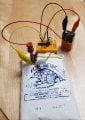
Finally for MOSFET cooling, I'm attaching an ice pack to the heatsink like this:
20220605_132518.jpg

You get a better view in that last picture of the OP AMP and MOSFET connections that I'm using above. Did I get something wrong?

Let me know if I should change something or should proceed anyway with connecting an actual power supply to the MOSFET drain.
 
Last edited:
Top