AC-DC Power supply failure

Irving

Joined Jan 30, 2016
5,136
On the face of it, statically, Q2 seems to be ok. This is where it gets harder to diagnose without better test gear. My next step would be to look at whats coming out of the transformer aux winding, using an oscilloscope, but that not an option for you.

How are your soldering skills?
 

Thread Starter

cparke

Joined Aug 28, 2017
79
This is where it gets harder to diagnose without better test gear.
Yeah, this is typically the point where I would just assume it is the transformer (most likely as it is), unsolder it and see if I can find anything wrong with it. Either way though, most likely I would try to find a replacement and see if that solves the problem.

So we are ready to remove the transformer?
 

Irving

Joined Jan 30, 2016
5,136
You wont find a replacement, its a proprietary part.

Some (many) of the solder joints on the board look very crusty. The problem could be a dry joint somewhere. It wouldn't hurt to reflow some of the joints.

Do you have any electronics parts lying around?
 

Thread Starter

cparke

Joined Aug 28, 2017
79
small electrolyic capacitors, diodes, etc.?

Just thinking of ways to test with what you have...
I definitely have various capacitors and resistors, and a breadboard and battery holders. Also an LM317T and a L7815CV voltage regulator. No specific diodes (maybe an LED), but I could get something if it would be helpful.
 
Last edited:

Irving

Joined Jan 30, 2016
5,136
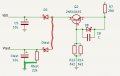
What I'm thinking, to check aux voltage to VDD is the following lash-up, using a diode, resistor and capacitor, in parallel with the existing setup...

This will tell us if VDD is actually being generated by the aux winding and Q2 etc...
The capacitor needs to be rated above 30v as does the diode, but anything from 1N4003 up will do.

1653386413896.png
1653386199941.png
 

Thread Starter

cparke

Joined Aug 28, 2017
79
The capacitor needs to be rated above 30v as does the diode, but anything from 1N4003 up will do.

View attachment 267910
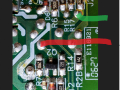
Alright, so the idea here is to measure voltage on this leg (green portion) by creating a bypass circuit smoothing the high frequency switched current with a capacitor? Can't the green line go to any ground point (rather than just J2 and R14), or would that interfere with the rest of the circuit?

If I read your diagram correctly, need a 22k ohm resistor (.25 watt?) and a 30v 10 micro-farad capacitor and the 30v diode?
 

Irving

Joined Jan 30, 2016
5,136
Alright, so the idea here is to measure voltage on this leg (green portion) by creating a bypass circuit smoothing the high frequency switched current with a capacitor?
Exactly - by replicating what should feed VDD we can see if the aux winding is generating power off load or never doing so... If it is then we can focus on the DC side not being able to deliver what the printer wants without killing the aux power. If we have no aux power we can focus on that. Either way we can then figure out ways to test without other equipment (maybe).

Can't the green line go to any ground point (rather than just J2 and R14), or would that interfere with the rest of the circuit?
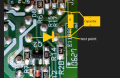
Its the nearest location to pick up the reference ground by a solder joint, and replicates what's there in case there is a return path fault due to a bad joint. You could use the heatsink or the -ve side of the big capacitor or pin 3 of the transformer (near the words R3B and C8) but I'd stick with J2 if you can...

Also that's easiest with just using component legs:

1653400610045.png


If I read your diagram correctly, need a 22k ohm resistor (.25 watt?) and a 30v 10 micro-farad capacitor and the 30v diode?
Yep, all good, though I'd use a diode rated at more than 30v; the 1N4003 is rated at 200v I think
 

Thread Starter

cparke

Joined Aug 28, 2017
79
Its the nearest location to pick up the reference ground by a solder joint, and replicates what's there in case there is a return path fault due to a bad joint. You could use the heatsink or the -ve side of the big capacitor or pin 3 of the transformer (near the words R3B and C8) but I'd stick with J2 if you can..
I'd really rather use the heatsink so that I don't have to solder anything and can just use alligator clips on the ground side. We don't really need the connection for more than a few seconds to get a voltage reading ... I seem to have a some suitable diodes on an old broken control board, so I'll just take one from there!
 

Thread Starter

cparke

Joined Aug 28, 2017
79
Exactly - by replicating what should feed VDD we can see if the aux winding is generating power off load or never doing so... If it is then we can focus on the DC side not being able to deliver what the printer wants without killing the aux power. If we have no aux power we can focus on that. Either way we can then figure out ways to test without other equipment (maybe).
Small update - I actually have a few more meters than I realized! While searching for my capacitance meter to confirm the used capacitor that I'm planning to use is good and really 10 micro-farads, I noticed that I also have a DC clamp meter which has additional functions via test leads that I never used, one of which is a frequency meter! (I don't quite get why a DC-only meter has this feature but AC-DC multimeters don't) It's rated as a CAT III 300V, one step down from what we would like to be safe, but I just endeavored to be really careful for this single test function...

With the meter's negative line clipped to the heatsink, I get 60Hz (AC-in line frequency) upon powering up the unit when the red probe isn't touching anything (0Hz of course once unplugged). I guess that makes sense. Touching red to Q2 before the device shuts down, it reads 4.7kHz. After applying the printer start up load to the power supply and causing it to shut down, touching red to Q2 has no effect and the frequency meter just keeps reading 60Hz, indicating a true 0 volts?

Not sure if you still really need a voltage reading at Q2 or if this is enough info. I have the parts that I need to build the add-on circuit, except I still need to unsolder the diode from a board tonight.
 
Last edited:

Irving

Joined Jan 30, 2016
5,136
Touching Q2 before the device shuts down, it reads 4.7kHZ. After applying the printer start up load to the power supply and causing it to shut down, touching red to Q2 has no effect and the frequency meter just keeps reading 60Hz, indicating a true 0-volts I assume.
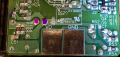
4.7kHz is good - that shows the SG6848 internal oscillator is running in what the designers call 'green-mode' which is basically a low-energy power-down mode when there is no load on it. When load is applied the frequency should ramp up to around 70kHz - your 0 might indicate the oscillator has stopped or, possibly, the meter can't read at 70kHz, what's its specifications? What do you actually get at the secondary output across pins 7 and 8?

1653414730394.png
 

Thread Starter

cparke

Joined Aug 28, 2017
79
4.7kHz is good - that shows the SG6848 internal oscillator is running in what the designers call 'green-mode' which is basically a low-energy power-down mode when there is no load on it. When load is applied the frequency should ramp up to around 70kHz - your 0 might indicate the oscillator has stopped or, possibly, the meter can't read at 70kHz, what's its specifications? What do you actually get at the secondary output across pins 7 and 8?

View attachment 267930
Not out of range for the frequency meter, which goes 10Hz - 10MHz. I didn't say it read 0Hz either, I said it continues reading 60Hz (AC-in line frequency) even when red is touched to Q2 (like I didn't touch it at all, or Q2 is dead / switched off / disconnected and truly at 0V).

Pin 1 of the IC to ground is 100k ohm, which makes sense since there is only a 104 resistor between pin and ground, and this value is in range for the IC's configuration. But, it seems to me like pin 1 (GND) & pin 3 (RI) of the SG6848 IC are actually opposites of the pinout described in the data sheet, as pin 3 of the IC is clearly connected directly to ground and reads 0 ohm.

Interesting random observation: Looks like ohms measurement across R19 is only 41.6k ohm, but that thing is labeled 104. Maybe something else in circuit is influencing this result?
 
Last edited:

Thread Starter

cparke

Joined Aug 28, 2017
79
Of transformer, see pic in post #72 above
Sorry, photo didn't load when I read that post.

Are we talking about the powered off resistance, or powered on voltage (before & after shutdown/green mode), across pins 7 & 8 of the transformer?

(also, please notice post #73 has several significant edits, as I was in a hurry at the time)
 
Last edited:

Irving

Joined Jan 30, 2016
5,136
Sorry, photo didn't load when I read that post.

Are we talking about the powered off resistance, or powered on voltage (before & after shutdown/green mode), across pins 7 & 8 of the transformer?
No I was refering to frequency. Since you get 4v out when loaded it must be still running - but at what frequency?

Pin 1 of the IC to ground is 100k ohm, which makes sense since there is only a 104 resistor between pin and ground, and this value is in range for the IC's configuration. But, it seems to me like pin 1 (GND) & pin 3 (RI) of the SG6848 IC are actually opposites of the pinout described in the data sheet, as pin 3 of the IC is clearly connected directly to ground and reads 0 ohm.
Think youre reading pins wrong... looks ok to me

1653426876437.png
 

Thread Starter

cparke

Joined Aug 28, 2017
79
No I was refering to frequency. Since you get 4v out when loaded it must be still running - but at what frequency?
Frequency at the secondary output of the transformer? Ok, I'll do that later tonight along with the diode/capacitor voltage check at Q2.

BTW - It's not accurate to say that we only get 4V while under a full load. We get normal 30V power out while under green mode at startup with no load and even light load. But as soon as the large load is applied (like turning on the printer and once the print head starts to move), the power supply shuts down and the voltage output drops to around 4V (the actual value has varied each time from between 1V - 5V). It doesn't matter at that point if you remove the load or not (which I have been doing), full voltage doesn't come back. Even unplugging it and re-plugging it in immediately, the full voltage doesn't come back. But after it sits for like 10 minutes or something, only then do we get back into green mode and 30V output. From the beginning, this has seemed very much to me like a protection mechanism is shutting the unit down because an overload condition has been detected.
 

Thread Starter

cparke

Joined Aug 28, 2017
79
What I'm thinking, to check aux voltage to VDD is the following lash-up, using a diode, resistor and capacitor, in parallel with the existing setup...
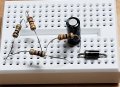
Ok, I connected the below set up, comprised of a 1N4004 diode, 10 micro-farad 50V capacitor, and two 10k ohm + two 1k ohm resistors in series, and then connected Q2 into this as you suggested.
20220525_011406.jpg

In green mode, at 4.7kHz, with voltmeter connected to the capacitor, and the diode connected to Q2, the volt reading is somewhat unstable and moving up and down between 3VDC and 6VDC, but seemed more often around 5VDC. Connecting this extra circuit to the secondary output instead, at pins 6,7,8 on the transformer, just 0V displayed on all if them! Then, after placing the printer load on the power supply output and triggering its shut down, 0V at Q2 too as expected!

What do you actually get at the secondary output across pins 7 and 8?
Frequency at pin 8 was around 12.1kHz. For pins 6 and 7, frequency is very unstable. Mostly, it just keeps jumping up and down between 55Hz and 65Hz, like this was ground, but occasionally I noticed 1.x kHz flashing on the screen too. Something seems wrong to me about that, maybe it's some sort of interference!

Does this make sense? What does it tell us now?
 

Irving

Joined Jan 30, 2016
5,136
In green mode, at 4.7kHz, with voltmeter connected to the capacitor, and the diode connected to Q2, the volt reading is somewhat unstable and moving up and down between 3VDC and 6VDC, but seemed more often around 5VDC.
Where was the -ve end of the capacitor connected? What is the PSU output voltage in that situation?

You could also try with the diode connected direct to pin 5 of the transformer/R7 and the -ve of the capacitor/load resistor to J2 or the heatsink, in case Q2 is actually faulty.

Connecting this extra circuit to the secondary output instead, at pins 6,7,8 on the transformer, just 0V displayed on all if them!
The only valid arrangement for that would be diode to pin 8, R&C- to pin 6...

Frequency at pin 8 was around 12.1kHz. For pins 6 and 7, frequency is very unstable. Mostly, it just keeps jumping up and down between 55Hz and 65Hz, like this was ground, but occasionally I noticed 1.x kHz flashing on the screen too. Something seems wrong to me about that, maybe it's some sort of interference!
Again, the only valid arrangement would be red to pin 8, black to pin 6. I would expect it to be same frequency as on Q2...

Does this make sense? What does it tell us now?
Well, subject to re-checking as above... yes, sort of. It seems the PSU is running in green-mode off load as expected. It just isn't ramping up when on-load. But why? Q3/Q4 play a part in this, though I'm not 100% sure how that works, none of the datasheets or app notes show anything similar (nor do they for the Q2 arrangement). I'm thinking what to do next...
 
Top