About opamp.

Thread Starter

q12x

Joined Sep 25, 2015
2,227
Hello,
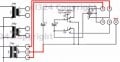
@q12x , No, your red connections are not correct. You can not connect the transformer directly to an electrolitic capacitor.
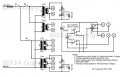
When I look at the schematic of @dl324 , the C - C connections on the right top are the AC inputs from the transformer.
Bertus
I really dont know that C notation inside the circle. Now I look more closely on that rectifying bridge and i see its a + and a - outside the circles indeed. I didnt look very closely before.
So... it means that for each transformer you have a switch, and when you select a transformer, its secondary will follow the right circuit, correct?
I think i got it now. Thank you for sharing it !
 
Last edited:

dl324

Joined Mar 30, 2015
18,327
a simple "Made by mister dl324" in a corner is more professional, serious and normal. Trust me...you are lucky if others will see it (besides us here). Im curious about it because sometimes people with experience include some interesting things that I never thought of.
I've had people steal ideas from me. Fool me once, shame on you. Fool me twice, shame on me... The watermark makes it slightly more difficult for someone to claim authorship by using my artwork.

If you use the work of someone else without attributing the work to them, that's plagiarism. AAC members have used my work without attribution. I'm okay with that as long as it's for their own personal, noncommercial use. If they include it as part of their original work that's published in any way, they need to note the portion that's my work, not theirs.

Some of the images I've posted here have showed up in Google searches.

The company I spent most of my career working for used my username as a watermark on every page of the top secret documents they issued to me. It was better to be safe than "professional" and just put a warning on the corner of each page.

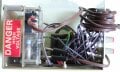
Here are the connections for a bipolar supply:
clipimage.jpg
EDIT: The switch would be in the down position and this jig isn't foolproof.

The connections for a single supply are the same except the N jack isn't used and a GND connection isn't made to the secondary.

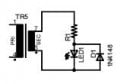
The LEDs are just connected to the top secondaries in each column to indicate which banks of transformers are powered. I'll add it and repost later, but this how they're connected:
clipimage.jpg

I checked the polarities on the secondaries and I did wire them correctly. Now I can make a 12V output using 19-7 without having to guess about polarity.

There's nothing special about how I wired things. I used a barrier strip for line and neutral and connected the secondaries to the screw terminals on the banana jacks:
clipimage.jpg clipimage.jpg
I really dont know that C notation inside the circle.
I don't know what it means either. When I was labeling, I just typed a C. Guess I could have used S for secondary.

EDIT 2: Actually it means charcoal. That's the jack color; so it did make sense. R for red, B for Black, N for neutral, and C for charcoal.
So... it means that for each transformer you have a switch that follows that right circuit when is selected
The only switches are shown. One is main power and the other power the center tapped transformers or those without.
 
Last edited:

Thread Starter

q12x

Joined Sep 25, 2015
2,227
oh, thank you very much for the clarification mister @dl324 .
So... if i understand right, you power ALL the transformers at once from the mains, and all the secondaries are connected at their respective screw terminals, all powered up ? I think your idea was to get power any time, without swithing between transformers or voltages. Hmmm, interesting way.
 

dl324

Joined Mar 30, 2015
18,327
So... if i understand right, you power ALL the transformers at once from the mains
I wired it as two banks (columns) of transformers, so there are only the 3 switches shown. The left column are center tapped transformers and the right column aren't and that's what switches 2 and 3 switch.

The box wasn't intended to be anything fancy. I wanted a convenient, and somewhat safe, way to use the transformers. Since I only planned for two rectifiers, I couldn't use more than two transformers at a time anyway.

The way you're doing it could be dangerous. I did something like that until I shorted line to earth once. My box has the chassis connected to earth ground and I have a fuse before the main switch. It would be best if I only used a GFCI outlet, but I know what to watch out for.
 

Thread Starter

q12x

Joined Sep 25, 2015
2,227
I get it now, so you power only 1 column at a time.
This is I would have done it, now that i understand what you did there. And probably I will do it someday in the future, but at the moment i dont have that many transformers like you do. I have the shitty ones, electronic transformers wall plugs. I dont count them as serious transformer.
So >
- I would have put a rectifying bridge for each secondary from each transformer.
- I've would make a switch for each transformer to open/close.
- I've also would make a switch for each transformer between alternative and continue, to cover any load type.
- I've would put a green led for each secondary and its own jack on the front panel. Yes it will be longer, but more interesting.
- If I wanted to be fancy, I would combine 2 secondaries to get more voltages variations, also commanded from a switch , also with its own led and jack. But it is rapidly getting very complicated in wires.
- Now that i know about -Voltages, I would have made this option too for each double tap transformer.
I understand perfectly what you did there, You wanted in the first place to make a minimum of practical usage of those transformers and you did very good. I like it. But I like to tune up a bit. Im an artist, i like details.
Why Charcoal? It sends me to the engine rotor contacts.
 

dl324

Joined Mar 30, 2015
18,327
Why Charcoal? It sends me to the engine rotor contacts.
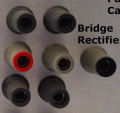
It's related to the colors of the banana jacks I used:
1601154555059.png

But I like to tune up a bit.
It was more important to me to have something functional and in a hurry.

When I was an R&D tech, the company allowed us to use company supplies to build one off prototypes for personal use. They thought letting us use the materials made us better technicians. I think they were right.

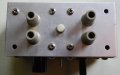
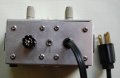
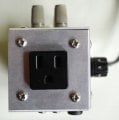
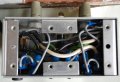
This is a jig I made for connecting things like open frame supplies to line voltage:
boxTop.jpgboxBack.jpgboxEnd.jpgboxInt.jpg

I used it to power some things that didn't have power cords:
ofSupply.jpg
 

dl324

Joined Mar 30, 2015
18,327
As what did you work as?
R&D related to devices my company was starting to manufacture at the time (laser diodes, fiber optics, surface acoustic wave resonators, liquid crystals, GaAs logic, ADCs/DACs, CCDs...). I was introduced to CAD to design some custom integrated circuits. It was my second job out of school and I really enjoyed it; even if a lot of the things I worked on never became products (at least while I was working there).

Every division in the company had their own R&D department, but we were corporate R&D reporting to the company CEO. I once prototyped an optical pulse generator prototype for our division in Germany. It used the laser diodes, optical fibers, and liquid crystals we were designing. The liquid crystal was used as an optical attenuator. One of my colleagues designed a motor controller used to pull the fibers and another worked on characterizing the laser diodes. Back then, laser diodes weren't very reliable or efficient and required currents of more than 100mA to start lasing.
 

sarahMCML

Joined May 11, 2019
697

  • Schematic showing LEDs.
    The transformer terminals marked N should be marked C, as they connect to the bridge rectifier points marked C also. The 2 bottom, centre tapped ones should have the centre N terminal renamed B, and the one currently named B renamed C.
 

Thread Starter

q12x

Joined Sep 25, 2015
2,227
to mister @dl324
I think is important to put in the Notes this part as well: R for red, B for Black, N for neutral, and C for charcoal(or input connectors)
Also your mains voltage ... 110V(american), to diferentiate from european 220V.
Also the secondaries output voltage as well ( i see them very little there,now)
Also give it a name/title - [Transformers Box] (for example) and the date it was conceived like: [made in 1978] - what im saying is dont leave anything to guess, make it as clear as possible.
Make it look good, even if it is a simple circuit. It's my motto for everything, especially for my art.
Then print it on a paper and stick it on a free wall on your transformer box. I got in the habit to stick my circuit diagram to every real circuit i made. Its a bit of work but is so easy to look over it after few years and remember instantly what it does, without any additional questions.
Of course, im only giving suggestions here, you take what you like and apply what you want.
 
Last edited:

dl324

Joined Mar 30, 2015
18,327
The transformer terminals marked N should be marked C, as they connect to the bridge rectifier points marked C also. The 2 bottom, centre tapped ones should have the centre N terminal renamed B, and the one currently named B renamed C.
Well, the color choices were more based on the banana jacks I had available. I chose charcoal to differentiate the rectifier inputs. Since the box and schematic are my original design, I get say what colors should be used and how they're labeled.

Regardless, thanks for reading it and taking the time to comment.
 
Last edited:

Thread Starter

q12x

Joined Sep 25, 2015
2,227
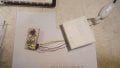
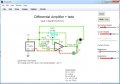
I finished today my First official (Working) opamp circuit !
And im exhausted, but happy because it is working perfectly. Very close to the simulator as well.
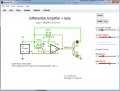
It is a [Diferential Amplifier opamp mode]
What is doing: It is lighten the leds from +5V to Vout and if the potentiometers are changed, from Vout to -5V.
The idea is when voltage over 0V is reached(+1to+5V), green led is open,
and when voltage under 0V is reached(-1to-5V), the yellow one will open.
Actually is a bit more complicated than this. When the voltage[changed from pot1] it will be over[the value of the pot2, which it can be 0.5V,1,1.8, etc), then the green led is open. And the same for the - sign.
Pot2 on V+ is called reference voltage. When pot1 is under or over pot2 voltage, corresponding led is ON and the other is OFF. But there is a smooth transition between leds , and not an abrupt one, as you can see from my pictures(the same in simulator and in reality). The leds are dimming slowly when moving the pots.
The resistors for the leds in simulator are 500R but in reality I used 10k for each.
Both the pots are 10k, both in sim and real.
IMG_20200927_222847.jpgScreenshot_4.jpgScreenshot_5.jpg
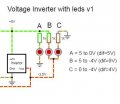
And of course, after i made everything, i look over my original inverter led diagram and is very diferent wiring and that I was actually intended to make. Now when im looking at my opamp i can see i can not do it only from it's Vout. But that 0v to -xV led opening is very cool! I wish i can command that from Vout, i have to think of that.
 
Last edited:

sarahMCML

Joined May 11, 2019
697
Well, the color choices were more based on the banana jacks I had available. I chose charcoal to differentiate the rectifier inputs. Since the box and schematic are my original design, I get say what colors should be used and how they're labeled.

Regardless, thanks for reading it and taking the time to comment.
I was thinking more from the point of our friend q12x trying to construct it "as is", rather your original explanation for the colours, but I take your point.
Best regards,
Sarah.
 

dl324

Joined Mar 30, 2015
18,327
The leds are dimming slowly when moving the pots.
Using pots to control LED brightness isn't very effective or efficient because LED brightness isn't linear with current and you're still consuming the same power.

A better way to control brightness is with Pulse Width Management Modulation (PWM). My go to way of doing that is to use 2 opamps to make a triangle wave generator and use a comparator to determine the duty cycle of the LEDs (time that they're on). You can vary the duty cycle from 100% to 0.

EDIT: corrected error.

One of the opamps is used to make a square wave oscillator and the other is used to integrate the square wave to make a triangle wave. The comparator then uses the triangle wave to create a PWM signal.
 
Last edited:

dl324

Joined Mar 30, 2015
18,327
I was thinking more from the point of our friend q12x trying to construct it "as is", rather your original explanation for the colours
I think it was more important to indicate the polarity of the secondaries so they can be combined to make other voltages. I didn't think that I had checked polarity when I built the box over 40 years ago, but it turns out that I did. I hadn't used it for over 40 years, but @q12x was trying to build a bipolar supply using a transformer and was having difficulties. Instead of just working things out in my head, I decided to use the transformer box.

If he ends up building something similar, he can do whatever he wants. Since he's an artist, he'll make an effort to make it look nice. For me, it was more about being logical and building something that I could use vs spending more time to make it look nice. I wasn't trying to impress anyone except myself by making a box to use some transformers more safely.

The thing I like most about that jig wass being able to figure out how to wire the DPDT switch to connect the caps either in series or parallel and to make the appropriate connections to the rectifier and banana jacks. I was quite pleased with my solution. The alternative would have been more jacks and jumpers to wire things from the banana jacks on the front. The switch solution was cleaner, less tedious, and less prone to making mistakes.
 
Last edited:

Thread Starter

q12x

Joined Sep 25, 2015
2,227
A better way to control brightness is with Pulse Width Management (PWM). My go to way of doing that is to use 2 opamps to make a triangle wave generator and use a comparator to determine the duty cycle of the LEDs (time that they're on). You can vary the duty cycle from 100% to 0.

One of the opamps is used to make a square wave oscillator and the other is used to integrate the square wave to make a triangle wave. The comparator then uses the triangle wave to create a PWM signal.
This is though ! I'll have to simulate it first. Because of an important tool i have in there, the osciloscope.
(PWM) = Pulse Width Modulation from what i recall myself. I did work with it a little bit, some 20years ago, driving some stepper motors. I dont remember if i used a pic16f84a or a dedicated IC. I think it was an IC and from the pic, i only give commands when to start and when to stop... or something. This is very blurry in my memory. But i did put my hands on the subject.
This opamp combination you propose is very new to me. Its very challenging. Ill do my best to make it.
 

Audioguru again

Joined Oct 21, 2019
6,826
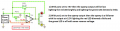
I changed your "inverter" and used a normal +5V, 0V and -5V power supply so that with pot2 in the middle then the +input of the opamp is at +2.5V. The opamp does not do what you say.

The green LED should connect to -5V instead of to ground.
 

Attachments

Thread Starter

q12x

Joined Sep 25, 2015
2,227
The green LED should connect to -5V instead of to ground.
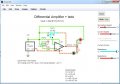
I responded too quickly - sorry. Im lazy. I then realize your modification actually resolved the problem.
I did the modification in simulator and it is exactly what I intended.
You are very good !
Congratulation, you win again. :]
here is the confirmation:
Screenshot_4.jpgScreenshot_5.jpg
I also like your comparisons between different opamp modes. "...then the opamp is a follower with its output at +2.5V..." (comment inside edited image). Very good teaching this way, at least for me. And I noticed it before too. Keep it this way. This is good.
 
Last edited:
Top