That is another mistake. Don't rewire a circuit until you find the fault. This is how you learn to diagnose a problem and learn from your mistakes. Every failed circuit is an opportunity to learn something.Hi:
Checked them. Pins are ok. I have checked the wiring multiple times and even re-wired multiple times.
Bertus, Eric & MrChips:That is another mistake. Don't rewire a circuit until you find the fault. This is how you learn to diagnose a problem and learn from your mistakes. Every failed circuit is an opportunity to learn something.
You may have a faulty breadboard. An oscilloscope is an essential tool for this kind of diagnostic work. If you don't have an oscilloscope, use your DMM, not the LED probe. Test the voltage at the pin leading into the IC package, not at the hole beside the pin in the breadboard.
Pin 1 of each counter is wired to ground.Check that you actually have 0V on pin 1 of the third 4510, at the pin, as MrChips suggests. It sounds as if you're stuck in Preset mode!
OK. Checked the pins not the holes. My scope only goes down to 10 Hz.That is another mistake. Don't rewire a circuit until you find the fault. This is how you learn to diagnose a problem and learn from your mistakes. Every failed circuit is an opportunity to learn something.
You may have a faulty breadboard. An oscilloscope is an essential tool for this kind of diagnostic work. If you don't have an oscilloscope, use your DMM, not the LED probe. Test the voltage at the pin leading into the IC package, not at the hole beside the pin in the breadboard.
OK. Checked the pins not the holes.
hi Ehi maker
Is the bottom half of that left side BB OK as far as you know, if yes, just move the logic IC's down to that lower half.
That's what I would do to prove a design.
E
Hi EHi,
How are the BB's secured to that Base plate?
E
These are prefabricated from Sayal. I suspect their stuff is garbage that was rejected inSolderless breadboards should come with sticky foam backing. If you are mounting the breadboards on metal I would add a layer of thick mylar film to prevent shorting on a metal base even if the metal is painted.

Hi:This is a long shot but I don't see any power supply decoupling capacitors on your board.
1) Where power enters the board, place a 10-100μF (around 25V) electrolytic capacitor across Vcc and GND. Make sure the -ve lead goes to GND.
2) Across every bus rail, place 0.1μF ceramic capacitors across Vcc and GND.
Your CD4013 IC is missing GND connection on pin-7.
View attachment 315421
I know that it is frustrating when things that are supposed to work don't fly.Hi:
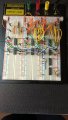
This is a photo of my original circuit that worked for 0 to 9 count. In my re-build, I have grounded
pin #7 of the CD4013. Don't know why it worked before without pin #7 grounded. I will add the
capacitors and let you know what happens.
I did everything that you suggested. The circuit counts from 0 to 7. There is a problem because
segment "d" doesn't always light up when it should. A good deal of the time the thing doesn't
even count at all when I power up, it just displays a zero. I am worse off than I was a week ago.
The wiring is definitely correct. I think that these breadboards are garbage as well as the jumpers.

I have a new Siglent 1104X-4 four channel digital storage scope but apparently it only goes down to 10Hz.I know that it is frustrating when things that are supposed to work don't fly.
Again, my advice would be to not give up, persevere. Don't rip up the circuit and start over.
I am going to say it again. Every failed circuit is an opportunity to hone your trouble shooting skills.
If your goal is to expand your knowledge and enjoyment in electronics then you need to acquire the right tools and skill set.
In this particular situation, you need to find the fault because if you try to brush it under the rug it will come back to haunt you.
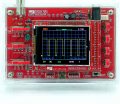
The way I would approach this would be to increase the CLOCK frequency to greater than 100Hz or more. Then use an oscilloscope to see what is actually failing. Ok, you don't have an oscilloscope. Even at this stage of your adventure, a DSO138 is still better than none. Later, when you acquire more experience you will be in a better position to choose for yourself either a used or a new better oscilloscope. (Don't buy a DSO138 DIY kit that needs to be assembled. Get one that has already been assembled and tested.) If you want to spend more money there are other options.
View attachment 315430
Give it a thought.
| Thread starter | Similar threads | Forum | Replies | Date |
|---|---|---|---|---|
| N | 3 Digit Frequency Counter | Digital Design | 93 | |
| 4 | 2-digit CD4026 counter not working | Digital Design | 8 | |
|
|
2-digit up-down counter (0000 to 1010) in logisim | Homework Help | 7 | |
| M | A 6 Digit Frequency Counter | Digital Design | 99 | |
| N | Mod 13 Counter (2-Digit Display) - Multisim | Homework Help | 1 |