24v Digital I/O Shield For Arduino

Thread Starter

sofresh007

Joined Oct 31, 2023
9
Hi,

Recently I've been working with Arduino OPTA, and connected the output signal from a sensor to one of the digital input pin on the arduino opta. But now i would like to build my own shield and do this on a Arduino Uno. As you might know then i need to lower the signal to 5 volts since arduino uno cant handle 24V.

What I want to make is a IO shield where I have.

  • 14 connectors where i can connect 24v output signals from example sick sensors
  • I need to convert the 24v signals down to 5v when signal is high, and 0 when LOW.
  • After this connect the signals to the Digital I/O pins on my Arduino Uno R4.

I only need 14 inputs since the sensors are already beeing supplied with +/- from an industrial machine, I just want to steal the signal so I can read it on my arduinos webserver.

If anyone knows if there is this kind of shields to buy please let me know. I know how to use easy eda but I'm only lacking electrical knowledge.
 

dl324

Joined Mar 30, 2015
18,219
Welcome to AAC!

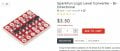
If the switching speed is low enough, you can use this from Sparkfun:
sparkfun-levelShifterPrice.jpg
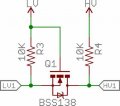
If you can layout a board, you can make your own:
sparkfunMOSFETLevelShifter.jpg

You can buy these on AliExpress for a fraction of Sparkfun's price, but it'll take several weeks and it's a crap shoot. I bought a batch that weren't packaged correctly. Luckily my first order of 20 was okay.

Sparkfun also has some higher speed options that have level shifters.
 

KeithWalker

Joined Jul 10, 2017
3,603
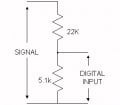
All you need is a resistive divider on each of the inputs. Yo don't mention the source impedance of the signals but try 22K and 5.1K.

Atten.jpg
 

Thread Starter

sofresh007

Joined Oct 31, 2023
9
Welcome to AAC!

If the switching speed is low enough, you can use this from Sparkfun:
View attachment 306421
If you can layout a board, you can make your own:
View attachment 306420

You can buy these on AliExpress for a fraction of Sparkfun's price, but it'll take several weeks and it's a crap shoot. I bought a batch that weren't packaged correctly. Luckily my first order of 20 was okay.

Sparkfun also has some higher speed options that have level shifters.
All you need is a resistive divider on each of the inputs. Yo don't mention the source impedance of the signals but try 22K and 5.1K.

View attachment 306425
How would the diagram look if i only have one digital input, and only one signal output. From my experience it would look something like this ? Thanks for the welcome and help :)
1698858563394.png
 

KeithWalker

Joined Jul 10, 2017
3,603
How would the diagram look if i only have one digital input, and only one signal output. From my experience it would look something like this ? Thanks for the welcome and help :)
View attachment 306440
NO, Definitely not! See my diagram in post #3. You need to connect the negative reference of the digital signal to the GND of the arduino and then make a potential divider between them, as shown.
 

Thread Starter

sofresh007

Joined Oct 31, 2023
9
NO, Definitely not! See my diagram in post #3. You need to connect the negative reference of the digital signal to the GND of the arduino and then make a potential divider between them, as shown.
Yeah but for example, the sick sensor that i connected to the Arduino opta I only used the output signal directly connected to the gpio1 pin on the arduino opta. Why do i need gnd aswell? A machine is supplying the power and ground to the sick sensor, I just want to read the output signal when its low and high thats all!
 

Thread Starter

sofresh007

Joined Oct 31, 2023
9
I mean the sick sensor is connected to an industrial machine, i just want to read the state of the sick sensor if its high/low. Why did i dont need it when i connected it to the Arduino opta, i just took the ouput signal from the sick sensor straight into the opta without any ground. Why would not this work on arduino uno ? I mean i can take another cable and connect it from ground of the sick sensor to my arduino but i dont get the reason for it ?

Best Regards.
 

crutschow

Joined Mar 14, 2008
38,316
I mean i can take another cable and connect it from ground of the sick sensor to my arduino but i dont get the reason for it ?
A voltage is always between two different nodes.
There's no such thing as voltage at a single point.
In this case the voltage is between the sensor output and the sensor ground so you need a connection to the sensor output and and connection to the sensor ground (unless the ground is already connected to the Arduino ground).
 

Thread Starter

sofresh007

Joined Oct 31, 2023
9
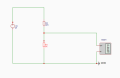
Yes its me thinking wrong, the sick sensor were actually connected to ground on the arduino aswell. So yeah ur right. But in easyEda i followed keithWalkers tips, but still dont work in the simulation...

Im still getting 24 volts and not 5v.

1698865991255.png
 

dl324

Joined Mar 30, 2015
18,219
Im still getting 24 volts and not 5v.
You don't have things connected properly. You put the power supply where you have the meter and the meter wherre where you have the power supply. You also need to change the ratio. What you're using would give you 8V.
 

dl324

Joined Mar 30, 2015
18,219
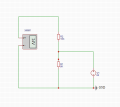
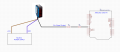
Would something like this work, or do i need one more ground from the powersupply to the arduino?
Why do you keep changing things around? It's just a voltage divider.

Referring to the schematic in post #13, you put the Arduino input where the '+' lead from the meter is. Ground from the sensor and Arduino ground need to be connected.
 

KeithWalker

Joined Jul 10, 2017
3,603
Would something like this work, or do i need one more ground from the powersupply to the arduino?

View attachment 306468
NO, it would not work. That sensor in the picture is connected to two resistors in series which will never make a voltage divider.
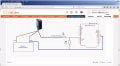
Just connect a resistive voltage divider as shown in answer #3 between each sensor output and Arduino digital input. Don't forget to connect the Arduino GND to the sensor reference, which is the source supply negative voltage; see below:
Div.jpg
 
Last edited:
Top