hi T,
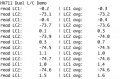
Built a two HX711 & LC module, balanced bridge resistors for testing, so no actual weights.
Attached is the simple sketch for a dual option.
Used the HXbegin as a template.
Remmed out the initial text.
Uses a Common Clock A0, and A1 and A2 for Data I/O.
This should allow up to 6 HX's, needs proofing.!
Lets know how it goes.
E
Clip:
void loop() {
scale.begin(A1, A0);
Why won't it compile for PORTD? Specifically? One thing about PORTD is that you cannot use all eight bits. At least bits 0&1 are used by the boot loader.
thanks a lot for the Dual L/C. Tested just with two L/Cs so far, but works!
Why is the limit 6?
@djsfantasi:
"It still may be a concern because there are only 6 ADC pins..."
I have a slight offset with the second L/C but it works great.
I measured with the multimeter and all the connections between the L/C ( Vcc, GND and SNG) and the hx711 module ( E+, E-, A+, A-) are the same. Dont know the reason yet but I think I can ignore that offset at first.
What I dont understand: the hx711 is sending a bit stream so why do I need an adc? You also said in #27, that the analog pins are set to digital ones. Didnt find out how that was done ...
What wire would your recommend to me for connecting the L/Cs over long distance (2 meters)?
Will there be a voltage drop for the L/Cs on the left side when supplying power from the arduino?
Are the DTOUT and the SCLCK from the hx711 more stable because they are digital?
If you use digitalRead or digitalWrite on an analog pin, it will behave just as if it were a digital pin. No mystery, they are defined by how they are used.
And I misread your requirements. Since the HX117 uses a digital stream, you do not need use the ADC on analog pins. I thought I read somewhere that there was a requirement to read analog values. Apparently there is no such requirement.
Since the Mega 2560 has 54 GPIO pins, I would say you're all set.
ADDENDUM: With the Mega, you have 16 ADC pins. You just don't need any.
hi T,
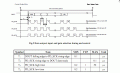
The Sclk to the HX is 24 bits long, the 24/25 bit length tells the HX711 a Gain of 128 is being used.
During/after each digital clock high going edge the I/O data pin saves the digital state , high or low of the data pin, it does this 24 times.
Bits 25 thru 27 of the clock are Gain set, refer image.
So in effect you have 24 bits in a register bits set High or Low within the Arduino.
The bit pattern is the binary value of the weight being measured.
The Arduino sketch converts this to a decimal value and outputs it on the serial port.
hi T,
Ref post #50.
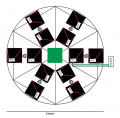
Locate the HX units close to the associated L/C pair, this will keep the low level analog bridge signal wires as short as possible.
The Arduino could be located close to one side of the Base plate, making it easier access to the Arduino.
How do you plan to display the weight data from the Arduino.??
thank you E for the explaination. I was unsure when I read the hx datasheeet, but know I understand.
the questions:
Locate the HX units close to the associated L/C pair, this will keep the low level analog bridge signal wires as short as possible.
What do you mean with one pair? so far i´m using one hx unit for 4 load cells. but I understand. I will keep those wires as close as possible to their original length.
How do you plan to display the weight data from the Arduino.??
there won’t be any visual display of the weight data except in my computer for control. the user will focus on auditive feedback.
Probably I will have some resonating metalplates hanging under the standing platform, which will be excited with some transducers.
Like this one.. https://www.google.de/search?q=ex+6...ntPTAhWhJ5oKHWvfDDkQ_AUICigB&biw=1916&bih=960
Due to the fact that I have to send the L/C values in serial to max msp I wonder how fast the data rate of one L/C is, relating to the amount of L/Cs I use.
Can I calculate that somehow? I guess the baudrate is the point to start right?
hi T.
For post #55, you could try the same test as I did, copy and paste the A0,A1 code, six times into the sketch, run it to get a feel for the total reading time.
I did the test as you suggested and when I send 6 values, I´m measuring 720ms in max msp for all of them.
I dont understand why it takes so long.
Baudrate is: 19200.
I´m delaying in the end of the loop but when I change that value between 5 and 30ms there is no change in total.
Also exchanged the cable but no effect.
In the Arduino Serial Monitor the data stream isnt faster than in max msp as I can see.
hi T,
I will set up a compare timing test, let you know what I find.
For a fast program you may have to resort to writing your own HX program code, if the HX711 library code runs slow.
I assume that the current Output data rate is (Internal Oscillator, RATE=0) 10 Hz which would take that 100ms for one conversion cycle.
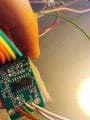
A clue for that could also be Pin15 on the hx711 module. I cant see any connection there.
So with that datasheet I guess this pin needs a digital supply 2.6 - 5.5 V.
Can I just go there with a fat solder iron and power that pin from the arduino?
hi T,
My test shows a similar time period as yours.
With ref to pin 15, I measure a 0V on that pin, I would advise a 1k resistor to +5v [pin #16], not a direct connection.
I am not sure of the internal connections, so a resistor would be a safe option.
E

 Facebook
 Google
 GitHub
 Linkedin