we need help with a car programmed in arduino. pls we need to do this urgently

Thread Starter

diego1087

Joined Oct 7, 2023
1
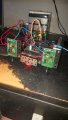
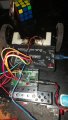
My brother and I are making a robot that can stop at the edge when the sensors don't detect a surface and go back to follow a different side until it finds a new edge and repeat the process, but we are beginners and don't know how to use Arduino. We built the car with two motors for the rear wheels and a small wheel at the front between two obstacle sensors, I'll put the command we made for it to stop here and a photo of it
WhatsApp Image 2023-10-06 at 23.18.33 (1).jpeg1696677253430.pngWhatsApp Image 2023-10-06 at 23.18.33.jpeg[/FONT]

  • input 2 and 3 are the right and left detectors respectively.
  • 4 and 5 are IN1.1 and IN1.2 respectively which are connected to the right motor.
  • 6 and 7 are IN2.1 and IN2.2 respectively which are connected to the left motor


We need help with this urgently as the activity has to be completed by this Tuesday. pls
 

Jerry-Hat-Trick

Joined Aug 31, 2022
777
1. What is it doing or not doing that you want it to do?
2. Have you tried writing simpler code just to drive a motor one way and then the other?
3. Always define/name your variables so that the code makes sense, ideally without // comments
4. Are you trying to drive the motors connected directly to the arduino or a driver of some kind, if so what?
5. Do the sensors work and do the motors run when you trigger the sensors
 

MrAl

Joined Jun 17, 2014
13,667
My brother and I are making a robot that can stop at the edge when the sensors don't detect a surface and go back to follow a different side until it finds a new edge and repeat the process, but we are beginners and don't know how to use Arduino. We built the car with two motors for the rear wheels and a small wheel at the front between two obstacle sensors, I'll put the command we made for it to stop here and a photo of it

View attachment 304370View attachment 304373View attachment 304372[/FONT]

  • input 2 and 3 are the right and left detectors respectively.
  • 4 and 5 are IN1.1 and IN1.2 respectively which are connected to the right motor.
  • 6 and 7 are IN2.1 and IN2.2 respectively which are connected to the left motor


We need help with this urgently as the activity has to be completed by this Tuesday. pls
Hi,

You are using Arduino and don't know how to use Arduino?
That almost answers itself.

You need to do some smaller projects like blink an LED and stuff like that in order to get to know how the Arduino works and how the code is written, bascially. You have to know the basics about Arduino before you can move on to more complex and useful coding.

There are oodels of examples that come with the Arduino IDE such as an LED blink program, seven segment LED programs, LCD programs, motor driver programs, just way to many to list here. These are meant to show you how the code works and how to get the Arduino to work for you.

You can probably pick this up in less than a week. One thing you don't do is jump into a real project without any previous experience with using the IDE for smaller things.
 

Alec_t

Joined Sep 17, 2013
15,103
  • 4 and 5 are IN1.1 and IN1.2 respectively which are connected to the right motor.
  • 6 and 7 are IN2.1 and IN2.2 respectively which are connected to the left motor
Why do you have pins apparently configured as inputs connected to the motors (which should be controlled by outputs and proper driver stages able to handle significant current)?
 

MrAl

Joined Jun 17, 2014
13,667
Here is a video on edge avoiding robot. You can see here.

Hi,

It's not easy to accept an entire design for a product on a typed back and forth forum, and it looks like you need a lot of help with this.

First, it looks like you need sensors on all sides of the device that moves. I would say minimum front, back, and both sides, and if it has to fit under something overhead you may even need vertical sensors.
Since the wheels are so big and stick out so far, maybe one or two sensors per wheel on the sides.

As far as the Arduino code, what have you done in the past with this microcontroller, and it would help to say which one you are using as there are many different types of Arduino such as Nano, Uno, etc.
 

MrAl

Joined Jun 17, 2014
13,667
Thanks for your kind input. I think, for edge detection, Raspberry Pi+OpenCV-based solutions will be more accurate. What do you say?
Hello again,

You're welcome.
I do not use Raspberry Pi or other systems I just use Microchip and Arduino, but I am not sure what you mean by "accurate". Accurate in what respect? I would not think you need numerical accuracy for example to detect an edge unless maybe there was little ambient lighting, but maybe you can even add a small LED light to light up the area to be sensed, and that would probably increase accuracy right off the bat.

What are you using for the sensors?
If they are simple sensors might I suggest an added physical mechanical sensor as well. That is like to mimic the working of a blind man trying to navigate city streets and curbs with his 'stick'. He feels around on the ground with the end of the stick to determine if there is a curb or something like that, or something in the way perhaps.
I suggest this because it might be hard to detect some edges where the color of the drop is similar to the color of the platform it is currently rolling on, and that could fool a sensor, even a 16 million color camera.
You may be able to use a solenoid or something so you can still travel fast with rolling vehicle. If the solenoid travel goes down too far, it's an edge. If it is a ramp you would have to try to sense in more than one place as it rolls forward.

Are you using regular sensors or a camera?
 

Ya’akov

Joined Jan 27, 2019
10,226
Thanks for your kind input. I think, for edge detection, Raspberry Pi+OpenCV-based solutions will be more accurate. What do you say?
On what planet is there an ”accuracy” requirement for an edge detecting robot that runs on a tabletop?
What material difference would “accuracy” make to the robot’s operation?
In what way would an overly complicated method improve this robot?

This thread is to help the thread starter, not to discuss something unrelated that you happen to find interesting. Please refrain from hijacking threads started by others, and particularly in this forum please refrain from posting anything that you don’t have 100% confidence will help the person who started the thread.
 

Jerry-Hat-Trick

Joined Aug 31, 2022
777
It looks like the TS has moved on, but just in case he/they come back:

The key to virtually every project is to take things step by step and to break up the overall problem into tasks which can be addressed and tested in isolation.

1. It's always useful to have at least one LED connected to an arduino output (LED in series with a 220 ohm resistor, for example). You can use this to test the state of sensors and other outputs
2. From the first photo you have two small geared motors turning wheels at the back and a motor drive shield near the front. Can you write really simple code to drive one motor for five seconds and turn it off for a second? Use the "delay(5000);" instruction for a 5 second delay.
3. Now do the same with the other motor. Then try driving each motor in opposite directions. Get familiar with code which gives you control of the motors
4. From the second photo, it looks like you have two sensor boards which each have an LED facing down, adjacent to a photo diode facing down. Maybe you could provide a link to this? There is also a red LED on the board, so I'm guessing this may go on or off when the an object moves close to the down facing LED/photodiode pair? Is this what happens? Is the sensor near enough the table for you to see the change when you move to the edge of the table where you will get no reflected light? It's not ideal that the table is mostly painted black which will reduce the reflected light. Maybe you could stick adhesive silver tape around the border of the table and use this to trigger the robot change of direction. There are other ways to detect an edge which might be better if you are struggling with this. Can you write code that will turn the LED in (1) above on and off when you slip a piece of paper under the sensor?
5. Generally, the mechanics of your robot look okay. If you have edge sensors that work and you are comfortable making the motors run in either direction you then need to think about the exact action you want the robot to perform when one of the sensors reaches an edge. Let's assume that both motors are running at about the same speed so the robot is moving in a straight line before the sensor is triggered. The next step should be to reverse both motors briefly (with a duration you can easily change in code) so the robot moves away from the edge in the direction it came from. Then, again briefly, with a duration you can easily change in the code, spin the motors in the opposite direction so the robot is facing in the other direction. You don't want it to turn exactly 180 degrees - that would be boring. You could think about which way the robot rotates, clockwise or counter-clockwise depending on which sensor was triggered, but this can be refined later. Don't try spinning before moving away from the edge, you might fall off the table!
6. After spinning the robot, then try having both motors turning together to drive the robot forward.
7. If you really get confident, you could use the sensor data and motor timings to do some rudimentarty mapping of the terrain so you can make the robot turn before reaching the edges.....

I invite you to go through these suggestions in order and share with us how each step goes, including showing your code for each step. Whilst I agree that the way to start learning to use the Arduino is to try the given examples and experiment with changing the given coding to check the effect, the best way to learn after that initial approach is to have a real problem to solve. You may have dived into deep water before you can swim but I hope this post throws you a lifeline.
 
Top