Visio Professional on sale for $29.99 (88% off)

Status
Not open for further replies.

Jon Chandler

Joined Jun 12, 2008
1,595
I purchased a Visio license from one of these brokers a few years back. It's legit – they buy unused commercial licenses and sell them at great discounts.

Visio is one of my most-used programs. Highly recommended for drawing needs.
 

atferrari

Joined Jan 6, 2004
5,011
I purchased a Visio license from one of these brokers a few years back. It's legit – they buy unused commercial licenses and sell them at great discounts.

Visio is one of my most-used programs. Highly recommended for drawing needs.
Do you use it for schematics?
I use C Draw.
 

Jon Chandler

Joined Jun 12, 2008
1,595
No. For schematics, EasyEDA from JLCPCB is tough to beat. It has symbols for almost any part you can imagine.

It's free, and the learning curve is pretty shallow.
 

KeithWalker

Joined Jul 10, 2017
3,607
No. For schematics, EasyEDA from JLCPCB is tough to beat. It has symbols for almost any part you can imagine.

It's free, and the learning curve is pretty shallow.
I just installed it. It is definitely not intuitive at all. I spent an hour playing with it and got nowhere! I will try it again when I have half a day to waste.
I have used Visio for all my mechanical, electronic schematic and printed circuit diagrams for the last 23 years. It is very intuitive and flexible.
 

Jon Chandler

Joined Jun 12, 2008
1,595
Sorry you had a hard go of it. Here are a few tips to help you get started.

First, I use the EasyEDA standard version; the pro version lacks some of the features that that I like. Try it if you have the pro version.

To draw a schematic in the standard version, from the FILE tab at the top of the screen, click new schematic.

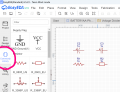
Generic parts may be found in the common menu on the left. This includes things like resistors, capacitors, LEDs and transistors. Click on the component you want (click and release, not click and drag like Visio) and click in the schematic area where you'd like the part. Click again and you'll get another, with an incremented reference designator. Press ESC when you're done. Click and drag on the symbol to move it. Click to highlight the symbol and press R to rotate it.

EasyEDA 1.png


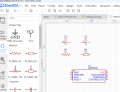
For specific items, say a 555 time, click SEARCH on the left, and enter the part number in the pop-up screen. Click PLACE at the bottom of the pop-up screen to place it in the schematic. Click again for additional copies.


EasyEDA 2.png


EasyEDA 3.png


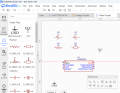
From the WIRING floating window, you can select power, ground and other symbols.


EasyEDA 4.png


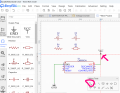
Also, from the WIRING window, select the WIRE tool to connect points together. Click on a terminal to start the run. Click when you want to change direction. A large black dot will show when you're on the terminal.


EasyEDA 5.png


To edit a reference designator or to change the value of a part, click on the part and change it's properties on the right, Alternatively, clicking on the reference designator or value will pop open a text box where you can edit the value.

EasyEDA 6.png


Hope this helps and eases your frustrations.

Sorry for the formatting. The editor and I don't seem to be getting along!
 

Jon Chandler

Joined Jun 12, 2008
1,595
I don't believe you need subscriptions to those services until you want some of the specialized features.

The version I got a few years back is completely stand-alone.
 

KeithWalker

Joined Jul 10, 2017
3,607
Sorry you had a hard go of it. Here are a few tips to help you get started.

First, I use the EasyEDA standard version; the pro version lacks some of the features that that I like. Try it if you have the pro version.

To draw a schematic in the standard version, from the FILE tab at the top of the screen, click new schematic.

Generic parts may be found in the common menu on the left. This includes things like resistors, capacitors, LEDs and transistors. Click on the component you want (click and release, not click and drag like Visio) and click in the schematic area where you'd like the part. Click again and you'll get another, with an incremented reference designator. Press ESC when you're done. Click and drag on the symbol to move it. Click to highlight the symbol and press R to rotate it.

View attachment 323805


For specific items, say a 555 time, click SEARCH on the left, and enter the part number in the pop-up screen. Click PLACE at the bottom of the pop-up screen to place it in the schematic. Click again for additional copies.


View attachment 323806


View attachment 323808


From the WIRING floating window, you can select power, ground and other symbols.


View attachment 323809


Also, from the WIRING window, select the WIRE tool to connect points together. Click on a terminal to start the run. Click when you want to change direction. A large black dot will show when you're on the terminal.


View attachment 323810


To edit a reference designator or to change the value of a part, click on the part and change it's properties on the right, Alternatively, clicking on the reference designator or value will pop open a text box where you can edit the value.

View attachment 323811


Hope this helps and eases your frustrations.

Sorry for the formatting. The editor and I don't seem to be getting along!
Thank you for the tips. They should get me going. I will try again tomorrow.
 

MrAl

Joined Jun 17, 2014
13,702
Hello there,

If you want to draw schematics only, why not just use LT Spice?
It's natural to use for drawing schematics because you do that for simulations anyway.
 

KeithWalker

Joined Jul 10, 2017
3,607
Hello there,

If you want to draw schematics only, why not just use LT Spice?
It's natural to use for drawing schematics because you do that for simulations anyway.
I have never used simulations. I always use a breadbord for checking new circuits. I don't do much HF stuff.
 

MrAl

Joined Jun 17, 2014
13,702
I have never used simulations. I always use a breadbord for checking new circuits. I don't do much HF stuff.
Hi Keith,

Oh yes, no problem there, but it's an easy download and not too hard to learn how to draw circuits with it even if just for that. This is just a suggestion you don't have to do it if you do not want to, of course.

What I wanted, and can't find yet, is a drawing program or just some "ai" program that will take a hand drawn schematic and redraw it into a nice, neat, organized schematic. I tried one ai chat bot but it's so stupid it's almost "anti-ai". A monkey could do better :)
A monkey would not state that it could do it, then not be able to do it, like the chat bot does. A monkey would just not do it.

Maybe I'll attempt writing a program for that myself at some point. It's mostly about pattern recognition.
 

KeithWalker

Joined Jul 10, 2017
3,607
After trying EasyEDA and LTSpice as schematic drawing tools, I think I will stick with Visio. I am a creative artist and portrait painter as well as an Electronics Engineer. I like the flexibility and vector graphics that Visio offers as well as the intuitive commands. I will continue to use it as my primary tool for schematic diagrams, engineering drawings and circuit board layout. Thanks for the suggestions of alternate tools and how to use them. I found that very helpful.
 
Status
Not open for further replies.
Top