Learning to Write Professional Software Code Style

Thread Starter

Embededd

Joined Jun 4, 2025
143
Dear experts,

I want to learn how to write professional-quality code starting from my hobby projects. I’ve some components like an ATmega 8 MCU, EM-18 RFID reader, RTC DS1307, displays 16 *2 , relays, buzzer, red/green LEDs, push buttons, EEPROM, etc.

My idea is to combine these into a door access control system project. I can already program microcontrollers in C using Atmel Studio, and I’ve written some code before, but it’s mostly been in the “just get it working” style.

Now I’d like to learn how to structure things more like a professional embedded developer would splitting code into proper modules, writing drivers separately, organizing application logic, and following best practices.

I’m specifically looking for someone who can assist me here. point me in the right direction, review my approach, and help me understand how to do this step by step. I’m not asking for ready-made code. I want to learn the process and improve.

Any guidance, tips would be super appreciated.
 

Thread Starter

Embededd

Joined Jun 4, 2025
143
What is “professional-quality code”?
MS creates code that sucks. Is that ”professional-quality code”?
A beginner like me usually writes code just to get things working, often everything in one file or main loop. But I believe that professionals think differently. They structure the project in a clean, modular way, make it easier to test, maintain, and extend later.

That’s the kind of mindset and approach I want to learn. Not just syntax, but how a professional would actually structure and organize an embedded project.
 

MrChips

Joined Oct 2, 2009
34,698
Here are 10 tips I can provide.

1) Learn and practice the principles of Structured Programming.

2) Apply Top-Down design. Leave details for last. Don’t become a code monkey.

3) Draw flow charts.

4) Apply modular programming. Break the task into smaller tasks.

5) No module should be longer than a printed page or one screen page.

6) The program must run from the get go, after you enter the first 10 lines or fewer of code. If it does not, you are not thinking modularity.

7) Think universality. The code must work for all possible situations. Plan for future applications. Reuse code.

8) Look for holes in the code. If there is a chance it can break then it will break.

9) Test, test, and test again.

10) Document and comment your code. Specify inputs and outputs of each module. Use plain language. Do not use computer jargon. Assume that someone else has to understand and maintain your code.
 

BerniMike

Joined Apr 9, 2025
1
I would add:
Learn electronics, power distribution, proper wiring.
Although u will code it and the simulation confirms the results, yet on the testbench they will come out EMI, Impedance mismatch, Offsets .ecc
 

Ian0

Joined Aug 7, 2020
13,112
SO which is worse? the electronics engineer who designs impeccable analogue interfaces, properly isolated and balanced data comms and write untidy code, or the software engineer who writes impeccable code which doesn't work because of noisy data, DC offsets and interfaces that don't survive in the real world?
 

Thread Starter

Embededd

Joined Jun 4, 2025
143
2) Apply Top-Down design. Leave details for last. Don’t become a code monkey.
4) Apply modular programming. Break the task into smaller tasks.
I was initially thinking in a bottom-up approach, starting with the lowest-level drivers like UART, I2C, LCD, reading the RFID tag, and controlling LEDs and relays. That’s why I focused on getting the hardware modules working individually first.

After your suggestion about top-down design, I am now splitting the main system goal ( grant or deny access based on a user card ) into the following submodules:

Tag Detection
  • Continuously monitor the RFID reader for card presence.
  • Capture the card ID.

Tag Validation
  • Compare the captured ID against the stored authorized list.
  • If a match is found, access is granted.
  • If no match is found, access is denied.
  • Display an appropriate message.

Access Granted Actions
  • Energize the relay to unlock the door for a set time 3 Seconds.
  • Display a success message.
  • Buzzer gives a short beep.
  • Record the event timestamp from the RTC.
  • Save the event to the EEPROM log.

Access Denied Actions
  • Keep the relay off (door stays locked).
  • Turn on the Red LED.
  • Buzzer gives short beeps.
  • Record the event timestamp from the RTC.
  • Save the event to the EEPROM log.

System Ready / Idle State
  • Door relay off.
  • Buzzer silent.
  • System continuously waits for the next card.

Is this the right way to start a top-down design?
 
Last edited:

MrChips

Joined Oct 2, 2009
34,698
I was initially thinking in a bottom-up approach, starting with the lowest-level drivers like UART, I2C, LCD, reading the RFID tag, and controlling LEDs and relays. That’s why I focused on getting the hardware modules working individually first.

After your suggestion about top-down design, I am now splitting the main system goal ( grant or deny access based on a user card ) into the following submodules:

  1. Tag Detection
    • Continuously monitor the RFID reader for card presence.
    • Capture the card ID.
  2. Tag Validation
    • Compare the captured ID against the stored authorized list.
    • If a match is found, access is granted.
    • If no match is found, access is denied.
    • Display an appropriate message.
  3. Access Granted Actions
    • Energize the relay to unlock the door for a set time 3 Seconds.
    • Display a success message.
    • Buzzer gives a short beep.
    • Record the event timestamp from the RTC.
    • Save the event to the EEPROM log.
  4. Access Denied Actions
    • Keep the relay off (door stays locked).
    • Turn on the Red LED.
    • Buzzer gives short beeps.
    • Record the event timestamp from the RTC.
    • Save the event to the EEPROM log.
  5. System Ready / Idle State
    • Door relay off.
    • Buzzer silent.
    • System continuously waits for the next card.

Is this the right way to start a top-down design?
No.

Top-down design means seeing the big picture without attention to details.

For example, if you were designing an operating system with any number of hardware devices, you don’t design the device drivers first. You design a set of universal interfaces that will be used for any and every device.

For example, every device can be accessed with Open, Close, Read, Write commands. It means that your calling procedures remain the same regardless of the device being accessed.
 

Thread Starter

Embededd

Joined Jun 4, 2025
143
No. Top-down design means seeing the big picture without attention to details.
I don't know why my idea was rejected.

I’ve again drafted modules for my door access system as follows.

Input Module
  • Function: Read Input ( )
  • Purpose: Obtain user credentials from any input device (RFID, keypad, etc.)
  • Output: Credential data

Access Control Module
  • Function: Process Access(credential)
  • Purpose: Decide whether the credential is valid or not
  • Output: Access Granted or Access Denied

User Notification Module
  • Function: Notify User(status)
  • Purpose: Inform the user of the result (LEDs, buzzer, display)

Door Control Module
  • Function: Control Door(status)
  • Purpose: Unlock or keep the door locked depending on the access decision

Logging Module
  • Function: Log Event(credential, status)
  • Purpose: Record the credential and access result with timestamp

Does it look like a proper top-down design to you?
 

MrChips

Joined Oct 2, 2009
34,698
You are still using Bottom-Up approach.
Do not define devices or modules yet.

What is a Door Access System?
Define your ultimate goal first.
What is the purpose of a door access system?
What are the inputs? What are the outputs?
What are the security criteria?
What data collection and reporting is required?
 

KeithWalker

Joined Jul 10, 2017
3,604
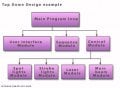
Here is a very general description of how to do top-down programming:
To write a program, you need a functional specification of what the device will do (not how it will do it!). If you do it as a block diagram, it will look like an inverted tree.
Start with a very general description in simple terms. That is called the executive overview, and can be understood by non-technical people(executives). In the next level down, you define the operator interface and input/output interfaces (display, printer, sensors, indicators, etc.).
For the next level down, you create a description for each of the functions of the device that are controlled by the input level above. Below each of these functions, create a detailed function for each of its inputs and outputs. If a function is too complicated, divide it into two or more separate functions.
At the interface between each of the function, inputs and outputs must be defined.
There may be more or less steps in your specification, depending on the complexity of what you are creating.
Once you have defined the whole system, you have "Top-down" designed your software. all you have to do is write the code needed in each of the boxes.
TopDown.jpg
 
Last edited:

Thread Starter

Embededd

Joined Jun 4, 2025
143
just want to clarify something.

My main goal here is to get better at writing code. Since I already have some components, I thought it would make sense to put them together into something meaningful. That’s how I ended up with the idea of building a small door access control prototype.

Of course, I’m not actually locking or unlocking a real door for me it just means switching a relay on and off. The overall idea is to take the C coding skills I already know, and try to apply them in a cleaner, more professional way on this project.

It’s not really a “production” project, more like a practice ground. But I feel I can learn a lot by doing it this way, and that’s why I picked this example. The whole point is to practice, improve, and hopefully pick up better habits from the guidance I get here.


What is a Door Access System?
A system that decides whether a person is allowed to enter a restricted area, based on some form of identification or credential.
Define your ultimate goal first.
To reliably grant access only to authorized users while preventing unauthorized entry.
What is the purpose of a door access system?
Provide controlled entry and keep a record of who attempted access.
What are the inputs? What are the outputs?
Inputs
User credentials (card, PIN, etc.)
Administrative actions (e.g., adding or removing users, configuring the system)

Outputs
Access decision: grant or deny
Physical action on the door: unlock or keep locked
Stored records for later review

What are the security criteria?
Only authorized credentials should be accepted
Unauthorized attempts must be denied
All attempts must be recorded for accountability

What data collection and reporting is required?
Log every access attempt (granted or denied)
Store credential information with timestamp
Provide a way to retrieve or review logs for audits or reports
 

MrChips

Joined Oct 2, 2009
34,698
just want to clarify something.

My main goal here is to get better at writing code.
Here lies your problem.
Writing code is the last thing you want to do.

If you are building a house, when do you start hammering nails?
Long before that, you need specifications for the house, a concept, artistic impression, architectural design and engineering blueprints.
 

Thread Starter

Embededd

Joined Jun 4, 2025
143
Here lies your problem.
Writing code is the last thing you want to do.
I understand that you want me to first learn the system design process, while coding should come as the last step. I just wanted to mention that I only have a limited set of components, so this won’t become a full product and I probably won’t be able to implement every feature

I’m posting a portion from my one of thread where I had written down the requirements for office door access control system

I’m attaching a reference thread where I was talking about Requirement , system design. https://forum.allaboutcircuits.com/threads/project-requirement-specification-design.207816/page-2

Are you asking me to write requirements like this?

PR1 : Unauthorized person may follows an authorized user through a door without presenting their own credentials. This is a big risk because important places like server rooms, labs, and storage areas can be exposed if there is no strong authentication

Solution: The system shall address tailgating through a combination of physical and electronic controls. The system shall authenticate and allow only authorized personnel through RFID smart cards, biometrics, or facial recognition. To enforce one-at-a-time entry, the access points shall be equipped with mechanisms such as mantraps (a two-door vestibule where only one person is allowed at a time) or turnstile-style speed gates that open only for a single authenticated person. Where physical infrastructure does not allow for mantraps or gates, the system shall rely on video analytics integrated with cameras to detect if more than one individual enters on a single authentication. Whenever a suspected tailgating event is detected, the system shall generate an alert within thirty seconds and shall be sent to security staff

PR3: Exit doors must unlock automatically during emergencies such as fire or gas leaks to ensure life safety. However, this creates a loophole: if someone deliberately triggers a false alarm, doors may unlock and allow unauthorized entry.

Solution: the system shall unlock doors in a controlled, directional way. Exit paths will always unlock from the inside to let people evacuate, but will remain locked from the outside. External entry points shall only unlock if both the fire alarm and in-building detectors confirm a real emergency. For critical zones, an authorized officer’s override may be required to open main entries, while all exit routes remain fail-safe. Every emergency unlock event shall be logged with timestamp, door ID, and trigger source. Administrators will receive immediate alerts, and any event later identified as a false alarm shall be flagged for review.

PR4: During power cuts or network outages, access systems may stop working, leaving doors either locked (blocking staff) or unlocked (risking intrusion).

Solution: The system shall automatically switch to backup battery power the moment the main power supply fails, ensuring uninterrupted operation. It shall continue on battery for at least 8 hours, during which all authorized users can access doors while unauthorized attempts remain blocked. When the battery capacity falls to about 30 minutes, the system shall issue a low-battery alert to administrators. If the battery becomes fully depleted, all doors shall automatically revert to a secure locked state, and administrators shall be notified within 15 minutes. Once main power is restored, the system shall return to it without manual intervention.

In case of network failure, the system shall enter an offline mode where user credentials are validated against a locally cached database. All access attempts, whether successful or failed, shall be logged with user ID, timestamp, door ID, and authentication method. These logs shall automatically sync with the central server once connectivity is restored. While in offline mode, temporary visitors or new users not present in the local cache shall be denied access. The system shall support offline operations for at least 72 hours, and administrators shall receive alerts within 5 minutes of both network failure and restoration.

PR5: If access attempts are not recorded, it becomes hard to check what happened during a security incident. Without logs, it is impossible to find who entered and when.

Solution: The system shall record every access attempt, whether successful or failed, in a secure and tamper-resistant log. Each entry shall include the timestamp, user ID, door ID, and the method of authentication used. Logs shall be stored locally and synchronized with the central server to ensure availability even if the system operates in offline mode. To support investigations of security incidents, all logs shall be retained for a minimum of 90 days by default, with the option to configure retention up to 180 days based on organizational policy. Logs shall be protected against unauthorized modification or deletion, and administrators shall be able to retrieve them quickly through the dashboard for audit or compliance reviews.

PR6: Manual user management is error-prone, inefficient, and time-consuming. HR staff or administrators may forget to revoke access for employees who resign, increasing the risk of unauthorized access.

Solution: The system shall automatically synchronize user access rights with the organization’s HR and IT systems to eliminate errors and delays caused by manual management. Whenever an employee joins, changes role, or leaves the organization, their access permissions shall be updated in real time, ensuring that only active and authorized personnel retain entry rights. This synchronization shall include role-based access control, so that employees only gain access to the doors, zones, or buildings relevant to their position. In the event of employee termination or resignation, all access rights shall be revoked immediately upon update in the HR/IT system, reducing the risk of unauthorized access from outdated credentials.

The integration shall support both scheduled synchronization and real-time event-driven updates. The system shall maintain a secure local cache of user data so that access control continues to function even during temporary HR or network outages, with all changes reconciled automatically once connectivity is restored. All user management actions, including creation, modification, and revocation, shall be logged for audit purposes

PR7: Administrators don’t have one central place to monitor and manage the whole system, making it harder to respond quickly.

Solution: The system shall provide a centralized dashboard that gives administrators a real-time overview of all access control activities across the organization. From this interface, authorized administrators shall be able to monitor door status (locked, unlocked, forced open, or held open), view live and historical access logs, and track authentication attempts in real time. The dashboard shall also display system health indicators, such as battery status, network connectivity, and device availability, allowing quick detection of failures or anomalies.

The dashboard shall support configurable alerting, ensuring that critical events such as repeated failed access attempts, forced door openings, power failures, or network disruptions trigger immediate notifications to administrators via SMS, email, or on-screen alerts. These alerts shall include contextual information such as the location of the door, user ID (if available), and timestamp, enabling administrators to respond quickly and effectively.

The dashboard shall allow filtering and search functions across logs by user ID, door ID, time range, or authentication method. Historical reports shall be exportable in multiple formats (e.g., CSV, PDF) for compliance and audit purposes. The system shall also support role-based administrative access, ensuring that sensitive functions (such as revoking credentials or changing door access rules) can only be performed by users with the appropriate authorization level.

PR8: If the access control system is not designed to handle growth, future expansions such as adding new doors, users, or sites can overwhelm the system, causing degraded performance, data inconsistencies, or outright failures. For example, a system designed for a single building may not cope well if the organization later decides to secure multiple branch offices. Similarly, as the number of users increases into the thousands, the system may become slow in verifying credentials, resulting in access delays, frustrated users, and potential security gaps if the system times out or fails under load. Without scalability, the system becomes a bottleneck and eventually unusable, forcing costly replacements or migrations.

Solution: the system shall be architected for horizontal and vertical scalability from the beginning. It shall be capable of supporting at least 10,000 active users, 500 secure doors, and multiple sites connected over a network, without performance degradation. Authentication response time shall not exceed 2 seconds under full system load. The system shall employ a modular architecture, allowing new controllers, readers, or servers to be added without requiring a full redesign. All configurations, user databases, and logs shall be centrally managed, with replication across sites to ensure consistency.

As growth occurs, administrators shall be able to add new users, roles, or access policies dynamically, without downtime. For multi-site organizations, the system shall support distributed deployments with local autonomy (so each site can continue operating independently if disconnected from the central server) while still synchronizing data once connectivity resumes. Performance benchmarks shall be defined and tested to verify that the system maintains stability and responsiveness under expected peak load conditions.

PR9: In modern security environments, access control systems rarely operate in isolation. If the system cannot integrate with third-party services such as video surveillance, fire alarms, or HR databases, organizations will face fragmented security operations. For example, if a person badges into a secure room but the CCTV feed is not linked to that event, administrators lose valuable forensic evidence. Similarly, if employee data in the HR system is not synchronized with access control, a former employee could retain access longer than intended, creating a security risk. Lack of integration leads to duplicate data entry, higher administrative overhead, and delayed responses during emergencies.

Solution: The system shall expose secure APIs and standard integration protocols (such as REST or MQTT) for seamless connectivity with third-party platforms. The design shall allow integration with video surveillance systems so that door access events can be paired with corresponding camera footage. It shall also support automatic synchronization with HR databases, ensuring that when an employee is onboarded, promoted, or offboarded, their access rights update instantly across the system. Integration with fire alarm and building safety systems shall be supported, enabling automatic door unlocks or escalations during emergencies while preserving security controls.
 
Last edited:

KeithWalker

Joined Jul 10, 2017
3,604
Another thing you have to consider, when starting a project like this, is the choice of hardware necessary to achieve your goal. If it is a very small project your choice may be limited to what you already have, and in all cases will be limited by what restraints your budget has. In any case, to be successful, the final choice of hardware should be made after the functional specification has been defined. When you have defined what is required, the software is the filling in the blocks of the diagram that defines how it will work.
 
Last edited:

KeithWalker

Joined Jul 10, 2017
3,604
As a consultant Systems Engineer, I designed, built and wrote the software for many functional industrial systems, both large and small. Usually the potential customer was rather vague about exactly what was required, and had already decide what hardware he thought was needed. Sometimes it was necessary to do a feasibility study to find out if the customers' wishes were even possible. It was only after working with him to write a functional specification that I could start figuring out what was really needed and what it would cost.
Even the smallest projects required the steps I outlined above, to guarantee success in the most economic and effective way.
These are all steps required to be able to write efficient software!
NOTE: When you finally get to write the software, keep it modular, document it and include notes. Give your variables meaningful names and add test points that can be activated to enable trouble-shooting. I mention this because it may not be you that has to make changes or solve problems in future. I have spent many long hours working on someone else's undocumented spaghetti code to add features or debug a problem.
 
Last edited:

MrChips

Joined Oct 2, 2009
34,698
Here are my personal guidelines for code styles, using C language as an example.

1) Think reusable code. Put module specific code in libraries, for example, serial.c and serial.h.

2) Project specific code goes in main.c and constant.h.

3) Do not use literal constants in your code. Project specific constants go in constant.h. Use all upper case, for example,
#define BAUD 9600

4) Global variables start with upper case character. Local variables are all lower case. Instead of short names, spell out an entire phrase using underscore, for example, Time_of_entry, number_of_attempts.

5) Make your code readable using (4). Your code will require fewer comments.

6) Every subroutine must have a header info section stating what it does, all inputs and outputs defined, dependencies, date, name of editor, and changes if edits were made. Edit information should also go at the beginning of main.c.

7) Use compiler directives to customise code for specific projects, for example,

#define NASA
#ifdef NASA
:
#endif

8) Indent your code properly. I prefer matching opening and closing braces to be in the same column. When typing control structures, I enter opening and closing braces immediately with appropriate comments, for example,

C:
if (valid_user)
  { // valid user
  } // valid user
else
  { // not valid user
  } // not valid user
You will come to appreciate this when you have many nested control structures.

8) No subroutine should be longer than a printed page.
 

Rf300

Joined Apr 18, 2025
76
Try to follow coding style guidelines like MISRA. They seem to be restrictive but are a requirement e. g in automotive software. They help you to deal with the common pitfalls of simple C programming.
 
Top