Using capacitors and a resistor to trick a tablet into booting off USB

Thread Starter

clifter1

Joined Sep 4, 2024
11
Hi everyone!

In the past, I've successfully been able to take a cheap Walmart Onn tablet, remove the battery, leave the charging circuit, and connect the postitive/negative terminals to a simple microUSB cable. The tablet was then able to boot and run off the cable (The battery percentage would decrement slowely, but I was not keeping it on 24/7 and would clear on shutdowns).

Could I use a few capacitors and resistors, wired to the same +/- charging circuit, to trick the tablet into thinking there was a battery? That way, I could boot off of the USB-C connection on the tablet (and keep the case intact) From my understanding, tablets and phones pull heavier current on boot and need the battery to assist. From that logic, you only need the capactors to trick the phone and maybe provide that initial juice?

As an example, the battery I pulled off of the tablet is:

Nominal Voltage: 3.85 V
Charge Voltage: 4.4 V
Capacity: 4400 mAh 17 Wh

Thanks!
 

geekoftheweek

Joined Oct 6, 2013
1,429
I doubt you're going to trick it in to thinking it has a battery without actually having a battery installed.

Putting capacitors in the charging circuit isn't going to do anything.

Replacing the battery with capacitors is a little closer, but the battery manager probably won't like them and won't charge them. Even if it does charge them you're probably going to need a fair amount of capacitance to make it work.
 

sparky 1

Joined Nov 3, 2018
1,218
The diagnostic file says the battery did not pass, actually it is measuring 1/2 voltage. possible cap works but not best.
The battery management setting is preventing normal boot. PXE server and Lan cable would fix that. instead hardway
you get into bios and it sends you to diagnostic. When you bypass that then you reset factory defaults.
the boot order will be pxe so you move USB to the top then save. formatting thumb drive with rufus default
is where the usb boot worked because factory default modified to usb boot priority. The capacitor might temporarily get you in just before the low battery is again detected. big bubbles no troubles chewing gum new battery factory default no pass cleared, good to go.
 

geekoftheweek

Joined Oct 6, 2013
1,429
@sparky 1

Where is this LAN cable supposed to plug into this cheap tablet that only has WiFi? How do you get to BIOS settings on something that doesn't have BIOS settings that a normal user can get to?

According to everything I understand the original question was how do I power a tablet without a battery? I'm pretty sure everything else works without formatting, BIOS, and what not.

In the original post "In the past, I've successfully been able to take a cheap Walmart Onn tablet, remove the battery, leave the charging circuit, and connect the postitive/negative terminals to a simple microUSB cable. The tablet was then able to boot and run off the cable" -- The cable was supplying the power that was no longer available because of no battery.
 

sparky 1

Joined Nov 3, 2018
1,218
Ok I see now that in 2022 the pxe became a security issue so they say.
here is what I read " PXE booting with USB Ethernet adapters is disabled for security reasons. Booting from USB is not a problem, it just requires a key sequence (which is the case for most laptops, you open the boot menu or BIOS to change boot order) "

Another comment about getting around that problem " Turn Secure Boot off in UEFI "
Almost all tablets to date have a PXE and because they run fine in virtual machines shows that there are a few tricks but it uses pxe.
There might be a few odd ones that have less common keypress to get into a recovery mode.
once you get in do a factory reset. network, usb and other memory cards will boot and fast boot the os.
Frustrating to manually load a system, more difficult when they made UEFI mandatory. ***

If you recycle the battery keep the connector, use it with a power supply sorry you're having these issues.
I am humbled by your post. Things are starting to get messed up.
 
Last edited:

geekoftheweek

Joined Oct 6, 2013
1,429
Ok I see now that in 2022 the pxe became a security issue so they say.
here is what I read " PXE booting with USB Ethernet adapters is disabled for security reasons. Booting from USB is not a problem, it just requires a key sequence (which is the case for most laptops, you open the boot menu or BIOS to change boot order) "

Another comment about getting around that problem " Turn Secure Boot off in UEFI "
Almost all tablets to date have a PXE and because they run fine in virtual machines shows that there are a few tricks but it uses pxe.
There might be a few odd ones that have less common keypress to get into a recovery mode.
once you get in do a factory reset. network, usb and other memory cards will boot and fast boot the os.
Frustrating to manually load a system, more difficult when they made UEFI mandatory. ***

If you recycle the battery keep the connector, use it with a power supply sorry you're having these issues.
I am humbled by your post. Things are starting to get messed up.
https://www.walmart.com/ip/onn-10-1...Af8Ir599tq84dhBQQ9JkQo9-UWmD6HOBoCe_QQAvD_BwE

There is no UEFI, BIOS, USB boot, keyboard, or anything else that resembles a standard computer and ways of operation. What are you even talking about?
 

Thread Starter

clifter1

Joined Sep 4, 2024
11
I doubt you're going to trick it in to thinking it has a battery without actually having a battery installed.

Putting capacitors in the charging circuit isn't going to do anything.

Replacing the battery with capacitors is a little closer, but the battery manager probably won't like them and won't charge them. Even if it does charge them you're probably going to need a fair amount of capacitance to make it work.
If I could trick the Battery Control Module (Or whatever that simple circuit strip is) with simple +/- voltage from a microUSB wire, I would think a bunch of capacitors could too? My only concern would be the BCM initially charging the capacitors when the USB cable is first plugged in. Most of the BCM's seem to be pretty stupid too, measure voltage, charge, repeat in a loop until some baseline voltage is measured...
 

geekoftheweek

Joined Oct 6, 2013
1,429
Most of the BCM's seem to be pretty stupid too, measure voltage, charge, repeat in a loop until some baseline voltage is measured...
In a sense I'll agree, but I do know there are some specific processes to follow based on the battery chemistry. Other than that I really don't know much about BCM or batteries to speak of. I just know modifications before the USB port and probably the BCM aren't going to do a whole of good otherwise. I've run my phone dead enough times and used enough different chargers to say the amount of time from when I start charging it to when it will turn on is pretty constant. That is one moment where my lack of patience for trivial matters would notice the difference... if it took too long I would just leave it and come back later.

I tried to do a quick look up power consumption at boot (I'm running out of time for the day), and the only thing I found says yes and the reasoning made sense. It may also be that during times of heavy processor usage (games, videos, etc) it also relies on the battery for extra power when needed.

Something tells me to get any sort of usable power out of capacitors it's going to take a lot of them to make it work or something insanely bulky. The amount of power a battery stores versus a comparable sized capacitor is astronomically different.

Good luck with whatever you decide!!
 

geekoftheweek

Joined Oct 6, 2013
1,429
I do feel the need to ask how do you like the tablet in general? I could use something like that for a controller for a project I'm working on. It doesn't need to be something super powerful, but I will put it through some pretty heavy math.
 

Thread Starter

clifter1

Joined Sep 4, 2024
11
In a sense I'll agree, but I do know there are some specific processes to follow based on the battery chemistry. Other than that I really don't know much about BCM or batteries to speak of. I just know modifications before the USB port and probably the BCM aren't going to do a whole of good otherwise. I've run my phone dead enough times and used enough different chargers to say the amount of time from when I start charging it to when it will turn on is pretty constant. That is one moment where my lack of patience for trivial matters would notice the difference... if it took too long I would just leave it and come back later.

I tried to do a quick look up power consumption at boot (I'm running out of time for the day), and the only thing I found says yes and the reasoning made sense. It may also be that during times of heavy processor usage (games, videos, etc) it also relies on the battery for extra power when needed.

Something tells me to get any sort of usable power out of capacitors it's going to take a lot of them to make it work or something insanely bulky. The amount of power a battery stores versus a comparable sized capacitor is astronomically different.

Good luck with whatever you decide!!
Thank you for the input! I was able to talk with a former coworker who did a lot of industrial programming on a license plate camera (android device with a big battery and camera) and he said a similar thought. It's all dependent on the whatever power management chip and programming they are doing
 

Thread Starter

clifter1

Joined Sep 4, 2024
11
I do feel the need to ask how do you like the tablet in general? I could use something like that for a controller for a project I'm working on. It doesn't need to be something super powerful, but I will put it through some pretty heavy math.
I used a ~50$ 7" Onn tablet. The back comes off easy and it was very simple to cut the battery off the BCM. I used a power only USB-A cable and it works great. A USB-C cable did not work. It would not boot.

Only issue was on power, the battery % meter would very slowly decrement. I've read you can reset it in code, or do a split off power to the normal tablet USB port (with resistors in the correct spot) to trick it into always showing 100%

On the software side, the Onn tablet surprised me. I am making an off grid tablet, so I was happy to be able to disable and remove almost all the installed apps. I could then install my offline apps and data. It's also usable, but not a powerhouse. I'm not sure if it could do any heavier math computation

But, it's 50$ or so, and was a fun little project. I can post pics if anyone wants to see the modified guts...
 

sparky 1

Joined Nov 3, 2018
1,218
Finally the basic information about the tablet. No one knows which tablet unless you say.

The ONN tablet has the same android hard reset as any android.
enter recovery mode hold power button and volume up at the same time 6 seconds
green robot screen do the hold and press 6 seconds
select factory reset then select the boot loader use either SD or USB
Simple android bootload thats all
 

geekoftheweek

Joined Oct 6, 2013
1,429
The back comes off easy and it was very simple to cut the battery off the BCM. I used a power only USB-A cable and it works great. A USB-C cable did not work. It would not boot.
I just realized I missed a very important clue. USB-C ports are capable of being used for video, sound, and a few other things and when you connect a device to them there is a bit of negotiation that needs to happen in order for the port to be set up as a USB port. I haven't looked into the charger side of things, but I'm going to suspect if you're not connecting to a valid port then it won't charge either.

If you use a USB-C to USB-A then your USB-A power only it will probably work.
 

geekoftheweek

Joined Oct 6, 2013
1,429
Finally the basic information about the tablet. No one knows which tablet unless you say.

The ONN tablet has the same android hard reset as any android.
enter recovery mode hold power button and volume up at the same time 6 seconds
green robot screen do the hold and press 6 seconds
select factory reset then select the boot loader use either SD or USB
Simple android bootload thats all
Not to be rude, but...

In the original post "a cheap Walmart Onn tablet" says about all you need to know. The link I posted was the first that showed up with a quick search and while it may not be the exact model the OP has it should be close enough for the topic at hand.

Unfortunately the whole problem from the beginning of the thread was how make it boot without a battery installed... not alternative boot options to fix it. It will boot just fine when powered directly through the battery connection, but not when powered through the USB port and no battery or power to the battery pins.

The lack of battery or power directly applied to the battery pins is where the issue is.
 

be80be

Joined Jul 5, 2008
2,394
The onn needs 3.7 volts on the power wires to from the battery not the 5 volt from a supply it will run off the supply if it thinks there is a battery hooked to batterys wires the USB C uses PD to set up the charging whole new ball game If your using a PD charger I used a USB C cord in the 3.0 port it will not supply 5 volts but my hub will I guess it is because the hub is powered
 

Thread Starter

clifter1

Joined Sep 4, 2024
11
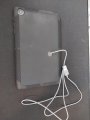
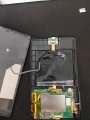
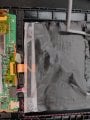
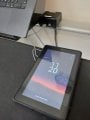
Attached pictures below. And sorry about specifics. I have a Onn 7" 2022 model. I just noticed they released a 2024 model. I used a standard USB-A cheap power only cable, and it works on any power supply that provided USB-A charing capabilities. I don't even have any resistors or what-not on the to the BCM... Sorry for the tape covering, but you can see above where the cable simply routes around to provide pull protection, and simply is soldered onto the BCM battery terminals.

I put an order in for a sample pack of various capacitor sizes. I'm going to try the capactors on a Galaxy Xcover6 pro that has removable batteries...
 

Attachments

be80be

Joined Jul 5, 2008
2,394
I would think all you need is to find the battery wires put a 100 uf and feed them with 3.7 volts from the usb the cap would hold a little charge to look like there is a battery there but it would boot and run off the usb and think its charging most of theses will run if they have a little bit of battery charge
My LG takes like a second to boot with dead battery Ai said you need a cap with 8.33 mA of charge in it The 100 uf would be more then you probably need
 
Top