USB-to WiFi

Thread Starter

Martyk

Joined Jul 23, 2009
69
RE-STATING THE PROBLEM

I will be running ethernet to the board from the router.
But for the USB port to my computer, I will need shielded cable and I am not able to terminate it with a mini-A connector. I can't even find a breakout
board for mini-A. Hence my idea of Wifi.

TIA
Marty
 
Last edited:

MrChips

Joined Oct 2, 2009
34,626
Hello everyone

I need to access a microcontroller board's USB port (mini-B) remotely over WiFi.
What hardware would I need ?
Is it necessary to convert USB to UART ?

TIA
Marty
You don't need UART. But more importantly, going from USB to WiFi is not a walk in the park. For starters, read up on how USB works.
 

geekoftheweek

Joined Oct 6, 2013
1,429
What microcontroller board are you working with? Is the USB part of the microcontroller itself or does is use something like an FTDI chip to bridge between UART and USB? What do you actually know about USB and TCP/UDP (WiFi) connections?

I don't know all the magic myself, but I do know there are several device classes defined like HID, CDC, mass storage, custom, and others that define how the USB host communicates with the device to start with. You can't simply convert USB to UART and send it through WiFi without a whole load of processing in between.

The device in your link as shipped is more or less a simple modem that recognizes the "AT" command set. Although it can be used as is to create a basic connection between two points you're going to be able to do a lot more with it if you create and upload a custom program to it.
 

MrChips

Joined Oct 2, 2009
34,626
What we are trying to convey to you is that USB is not UART and vice versa.
UART is not WiFi and vice versa.
USB is not WiFi and vice versa.

When you plug a USB device into a computer there is a lot of negotiating that has to take place before you can transmit data. Information is sent in packets. You need a device handler to process all this traffic.

If your MCU board has a USB port, what information does it transmit? All data is sent in packets.
Similarly, WiFi traffic is in the form of packets. USB packets and WiFi packets are totally incompatible.
 

GetDeviceInfo

Joined Jun 7, 2009
2,270
Hello everyone

I need to access a microcontroller board's USB port (mini-B) remotely over WiFi.
What hardware would I need ?
Is it necessary to convert USB to UART ?

TIA
Marty
You will need to convert data from a USB endpoint, to and from an Ethernet socket. An esp32 with otg capabilities, and a smatter of code, could do the job.
 

sparky 1

Joined Nov 3, 2018
1,218
The picture shows the input RJ45 lan cable. you can salvage a lan cable, cat4 has two twisted pairs

Arduino is given an RJ45 that connects to Router → RJ45 → dS3484 → ethernet relay

the dS3484 has its own Ethernet PHY + MAC chipset on the board. That chip is the one that
interprets, conditions, and articulates the LAN signals, not the Arduino.
When the arduino is working with the router the dS3484 should connect.

You can use a linux debian that is downloaded from that website then: sudo apt install net-tools
this lets you dink with the network
ifconfig
route -n
netstat -tulnp

Example that shows why your microcontroller can work.
An arduino has an ethernet library for Ethernet Shield (W5100/W5500) like the linux.
It is the chipset in these Lan boards that articulate how the signals flow correctly.
Even though the RJ45 or USB is a just a connector it's purpose can be realized with the right chip set.


The many uses of USB connectors and different purposes has caused much confusion.
The cell phones needed a small connector then the laptop manufacurers started removing the rj45 lan ports.
now they sell lots of laptoys to keep up. Some of the mini computers have 2 RJ45 connectors.
I think the dS3484 ethernet relay board only uses the USB-B for power.
 
Last edited:

Thread Starter

Martyk

Joined Jul 23, 2009
69
I will run ethernet to it from the router.
But for the USB port, I need shielded cable and I am not able to terminate with a mini-A connector. Hence my idea of Wifi.
 

geekoftheweek

Joined Oct 6, 2013
1,429
I looked through the documentation and found it's actually a pretty interesting board. I still do not see how you plan on doing anything with the USB port. It looks like the sole purpose of the USB port is to reprogram the board itself and not for any sort of communication.
It is designed to be operated from the ethernet connection in a couple different ways or the serial connections although it only seems to give a RS485 example.
If you simply want to power a few relays I think you would be better off learning how to program an ESP32, the ESP8285 you linked above, or something similar.
 

Ya’akov

Joined Jan 27, 2019
10,226
Welcome to AAC

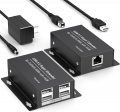
What you want to do will be an endless source of flakiness is you attempt to encapsulate USB protocol over TCP/IP via WiFi. Instead, the most reasonable solution to making the dev board's USB port available remotely is to use CAT5e/6 cable and a pair of boxes like these.

1766654836414.png

This is a purely hardware solution, not requiring any flaky OS-level shimming. It will present the USB port to the the remote box as if it was local, you just need to plug in.

N.B.: The Type-C port on the board is not a problem in itself but because you will need to use a Type-C to USB A cable it is very important that you ensure the one you choose includes the D+/D- lines. Many cables supplied for charging omit the data lines and there is no way to tell without testing them. It is worth investing in a reputable cable (e.g.: Anker) that you can be certain should work.
 

geekoftheweek

Joined Oct 6, 2013
1,429
So I take it from "restating the question" the actual problem is your computer only has a USB A mini port available. As stated several times there is no one size fits all conversion between USB and WiFi. Your best bet is to configure it from a different computer through USB and use the ethernet connection to actually run the board. I hate to be the bearer of bad news, but that is just the way it is.
 

sparky 1

Joined Nov 3, 2018
1,218
This is test to check the network on ESP32
Code:
import socket
import time
import network

sta = network.WLAN(network.STA_IF)
sta.active(True)
sta.connect("SSID", "PASSWORD")
while not sta.isconnected():
    time.sleep(0.1)
print("WiFi connected:", sta.ifconfig())

# MicroPython does not have raw_input, so we hardcode or
# read from a config file. Replace these with your values:
IP_ADDRESS = "192.168.1.50"
PORT = 17494

# Create TCP socket
s = socket.socket()

def writeData(data):
    try:
        s.send(data)
    except Exception as e:
        print("Error writing message:", e)

def readData(num):
    try:
        chunk = s.recv(num)
    except Exception as e:
        print("Error reading:", e)
        return bytearray()

    # MicroPython already returns bytes, so just wrap it
    return bytearray(chunk)

# Connect to the dS module
print("Connecting...")
try:
    s.connect((IP_ADDRESS, PORT))
except Exception as e:
    print("Connection error:", e)
    s.close()

# Request relay state
writeData(b'\x33\x01')
relay_data = readData(5)

# Toggle relay 1
if len(relay_data) > 0 and relay_data[0] > 0:
    print("Relay 1 is on - toggling state")
    writeData(b'\x31\x01\x00\x00\x00\x00\x00')
else:
    print("Relay 1 is off - toggling state")
    writeData(b'\x31\x01\x01\x00\x00\x00\x00')

# Read back confirmation
input_data = readData(2)

# Read input 1
writeData(b'\x34\x01')
input_data = readData(2)

if len(input_data) > 0 and input_data[0] > 0:
    print("Input 1 is active")
else:
    print("Input 1 is inactive")

# Close socket
try:
    s.close()
except Exception as e:
    print("Error closing socket:", e)

print("Disconnected")

[Code/]
I think that after sorting out the process; Thonny, git hub and hardware signal path that you can follow the video.
There are at least 3 ESP32 variants that have the wireless wifi onboard: ESP32‑WROOM‑32, ESP32‑WROVER‑IE, ESP32‑DevKitC
If you hear a new word or term write them down so you can better understand. I sometimes watch a procedure video several or more times.
Beside terminology and variable names, I would expect that there will be small changes in the code that come from performing good network testing.
Maybe you will write an easier step by step procedures on how you make it work. We try to keep record of repeatable instructions. Many configs needed.

 
Last edited:
Top