WiFi Questions

Thread Starter

Futurist

Joined Apr 8, 2025
720
Can anyone shed light in the channels used by WiFi? I'm wondering how I can tell what channel is best. For example my PC has a USB WiFi adapter and I want to set its channel to a channel not used by the other networks in my area:

View attachment 356789

How can I tell what channel numbers each of the other networks (neighboring homes) are using?
 

ronsimpson

Joined Oct 7, 2019
4,645
On my phone there are several tools.
WiFi Analizer. This is a good place to start.
Right now I show a network on channel1, My mesh network on 4 through 6 And I am using channel 40-42, 161 on 5ghz. I can see how strong on each channel.

Wi-F Toolskit. This might only work with tp-link.
 

Ya’akov

Joined Jan 27, 2019
10,226
As Ron mentioned there are software tools that can show the spectrum in use.

Channels overlap so moving to a different numbered channel may not eliminate interference. The programs generally display the overlap graphically.

Keep in mind, it is the AP (Access Point) that decides the channel, not the client hardware. Your AP/Router probably offers a finite to automatically pick the best channels for the two bands.
 

DC_Kid

Joined Feb 25, 2008
1,242
Also keep in mind, with all the wifi "noise" that's there, there's a lot of SSID's on the same channels, no matter what channel it is. Vendors default to a channel. That said, everything still works.

Using a channel (center, just like FM radio) that is less used by others has less noise to deal with. In wifi that noise is filtered by SSID, in FM radio the noise is overlayed and heard.

5G has more free channels only because 5G hardware is way less than the 2.4G. The lower 2.4G band will wane off as 5/6G stuff becomes more standard in hardware. The $40 2.4G of 10yrs ago will be the $40 5/6G "soon".

The cruddy part about 5/6G stuff is that using your own antenna becomes harder to do because of FCC restrictions (US) and that the wifi box does not provide an sma connector.
 

ronsimpson

Joined Oct 7, 2019
4,645
I am using 2.4ghz for home automation and cameras. It does not cut through rain. Not good outside.
The computers are on 5Ghz impart because there are many channels. I am talking on two different parts of the 5Ghz band. It talks through rain very well.
I have a "bridge". Two long range transceivers with high gain antenna to jump a long distance to the shop/barn where there is a router.

I am looking at the network now. I have a guest router on 2.4ghz channel 1 and 5gHz channel 52-58 and 161-167.
The main network is on 2.4ghz channels 4-6 and at 5ghz channel 4-6 to gain speed.

I don't have neighbors so not worried about hogging the band.
 

Ya’akov

Joined Jan 27, 2019
10,226
Also keep in mind, with all the wifi "noise" that's there, there's a lot of SSID's on the same channels, no matter what channel it is. Vendors default to a channel. That said, everything still works.

Using a channel (center, just like FM radio) that is less used by others has less noise to deal with. In wifi that noise is filtered by SSID, in FM radio the noise is overlayed and heard.

5G has more free channels only because 5G hardware is way less than the 2.4G. The lower 2.4G band will wane off as 5/6G stuff becomes more standard in hardware. The $40 2.4G of 10yrs ago will be the $40 5/6G "soon".

The cruddy part about 5/6G stuff is that using your own antenna becomes harder to do because of FCC restrictions (US) and that the wifi box does not provide an sma connector.
2.4GHz has propagation advantages that it will keep it with us for a long time. The use of sub-GHz bands will also become prominent, such as Wi-Fi HaLow which operates in the US on the 902-928MHz ISM band (863-868MHz in the EU). This is for the propagation characteristics. HaLow is Wi-Fi (802.11ah specifically) designed for long haul. While it only specifies the AP and STA behavior, practically relays can be used to extend the range.

The general idea is 902MHz/2.4GHz—better penetration of buildings, generally longer distance propagation at the cost of bandwidth/data rate; 5GHz/6GHz more spectrum, more bandwidth/higher data rate at the cost of propagation through obstacles and practical distance.
 

drjohsmith

Joined Dec 13, 2021
1,548
I am using 2.4ghz for home automation and cameras. It does not cut through rain. Not good outside.
The computers are on 5Ghz impart because there are many channels. I am talking on two different parts of the 5Ghz band. It talks through rain very well.
I have a "bridge". Two long range transceivers with high gain antenna to jump a long distance to the shop/barn where there is a router.

I am looking at the network now. I have a guest router on 2.4ghz channel 1 and 5gHz channel 52-58 and 161-167.
The main network is on 2.4ghz channels 4-6 and at 5ghz channel 4-6 to gain speed.

I don't have neighbors so not worried about hogging the band.
2.4 GHz not cutting through rain ?
How far are you between tx and Rx ?
The advantage of the 2.4 GHz is the water absorbtion, anyone off the direct line of site will not interfere.
2.4 GHz is such high power compared to the higher frequencies , what problems are you having ?
 

ronsimpson

Joined Oct 7, 2019
4,645
How far are you between tx and Rx ?
For 15 years I got my internet over line of sight 5 miles at 2.4ghz. Then for about 7 years at 5ghz. The higher frequency receiver does not see a drop in signal level in the rain or fog. At 2.4 the signal drops to nothing in fog or even light rain. I was using a very high gain antenna on each end.
2.4 GHz is such high power compared to the higher frequencies
Most WiFi does not use a high gain antenna. The power level is very low.

I asked the internet the question and got several articles that all reference the same paper saying the 5ghz should be worst in the rain. (not better) I don't know why 2.4ghz at 5 miles and at 300 feet to the barn breaks down in the rain/fog while 5ghz keep going.

On the other hand there are a number of articles on water absorbing 2.4ghz. "63% loss for every 1.2cm of water"

I don't know why I have problems with 2.4ghz. It might be the 5ghz antennas are more directional.
 

drjohsmith

Joined Dec 13, 2021
1,548
For 15 years I got my internet over line of sight 5 miles at 2.4ghz. Then for about 7 years at 5ghz. The higher frequency receiver does not see a drop in signal level in the rain or fog. At 2.4 the signal drops to nothing in fog or even light rain. I was using a very high gain antenna on each end.

Most WiFi does not use a high gain antenna. The power level is very low.

I asked the internet the question and got several articles that all reference the same paper saying the 5ghz should be worst in the rain. (not better) I don't know why 2.4ghz at 5 miles and at 300 feet to the barn breaks down in the rain/fog while 5ghz keep going.

On the other hand there are a number of articles on water absorbing 2.4ghz. "63% loss for every 1.2cm of water"

I don't know why I have problems with 2.4ghz. It might be the 5ghz antennas are more directional.
2.4 GHz is the resonant frequency of water
It's why 2.4 GHz is the microwave oven frequency , also why it's used in point to point comms .

Yes, WiFi is not intended to run over miles !
.it's a local connection..
I'd be looking at something else
,5 GHz , also won't work over miles , without external directional antennaa.
But the reason commercial 5 GHz hear does not have external connectors , your real near the absorption limit at 5 GHz with the provided antennas .
If you add directional antennas , you can quickly come into the regulated erp me rkescof needing a licence.
 

ronsimpson

Joined Oct 7, 2019
4,645
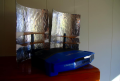
25 years back made an antenna something like the picture. I used a sheet of brass and bent it to make two parabolas. About twice as tall. I used a much longer antenna(s) on the router. I think they were 5db antennas. I don't know that the total gain was, but I can see routers in town from here.
1768754341280.png

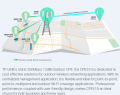
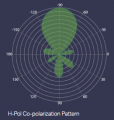
I am using CPE510 now. They say 9 miles. I just want to reach 1/4 mile.
1768753875951.png
1768754820888.png
 
Top