Facebook
 Google
 GitHub
 Linkedin

If you use ESP-01 modules, you've probably cobbled together some programmer with a UART module and a breadboard—I know I did.
But I ran across these little boards on Amazon and they seemed worth a try. I'm glad I did.
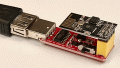
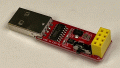
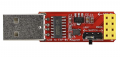 They are the same width as an ESP-01 and including the USB connector, about twice as long. Construction is reasonable good with soldering probably average to slightly above for generic modules but certainly no problems.
They feature a 1117-3.3 regulator to supply the ESP-01 and a CH430G USB to UART chip to talk to it. The board only has a few additional components on it, including a 12Mhz crystal for the CH340FG and five caps for one for the 1113 and the others for decoupling.
There is a female 8-pin .1" header for the ESP-)1, of course, and a slide which to select between UART and programming configurations.
It's a two layer board but all components are on the top side with only the pins for the connectors and switch appearing on the bottom.
Using it couldn't be easier. Connect the USB connector to a port on the machine running the IDE, make sure the switch is set to "PROG", and upload a sketch. To see serial communications, for example in the serial monitor, set the switch to UART.
The only complaint I have is the USB connector, I would have much preferring a USB-C or MicroUSB female to the USB-A male, but that's a minor thing and not enough to even take a point off.
Definitely recommended.
But I ran across these little boards on Amazon and they seemed worth a try. I'm glad I did.
They feature a 1117-3.3 regulator to supply the ESP-01 and a CH430G USB to UART chip to talk to it. The board only has a few additional components on it, including a 12Mhz crystal for the CH340FG and five caps for one for the 1113 and the others for decoupling.
There is a female 8-pin .1" header for the ESP-)1, of course, and a slide which to select between UART and programming configurations.
It's a two layer board but all components are on the top side with only the pins for the connectors and switch appearing on the bottom.
Using it couldn't be easier. Connect the USB connector to a port on the machine running the IDE, make sure the switch is set to "PROG", and upload a sketch. To see serial communications, for example in the serial monitor, set the switch to UART.
The only complaint I have is the USB connector, I would have much preferring a USB-C or MicroUSB female to the USB-A male, but that's a minor thing and not enough to even take a point off.
Definitely recommended.