USB protection

Thread Starter

kalemaxon89

Joined Oct 12, 2022
389
I don't really know what section of the forum to put this question in and I hope it is relevant to what is being discussed here.

I just bought the Hantek6022BE oscilloscope and realized (unfortunately too late) that it needs to connect two USBs to the computer to work.
I think it is because of a power issue (maybe 500mA from a single port is not enough to supply the oscilloscope).

I unfortunately only have two USB ports on my laptop, so I need to buy a usb hub with multiple inputs so as to:
- Connect the first usb wire from the oscilloscope to the first port (USB1) on my pc.
- Connect the usb hub to the second port (USB2) on my pc:
.....- connect the second usb wire of the oscilloscope to the usb hub.
.....- connect the microcontroller to the usb hub.

Isn't there a risk that for whatever reason it will draw too much current from the usb and create problems? (overcurrents and/or short circuits)
I had a terrible experience (that I don't want to happen again) where my pc shut down without rebooting due to a shortcircuit during the Arduino - breadboard - usb connection .. the battery had disconnected due to a safety issue, etc. What a nightmare!

I am asking if my concerns are correct and therefore whether I should buy a USB hub that has protection so that the USB port is not damaged.
And most importantly ... are there usb hubs that have protection? Because usually online there are individual usb ports with protection ... not usb hubs!
 
Last edited:
geekoftheweek

Joined Oct 6, 2013
1,429
Isn't there a risk that for whatever reason it will draw too much current from the usb and create problems? (overcurrents and/or short circuits)
I had a terrible experience (that I don't want to happen again) where my pc shut down without rebooting due to a shortcircuit during the Arduino - breadboard - usb connection .. the battery had disconnected due to a safety issue, etc. What a nightmare!
Unfortunately there will always be a risk no matter what it is you connect... things fail. The chances of this device drawing too much power are pretty low. I don't know off hand, but I'm guessing it's less than 300 mA max. There is a field in the USB Device Descriptor that should tell you how much power it will draw, but I don't know how to go about printing the information out on Windows. It may be possible to find it in Device Manager when connected. The manual for the scope does not seem to have that information.

As far as your battery disconnecting you must have had a direct connection between power and ground. I bought a small assortment of Polyfuses after melting a few breadboards with external power supplies. They will limit the current draw to keep everything somewhat safe. I normally have a 250 mA connected to my micro (or whatever it's maximum current rating is), then additional 50, 100, 200, 500 mA or whatever for other circuits. It is not idiot proof, but it does help. I would not connect one to your scope as it will decrease the voltage to limit current which can cause issues with the scope, but it might be worth looking in to for your breadboard circuits.

I am asking if my concerns are correct and therefore whether I should buy a USB hub that has protection so that the USB port is not damaged.
And most importantly ... are there usb hubs that have protection? Because usually online there are individual usb ports with protection ... not usb hubs!
You can get a powered USB hub that has a separate power supply that may help. The only issue is the few that I have used will still power a device without the external power connected. A hub will also slow down your port to some degree since it is combining the traffic of several ports into one, and acting as a repeater. If your scope display updates in real time it may cause it to lag. Also with a powered hub it will probably melt things if your connections are not right so be careful there too.
 

Thread Starter

kalemaxon89

Joined Oct 12, 2022
389
Unfortunately there will always be a risk no matter what it is you connect... things fail. The chances of this device drawing too much power are pretty low. I don't know off hand, but I'm guessing it's less than 300 mA max. There is a field in the USB Device Descriptor that should tell you how much power it will draw, but I don't know how to go about printing the information out on Windows. It may be possible to find it in Device Manager when connected. The manual for the scope does not seem to have that information.

As far as your battery disconnecting you must have had a direct connection between power and ground. I bought a small assortment of Polyfuses after melting a few breadboards with external power supplies. They will limit the current draw to keep everything somewhat safe. I normally have a 250 mA connected to my micro (or whatever it's maximum current rating is), then additional 50, 100, 200, 500 mA or whatever for other circuits. It is not idiot proof, but it does help. I would not connect one to your scope as it will decrease the voltage to limit current which can cause issues with the scope, but it might be worth looking in to for your breadboard circuits.


You can get a powered USB hub that has a separate power supply that may help. The only issue is the few that I have used will still power a device without the external power connected. A hub will also slow down your port to some degree since it is combining the traffic of several ports into one, and acting as a repeater. If your scope display updates in real time it may cause it to lag. Also with a powered hub it will probably melt things if your connections are not right so be careful there too.
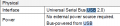
The fact is that I still don't understand whether I should use two or one usb cable during normal operation of the oscilloscope. Knowing this would solve things. I'm sure during installation you need two ... but only during installation maybe. I have updated the main post by adding an image and what is in the manual, we may be able to glean some more information. I have a better idea: I'll try connecting only the black usb and see if it works, then try only the red one.
 

k1ng 1337

Joined Sep 11, 2020
1,038
In fact, I can't figure out what one of the USBs is used for.
View attachment 306406
What other USB? The manual for the Hantek6022BE lists two USB ports labeled "USB" and "USBXI". The USB port goes to your computer which provides both data and power. The USBXI port is for a special instrument. The manual will tell you exactly what you need to do to configure the device.. did you read it?

Also, the table you posted is simply telling us that power comes from USB and the version of USB used is 2.0. Nothing implies these are two different USB cables required for normal operation of the device.
 

geekoftheweek

Joined Oct 6, 2013
1,429
The fact is that I still don't understand whether I should use two or one usb cable during normal operation of the oscilloscope. Knowing this would solve things. I'm sure during installation you need two ... but only during installation maybe. I have updated the main post by adding an image and what is in the manual, we may be able to glean some more information. I have a better idea: I'll try connecting only the black usb and see if it works, then try only the red one.
Since you only have one USB connection according to the pictures in the manual you only need one cable. As k1ng 1337 has mentioned a couple times the USBXI is for an instrument connection. In the video I watched it showed what looked like a flat pin connector not a USB connector for the USBXI. If it doesn't look like a normal USB connector for a commercially available USB cable it is not a USB connection to connect to a PC.

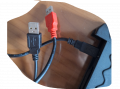
Edit... what do your cables look like?
 

Thread Starter

kalemaxon89

Joined Oct 12, 2022
389
What other USB? The manual for the Hantek6022BE lists two USB ports labeled "USB" and "USBXI". The USB port goes to your computer which provides both data and power. The USBXI port is for a special instrument. The manual will tell you exactly what you need to do to configure the device.. did you read it?

Also, the table you posted is simply telling us that power comes from USB and the version of USB used is 2.0. Nothing implies these are two different USB cables required for normal operation of the device.
Since you only have one USB connection according to the pictures in the manual you only need one cable. As k1ng 1337 has mentioned a couple times the USBXI is for an instrument connection. In the video I watched it showed what looked like a flat pin connector not a USB connector for the USBXI. If it doesn't look like a normal USB connector for a commercially available USB cable it is not a USB connection to connect to a PC.

Edit... what do your cables look like?
1699288719454.png
 

k1ng 1337

Joined Sep 11, 2020
1,038
I read the manual and it didn't mention it.. probably an oversight on their part. I did a quick search and it seems like the black is data and red is power. One user claimed they didn't need power red but you should probably use it anyway. Check the label on the unit, it should say how much power it needs. From there we can work out what kind of USB hub you need.

As for your original question about how much current can be supplied from a USB port, it depends on the port from your computer or hub. USB 2.0 lists a value of 5V@500mA (2.5W). This numbers are tricky because it depends a lot on who made the circuit board.

A normal passive USB hub doesn't provide extra power (don't even try it) so you have two options:

1) Use a typical cell phone charger rated at 5V/1A for the red cable.

2) Buy a powered USB hub that plugs into the AC outlet.

There isn't need to worry about current limiting because USB itself has current limiting and I'm sure your scope does too. If your USB port caused your computer to shut down then that port might be fried otherwise it should just temporally disconnect during a short circuit. Happens all the time to my PC when I'm breadboarding without problems. As soon as the short is removed, the USB connection to the motherboard is re-enabled.
 
Last edited:

Thread Starter

kalemaxon89

Joined Oct 12, 2022
389
I read the manual and it didn't mention it.. probably an oversight on their part. I did a quick search and it seems like the black is data and red is power. One user claimed they didn't need power red but you should probably use it anyway. Check the label on the unit, it should say how much power it needs. From there we can work out what kind of USB hub you need.

As for your original question about how much current can be supplied from a USB port, it depends on the port from your computer or hub. USB 2.0 lists a value of 5V@500mA (2.5W). This numbers are tricky because it depends a lot on who made the circuit board.

A normal passive USB hub doesn't provide extra power (don't even try it) so you have two options:

1) Use a typical cell phone charger rated at 5V/1A for the red cable.

2) Buy a powered USB hub that plugs into the AC outlet.

There isn't need to worry about current limiting because USB itself has current limiting and I'm sure your scope does too. If your USB port caused your computer to shut down then that port might be fried otherwise it should just temporally disconnect during a short circuit. Happens all the time to my PC when I'm breadboarding without problems. As soon as the short is removed, the USB connection to the motherboard is re-enabled.
I thank you for the detailed answer! Very kind.

I wonder about this:
in the hypothetical scenario where I use a passive USB hub (connected to a computer usb port) to which I connect the two oscilloscope usbs (red and black) ... would I have 500mA (2.5W) distributed in the two usbs ... so 250mA for each?
This may not be enough to turn on the oscilloscope which, supposedly, requires 500mA from the black usb .. right?
I'll probably take your advice, but I'm curious to understand a bit about the dynamics behind these hub/usb connections.
 

k1ng 1337

Joined Sep 11, 2020
1,038
I thank you for the detailed answer! Very kind.

I wonder about this:
in the hypothetical scenario where I use a passive USB hub (connected to a computer usb port) to which I connect the two oscilloscope usbs (red and black) ... would I have 500mA (2.5W) distributed in the two usbs ... so 250mA for each?
This may not be enough to turn on the oscilloscope which, supposedly, requires 500mA from the black usb .. right?
I'll probably take your advice, but I'm curious to understand a bit about the dynamics behind these hub/usb connections.
This is a good question but there isn't a clear answer without knowing exactly which equipment you have.

Assuming the passive usb is well made and up to code, it should be capable of converting the input power to however many ports are in use.

1 port = 2.5W
2 ports = 1.25W

I wouldn't just assume it works this way or automatically balances. Maybe give Hantek a call?

This next part is somewhat poor advice but I think you are safe if you plug black into your PC and red into a 5V/1A cell phone charger. I wouldn't use a passive hub.
 

geekoftheweek

Joined Oct 6, 2013
1,429
This next part is somewhat poor advice but I think you are safe if you plug black into your PC and red into a 5V/1A cell phone charger. I wouldn't use a passive hub.
It may seem like poor advice, but given the lack of information it sounds reasonable.

I'll second not using a passive hub. I don't know the capabilities of the scope itself so I may be wrong, but chances are a cheap hub will cause performance issues.
 
Top