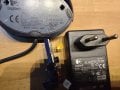
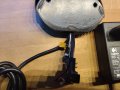
Unknown type of polyswitch

Thread Starter

MisterLonewold

Joined Jun 5, 2025
20
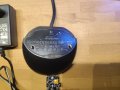
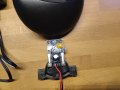
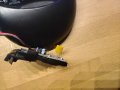
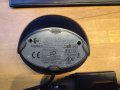
Ok her is the promised full conext with pictures. So for the mx 900 mouse, the one that does not charde the batteries fully:
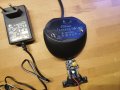
IMG_20250606_190531.jpg
This is the pcb of it with the dock and adaptor for reference for the specs. Ill zoom in in the next images.
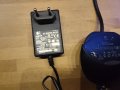
.trashed-1751821553-IMG_20250606_190543.jpg
IMG_20250606_190538.jpg
IMG_20250606_190604.jpg
IMG_20250606_190621.jpg

And then for the mx700 mouse (i use this one just to compare, i dont actually know if this one charges correctly cause i dont heb 40hours of time to wait on it).
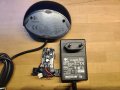
IMG_20250606_190641.jpg
IMG_20250606_190647.jpg
IMG_20250606_190652.jpg
IMG_20250606_190705.jpg
IMG_20250606_190718.jpg

Ill also add for context the following: the mx900 is the mouse i am tying to use and charge, it does seem to charge the batteries until a certain point, mainly 1.37V per cell (nimh cells from panasonic of 1900mAh) however the mouse does not last a day on it. But if i charge the batteries with a dedicated charger they go to 1.42-1.46V and this makes the mouse last 5 days or so. This was all with the same batteries and mouse, just a different charger. its like the mouse charger cuttsoff to early or so.

 

MisterBill2

Joined Jan 23, 2018
27,522
I see a lot of things that could fail and cause a lack of charge. I see one or two wall warts tha may have poor connections. I see a red wire and a black wire that should have that 5.8 volts between them. Lots of things to check prior to unsoldering anything. And we have no hint about the TS soldering skills. In some threads in the past I have seen total destruction from poor solder work. I have no clue about the TS is this instance.
 

Tonyr1084

Joined Sep 24, 2015
9,744
Here's a novel idea: How old are the batteries? My mice (or mouses if that's the correct term for computer mouses - mice? Meece?) Mine last weeks on a full charge. Mine don't have a charging dock; would be nice if they were wireless charging, but if your mice are not lasting a week on a full charge - I'd suspect the batteries may be the cause of the issues. A bad cell won't appear to be the same load to the charger and may fool the charger into thinking the mouse is fully charged.
 

Thread Starter

MisterLonewold

Joined Jun 5, 2025
20
I see a lot of things that could fail and cause a lack of charge. I see one or two wall warts tha may have poor connections. I see a red wire and a black wire that should have that 5.8 volts between them. Lots of things to check prior to unsoldering anything. And we have no hint about the TS soldering skills. In some threads in the past I have seen total destruction from poor solder work. I have no clue about the TS is this instance.
Well the thing is i do not know exactly where to look. The ac adaptor (the red and blakc wire from the charging dock thus) aswell as the actial (pogo like) pins that connect to the mouse give 6.0V on my mulitmeter (even though the adaptor whould give 5.8V but i guess thats cause its an open circuit or so). thats why i looked in the dock, and later on possibly in the mouse. i do not know if the voltage drops segnificantly when charging since i didnt have the correct leads to measure last time (you know, small pins or crocodile clamps).

As for my soldering skills, I like to think they are pretty on pint since i solderd many 0603 smd components a few weeks ago without destroying them. I also have a desoldering station. But even then i dont wanna reclessly desolder stuff for no reason, cause i think it coudl break since its so old.
 

Thread Starter

MisterLonewold

Joined Jun 5, 2025
20
Here's a novel idea: How old are the batteries? My mice (or mouses if that's the correct term for computer mouses - mice? Meece?) Mine last weeks on a full charge. Mine don't have a charging dock; would be nice if they were wireless charging, but if your mice are not lasting a week on a full charge - I'd suspect the batteries may be the cause of the issues. A bad cell won't appear to be the same load to the charger and may fool the charger into thinking the mouse is fully charged.
I havee actually no idea, i think about 6years old? idk for sure but they are barly used barely used and like i said, with a normal AA cell wall charger they charge fine and last as long as i expect them to. they are panasonic HHR-3MVE cells, like in this picture, pretty sure they are the exact ones.1749304445012.jpeg
 

Thread Starter

MisterLonewold

Joined Jun 5, 2025
20
How many cells in the mouse?
2 of those cells, and the battery door on the mouse says that they need to be nimh and between 1500-1900mAh. So i am right at the limit, but then that means there might be a component aging badly cause it should be able to handle it, no?
 

Tonyr1084

Joined Sep 24, 2015
9,744
Right now I have a 12V battery on my desk. A Duracell Ultra (12V 5Ah). It measures 12V. But it can't even light a simple automotive bulb. That's due to a condition known as sulfating of the plates. The battery can't deliver the current even though a reading of the battery voltage says 12V. I don't know NiMh batteries and I don't know if they can suffer similar fates. But just because a battery measures proper voltage, one would have to test it with a load and calculate the time the battery should last. If it doesn't then probably the internal resistance has increased significantly. Before you do anything more, swap the batteries around and see what happens. If you have or can get new batteries - try that. See what happens. Extra batteries are always nice to have around.

So in my mind we have not ruled out bad batteries. Even a single battery can greatly affect performance. I'm not placing all the issues on batteries, just saying it's worth looking into. In other words, fully diagnose the problem before you start replacing parts. After all, you could end up with a new car for your radiator cap.
 

Thread Starter

MisterLonewold

Joined Jun 5, 2025
20
Right now I have a 12V battery on my desk. A Duracell Ultra (12V 5Ah). It measures 12V. But it can't even light a simple automotive bulb. That's due to a condition known as sulfating of the plates. The battery can't deliver the current even though a reading of the battery voltage says 12V. I don't know NiMh batteries and I don't know if they can suffer similar fates. But just because a battery measures proper voltage, one would have to test it with a load and calculate the time the battery should last. If it doesn't then probably the internal resistance has increased significantly. Before you do anything more, swap the batteries around and see what happens. If you have or can get new batteries - try that. See what happens. Extra batteries are always nice to have around.

So in my mind we have not ruled out bad batteries. Even a single battery can greatly affect performance. I'm not placing all the issues on batteries, just saying it's worth looking into. In other words, fully diagnose the problem before you start replacing parts. After all, you could end up with a new car for your radiator cap.
What you say is completely true, but i was not at the point of replacing just yet because you know, money doesnt grow on trees :). I wanted to fidn a datasheet for that specific component to check if it is acting like it should, since they are both simeplair but not giving the same value. I am gonna check the mouse next and then consider the batteries and after that replacing components if nessesairy. But i am pretty confident that the batteries are good since, when charged with a dedicate AA batterycharger, they last exactly like i expect them to. but its certainly an option to look at them again.

Also interesting to note is that i charged the mouse again yesterday with the other walladaptor this time( sicne they should be both the same), and even though the voltage is still only 1.37V for each cell, it still didnt die on me since yesterday, so it might even be the wasladaptor that cant deliver the needed current or so, idk. I am gonna keep an eye on it anyway.

But i guess, besides contacting littlefuse like someone said before, i am not gonna find a datasheet for those orange ones am i?
 

MisterBill2

Joined Jan 23, 2018
27,522
One more simple check: take the batteries thru a complete charge period as recommended, then measure accurately the terminal voltage with no load applied. AND, measure the voltage across the cells during the charging period.
REport those voltages to us. THAT can provide a clue as to if it is time for a battery replacement.
 

Thread Starter

MisterLonewold

Joined Jun 5, 2025
20
One more simple check: take the batteries thru a complete charge period as recommended, then measure accurately the terminal voltage with no load applied. AND, measure the voltage across the cells during the charging period.
REport those voltages to us. THAT can provide a clue as to if it is time for a battery replacement.
I already did the charging peroid before using the mouse, cause they were completely empty for a long time, and this resulted in the earlier mentioned 1.42V with a normal AA cell charger (so not the mouse) and the charger uses 1.4V (so probs with tolerance since the cells are 14.2V) and 700mAh. They also lasted for a long time after this.

I can do the same with the mouse if you want to know it but its currently "completely" charged. I say "completely" cause they still measured only 1.375V after charging with the mouse BUT they are holding on now, its been 2 days now since i charged them. The only thing i did was use the other wall adaptor i had for the stations (so the one for the mx700 mouse this time). I guess that, if the mouse holds on for a few cycles in this way, the one wall adapeter i used before (the mx900 one) is weak/bad? I htink this cause they should be exactly the same going of of the specs. But also, since they are exactly the same idk which one originally came with which dock.
 

MisterBill2

Joined Jan 23, 2018
27,522
One thing that can provide a lot of insight is the cell voltage drop from freshly charged when the load is first applied. The drop from no load to full load initially versus after a few hours of use. That shows the battery effective internal resistance, which indicates the usefulness of the battery for that application.
 

MisterBill2

Joined Jan 23, 2018
27,522
What is a polyswitch? Is that a brand name? A picture would help but I know there may be a restriction on new members.
A "Polyswitch" is a Positive Temperature coefficient resistor used to prevent excessive over-current. It may even have a non-linear TC . The best ones rapidly increase resistance when the current rises above some specified level.

In this case the check for correct operation will be to monitor the voltage across the device in operation to see if the start of current limiting is starting at too low a value.
My experience has been that the heat of soldering the leads can cause a permanent change, if there is too much heat or tolong a time.
 

Thread Starter

MisterLonewold

Joined Jun 5, 2025
20
One thing that can provide a lot of insight is the cell voltage drop from freshly charged when the load is first applied. The drop from no load to full load initially versus after a few hours of use. That shows the battery effective internal resistance, which indicates the usefulness of the battery for that application.
Ok so, i measured the bats right after the mouse died, on is 0.9V and on is 1.1V (even though they are in series? maybe one is bad afterall but that does not declare why it doesnt get charged to 1.42V like it should i think, i coudl be wrong).

The cradle outputs 6V without a mouse on it. When i place the mouse on it it sends, without the batteroes installed, 5.6 ish V to the battery terminals.

When i install the batteries and put the mous on the cradle the voltage over the batteries (they are 0.9V and 1.1V respectively when i put them in) is 2.50V and very slowly climbing.
 

Tonyr1084

Joined Sep 24, 2015
9,744
When i install the batteries and put the mouse on the cradle the voltage over the batteries • • • is 2.50V and very slowly climbing.
High internal resistance can do this.

if you have one, a very small motor that runs on very low voltage, you can run it on a single battery and listen to the tone generated, if it makes enough sound. A weak battery will manifest itself quite fast. Something I did a long time ago was take a plastic bottle cap, one with ridges, and poke the motor shaft through the cap. Then using a battery to spin the motor and using something like the corner of a playing card and listen to the tone. Battery after battery, without the aid of a meter, I could quickly sort out the stronger batteries from the weaker. Perhaps I'll make a video and post it to BoobToob. While it seems like a goofy way of testing batteries - it works.
 

Thread Starter

MisterLonewold

Joined Jun 5, 2025
20
I have found that simply watching the meter voltage display while the load is connected provides an adequate picture of the battery capabilities.
ok so without load one cell is 1.17 and the other is 1.23V, and under load they are 2.35 V, as for the other 2 of the same pakage (that i didn't use up untill now) they were 1.29V each(no load) and under load 2.55V.
 

Thread Starter

MisterLonewold

Joined Jun 5, 2025
20
High internal resistance can do this.

if you have one, a very small motor that runs on very low voltage, you can run it on a single battery and listen to the tone generated, if it makes enough sound. A weak battery will manifest itself quite fast. Something I did a long time ago was take a plastic bottle cap, one with ridges, and poke the motor shaft through the cap. Then using a battery to spin the motor and using something like the corner of a playing card and listen to the tone. Battery after battery, without the aid of a meter, I could quickly sort out the stronger batteries from the weaker. Perhaps I'll make a video and post it to BoobToob. While it seems like a goofy way of testing batteries - it works.
i do not have such a ting at the moment but its certainly an interesting way to keep in mind :)
 

wraujr

Joined Jun 28, 2022
259
Top