Understanding PWM on a 4-pin fan

Thread Starter

elsmandino

Joined Mar 3, 2022
7
Hi there.

I am taking up electronics as a hobby and am really struggling with how my 4-pin pwm fan (taken from a PC) actually works.

I have connected the 12v and ground pins, on the fan, to an old router power supply and the fan is spinning at maximum revs.

If I then connect the pwm wire on the fan to the ground on the power supply, the fan switches off.

What, therefore, does the pwm pin actually do on the motherboard of the PC?
 

ThePanMan

Joined Mar 13, 2020
864
Passive Wiring Method ? ? ?

Positive Wave Monitor ? ? ?

Possessive Wife Machine ? ? ?

Pulse Width Modulation ? ? ? ")

PWM is the modulation of the pulse width. Every pulse comes at the exact same time spacing. How long it remains high versus how long it stays low produces an overall average power. The Mother Board, and I'm probably guessing here, detects the temperature of the CPU. If it's running cool then the fan can be slowed down. If it's running on the hot side then the fan goes into higher RPM. Without PWM your fan will run at full speed. One of those wires - I guess - is for the MB to know if the fan is working as expected. If the bearings of the fan are going bad then the blades will slow down, and the computer will know there's a problem. It will increase the amount of power going to the fan. If the fan stops turning all together then the CPU needs to be shut down to prevent thermal failure.

I have several fans out of computers. I just run them at full speed or I use PWM to power the fan as I may desire. They can be useful for smoke extraction when soldering. Otherwise, and I don't know about anyone else here, but the smoke ALWAYS finds its way to my face no matter where I'm sitting in the room. I guess it's the heat rising off my body that sets up a convection that just draws the smoke to my face. But with the fan pulling a gentle breeze away from where I'm soldering the smoke doesn't bother me.

And excuse my silliness at the top. There's a chance you do know what PWM is. But if not - it doesn't hurt to explain it because the next guy who comes across this thread might not know.
 
Last edited:

Reloadron

Joined Jan 15, 2015
7,868
Wow, this is a Deja Vu all over again.


This is your fan data sheet.

You have 4 pins. When you apply 12 VDC to the 12V pin and ground the fan runs at about 1350 RPM which is maximum speed. Your fan has 4 pins. In addition to 12 volt power you have a tach out normally two pulses per revolution and you have a PWM (Pulse Width Modulation) input. Try something. With the fan powered as you have running full speed try connecting the PWM in pin to ground rather than have it just float. Does the fan stop?

Should that work and you have a source of PWM pulses you can apply your PWM pulses to the PWM in pin. The tach out is strictly an output so a cpu can determine the fan speed. The PWM as was mentioned is simply turning the fan On/Off at a very fast rate. This makes for fan speed control. Likely as mentioned using a MOSFET internal to the fan. Figure at full speed the fan only draws 110 mA so a tiny little N Channel MOSFET is easily embedded in the fan case.

Ron

Copied and pasted from the Arduino Forums. Hopefully you will get an understandable answer. Never hurts to ask the same question in several places. :)
 

Thread Starter

elsmandino

Joined Mar 3, 2022
7
Thanks everyone - really appreciate your responses.

Here is what I think is happening, based upon what you have said:

The fan contains a mosfet, the bridge of which is the PWM wire.

The mosfet is of the type where if no voltage is applied to the gate, the stream stays open - this is why the fan spins at full speed when only the ground and +12v are plugged in.

It is from here, that things start to get a bit muddled in my head:

1. I would have assumed that, based upon the above, a voltage added to the PWM wire would make the fan stop.

However, why does grounding this wire have the same effect?

Is the fan's 12v power supply also being added to the PWM wire as well?

2. I used a multimeter to check the voltage between the PWM wire and the ground on the power supply and it read 7.35v - is that to be expected?

Perhaps if I give a bit of background, behind this, that might also help:

I have a Raspberry Pi 2 that I would like to use as a NAS (underpowered for the job but I am hoping to swap this for a RPi 4 in the near future).

I want to have the Pi monitor its CPU temperature and use PWM to ramp up the fan speed as necessary.

I was going to power the fan from a separate 12v DC power supply but it is the PWM pin that is causing me a bit of concern (as the Pi pin are apparently only rated for 3.3v).

My initial though was just to connect the PWM of the fan to a PWM pin on the Pi but I am worried that I am going to destroy it.
 

Reloadron

Joined Jan 15, 2015
7,868
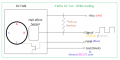
Below is a rough cartoon of what a 4 wire fan typically looks like.

4 Wire Fan approximate.png
The +VCC is the 12 volt constant power. The hall effect sensor is the tachometer out with an external pull up resistor illustrated. The PWM is the external PWM signal applied to control fan speed. When left floating it's anyone's guess what voltage may be found. Notice the fan motor is switched by the MOSFET on the low (Ground) side of the motor. The MOSFET illustrated is an N Channel which is suitable for low side switching. Applying a Logic level High to the Gate turns the MOSFET On. Leaving the gate open and floating will result in the MOSFET being On. Normally external to the fan the PWM line in will have a 10K resistor to ground. This will prevent the fan from running full speed when no PWM signal is applied. For the fan to run the PWM input is a logic high, a logic low turns off the MODFET which is why grounding the PWM line stops the fan.

Next and as mentioned fans like this typically use what we call a Logic Level MOSFET meaning the pulses applied to the gate of the MOSFET are 5.0 Volts. Meaning that 5.0 VDC is enough to turn on the MOSFET. This is commonly called the gate source voltage. If you pursue this I suggest adding an external 10K resistor to ground, a 1/4 watt or even 1/8 watt should do fine.

Ron
 

k1ng 1337

Joined Sep 11, 2020
1,038
Thanks everyone - really appreciate your responses.

Here is what I think is happening, based upon what you have said:

The fan contains a mosfet, the bridge of which is the PWM wire.

The mosfet is of the type where if no voltage is applied to the gate, the stream stays open - this is why the fan spins at full speed when only the ground and +12v are plugged in.

It is from here, that things start to get a bit muddled in my head:

1. I would have assumed that, based upon the above, a voltage added to the PWM wire would make the fan stop.

However, why does grounding this wire have the same effect?

Is the fan's 12v power supply also being added to the PWM wire as well?

2. I used a multimeter to check the voltage between the PWM wire and the ground on the power supply and it read 7.35v - is that to be expected?

Perhaps if I give a bit of background, behind this, that might also help:

I have a Raspberry Pi 2 that I would like to use as a NAS (underpowered for the job but I am hoping to swap this for a RPi 4 in the near future).

I want to have the Pi monitor its CPU temperature and use PWM to ramp up the fan speed as necessary.

I was going to power the fan from a separate 12v DC power supply but it is the PWM pin that is causing me a bit of concern (as the Pi pin are apparently only rated for 3.3v).

My initial though was just to connect the PWM of the fan to a PWM pin on the Pi but I am worried that I am going to destroy it.
The purpose of PWM is to set the average voltage from an input source to a load via a switching transistor. A PWM duty cycle of 100% will yield the full voltage of 12V, 50% will yield 6V and 0% will yield 0V. The PWM duty cycle can be interpreted as a ratio of the supply voltage. Note that the maximum voltage of a PWM signal does not have to match the source voltage, it only has to correspond (ratio) which in an inherent feature of PWM that makes it so useful and dummy proof.

Thus the maximum voltage of a PWM signal will commonly be 3.3V or 5V (from a microcontroller perhaps) and the source voltage can be whatever you want as long as your switching transistor allows. Therefore grounding the PWM wire on the fan is as if you are feeding it a 0% duty cycle PWM signal.
 

Reloadron

Joined Jan 15, 2015
7,868
Something else to consider since you mention using a uC (Arduino) I have not mentioned. You have a 12 volt fan. Using an Arduino PWM out is expressed as a value between 0 and 255 so in your code it looks like this:
Analog In PWM Out:
const int pwm = 9 ;    //naming pin 9 as ‘pwm’ variable
const int adc = 0 ;   //naming pin 0 of analog input side as ‘adc’
const int sensorValue = 0 ;
void setup()
{
     pinMode(pwm,OUTPUT) ;  //setting pin 9 as output
}
void loop()
{
     int adc  = analogRead(0) ;    //reading analog voltage and storing it in an integer
     adc = map(adc, 0, 1023, 0, 255);  //map the analog input to 0 to 255 for PWM out.
 Serial.println(sensorValue);
 Serial.print(" "); 

 analogWrite(pwm,adc) ;
}
What you need to do is have an analog input from your temperature sensor as an analogRead scaling it for 0 to 1023 (2^10) which is your 10 bit Arduino analog input. In the above example we map the analog in value to a PWM output value. As written as the analog input value from your temperature sensor increases, temperature rise, the pulse with of your PWM out increases and your fan speed increases.

Now the caveat. Your fan likely will not even run below a certain level (PWM) so you need to experiment. A 12 volt fan using a 0 to 5 volt control is going to be ratiometric. In the above example 0 to 5 volts into your analog in will result in 0 to 100% PWM or 0 to 255 bit count. If your fan requires at least 3.0 volts to even start obviously you don't want a PWM count below 75 bits. When setting up your map function you need to scale to real life working numbers, Also when writing your code it's best to have the fan start at full speed for a few seconds and then settle down and run based on temperature input.

Once you define your temperature sensor schemes and limits fan speed control can be worked out.

Things to Consider
Ron
 

eetech00

Joined Jun 8, 2013
4,704
Thanks everyone - really appreciate your responses.

Here is what I think is happening, based upon what you have said:

The fan contains a mosfet, the bridge of which is the PWM wire.

The mosfet is of the type where if no voltage is applied to the gate, the stream stays open - this is why the fan spins at full speed when only the ground and +12v are plugged in.

It is from here, that things start to get a bit muddled in my head:

1. I would have assumed that, based upon the above, a voltage added to the PWM wire would make the fan stop.

However, why does grounding this wire have the same effect?

Is the fan's 12v power supply also being added to the PWM wire as well?

2. I used a multimeter to check the voltage between the PWM wire and the ground on the power supply and it read 7.35v - is that to be expected?

Perhaps if I give a bit of background, behind this, that might also help:

I have a Raspberry Pi 2 that I would like to use as a NAS (underpowered for the job but I am hoping to swap this for a RPi 4 in the near future).

I want to have the Pi monitor its CPU temperature and use PWM to ramp up the fan speed as necessary.

I was going to power the fan from a separate 12v DC power supply but it is the PWM pin that is causing me a bit of concern (as the Pi pin are apparently only rated for 3.3v).

My initial though was just to connect the PWM of the fan to a PWM pin on the Pi but I am worried that I am going to destroy it.
Do you have a part number for the fan?

Nevermind....found it.

Just use the 3-pin socket attached to the fan cable:
1646454305211.png
 
Top