Troubleshooting Rotary Encoder

Thread Starter

tothemoonn

Joined May 21, 2018
21
Hello!

I'm working on a stirring hot plate that uses two quadrature encoders to set temperature and stir speed. Recently the encoders have begun to malfunction - resulting in values jumping rapidly or at times incrementing in the opposite direction to the actual knob turn. The encoders themselves seem to be fine - the signal looks pretty much as I'd expect on the scope, and I replaced one entirely with a known good encoder with no luck. The two channels of the encoder both appear to feed directly into the microcontroller on the board and the only other component attached to the path of a given encoder channel is a typical small value surface mounted decoupling cap.

I've read here that it's typical for encoders to use a first order RC filter to deal with mechanical noise and clean up the signal for the MCU but that doesn't seem to be the case here, so I'm stumped as to what else could be causing the issue. I don't know what the original value for the decoupling caps was or if it's worth trying to replace them ( they are flea bite sized and I get the impression small ceramic caps are not likely to fail anyways ). If the problem then is in the MCU, what might give rise to this kind of issue? Bad power to the MCU, a problem with the reference, clock issues?
 

joeyd999

Joined Jun 6, 2011
6,204
Hello!

I'm working on a stirring hot plate that uses two quadrature encoders to set temperature and stir speed. Recently the encoders have begun to malfunction - resulting in values jumping rapidly or at times incrementing in the opposite direction to the actual knob turn. The encoders themselves seem to be fine - the signal looks pretty much as I'd expect on the scope, and I replaced one entirely with a known good encoder with no luck. The two channels of the encoder both appear to feed directly into the microcontroller on the board and the only other component attached to the path of a given encoder channel is a typical small value surface mounted decoupling cap.

I've read here that it's typical for encoders to use a first order RC filter to deal with mechanical noise and clean up the signal for the MCU but that doesn't seem to be the case here, so I'm stumped as to what else could be causing the issue. I don't know what the original value for the decoupling caps was or if it's worth trying to replace them ( they are flea bite sized and I get the impression small ceramic caps are not likely to fail anyways ). If the problem then is in the MCU, what might give rise to this kind of issue? Bad power to the MCU, a problem with the reference, clock issues?
This document contains the recommendation for a series of Bourns encoders as far as filtering is concerned (see the schematic on sheet 2). It works well, as long as the CPU is not programmed with weak pull-ups on the A/B input port pins. And, it limits the rotational speed at which the encoder will function.
 

Thread Starter

tothemoonn

Joined May 21, 2018
21
This document contains the recommendation for a series of Bourns encoders as far as filtering is concerned (see the schematic on sheet 2). It works well, as long as the CPU is not programmed with weak pull-ups on the A/B input port pins. And, it limits the rotational speed at which the encoder will function.
Thanks for the link - it's interesting to see different approaches for how these things are hooked up. Unfortunately I dont think I have the pad real estate to really alter the filtering scheme, short of changing the value of the single decoupling cap/channel that is already there I think my only option is to try to repair whatever it is that has begun to fail rather than trying to modify it. It's tight real estate in this thing and everything is very small, and the factory circuit was reliable for 5 or more years so it must be repairable right?
 

joeyd999

Joined Jun 6, 2011
6,204
Thanks for the link - it's interesting to see different approaches for how these things are hooked up. Unfortunately I dont think I have the pad real estate to really alter the filtering scheme, short of changing the value of the single decoupling cap/channel that is already there I think my only option is to try to repair whatever it is that has begun to fail rather than trying to modify it. It's tight real estate in this thing and everything is very small, and the factory circuit was reliable for 5 or more years so it must be repairable right?
Do you have a scope? If so, look at the A and B inputs to ensure they are clean and without excessive bounce when you turn the encoder.
 

Thread Starter

tothemoonn

Joined May 21, 2018
21
They appear to look at least as good in terms of bounce ( these are optical but I guess the term still applies? ) as they did from new which is why I think the problem has to be with decoupling somewhere ( decoupling since there's no sign of an RC filter or anything but a decoupling cap in the path from A and B all the way to the MCU ) or another problem with the MCU itself.
 

joeyd999

Joined Jun 6, 2011
6,204
They appear to look at least as good in terms of bounce ( these are optical but I guess the term still applies? ) as they did from new which is why I think the problem has to be with decoupling somewhere ( decoupling since there's no sign of an RC filter or anything but a decoupling cap in the path from A and B all the way to the MCU ) or another problem with the MCU itself.
A good optical encoder should not require debouncing, just good decoding code in the firmware.

But I cannot see how that would have changed over the years.
 

Thread Starter

tothemoonn

Joined May 21, 2018
21
A good optical encoder should not require debouncing, just good decoding code in the firmware.

But I cannot see how that would have changed over the years.
Ditto! There has to be some solution though, and I'd hate to see a $1200 piece of equipment get trashed for such a silly issue.
 

RichardO

Joined May 4, 2013
2,270
I am guessing that the vibration from the stirrer has caused the wires connecting to the encoders to go intermittent. The wires will tend to break at places that they can't move. This includes at strain reliefs.

I suggest looking to see if any of the wires have broken inside the insulation. The way I do this is to pull on the wires. Any wire that stretches is broken where it stretches.
 

Thread Starter

tothemoonn

Joined May 21, 2018
21
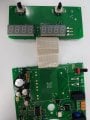
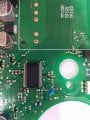
So as you can see the A/B and ground pins are along the left hand side of the encoders. Those pads have traces that go straight to the flat flex cable, exit, and head to the MCU in the second photo. The traces and caps marked in red each represent an A or B pin on one of the encoders. The ground pins on each encoder have been checked to also be connected solidly to ground -- good continuity with other grounds in the area and the ground side of all the decoupling caps so I'm fairly confident it's not a loose wire issue...these are pretty smooth, quiet operating plates with a high quality 3 phase motor mounted directly to the chassis, so vibration is really minimal.
 

MrChips

Joined Oct 2, 2009
34,630
If you have an oscilloscope, first thing to check would be the low voltage power supply.
Make sure the supply voltage is correct with no noise or ripple.

You could temporarily put a 10-100μF electrolytic across Vcc and GND on the encoder board and see if that helps.
 

ScottWang

Joined Aug 23, 2012
7,499
resulting in values jumping rapidly or at times incrementing in the opposite direction to the actual knob turn.
Except this one, any other failures of encoder?

Could you measure the input A/B of Mcu? (this is to make sure the inputs signal A/B of encoder are ok)

Have you ever check the 26 pins wires (cable) between the Display board and Mcu board?
 

Thread Starter

tothemoonn

Joined May 21, 2018
21
If you have an oscilloscope, first thing to check would be the low voltage power supply.
Make sure the supply voltage is correct with no noise or ripple.

You could temporarily put a 10-100μF electrolytic across Vcc and GND on the encoder board and see if that helps.
I take a look at these things today - I was finally able to find a good part number on the MCU so I at least have the pin assignments on it now.

Except this one, any other failures of encoder?

Could you measure the input A/B of Mcu? (this is to make sure the inputs signal A/B of encoder are ok)

Have you ever check the 26 pins wires (cable) between the Display board and Mcu board?
That's the only way it's failing, but I have two different stir plates with the same issue - one with only a single encoder doing it, and both seem to have the issue on the other.

I can at least check that they are similar to the signal I see probing the leg of the encoder directly. My scope is old and doesn't have any memory though so assessing the quality of the signal is a little tricky...it's not there long. I can see that A and B are working and appear to have polarities and timing roughly like you'd expect between A/B, but quantifying the bounce, particulars of the timing, or getting a picture of the trace for you folks to verify will be a little harder.

I have checked out those wires and they're all looking good.
 

RichardO

Joined May 4, 2013
2,270
Nice pictures. That helps a lot.

Be very gentle with the flex cable. Just a few bends near the connections can cause them to break. It may not be obvious that you have a broken conductor. Use a magnifying glass to see the connections better.

Learned the hard way. :(
 

ScottWang

Joined Aug 23, 2012
7,499
I can at least check that they are similar to the signal I see probing the leg of the encoder directly. My scope is old and doesn't have any memory though so assessing the quality of the signal is a little tricky...it's not there long. I can see that A and B are working and appear to have polarities and timing roughly like you'd expect between A/B, but quantifying the bounce, particulars of the timing, or getting a picture of the trace for you folks to verify will be a little harder.
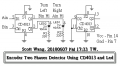
You can use a simple circuit to do the test for the A input and B input, and connecting them to the inputs of Mcu, when you turning the encoder to the right direction then the Led1 will be light up and Led2 will be Turn OFF, and when you turning the encoder to the left direction then the Led2 will be light up and Led1 will be Turn OFF.

Encoder Two phases detector_ScottWang.png

I have checked out those wires and they're all looking good.
Did you measure the cable pin to pin using the multimeter turn to the Rx1 range and does not just checked it used your eyes?
 

Thread Starter

tothemoonn

Joined May 21, 2018
21
Nice pictures. That helps a lot.

Be very gentle with the flex cable. Just a few bends near the connections can cause them to break. It may not be obvious that you have a broken conductor. Use a magnifying glass to see the connections better.

Learned the hard way. :(
I've been there. It's all good here though - every conductor has been inspected visually and with the DMM, nothing broken there.

You can use a simple circuit to do the test for the A input and B input, and connecting them to the inputs of Mcu, when you turning the encoder to the right direction then the Led1 will be light up and Led2 will be Turn OFF, and when you turning the encoder to the left direction then the Led2 will be light up and Led1 will be Turn OFF.

View attachment 153867


Did you measure the cable pin to pin using the multimeter turn to the Rx1 range and does not just checked it used your eyes?
Thanks for the suggestion. I did check the flat flex with a multimeter - everything is good there. I wired up the circuit you described but my results are a little inconclusive for me...Here's a video of the circuit's behavior. As you can see, while rotating the LEDs do indeed alternate, but you can probably also see on the readout the numbers failing to track properly, and you might notice that the LED connected to Q1 is often the one left on at the end of a sweep in either direction, with the other being left on instead only a portion of the time, regardless of sweep direction. I just dont have enough experience with encoders to know if that relates to my problem. One channel certainly seems to be dominant for some reason, ON a greater % of the time and a bit brighter for some reason or another.
 

ScottWang

Joined Aug 23, 2012
7,499
I saw the numbers didn't decrease and only increasing, so the Mcu didn't receive the turn left signal.

Could you measure the voltages of Ain/Bin at the inputs of Mcu, before you turn it and after you turn it to the right and left direction?

Could you build the circuit in the page 2 of the document that joeyd999 provided the linked, and you have to use another encoder independently, just use the circuit of encoder and my circuit and do the test again, and turning the encoder very slowly, and make the video.
 
Top