Treadmill suddenly stopped working and blew fuse

keewhip

Joined Mar 13, 2018
12
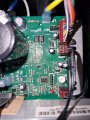
I replaced the controller board with a new one.
The treadmill functioned ok after that, for 10 minutes.
Then the fuse blew again.

I turned the power back on.
Trying again to turn on the belt motor doesn't blow the fuse anymore, but the motor doesn't run either.
I can turn the belt by hand with normal effort.
Display and incline etc. functions normally.

I guess it must be the motor then which causes the board to fail.
Out of curiosity, I will try to run the motor on an external power source again.
But I am afraid this repair ends here for me.
 

keewhip

Joined Mar 13, 2018
12
I Checked the motor again with an external power supply and it runs fine, not super quiet but it seems normal to me.

Turning the motor and treadmill by hand is also really easy, no broken bearings or weird resistance.

I find it hard to just abandon the repair and ditch a treadmill with what looks like good hardware to me.

I decided give it another go.
I want to replace the mosfet and the rectifier and let the motor run for 2+ hours without the belt connected.
Then see from there :)

Last time I replaced the mosfet GP4063D with IKW50N65ET7XKSA1.
I would like to replace it with the exact original this time, but I can't find it anywhere. Only used desoldered mosfets on Aliexpress etc.
I found the suggestion for the replacement over here: https://community.infineon.com/t5/IGBT/IRGP4063D-replacement/td-p/356770#.

Should I get a second hand original mosfet from Aliexpress, or a brand new IKW50N65ET7XKSA1 from Farnell?

The IXYS DCEI30-06A is available new from Farnell.
 

keewhip

Joined Mar 13, 2018
12
Amazon have the GP4063D, just you have to buy qty 10!

PS: I see they also sell a pair!
The ones I find on amazon all seem to have traces of solder on the legs and it states nowhere they are new.
Maybe that's why you have to buy them in batches of 2, 5 or 10; then there's room for error...

Is your advice to buy original second hand or replacement new, I lean to the new replacement.
In the datasheet it does seem to match the original one.

BTW:
I just desoldered the replaced mosfet and measured it with a simple multimeter and it is toast.

And I found out I am an ignorant stupid twat...
Upon further inspection of the roller bearings I found some metal chips; one bearing is finished.
Rolling by hand is fine, but I can imagine this creates too much resistance when warming up, thus frying the controller board.

So, I'll add four bearings to the list :)
 
Last edited:

Havercy16

Joined Nov 15, 2025
1
A treadmill that suddenly stops and blows a fuse is likely experiencing a short circuit in the motor or control board, or there is excessive friction from the belt and deck. To troubleshoot, start by replacing the fuse with one of the correct rating, then inspect the power cord, motor brushes, and wiring. If the issue persists, reduce strain by cleaning and lubricating the belt, and if the problem continues, a faulty motor control board or motor itself is the probable cause, requiring professional diagnosis.
 

keewhip

Joined Mar 13, 2018
12
@keewhip did you find the bearing problem the cause?
I replaced the 4 bearings by SKF bearings, should be good for the coming years.
One bearing was obviously worn out, another was a case of doubt.

Haven't been able to run or test the new setup yet, because I am waiting on the GP4063D Mosfet to arrive.

I will post an update when there is new information.
 

keewhip

Joined Mar 13, 2018
12
Update,
The GP4063D Mosfet arrived yesterday and today I soldered it in the original controller board.

The treadmill runs again but here is something fishy about it.
The treadmill runs, but when I get on it it runs at a significantly lower speed then when I am next to it.

I assume the reed sensor next to the the front roller measures the speed of the belt and the controller board controls the speed of the motor based on the reed sensor reading.
So when I set the speed to 10km/h, it will run at this speed wether it is running with no load or I am on it (causing much more drag, hence more power).
It doesn't...

When I unplug the reed sensor, the treadmill shows the exact same behavior.
It runs at a faster speed when running with no load and a significantly lower speed if I am on it.
No error message or anything like that.

So, nw I am thinking I have a faulty reed sensor.
The magnet is still in the present in the front roller.
Can I test the speed pickup sensor with a multimeter?
 

keewhip

Joined Mar 13, 2018
12
I measured the reed sensor, seems to function normally.
It is around 3 Ohm next to the magnet and open otherwise.

While the belt is running, I took out the reed sensor from its position near the magnet and there was no change in speed or functioning whatsoever.

Any ideas?
 

MaxHeadRoom

Joined Jul 18, 2013
30,713
IIRC, the belt sensor comes into the motor board and then is steered up to the operator panel, if this is so it could either be a continuity (open) problem on the connectors/wiring, or in the console itself, which also has a microprecessor as well as the motor board.
The voltage for it comes from the console, Trace the pulse through the tach 2 pin input and at the console.
 

keewhip

Joined Mar 13, 2018
12
I measured the voltage over the two pins to the reed switch and it reads 5V.

If it gets its power from the console, there should be no wiring problem.
 
Last edited:

keewhip

Joined Mar 13, 2018
12
I looked at the treadmill again, but I am a bit lost.

The fact that the treadmill is behaving the same with or without the reed sensor connected is my biggest clue.

A static test shows the reed switch does function; open when the magnet isn't near the switch and about 3 Ohm when the magnet is in front of it.

There is 5V at the 2pin connectors to the reed switch when the machine is on.

There is a green cable which reads tach at the motor control board, which goes up to the console.
Visually it's looking A-OK and it is totally protected, no risk of it being grabbed or hooked somewhere.

Can/should I measure something at the green cable to the console when the treadmill is running?

The connection from the reed switch to the console connector is no straight line, it does cross paths with some components.20251127_211342.jpg

What are the odds the problem is actually in the console, all the buttons, bluetooth and lcd function like they should.
Is it worth removing the console for inspection or is this it and should I scrap the treadmill?

@MaxHeadRoom you mentioned a reverse engineered schematic earlier in this thread, do you still have it and may I have a look at it?
 
Last edited:
Top