Thoughts On Using CNC Machines For Circuit Board 'Etching'

MrChips

Joined Oct 2, 2009
34,807
CNC machines are like 3D printers. You learn by doing. You have to experiment and try different things to be able to answer all your questions and what-ifs.

What happens when the machine attempts to move beyond its physical limits? That depends of the power the motor, the current drive capabilities of the motor drive and power supply and the strength of the mechanical structures. You would hope that any damage would be minimal and not too costly.

The top priority of the E-Stop is to prevent injury to any operator or bystanders. Saving the machine is secondary.
 

Thread Starter

MrAl

Joined Jun 17, 2014
13,702
Are you using work offsets for the program or from machine zero reference?
https://www.cnccookbook.com/g54-g92-g52-work-offsets-cnc-g-code/
Your drives should be set to the motor current limits, so no overcurrent should normally exist.
Steppers motors should be operated at their rated current from zero RPM to Maximum.
Normally LS are set up in the Normally closed condition, so any open circuit in E-stop line should stop the M/C.
Hi,

Right now I am not deep enough into it to use offsets or anything like that. For today I just used a manual control.
The manual control consists of a set of pushbuttons. There is one for -x, +x, -y, +y, -z, +z, and step size and spindle speed.
You set the step size to either 0.1, 1, 5, or 10. You then press any of the x,y,z buttons one only I think. The head moves in that direction.
When you press -z the head comes down and contacts the work, then you go a little deeper, then start moving with the x and y buttons to make an etched line.

I will probably get to more complex operations tomorrow or the next day.

I happened to run across a reading where they say the stepper motors will just stop moving, I guess that is slippage, if they cannot actually turn the lead screws anymore. Not sure if that is the only thing that happens or not, but I do have the kill switch now.
 

MaxHeadRoom

Joined Jul 18, 2013
30,654
On decent stepper motor drives, the current cannot (or should not) exceed the rating of the motor, the drive will go into current limit if they are stalled etc.
 

Thread Starter

MrAl

Joined Jun 17, 2014
13,702
On decent stepper motor drives, the current cannot (or should not) exceed the rating of the motor, the drive will go into current limit if they are stalled etc.
Hi,

Yes now I think that is what this one will do. I think the controller has a built in current limit. This was true of the drive chips I have used in the past myself also where you select a resistor value to limit the current. So maybe this CNC does not need limit switches.
I do like the kill switch though to stop operation before it can eat up the board being worked on.
 

MrChips

Joined Oct 2, 2009
34,807
On a small CNC machine such as CNC3018 the need for travel limits is not as essential as on a bigger, more powerful machine. Yes, it is not practical to install limit switches on the Z-axis.

On my home built CNC machine with a table size of 1000 x 600 mm, I have installed limit switches on all three axes. The motors are very powerful and would likely cause physical damage to the frame if limits were exceeded. I would not want to test it.
 

Thread Starter

MrAl

Joined Jun 17, 2014
13,702
Ideally you should still use over-travel limits.
Hi,

Oh ok thanks.
I am going to calculate the force on the head due to the current limit of the motor and the mechanical advantage of the lead screw. If the force is great enough I would think damage could happen so limit switches would be good.
However, I still have to question the use of a limit switch in the -z direction because the height will even with a circuit board I think. I am not sure if we could adjust the regular type of limit switch to an accuracy of maybe 0.1mm. Maybe a more expensive one for the -z direction.
 

Thread Starter

MrAl

Joined Jun 17, 2014
13,702
On a small CNC machine such as CNC3018 the need for travel limits is not as essential as on a bigger, more powerful machine. Yes, it is not practical to install limit switches on the Z-axis.

On my home built CNC machine with a table size of 1000 x 600 mm, I have installed limit switches are all three axes. The motors are very powerful and would likely cause physical damage to the frame if limits were exceeded. I would not want to test it.
Hi,

Oh wow that's a big one.
How did you do the limit switch in the -z axis direction?
 

MrChips

Joined Oct 2, 2009
34,807
The spindle motor is a huge 500W motor.
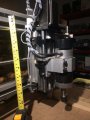
The bottom limit switch is visible. The top switch is partially hidden behind the spiral wrap.

CNC Z-axis.jpg
 

shortbus

Joined Sep 30, 2009
10,050
Hi,

Just for a possible better sitting position to fit in a special place. The total height is 11 inches, the width is 17 inches, the 'depth' is 12 inches. If standing on one side, the height is 17 inches, width 11 inches, depth still 12 inches. 11x12 stands in a floor space smaller than 11x17. That's really all, except maybe the dust and debris will fall to one side now which means it may not get into the lead screws. One side has no mechanics at all, so standing on that side it would just create a small pile of debris, and I would think less could get on the lead screws. I'm not really sure how much of a difference it would make though as I have not tried that yet. Maybe once I get up and running and familiar with everything.
Don't think you've been around mills much. How, if you turn in on it's side are you going to set up the work before starting to cut?
 

Thread Starter

MrAl

Joined Jun 17, 2014
13,702
Don't think you've been around mills much. How, if you turn in on it's side are you going to set up the work before starting to cut?
Hi,

By laying on my side? :)

There is no real difference except for the perceived direction of gravity.

I had a problem the other day with the CNC in the normal position and that was because of the direction of gravity being downward. When I put the bit in the collet I had to be careful that it did not drop out and hit the slide bed which is all metal. If it fell out of the collet when I went to tighten it with the two wrenches, it might have damaged the sharp tip. Then again when I went to remove the bit, when I loosened the collet, I had to be careful it did not drop out so I placed a crumpled-up paper towel that it could fall into and be cushioned.
If it was on its side, I would not have that problem. The bit would be sitting horizontally instead of vertically.
 

Thread Starter

MrAl

Joined Jun 17, 2014
13,702
The spindle motor is a huge 500W motor.
The bottom limit switch is visible. The top switch is partially hidden behind the spiral wrap.

View attachment 305942
Hi,

Thanks for the image and the explanation.

My question was what happens after you setup the limit switch on the bottom.
In your pic, we see the switch that detects when the head mechanism reaches what I presume to be the FINAL limit of travel of the head mechanism.
The head appears to be about say 2 inches from its lowest travel. That means if the head goes down by 2 inches, the switch opens (or closes) and that tells the control to stop the head from going down any farther.
But now place a 1 inch high piece of wood under it for the workpiece, and when the head comes down and the bit hits the wood, in order to mill the wood it has to go lower. So say it goes down too far and the bit hits the wood too abruptly. I think some bits would break off. Granted, that's just the bit though, but since the wood has some density to it and the bit did not break off all the way, the downward travel tries to force the bit through the wood and the wood resists, so the head mechanism is still effectively jammed up. That puts a lot of strain on the head and x bars. The head is not down far enough yet to trigger the limit switch, so it keeps pushing downward even though there is no movement.

I see that as the same problem as it reaching the bottom without a limit switch. What do you think?
 

MrChips

Joined Oct 2, 2009
34,807
You can only do so much with limit switches. The machine does not know the length of the cutting tool or the height of the work piece. Yes, you do break a lot of bits especially PCB drill bits if they are carbide bits.
 

Thread Starter

MrAl

Joined Jun 17, 2014
13,702
You can only do so much with limit switches. The machine does not know the length of the cutting tool or the height of the work piece. Yes, you do break a lot of bits especially PCB drill bits if they are carbide bits.
Hi,

Oh, I wish you hadn't told me that :)
I was hoping to avoid breaking bits but that's life I guess.
Too bad, I love using carbide bits, although it does require a lot of extra care in using.

That's why I was wondering if a lower z axis limit switch was worth installing.
Yes would be nice to have a 3d printer too now.
 

Thread Starter

MrAl

Joined Jun 17, 2014
13,702
The Creality Ended 3 printer is a great little machine. I get more work done on the 3D-printer (additive manufacturing) than on a CNC machine (subtractive manufacturing).

https://www.amazon.com/Comgrow-Creality-Ender-Aluminum-220x220x250mm/dp/B07BR3F9N6/
Hi,

I avoided getting a 3d printer because of what looks like the "bumpyness" of the finished piece. The ones I have seen appear to have bumps all over them.
Maybe you know some way to minimize this, or maybe some printers are better than others. I have no experience with one yet so maybe you can explain how you might create a simple 'bar' with at least two smooth sides. Maybe it's easy, I have no idea yet.
 

MrChips

Joined Oct 2, 2009
34,807
Hi,

I avoided getting a 3d printer because of what looks like the "bumpyness" of the finished piece. The ones I have seen appear to have bumps all over them.
Maybe you know some way to minimize this, or maybe some printers are better than others. I have no experience with one yet so maybe you can explain how you might create a simple 'bar' with at least two smooth sides. Maybe it's easy, I have no idea yet.
The bumpiness is the visible layer of extruded plastic that is layed down in the 3D printing process. Typically, each layer is nominally 0.2mm thick, i.e. there are 5 layers per mm. To me, this is just cosmetic in most cases. It does have lower shear strength in this plane and you keep this in mind in the mechanical design of the object. I have printed many plastic project boxes and enclosures and the striated finish does not detract from the final product at all. I have designed, built and sold industrial equipment housed in enclosures printed on the 3D-printer.

If you want exceptionally smooth finish, you can do this on a resin type 3D-printer. But that calls for a totally different discussion.
 

Thread Starter

MrAl

Joined Jun 17, 2014
13,702
The bumpiness is the visible layer of extruded plastic that is layed down in the 3D printing process. Typically, each layer is nominally 0.2mm thick, i.e. there are 5 layers per mm. To me, this is just cosmetic in most cases. It does have lower shear strength in this plane and you keep this in mind in the mechanical design of the object. I have printed many plastic project boxes and enclosures and the striated finish does not detract from the final product at all. I have designed, built and sold industrial equipment housed in enclosures printed on the 3D-printer.

If you want exceptionally smooth finish, you can do this on a resin type 3D-printer. But that calls for a totally different discussion.
Hello again,

Thanks for the valuable information you and others have provided. I don't usually jump into new things like this, but I've been putting this off for years.

The finish may not be as bad as I thought for the 3d printed object. I guess I had this vision of something that looked like it was made out of spaghetti strands glued together.

But now after talking about it even briefly, I suppose it may be possible to 'machine' the finished structure to a very fine finish using none other than the CNC machine. Have you ever tried that?
I guess this also brings up the question as to if the striations are just on the very outside surfaces of the object, or are there tiny spaces inside the bulk of the object too. If there are tiny spaces inside then machining may not help it would just keep exposing more and more striations the deeper you cut.
 

MrChips

Joined Oct 2, 2009
34,807
In my opinion, you are agonizing over something that is less important than the overall benefits of have a finished 3D-printed product. Rather than calling it "bumpiness" I would prefer to call it the "surface finish".

The surface that is in contact with the bed will take on the finish of the bed surface, to every exact detail. I know because when I first got my Reality Ender 3 printer, I failed to setup the Z-zero adjustment correctly. I ended up with a clover leaf pattern that is permanently scratched onto the surface of the bed (hot plate). Now every object coming off of my 3D-printer has this beautiful signature clover leaf pattern.

Vertical walls will have a striated finish. Top surfaces will have a smoother finish. In all cases, there is no need to improve on the finish.

Trying to surface the finish on a CNC machine will not work. The heat generated by the face-off tool will soften the plastic and the result will be a mess.

You can try sanding the surface but in my opinion it this totally unnecessary. The natural finish of the 3D-printed surface is actually very pleasing.

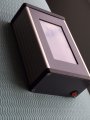
Here is an example of a 3D-printed enclosure. The case itself is an off-the-self extruded aluminum enclosure. The front bezel and side panels are 3D-printed with no extra finishing done on them. Any rainbow patterns or coloration that you may observe is a result of the moiré patterns coming from the resolution of the photograph, the web browser and the display screen on your computer.

DMI 3D printed case.JPG
 
Top