spi ram help needed 23K256

Thread Starter

bug13

Joined Feb 13, 2012
2,002
Hi guys

I need more ram so I bought the Microchip 23k256:
http://www.microchip.com/wwwproducts/en/23K256

I can't get anything out of the MISO pin of the spi ram. (Or I didn't put the data in the first place). Here is part of the code, I am just writing to the status register and reading it back for quick test.
C:
    EE_nCS = 0;
    SPIPut2(SPI_SRAM_WRSR);
    SPIPut2(SPI_SRAM_BYTE_MODE | SPI_SRAM_DIS_HOLD);
    //SPIPut2(0x01);
    EE_nCS = 1;
    DELAY_10us(1);
    EE_nCS = 0;
    uint8_t status;
    SPIPut2(SPI_SRAM_RDSR);
    status = SPIGet2();
    EE_nCS = 1;
I can confirm my SPIPut2() and SPIGet2() work correctly, as there is a eeprom on the same bus, and I can read and write to it no problem. I can see in a scope that my CS, SCK and MOSI pin is working correctly. I Just can get anything from the MISO pin.

It must be something really stupid that I over look. any thought?

Thanks guys
 

NorthGuy

Joined Jun 28, 2014
611
The code looks ok (if your functions are ok and defines are ok). Could be as simple as a bad connection. The EEPROM on the same bus - does it release the MISO line when not in use?

EE_nCS looks suspicious. If you named your RAM CS EE_nCS, then the EEPROM CS is named RAM_nCS, right? ;)
 

Thread Starter

bug13

Joined Feb 13, 2012
2,002
The code looks ok (if your functions are ok and defines are ok). Could be as simple as a bad connection. The EEPROM on the same bus - does it release the MISO line when not in use?

EE_nCS looks suspicious. If you named your RAM CS EE_nCS, then the EEPROM CS is named RAM_nCS, right? ;)
Arrh, when I first wrote to the code, I was using an EEPROM, that's why it's EE_nCs. I will rename it to RAM_nCS ;)

I have check connection by putting an EEPROM there, I can write and read OK, so it must be something else. I will re-check my defines and functions.
 

Thread Starter

bug13

Joined Feb 13, 2012
2,002
Just an update, I wrote a software spi driver to test the spi ram, and it works, nothing have changed in my hardware. I am going to try slow down the spi clock and see if it helps.

My spi clock is at 750KHz, the chip should work at 20MHz max, weird!
 

Thread Starter

bug13

Joined Feb 13, 2012
2,002
This might suggest that rather than the clock speed being a problem it is the relationship of clock and data signals that is the problem (CPOL CPHA).

https://en.wikipedia.org/wiki/Serial_Peripheral_Interface_Bus#Clock_polarity_and_phase
Here are what I did: I have add a 220R resistor on the CLK, MISO, MOSI line, because the ringing on the those line is a bit too much. But still can't get anything out. The SO line just stay high.

I also tried physically remove the other EEPROM on the same bus, the SRAM still no go.

I believe I can't write the data in properly, reading the data out in the MCU is fine, because I can physically pull the SO high and low to get 0xFF and 0x00 out from the MCU.

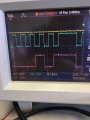
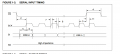
I believe my clock signal match the datasheet, but I could be wrong, here are the actual scope capture and the datasheet info, any thought?

Scope: Yellow = CS, Blue = clock, Purple = SI, (SO was not captured, it just stay high), the capture was writing 0x05 status register read command.

image1.JPG

Here is the datasheet timeing:
Capture.PNG
 
Last edited:

Thread Starter

bug13

Joined Feb 13, 2012
2,002
On your logic analyzer screenshot CLK appears to be active low, while the diagram you enclosed shows CLK active high.
Doh... Yes you are right, it's active low. Now it's all working.

The funny thing is my eeprom is active low too, somehow it works...

Thanks a lot NorthGuy...
 

NorthGuy

Joined Jun 28, 2014
611
There are 4 different SPI modes (clock active high/low and reading on rising/falling edge). Different devices will require different modes. Also, there may be propagation delays. Depending on the conditions, SPI may work even if the mode isn't selected correctly (although not as reliable).
 
Top