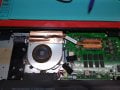
I'm replacing the fan in my Gateway laptop. I've ordered a fan, and thermal paste for heatsink/cpu connection, but the heatsink was glued to the fan. Is there a special glue I need to puchase for this? Thamk you.
Yeah I've heard of Google, which is why I came here in the first place as when I found a thermal glue, there was a note that stated Do not use thermal glue "between CPU and HEATSINK"! Which is not where I intend to use it anyway, but I figured I should check with someone who might know for my specific application... So would it be of your opinion that I can use thermal glue here? Thanks.
Hmm. Ok. My wonder was, I was thinking since the heatsink is transferring heat to to fan, and then the fan kicks on at the set temp, that this connection would require good thermal conductivity...? Also, I wondered if a particular glue would hold up under these, I'm guessing, rather moderate temps? Otherwise, couldn't I just use a decent off-the-shelf general adhesive? Thanks.
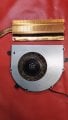
Well, I don't have the parts in front of me, but if you can tell from my pic, the sink plate is glued to the fan plate, which I'm guessing is supposed to transfer heat to the fan also, or maybe the plate is must acting as a thermostat for the fan? Either way, the fan does not blow directly on the sink plate, it blows out of the laptop, so I'm thinking this system depends on transferring the heat from the plate to the fan...?
Well, I don't have the parts in front of me, but if you can tell from my pic, the sink plate is glued to the fan plate, which I'm guessing is supposed to transfer heat to the fan also, or maybe the plate is must acting as a thermostat for the fan? Either way, the fan does not blow directly on the sink plate, it blows out of the laptop, so I'm thinking this system depends on transferring the heat from the plate to the fan...?
Again, I don't have the parts in front of me right now to show you, but if you were to flip the fan/sink over as shown in the pic, at the end of the sink where it's attached (glued) to the fan it has a radiator with fins so I think the heat from there is drawn into the fan and pushed out... that combined with the sink plate also transferring heat to the fan frame results in most of the heat removal, I'm guessing... thanks again.
It looks like a very thin transparent glue, not thermal epoxy. The glue residue contact area looks like 50%.
If the copper is flattened perfectly to maximize contact area and surfaces cleaned with wet dry paper, you might get away with a very thin layer of contact cement on both sides applied with a blade allowed to dry then mate with pressure.
You can see a lot of dust in the fan blades which will have elevated the RPM and temperature and premature failure of bearings.
The environment must be dusty.
It looks like a very thin transparent glue, not thermal epoxy. The glue residue contact area looks like 50%.
If the copper is flattened perfectly to maximize contact area and surfaces cleaned with wet dry paper, you might get away with a very thin layer of contact cement on both sides applied with a blade allowed to dry then mate with pressure.
Ok, thanks for the reply. And the more I look at it and think about it with yours and Mr. Chips' input, Ithink the glued section of foil to the fan maybe offers some additional or 'secondary' heat transfer, the primary being the heat from the radiator section being drawn into the fan and expelled... thus the primary reason for the glue being to make more/less a sealed duct to draw the heat from the radiator to the fan... maybe. Anyhow, I've already now ordered the thermal glue also, so I guess I'll try that, with a light application.
And to reply about the dust, yes... I've had the laptop over a decade now and used it in a lot of different environments, and never bothered cleaning the fan. I'm sure it's contributed to the eventual failure of the fan/bearings. I actually powered up the fan after I removed it, it ran for a bit full speed then heated up and eventually quit. I suspect the bearings. But the laptop doesn't owe me anything and still does what I need it to do, so rather than put out several hundred dollars right now for a new one, I thought I'd play around a bit and for $30 or so see if I could extend its life a while. It's been acting weird lately when I've been running a lot of processor hungry stuff on it and I didn't remember the fan coming on so I thought I'd pop it open to have a look - nothing much to loze before buying a new one... thanks for the input.
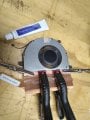
Update for anyone interested: i received the fan and theral glue yesterday. I removed the glue residue from the heatsink with rubbing alcohol, apllied a thin layer of glue to the sink, clamped it to the fan. I read in the glue reviews to let the glue set 24 hours. I'll apply the thermal paste later today and attach it to the cpu and see what happens...

 Facebook
 Google
 GitHub
 Linkedin