[SOLVED] Tips on Breadboard Wiring

Thread Starter

Embededd

Joined Jun 4, 2025
131
Hello Experts,

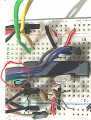
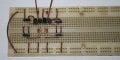
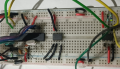
I’ve wired my circuit on a breadboard, and it’s working fine I can program the ATmega8A MCU , but it looks messy. The setup includes an ATmega8A MCU, crystal with load capacitors, USBasp programmer wiring, DS1307, and other components. I want to arrange the connections neatly so that if I post a photo, anyone can easily follow and understand the circuit.

1754669259418.png

How do you usually make and route your breadboard connections to keep them clean and clear ?
 

joeyd999

Joined Jun 6, 2011
6,204
I haven't used a solderless breadboard in over 20 years, but i used to make huge ones (perf boards, too).

I treated them like I was creating a work of art: slow and careful.

Each connection was cut and stripped to exact lengths using color-coded wire depending on the function of the connection, bending each wire to to route around existing components with the shortest wire possible. All bends were 90 degrees.

I never routed wires over top of other components, making component removal and replacement easier later.

I kept bins of 0.1 inch increment wire lengths, which I would repopulate frequently.

I also used 0.1" to 0.5" bare copper wires for short jumpers and power connections.

I wish I kept photos of my work. Some were quite beautiful!
 

MrChips

Joined Oct 2, 2009
34,628
Hello Experts,

How do you usually make and route your breadboard connections to keep them clean and clear ?
Yes and no.
If it is for a simple test and I plan to move on to a finished project then I don't bother about neatness.
If it is for show and tell, yes, I tidy up the wiring.

You are on the right track by using different colours for wires and being consistent, e.g. +5 V is red and GND is black. It helps yourself when debugging. Keeping wires short is another good step. Keep wires running straight across in line with holes.

Next, avoid running wires over ICs. There comes a time when you will need to change ICs.

Don't ignore power supply decoupling capacitors.
 

Thread Starter

Embededd

Joined Jun 4, 2025
131
avoid running wires over ICs. There comes a time when you will need to change ICs.
In this case, this is my programmer connection. I’ve seen people say that there shouldn’t be joints in the middle of the connection, so I routed the programmer wires over the MCU because not all the pins were close together for example, you can see the reset pin. In such situations, what’s better adding a joint in between or running the wires over the IC?

Mod: cleaned up image.1754672231234.png
 
Last edited by a moderator:

atferrari

Joined Jan 6, 2004
5,001
Hello Experts,

I want to arrange the connections neatly so that if I post a photo, anyone can easily follow and understand the circuit.
Sorry but for others to follow and understand the circuit you must create a schematic.

Regarding the breadboard itself, start neat and tidy! It is discouraging and tiring when already at the rats-nest stage, realizing that you need to start from scratch again.

And every change you do in the breadboard, make sure is shown in the schematic. After a long night testing and modifitying, some steps could be forgoten in the next morning.

I always start by wiring all common (black) and then Vcc (red). After checking there are no shorts, I move on.
 

MrChips

Joined Oct 2, 2009
34,628
“No joints in the middle of a connection.”
Don’t know where you heard that.
That means we have all been doing it wrong for more than 100 years.
 

Thread Starter

Embededd

Joined Jun 4, 2025
131
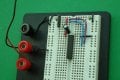
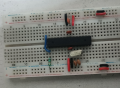
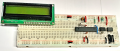
I’ve rewired the setup and tried to make it as neat and clean as I can. In this image, there’s an ATmega8A MCU in the center with a 10 kΩ reset pull-up resistor , a 12 MHz crystal along with 27 pF load capacitors, and a 0.1 µF decoupling capacitor placed close to the VCC and GND pins. The red wires indicate Vcc (+5 V) and the black wires indicate GND, the blue wire is the reset pin connection, and the programmer will connect using female-to-male jumper wires.

1754738581474.png1754738682778.png
 

MrChips

Joined Oct 2, 2009
34,628
Here is a tip but not essential.

If you are free to locate the Atmel MCU anywhere on the breadboard, why not install it with pin-1 at hole-1 or 11?
This way you wouldn't have to count pins, at least on one side of the chip.

The numbering on your breadboard is different from what I am accustomed to seeing.

1754751653133.png
 

Thread Starter

Embededd

Joined Jun 4, 2025
131
Here is a tip but not essential.

If you are free to locate the Atmel MCU anywhere on the breadboard, why not install it with pin-1 at hole-1 or 11?
This way you wouldn't have to count pins, at least on one side of the chip.

The numbering on your breadboard is different from what I am accustomed to seeing.
Yes, the numbering is different. I’ve placed the MCU a bit lower because I’ve put the I²C device above it that way the SDA and SCL lines have a shorter distance. At the bottom, I’ve positioned the LCD, and its VCC and GND are hidden behind the LCD itself. I’m also planning to add some LEDs with a push button and a seven-segment display soon.

Mod: lightened your image,

1754755298452.png
 
Last edited by a moderator:

MrChips

Joined Oct 2, 2009
34,628
Yes, neatness matters!
While short wires are a good thing, it is not a top priority on a breadboard. A neat layout takes precedence.
As a general rule, you should place all ICs with the top of the IC and pin-1 facing the same direction. Otherwise you are prone to making mistakes when probing while trouble shooting.

If you are planning on laying out a protoboard with a common MCU such as ATmega8 and a 1602 LCD display, you should take the time to make it a permanent board for future purposes. I have a number of such protoboards for different MCUs and applications, for example, boards with Microchip PIC, Atmel AVR, and TI MSP430.

Don't ignore that if you want to share your circuit design with others, a properly drawn circuit schematic is mandatory, even more important than a picture of the protoboard.
 

MrChips

Joined Oct 2, 2009
34,628
On a breadboard, there are few places where short wires make any difference, at that low frequency.

The only place were you need short connections is at the MCU crystal oscillator. What you have cannot be made better.
 

Thread Starter

Embededd

Joined Jun 4, 2025
131
If you are planning on laying out a protoboard with a common MCU such as ATmega8 and a 1602 LCD display, you should take the time to make it a permanent board for future purposes. I have a number of such protoboards for different MCUs and applications, for example, boards with Microchip PIC, Atmel AVR, and TI MSP430.
Exactly, that’s my next plan but I prefer to breadboard it first so I can test, debug, and make any changes easily before committing to a prototype board. Once I know everything works reliably, then I’ll move it to a permanent board for long-term use.

I hope now my wiring looks better than before.
 

Thread Starter

Embededd

Joined Jun 4, 2025
131
Sorry, when I say "prototype board or protoboard" I am referring to the same solderless breadboard that you are already using and have shown. I suppose I should have said "breadboard".
No worries, I thought you were talking about a permanent soldered protoboard

My main goal right now is to practice coding especially interfacing the ATmega8A with peripherals like the DS1307, LCD, push buttons, LEDs, and maybe a seven-segment display

By the way, what’s your experience with Atmel AVR, and which programming languages do you usually use for them? Also, can you share a snap of your AVR breadboard setup?
 
Last edited:

dl324

Joined Mar 30, 2015
18,220
The red wires indicate Vcc (+5 V) and the black wires indicate GND, the blue wire is the reset pin connection
Personally, I'm not a fan of using different colors of wires in breadboards; or having them lay flat.

I have around half a dozen standard jumper lengths, and I use the one that fits the best (or is handy). I use bare wire to jumper the supply rails. I usually form component leads and I align them the same direction. This makes reading color codes on resistors easier. But I don't always clip the leads.

Can't remember what this breadboard was. It was a layout done to show someone on AAC a neater way to do it.
breadboard1.jpg
The solderless breadboard is from the 1970's when no one tried to dictate what the rails were used for.
 

Thread Starter

Embededd

Joined Jun 4, 2025
131
Personally, I'm not a fan of using different colors of wires in breadboards; or having them lay flat.
Personally, Now I think colour coding makes a big difference, since you can tell at a whether a wire is power, ground, or a specific signal. Keeping wires flat and close to the board not only looks cleaner but also makes it easier to trace connections when troubleshooting.
 

MrChips

Joined Oct 2, 2009
34,628
I started using Atmel AVR when they first came out in the late 1990's. There were no compilers available and I wrote my own assembler which was ported from assemblers I already had created for Motorola 6809 and Freescale 68HC11.

Hence I am very comfortable writing code in ASM for Atmel AVR. Today, I suppose that I would use C instead of ASM.
For programming, I use the Atmel Studio 7 and AVR Pocket programmer.

1754767173993.png
 

dl324

Joined Mar 30, 2015
18,220
Keeping wires flat and close to the board not only looks cleaner but also makes it easier to trace connections when troubleshooting.
When you get more experience, it won't make a significant difference.

Something like this looks like it would be a nightmare to troubleshoot.
1754770818622.png
From eater.net
 
Top