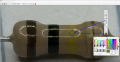
[SOLVED] Brown Black Yellow (or Green) what do you see?

Thread Starter

Tonyr1084

Joined Sep 24, 2015
9,744
View attachment 358555Now that I've posted it -it looks green here. But under bright light and high magnification it looks yellow to both me and to my wife. I'm the one with Red/Green deficiency. Upon measuring with an Ohm meter shows 98KΩ. So it must be green, even though I see yellow.

Another color hard to see for me is the difference between Blue and Violet. Given enough of the color and bright enough light when I examine the color - if it looks blue and has red tinges to it - I know it's violet. But otherwise I'm sunk.

And to think I made a living in the electronics industry. Somehow I managed to get it right every time.
 

SamR

Joined Mar 19, 2019
5,473
My wife is an artist and retired art teacher, and she is no help to me (red/green deficient) when I can't tell the color. The older carbon composite resistors aren't too bad, but I stock the 1% metal foil ones which are terrible for me to "see". I keep the trusty chineseum component tester in arms reach.
 

WBahn

Joined Mar 31, 2012
32,761
View attachment 358555Now that I've posted it -it looks green here. But under bright light and high magnification it looks yellow to both me and to my wife. I'm the one with Red/Green deficiency. Upon measuring with an Ohm meter shows 98KΩ. So it must be green, even though I see yellow.
It looks yellow to me, but photos can definitely be deceiving.

If it's green, then the value would be 10x10^5 = 1 MΩ = 1000 kΩ

For it to measure 98 kΩ, which is 2% below 100 kΩ, it would be 10x10^4 which would be BLK-BRN-YLW
 

Thread Starter

Tonyr1084

Joined Sep 24, 2015
9,744
It *must be* brown black yellow, for it to read 98k.
Yes, you're right. Yellow is 4. 104 = 10-0000 =10 100,000
I can be so dense at times. Both my wife and I agree, the third band is yellow. Weird how the picture renders on my screen. Can hardly see the third color band.
Thanks Trigg.
 

schmitt trigger

Joined Jul 12, 2010
2,056
Color rendering depends on the light source illuminating an object, also known as Color Rendering Index, and the camera’s attempt to white-balance the image.

Unfortunately, the CRI for common, low cost white LEDs are, to put it mildly, Scheiße. Some cameras have a tough time properly white balancing an image.
 

panic mode

Joined Oct 10, 2011
4,937
i see brown, black, yellow gold which is 100k 5%.
out of curiosity i checked the RGB values with IrfanView. I see that red and green content is about the same (red slightly stronger) which is a yellow.
to be green, both red and blue would need to be low values.

1762791841946.png
 

panic mode

Joined Oct 10, 2011
4,937
this may need some tweaking but should work. it is AutoIt script. compiled version is attached so no AutoIt is needed.

Collor_Picker_To_Text (AutoIt3):
#Region ;**** Directives created by AutoIt3Wrapper_GUI ****
#AutoIt3Wrapper_UseX64=y
#EndRegion

#include <GDIPlus.au3>
#include <GuiConstantsEx.au3>
#include <WindowsConstants.au3>
#include <StaticConstants.au3>
#include <ScreenCapture.au3>

_GDIPlus_Startup()

Global $aNames[12] = ["Black","Brown","Red","Orange","Yellow","Green","Blue","Violet","Grey","White","Gold","Silver"]
Global $aTol[12]   = [0,1,2,3,4,0.5,0.25,0.1,0.05,0,5,10]
Global $aDigit[12] = [0,1,2,3,4,5,6,7,8,9,-1,-2]

Local $hBitmap = _ScreenCapture_Capture("")
If Not $hBitmap Then
    MsgBox(16, "Error", "Screenshot failed!")
    Exit
EndIf

Local $hImage = _GDIPlus_BitmapCreateFromHBITMAP($hBitmap)
Local $iW = _GDIPlus_ImageGetWidth($hImage)
Local $iH = _GDIPlus_ImageGetHeight($hImage)

Local $iNewW = Int($iW * 0.25)
Local $iNewH = Int($iH * 0.25)

Local $hResized = _GDIPlus_ImageResize($hImage, $iNewW, $iNewH, $GDIP_INTERPOLATIONMODE_HIGHQUALITYBICUBIC)
Local $hBmpScaled = _GDIPlus_BitmapCreateHBITMAPFromBitmap($hResized)

Local $hGUI = GUICreate("Resistor Picker - VIOLET FIXED v4", $iNewW, $iNewH + 120)
GUISetBkColor(0xFFFFFF)

Local $idPic = GUICtrlCreatePic("", 0, 0, $iNewW, $iNewH)
_SendMessage(GUICtrlGetHandle($idPic), 0x172, 0, $hBmpScaled)

Local $idLabel = GUICtrlCreateLabel("Click band -> VIOLET PERFECT", 10, $iNewH + 10, $iNewW - 20, 90)
GUICtrlSetFont($idLabel, 11, 800, 0, "Consolas")
GUICtrlSetColor($idLabel, 0x000080)

GUISetState(@SW_SHOW)

Global $hOrig = $hImage

Func RGBtoHSV($r, $g, $b)
    Local $max = $r
    If $g > $max Then $max = $g
    If $b > $max Then $max = $b
    Local $min = $r
    If $g < $min Then $min = $g
    If $b < $min Then $min = $b

    Local $v = $max / 255
    Local $s = 0
    If $max > 0 Then $s = ($max - $min) / $max
    Local $h = 0

    If $max <> $min Then
        Local $d = $max - $min
        If $max = $r Then
            $h = ($g - $b) / $d
            If $g < $b Then $h = $h + 6
        EndIf
        If $max = $g Then $h = ($b - $r) / $d + 2
        If $max = $b Then $h = ($r - $g) / $d + 4
        $h = $h * 60
    EndIf

    Local $arr[3]
    $arr[0] = $h
    $arr[1] = $s
    $arr[2] = $v
    Return $arr
EndFunc

Func GetBestColor($r, $g, $b)
    Local $hsv = RGBtoHSV($r, $g, $b)
    Local $h = $hsv[0]
    Local $s = $hsv[1]
    Local $v = $hsv[2]

    If $v < 0.25 Then Return "Black (digit 0)"
    If $v > 0.95 And $s < 0.1 Then Return "White (digit 9)"
    If $v > 0.75 And $s < 0.15 Then Return "Silver (±10%) (×10^-2)"
    If $s < 0.2 And $v > 0.3 And $v <= 0.75 Then Return "Grey (±0.05%) (digit 8)"
    If $h > 40 And $h < 58 And $s > 0.6 And $v > 0.7 Then Return "Gold (±5%) (×10^-1)"

    Local $bestIdx = 1
    Local $bestDiff = 999

    ; Brown ~30°
    Local $diff = Abs($h - 30)
    If $diff < $bestDiff Then
        $bestDiff = $diff
        $bestIdx = 1
    EndIf

    ; Red ~0°/360°
    $diff = $h
    If $h > 180 Then $diff = 360 - $h
    If $diff < $bestDiff Then
        $bestDiff = $diff
        $bestIdx = 2
    EndIf

    ; Orange ~35°
    $diff = Abs($h - 35)
    If $diff < $bestDiff Then
        $bestDiff = $diff
        $bestIdx = 3
    EndIf

    ; Yellow ~55°
    $diff = Abs($h - 55)
    If $diff < $bestDiff Then
        $bestDiff = $diff
        $bestIdx = 4
    EndIf

    ; Green ~120°
    $diff = Abs($h - 120)
    If $diff < $bestDiff Then
        $bestDiff = $diff
        $bestIdx = 5
    EndIf

    ; Blue 210-250°
    If $h >= 210 And $h <= 250 And $s > 0.4 Then
        $bestIdx = 6
        $bestDiff = 0
    EndIf

    ; Violet 250-310°
    If $h >= 250 And $h <= 310 And $s > 0.4 Then
        $bestIdx = 7
        $bestDiff = 0
    EndIf

    Local $sResult = $aNames[$bestIdx]
    If $aTol[$bestIdx] > 0 Then $sResult = $sResult & " (±" & $aTol[$bestIdx] & "%)"
    If $aDigit[$bestIdx] >= 0 Then $sResult = $sResult & " (digit " & $aDigit[$bestIdx] & ")"
    If $aDigit[$bestIdx] < 0 Then $sResult = $sResult & " (×10^" & $aDigit[$bestIdx] & ")"

    Return $sResult
EndFunc

While 1
    Local $msg = GUIGetMsg()
    If $msg = $GUI_EVENT_CLOSE Then ExitLoop

    If $msg = $idPic Then
        Local $info = GUIGetCursorInfo($hGUI)
        If IsArray($info) And $info[4] = $idPic Then
            Local $x = $info[0]
            Local $y = $info[1]
            Local $origX = Int($x / 0.25)
            Local $origY = Int($y / 0.25)

            If $origX < 0 Then $origX = 0
            If $origX >= $iW Then $origX = $iW - 1
            If $origY < 0 Then $origY = 0
            If $origY >= $iH Then $origY = $iH - 1

            Local $pixel = _GDIPlus_BitmapGetPixel($hOrig, $origX, $origY)
            Local $r = BitAND(BitShift($pixel, 16), 0xFF)
            Local $g = BitAND(BitShift($pixel, 8), 0xFF)
            Local $b = BitAND($pixel, 0xFF)

            Local $color = GetBestColor($r, $g, $b)

            GUICtrlSetData($idLabel, _
                "RGB: " & $r & "," & $g & "," & $b & @CRLF & _
                "-> " & $color)
            GUICtrlSetColor($idLabel, 0xD60000)
        EndIf
    EndIf
WEnd

_GDIPlus_ImageDispose($hImage)
_GDIPlus_ImageDispose($hResized)
_WinAPI_DeleteObject($hBitmap)
_WinAPI_DeleteObject($hBmpScaled)
_GDIPlus_Shutdown()
GUIDelete($hGUI)
 

Attachments

Top