[SOLVED] difficulty to connect the ST-LINK/V2 to microcontroller

Thread Starter

Nidhi Sayanja

Joined Jul 5, 2024
11

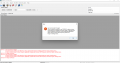
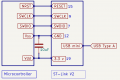
I am having difficulty connecting the ST-LINK/V2 to my microcontroller. An error appears in the ST-LINK utility. I have already verified all the connections, including the decoupling capacitor, all the pin connections, power supply connections, and USB drivers, but I am still unable to resolve the error. Here, I have attached my connections with ST-LINK pin numbers. Can anyone please help me solve this error?
 

Attachments

Sometimes, the issue can be something small or overlooked. Make sure your microcontroller is properly powered and grounded, and that the ST-LINK/V2 is firmly connected. Also, try using different USB ports or cables – sometimes those can be sneaky culprits.

If you've done all that and still no luck, it might be worth checking the specific error message in the ST-LINK utility for more clues.
 

MrChips

Joined Oct 2, 2009
34,628
Show us the ST-LINK board and the target board and how you made the connections.
On some boards, you have to move some jumpers in order to route the signals to the external device.

On rare occasions, you have to reboot the PC to get it working again.
 

Thread Starter

Nidhi Sayanja

Joined Jul 5, 2024
11
For the benefit of others, please say exactly what you did to resolve the problem.
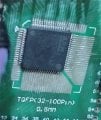
I made a mistake in choosing the first pin because the datasheet shows only one circle on the microcontroller, but the physical microcontroller has two circles. Then, I checked the continuity between the ground pins. Finally, I found that the first pin is on the left side of the small circle.
1721363681053.jpeg
 

MrChips

Joined Oct 2, 2009
34,628
Pin-1 is identified by the white triangle on the adapter board silk screening overlay.

I too made that mistake on my first PCB assembly and had to remove and reorient the package.

I don’t know why ST printed the device markings rotated 90°.
 
Top