Facebook
 Google
 GitHub
 Linkedin
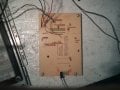
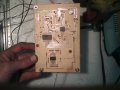
It's not entirely a "completed project" as there are some features I still want to add, and it's more a sub project of a larger project, but it does work beautifully. What it is... a PIC18F4525, a IDT71024S 128K x 8 SRAM, and 74VHC245 octal bus transceiver (I planned on a basic flip flop, but forgot to order it).
The PIC's A and B ports are connected to the address lines (with one other pin for the 17th bit) and port D is connected to the data lines. There is also another pin which is set up as an open drain pulls the line low when the analyzer is sampling to let me know when it's working and when it's done. The bus transceiver's output is connected to the data lines of the memory also, and the direction pin is set so that it will be input only (I thought about going both ways, but decided that the chance of accidents far outweighs any usefulness it would have.)
A simple command sent by I2C gets the ball rolling (one byte to tell it to start sampling, two bytes for a comparator value, and three bytes for a sample count). The comparator count is fed into a CCP1 which interrupts when the timer1 and ccp1 pairs match. The pic then sets the address pins, strobes the output enable of the transceiver, and the clock and write enable of the memory to take a sample. While sampling the PIC doesn't do anything with the data bus... the bus transceiver's output sets the data for the byte in memory. After the data is sampled, the address is incremented, the sample counts are adjusted, and if needed repeats the process.
Once the samples are taken you can query the pic to see how many samples were collected, or just start reading the samples from I2C. The bus transceiver stays idle, while the PIC reads data from the SRAM.
I struggled for a while trying to decide if I wanted to use a PIC with USB on board since it would be faster to retrieve the data, but in the long run decided the I2C would be better... I would like to connect this to a Pi eventually once I get one and figure out how to get it all to work. The USB version of the PIC would have required a latch or two, and more or less would have been a waste of a PIC with USB in the long run. At the moment I have a small connector board I use for most of my projects with a PIC18F2550 to handle the USB to I2C conversions.
For now the sample rate ranges from 122 Hz up to 125 kHz which is good enough to handle what I wanted it for... I need to sit down and do the math to see how much faster I can get it to go. At 125 kHz and one second of sampling it takes around 30 seconds (give or take a few) to get the samples from the analyzer to the computer for rendering... although it seems like forever after about 20 rounds of sampling to see if things are working right on what it's connected to.
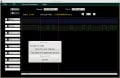
On the PC side of things the program will zoom in and out (1 - 10) pixels per sample to help make things easier to see. A double click of the left mouse button will add or remove a marker. A double click of the right mouse button will bring up a menu allowing you to select to go to the next change on the selected bit, calculate time between two markers, and once I get to it it will decode I2C and SPI (one of those things that will be nice to have, but probably won't make it off the back burner for some time). The drop down menu selects the color of the clip on connector used for a probe, and there's a line to enter text to label the bits. If the color isn't selected it won't draw that bit, but the data is still there and when you do select a color it will show what was sampled.
The PC program uses Qt and it's on Linux so I'm hoping with a little patience it will compile and work on the Pi with little effort. Once I get to that point I may break the logic part out of the program (it's just one window of six) and put together a little how to for anyone who may find it useful. As with anything there are a few small annoyances I still have to work out, but those will be dealt with in time. I also want to add programming to make it start sampling on a rising or falling edge, along with start on either, or just plain start when I tell it to.
Thanks all for taking a look.
The PIC's A and B ports are connected to the address lines (with one other pin for the 17th bit) and port D is connected to the data lines. There is also another pin which is set up as an open drain pulls the line low when the analyzer is sampling to let me know when it's working and when it's done. The bus transceiver's output is connected to the data lines of the memory also, and the direction pin is set so that it will be input only (I thought about going both ways, but decided that the chance of accidents far outweighs any usefulness it would have.)
A simple command sent by I2C gets the ball rolling (one byte to tell it to start sampling, two bytes for a comparator value, and three bytes for a sample count). The comparator count is fed into a CCP1 which interrupts when the timer1 and ccp1 pairs match. The pic then sets the address pins, strobes the output enable of the transceiver, and the clock and write enable of the memory to take a sample. While sampling the PIC doesn't do anything with the data bus... the bus transceiver's output sets the data for the byte in memory. After the data is sampled, the address is incremented, the sample counts are adjusted, and if needed repeats the process.
Once the samples are taken you can query the pic to see how many samples were collected, or just start reading the samples from I2C. The bus transceiver stays idle, while the PIC reads data from the SRAM.
I struggled for a while trying to decide if I wanted to use a PIC with USB on board since it would be faster to retrieve the data, but in the long run decided the I2C would be better... I would like to connect this to a Pi eventually once I get one and figure out how to get it all to work. The USB version of the PIC would have required a latch or two, and more or less would have been a waste of a PIC with USB in the long run. At the moment I have a small connector board I use for most of my projects with a PIC18F2550 to handle the USB to I2C conversions.
For now the sample rate ranges from 122 Hz up to 125 kHz which is good enough to handle what I wanted it for... I need to sit down and do the math to see how much faster I can get it to go. At 125 kHz and one second of sampling it takes around 30 seconds (give or take a few) to get the samples from the analyzer to the computer for rendering... although it seems like forever after about 20 rounds of sampling to see if things are working right on what it's connected to.
On the PC side of things the program will zoom in and out (1 - 10) pixels per sample to help make things easier to see. A double click of the left mouse button will add or remove a marker. A double click of the right mouse button will bring up a menu allowing you to select to go to the next change on the selected bit, calculate time between two markers, and once I get to it it will decode I2C and SPI (one of those things that will be nice to have, but probably won't make it off the back burner for some time). The drop down menu selects the color of the clip on connector used for a probe, and there's a line to enter text to label the bits. If the color isn't selected it won't draw that bit, but the data is still there and when you do select a color it will show what was sampled.
The PC program uses Qt and it's on Linux so I'm hoping with a little patience it will compile and work on the Pi with little effort. Once I get to that point I may break the logic part out of the program (it's just one window of six) and put together a little how to for anyone who may find it useful. As with anything there are a few small annoyances I still have to work out, but those will be dealt with in time. I also want to add programming to make it start sampling on a rising or falling edge, along with start on either, or just plain start when I tell it to.
Thanks all for taking a look.