replace mechanical switch

Thread Starter

Hondoman

Joined Feb 21, 2022
28
The datasheet for the solder you are using will tell you the temperature you should set. It's usually specified as a small range. Sometimes a bit on the hotter side is better since it reduces heating time and get the local region hotter faster.

Tip cleaner is great, but oyu only need it if you using the bronze wool doesn't do a good enough job. I don't suggest using a sponge, if you do. It doesn't work better than the wool, it cools the tip, and some suggest it could cause the plating to deteriorate more quickly from stress fractures. I don't know the validity of the last, but it is certainly no more effective than the wool and much more hassle.

If you want to get really nerdy about it, pick up one of these. It will allow you to calibrate your iron so the displayed temperature is the actual temperature. It is a copy of the Hakko FG-100 which is ~$270.00. It's not a counterfeit since it isn't labeled Hakko, though those do exist. It will be more than good enough for the 20 bucks to get your iron in spec considering your application, and, I find it very satisfying to know my display is actually the tip temperature for all intents and purposes I could have.

Yaakov, That is a great value! Thank you. I use an analog station, I will get this one.

As for the project you have helped me with.. her Speech therapist asked about adding an interruptor to it. I have a battery interrupt, https://www.amazon.com/Battery-Inte...B1P7600/ref=pd_lpo_4?pd_rd_i=B00B1P7600&psc=1 ( I would like to make those pigtails ! they do not look like they should cost that much, it is the 2-sided board that I don't know what it is called to search for it.)
Currently we use a (non-powered) 6" disc switch that operates the interrupt to activate devices. I am wondering if there would be a problem or feedback if I wire an interrupter in to the new tactile switch so that when the recording plays it also would activate the toy? The switch you helped me modify only records and plays back but no interface. Because this is a powered voice recording/ playback switch would the battery interrupter feedback on the tactile switch pads? I hope that makes sense. I am grateful the switch is easier to push and we can record/play on them but if I could get it to activate a light or a fan or device, I could record "light ON" and when pushed it would play that and light would come on thru battery interrupt. I do not want to power a device, it will have it's own power and the on/off switch is left ON then the interrupter operates it... at least currently. Adding a voice to the function would be very helpful in her development and enjoyment.
Do you think there would be a problem adding the interrupter? The toy/device will have battery power and the switch is powered and I do not know if that would create a series or parallel the 2 battery sources or somehow damage the circuits. Suggestions and comments welcome.
Thank you again for the help and knowledge.
 

Ya’akov

Joined Jan 27, 2019
10,239
OK, so I need a bit more information. I understand an interruptor is a device to disconnect the power supply on a battery powered two to adapt it. But I don't know the sequence of events you want to happen.

The button you replaced is on a voice recorder and it is dual function: record, then playback.

You seem to want the toy to activate on playback but not on record, is that right?

Please clarify but I am going to warn you that I am probably going to suggest you learn a little more and do something much more sensible which may seem daunting at first but I promise it's not outside your abilities and it will open up an entirely new vista in terms of making adapted toys and things like that.
 

Thread Starter

Hondoman

Joined Feb 21, 2022
28
OK, so I need a bit more information. I understand an interruptor is a device to disconnect the power supply on a battery powered two to adapt it. But I don't know the sequence of events you want to happen.

The button you replaced is on a voice recorder and it is dual function: record, then playback.

You seem to want the toy to activate on playback but not on record, is that right?

Please clarify but I am going to warn you that I am probably going to suggest you learn a little more and do something much more sensible which may seem daunting at first but I promise it's not outside your abilities and it will open up an entirely new vista in terms of making adapted toys and things like that.
Yes sir, the newly modified switch would only playback what was recorded in memory. I am up for an adventure... on the current switch there is a small side button and microphone that records the voice input, and then the tactile switch I replaced is what is pushed for playing the recording. I was thinking of adding the male cable to this tactile switch's pads that would plug into the battery interrupter barrel connector of a toy/device. That way it would allow the toy to activate and play the recording at the same time. I have been to the Design 2 Part expo and other local events trying to find solutions but it was more about manufacturing than the solution I needed.
What do you have in mind?
 

Ya’akov

Joined Jan 27, 2019
10,239
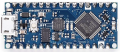
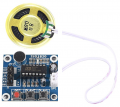
OK then. What I suggest is you build your own voice recorder using an Arduino compatible microcontroller like the Arduino Nano Every and a digital recorder module like this 10 second one.

1646902720640.png 1646902436244.png
I encourage you to follow the first link you can read about Arduino. It's really several pieces that make using microcontrollers easy for beginners and experts alike. It includes the hardware, development environment, and libraries to attach peripherals like displays, switches, knobs, servomotors, and modules like the voice recorder above,.

The software is all free, the hardware is cheap. You can save money buying clones, which work just fine, but if you but genuine Arduino boards you are supporting the people who create what the clones copy. It's perfectly OK for them to do it since it is all open source. I buy both as a way of supporting development and also saving money.

The reason I am suggesting this is because it will let you make nearly unlimited changes to the behavior of your adapted toys just by changing software and to add capabilities by attaching additional, modular hardware as you need it without starting over. Once you have a working prototype you can put it in a box and it will be exactly what you want.

It also opens up a universe of possibilities for the future. As your child grows, new age appropriate devices will be possible. And, if you are so inclined you could help others but creating new things that are better than what is available.

It may seem initially daunting but I promise you that if you take it step-wise, in a surprisingly short time you will be making things that you wouldn't have imagined you could do. The voice recorder is very small compared to the possibilities.

I am very happy to help you if you want to pursue this. The time invested in learning it will have a dramatically greater return than the time spent trying to work out how to hack this or that specific toy or device. Along the way you will learn programming, hardware interfacing, and circuits as you need them that can be reused over and over. And, no part of it is outside your demonstrated ability.

So, let me know if you'd like to pursue this. I would be happy to help you work out how to interface the existing device to an interrupter but frankly I think the result will be single-purpose and fiddly, and possibly quite hard to do with this remote and time constrained back and forth.
 

Attachments

Thread Starter

Hondoman

Joined Feb 21, 2022
28
OK then. What I suggest is you build your own voice recorder using an Arduino compatible microcontroller like the Arduino Nano Every and a digital recorder module like this 10 second one.

I encourage you to follow the first link you can read about Arduino. It's really several pieces that make using microcontrollers easy for beginners and experts alike. It includes the hardware, development environment, and libraries to attach peripherals like displays, switches, knobs, servomotors, and modules like the voice recorder above,.

The software is all free, the hardware is cheap. You can save money buying clones, which work just fine, but if you but genuine Arduino boards you are supporting the people who create what the clones copy. It's perfectly OK for them to do it since it is all open source. I buy both as a way of supporting development and also saving money.

The reason I am suggesting this is because it will let you make nearly unlimited changes to the behavior of your adapted toys just by changing software and to add capabilities by attaching additional, modular hardware as you need it without starting over. Once you have a working prototype you can put it in a box and it will be exactly what you want.

It also opens up a universe of possibilities for the future. As your child grows, new age appropriate devices will be possible. And, if you are so inclined you could help others but creating new things that are better than what is available.

It may seem initially daunting but I promise you that if you take it step-wise, in a surprisingly short time you will be making things that you wouldn't have imagined you could do. The voice recorder is very small compared to the possibilities.

I am very happy to help you if you want to pursue this. The time invested in learning it will have a dramatically greater return than the time spent trying to work out how to hack this or that specific toy or device. Along the way you will learn programming, hardware interfacing, and circuits as you need them that can be reused over and over. And, no part of it is outside your demonstrated ability.

So, let me know if you'd like to pursue this. I would be happy to help you work out how to interface the existing device to an interrupter but frankly I think the result will be single-purpose and fiddly, and possibly quite hard to do with this remote and time constrained back and forth.
I have an Arduino, I have 0, Zilch, Nada, comprehension of the syntax in Processing or any C language. I can follow instructions. I have made hello world, does that count? lol. Really though I like Arduino and micro controllers, almost understand the header file and I do get that a compiler works to debug the program. I didn't understand why certain words were used and caps like I said the syntax is so foreign. I read a few books and watched tutorials and have Jeremy from Element 14 book but the learning curve was too much.

If adding the 2 wire pigtail to the switch is going to feed back and blow something then I should probably just use them to "speak" for her and teach her the basic word commands we record. I hoped adding a cause and effect to the playback would help emphasize the lesson. I have some toys with the interrupters already and was going to modify some more later.
The female barrel end of interrupter connector for each toy is already in place, and we use that big switch (has a male end) to activate them now like a bubble making frog she can turn on or a cool dice roller that spins the dice when she pushes the switch. That was such a gift to have her play yatzee with us. So I was wanting to have the switches we modified add the male end to plug into those devices with the barrel connectors and we could record something relevant to what we were working with. I appreciate everything and will consider the Arduino option.
I really hope the switch option is viable and I would have time to learn the programming language later.
 

Ya’akov

Joined Jan 27, 2019
10,239
OK, I do hope you get the chance to learn. I think you just need to get the idea of how things are working and you will find it gets progressively easier.

As far as using the existing switch...

We can't use it directly but we could possibly make a high impedance connection to it and piggyback onto it sort of invisibly. I really have to think about it. It will be very hard to do without having the device in front of me, and have you being remote, and and asynchronous. Let me see if I can come up with a strategy.
 

Thread Starter

Hondoman

Joined Feb 21, 2022
28
OK, I do hope you get the chance to learn. I think you just need to get the idea of how things are working and you will find it gets progressively easier.

As far as using the existing switch...

We can't use it directly but we could possibly make a high impedance connection to it and piggyback onto it sort of invisibly. I really have to think about it. It will be very hard to do without having the device in front of me, and have you being remote, and and asynchronous. Let me see if I can come up with a strategy.
I don't know enough about circuit design, I was thinking maybe a diode inline or a relay. Probably not very efficient. I like the KISS principle. I will take some pictures and post later tomorrow.
 

djsfantasi

Joined Apr 11, 2010
9,237
I don't know enough about circuit design, I was thinking maybe a diode inline or a relay. Probably not very efficient. I like the KISS principle. I will take some pictures and post later tomorrow.
Hopefully to add to Yaakov’s comments on the Arduino, I’d like to add three specific resources.
  • Arduino IDE
  • Sample Programs
  • Reference page
The Arduino IDE (integrated development environment) allows you to enter your program* and will check your syntax when you compile. Compiling is the next task the IDE will do for you and will show you mistakes in your syntax. Lastly, it is how you put your program onto the Arduino.

The IDE also comes with sample programs for most of the features you can use, including that of add-on boards*. Looking at these may help you learn how to use and program the Arduino.

The Arduino Reference page describes each ‘word’ in the language with example code of how it’s used. Even though I’m an experienced programmer, I use this page all of the time. It’s invaluable. Even just browsing this page may be helpful.

I marked a couple of items with an asterisk. Programs are called ‘sketches’ in the Arduino environment. Confusing but don’t let it bother you. Also in the Arduino world, add-on boards that directly connect to an Arduino are called ’shields’. They come with ‘libraries’ that contain pre-written code to easily use them.

For example, there is an Arduino shield that plays sound files stored on a micro SD card through its library functions controlled by a sketch, written using the Arduino IDE, running on the Arduino.
 

Thread Starter

Hondoman

Joined Feb 21, 2022
28
Hopefully to add to Yaakov’s comments on the Arduino, I’d like to add three specific resources.
  • Arduino IDE
  • Sample Programs
  • Reference page
The Arduino IDE (integrated development environment) allows you to enter your program* and will check your syntax when you compile. Compiling is the next task the IDE will do for you and will show you mistakes in your syntax. Lastly, it is how you put your program onto the Arduino.

The IDE also comes with sample programs for most of the features you can use, including that of add-on boards*. Looking at these may help you learn how to use and program the Arduino.

The Arduino Reference page describes each ‘word’ in the language with example code of how it’s used. Even though I’m an experienced programmer, I use this page all of the time. It’s invaluable. Even just browsing this page may be helpful.

I marked a couple of items with an asterisk. Programs are called ‘sketches’ in the Arduino environment. Confusing but don’t let it bother you. Also in the Arduino world, add-on boards that directly connect to an Arduino are called ’shields’. They come with ‘libraries’ that contain pre-written code to easily use them.

For example, there is an Arduino shield that plays sound files stored on a micro SD card through its library functions controlled by a sketch, written using the Arduino IDE, running on the Arduino.
djsfantasi thank you! I have not revisited the Arduino Uno in a while. I remember the library was hard to grasp, it was very confusing on where to add it in the program "list" and how to call it, what the >> was for a lot of stuff. I am old, and I remember writing the numbers for the line code in Apple IIe and in IBM format. I understand a little but I do not understand even after a lot of time with it what the ( I am going to throw some words I remember) "function" and Object, how to include a library, that was, IS something I didn't grasp. It just IS and you have to know what they do and how to place them in the program. I printed the whole reference page and spent hours trying to figure it all out. In the end I was discouraged and boxed it all up. I made progress and took apart a mouse using the ADNS5020 sensor (now discontinued) to try to scale a motion feedback control from the little optical sensor. I spent weeks trying to write it differently and FINALLY when I put it back in the mouse housing, it reported something besides 000000000.
I didn't know the Z axis was needed to make it "talk" wait print on the screen lol. I was happy and so sad that I missed this. I had removed the mouse board from the housing because I latched on to the sensor pins with alligator clips and it was easier outside of it. I will let ya'll go for now and please laugh at my expense. That will make it all worth it.

Cheers.
 

Ya’akov

Joined Jan 27, 2019
10,239
djsfantasi thank you! I have not revisited the Arduino Uno in a while. I remember the library was hard to grasp, it was very confusing on where to add it in the program "list" and how to call it, what the >> was for a lot of stuff. I am old, and I remember writing the numbers for the line code in Apple IIe and in IBM format. I understand a little but I do not understand even after a lot of time with it what the ( I am going to throw some words I remember) "function" and Object, how to include a library, that was, IS something I didn't grasp. It just IS and you have to know what they do and how to place them in the program. I printed the whole reference page and spent hours trying to figure it all out. In the end I was discouraged and boxed it all up. I made progress and took apart a mouse using the ADNS5020 sensor (now discontinued) to try to scale a motion feedback control from the little optical sensor. I spent weeks trying to write it differently and FINALLY when I put it back in the mouse housing, it reported something besides 000000000.
I didn't know the Z axis was needed to make it "talk" wait print on the screen lol. I was happy and so sad that I missed this. I had removed the mouse board from the housing because I latched on to the sensor pins with alligator clips and it was easier outside of it. I will let ya'll go for now and please laugh at my expense. That will make it all worth it.

Cheers.
Sorry about your bad experience. I promise two things: Arduino of a few years ago ≠ Arduino today, and, if you choose to learn, we can help you get over the confusing parts.

The << was a bitwise operator, you almost never need to use it and so simply using it where something tells you to will get you by, but learning it is not hard if you want to. You mentioned UPPER_CASE and not knowing why or when to use it. It is just a convention that when you are naming a constant, to use upper case. This helps distinguish it, but if you don't it will still work.

In any case, we could certainly get you over that initial trouble and I do believe you would very much enjoy it, for the same reasons you tried to learn it in the past, plus a lot of new stuff the past Arduino couldn't have dreamt of.
 

Thread Starter

Hondoman

Joined Feb 21, 2022
28
Hopefully to add to Yaakov’s comments on the Arduino, I’d like to add three specific resources.
  • Arduino IDE
  • Sample Programs
  • Reference page
The Arduino IDE (integrated development environment) allows you to enter your program* and will check your syntax when you compile. Compiling is the next task the IDE will do for you and will show you mistakes in your syntax. Lastly, it is how you put your program onto the Arduino.

The IDE also comes with sample programs for most of the features you can use, including that of add-on boards*. Looking at these may help you learn how to use and program the Arduino.

The Arduino Reference page describes each ‘word’ in the language with example code of how it’s used. Even though I’m an experienced programmer, I use this page all of the time. It’s invaluable. Even just browsing this page may be helpful.

I marked a couple of items with an asterisk. Programs are called ‘sketches’ in the Arduino environment. Confusing but don’t let it bother you. Also in the Arduino world, add-on boards that directly connect to an Arduino are called ’shields’. They come with ‘libraries’ that contain pre-written code to easily use them.

For example, there is an Arduino shield that plays sound files stored on a micro SD card through its library functions controlled by a sketch, written using the Arduino IDE, running on the Arduino.
I tune modified vehicles often and the experience of setting up the pins in/out and everything I learned from the Arduino has been useful. I love to learn and unfortu
Sorry about your bad experience. I promise two things: Arduino of a few years ago ≠ Arduino today, and, if you choose to learn, we can help you get over the confusing parts.

The << was a bitwise operator, you almost never need to use it and so simply using it where something tells you to will get you by, but learning it is not hard if you want to. You mentioned UPPER_CASE and not knowing why or when to use it. It is just a convention that when you are naming a constant, to use upper case. This helps distinguish it, but if you don't it will still work.

In any case, we could certainly get you over that initial trouble and I do believe you would very much enjoy it, for the same reasons you tried to learn it in the past, plus a lot of new stuff the past Arduino couldn't have dreamt of.
I would enjoy that. Maybe for now Arduino could be the link between the switch and the devices? I will get the pictures of what I am using soon and if I have some help I would like to learn this. I warn you I have no classroom or instruction. What little I know is what I gathered from personal experience and with some guidance I think I could get it. I wanted to make a door alarm for the garage refrigerator, a thermometer for outdoors a humidity tracker endless stuff I wanted to make. With the bluetooth and wifi add ons now IofT oh man you have me excited about it again.
Thanks!
 

Ya’akov

Joined Jan 27, 2019
10,239
I tune modified vehicles often and the experience of setting up the pins in/out and everything I learned from the Arduino has been useful. I love to learn and unfortu

I would enjoy that. Maybe for now Arduino could be the link between the switch and the devices? I will get the pictures of what I am using soon and if I have some help I would like to learn this. I warn you I have no classroom or instruction. What little I know is what I gathered from personal experience and with some guidance I think I could get it. I wanted to make a door alarm for the garage refrigerator, a thermometer for outdoors a humidity tracker endless stuff I wanted to make. With the bluetooth and wifi add ons now IofT oh man you have me excited about it again.
Thanks!
You could do all of that. But the switch thing is probably going to be based on a transistor or small IC and a relay. I would be very happy, though, if you kept at it so you will be able to make whatever you want. It's a great hobby with practical benefits.

Don''t worry about formal education, it is absolutely not needed. We can pick something like the door alarm and progressively put you in a position to make it using IoT techniques and without being an electrical engineer. You'll find it much easier than you expect with a little help, I am sure.
 

djsfantasi

Joined Apr 11, 2010
9,237
Libraries now are very simple. Most are included. They are pre-written routines for various functions. Like controlling a servo. (This is just an example). Objects are occurrences or a name for a device. A function is an action you want to perform.

This reference page describes using the servo library. Look at it while reading my explanation below.

#include <servo.h>;​

…adds the code to control a servo into your program.

Servo myServo;​

…names the servo you want to control with “myServo”. This command is usually used just once (per device) in setup(). They call it an object. An object is just a name for the device. If you have multiple servos, you might name them like this:

Servo myServo1;​
Servo myServo2;​

This defines two different servos a with different names or objects.

And like I said, a function just uses the code from the library to do something. To move your servo to 135°, you use the write function for the servo named “myServo” (or the object named myServo).

myServo.write(135);​

The name before the period specifies the servo you want to act on. “write” after the period is the “function” or action you want to do. In this case, it’s move the servo to 135°

Does this explanation help?
 

Thread Starter

Hondoman

Joined Feb 21, 2022
28
Libraries now are very simple. Most are included. They are pre-written routines for various functions. Like controlling a servo. (This is just an example). Objects are occurrences or a name for a device. A function is an action you want to perform.

This reference page describes using the servo library. Look at it while reading my explanation below.

#include <servo.h>;​

…adds the code to control a servo into your program.
Servo myServo;​

…names the servo you want to control with “myServo”. This command is usually used just once (per device) in setup(). They call it an object. An object is just a name for the device. If you have multiple servos, you might name them like this:

Servo myServo1;​
Servo myServo2;​

This defines two different servos a with different names or objects.

And like I said, a function just uses the code from the library to do something. To move your servo to 135°, you use the write function for the servo named “myServo” (or the object named myServo).

myServo.write(135);​

The name before the period specifies the servo you want to act on. “write” after the period is the “function” or action you want to do. In this case, it’s move the servo to 135°

Does this explanation help?
Yes some. Question, do you need the library
Libraries now are very simple. Most are included. They are pre-written routines for various functions. Like controlling a servo. (This is just an example). Objects are occurrences or a name for a device. A function is an action you want to perform.

This reference page describes using the servo library. Look at it while reading my explanation below.

#include <servo.h>;​

…adds the code to control a servo into your program.
Servo myServo;​

…names the servo you want to control with “myServo”. This command is usually used just once (per device) in setup(). They call it an object. An object is just a name for the device. If you have multiple servos, you might name them like this:

Servo myServo1;​
Servo myServo2;​

This defines two different servos a with different names or objects.

And like I said, a function just uses the code from the library to do something. To move your servo to 135°, you use the write function for the servo named “myServo” (or the object named myServo).

myServo.write(135);​

The name before the period specifies the servo you want to act on. “write” after the period is the “function” or action you want to do. In this case, it’s move the servo to 135°

Does this explanation help?
djsfantasi That does help!! Question? does the library only need to be added 1 time and if yes, that was some of misunderstanding I had on how to enter it before. I mean the <servo.h> library right, it looks like if I use the word Servo later in the program that calls the library and I do not have to type or paste the contents of the library code? all is included by #include <servo.h>; Is that correct, that's enough to access the Servo control? And when I type Servo myServo1; or Servo myname even if I have several servos the one library is enough by using the Servo "title" it uses the same code from the library <servo.h> each time? The name before the period specifies the servo you want to act on. “write” after the period is the “function” or action you want to do. In this case, it’s move the servo to 135° What a revelation.
Yes that really helps. I didn't understand how the object points to the .h library. It was a long time ago when I was really working on this and support was limited like github and a few simple books that presumed I had some understanding of the language.
 

Ya’akov

Joined Jan 27, 2019
10,239
Yes some. Question, do you need the library

djsfantasi That does help!! Question? does the library only need to be added 1 time and if yes, that was some of misunderstanding I had on how to enter it before. I mean the <servo.h> library right, it looks like if I use the word Servo later in the program that calls the library and I do not have to type or paste the contents of the library code? all is included by #include <servo.h>; Is that correct, that's enough to access the Servo control? And when I type Servo myServo1; or Servo myname even if I have several servos the one library is enough by using the Servo "title" it uses the same code from the library <servo.h> each time? The name before the period specifies the servo you want to act on. “write” after the period is the “function” or action you want to do. In this case, it’s move the servo to 135° What a revelation.
Yes that really helps. I didn't understand how the object points to the .h library. It was a long time ago when I was really working on this and support was limited like github and a few simple books that presumed I had some understanding of the language.
Yes, just once.

The first part: Servo myServo instantiates an object to the class Servo and gives it a name so you can talk about it. You do this as many times and you want to have servo objects to connect to servos.

Once you have a Servo object you can use methods from the servo library on it using the dot notation. myServo.write() is an example. That one is a setter, that is, it changes a value inside the object.

There are also getters which return values from inside an object. For example, in case of the Servo library there is read() method which is the getter counterpart of write(). myServo.read() returns the angle of myServo in degrees. To use it you just assign the return values to a variable like:

myServoAngle = myServo.read();

The means "evaluate the expression myServo.read(), then assign to to the variable myServoAngle.

The methods are the only access you have to the libraries code, and that's called encapsulation. It protects the variables inside the code from being changed in ways that will cause it to behave badly. It also makes using libraries very easy. Once you internalize these ideas, things become much easier because it is very consistent.

The hardest thing you might commonly want to do with C++, which is the basis for the Arduno programming language, is probably string handling. Unlike dynamic languages which make it very easy, the strong typing in C++ means you have to learn how to convert different sorts of variable types back and forth to use them in different ways. But, it doesn't take too long to get a set of tools you use regularly to do that.

I'm really glad you appear interested in learning this. I am certain you both can, and will enjoy it.

[EDIT: a couple of typos]
 
Last edited:

djsfantasi

Joined Apr 11, 2010
9,237
Yes, just once.

The first part: Servo myServo instantiates an object to the class Servo and gives it a name so you can talk about it. You do this as many times and you want to have servo objects to connect to servos.

Once you have a Servo object you can use methods from the servo library on it using the dot notation. myServo.write() is and example. That one is a setter, that is, it changes a value inside the object.

There are also getters which return values from inside an object. For example, in case of the Servo library there is read() method which is the getter counterpart of write(). myServo.read() returns the angle of myServo in degrees. To use it you just assign the return values to a variable like:

myServoAngle = myServo.read();

The means "evaluate the expression myServo.read(), then assign to to the variable myServoAngle.

The methods are the only access you have to the libraries code, and that's call encapsulation. It protects the variables inside the code from being changed in ways that will cause it to behave badly. It also makes using libraries very easy. Once you internalize these ideas, things become much easier because it is very consistent.

The hardest thing you might commonly want to do with C++, which is the basis for the Arduno programming language, is probably string handling. Unlike dynamic languages which make it very easy, the strong typing in C++ means you have to learn how to convert different sorts of variable types back and forth to use them in different ways. But, it doesn't take too long to get a set of tools you use regularly to do that.

I'm really glad you appear interested in learning this. I am certain you both can, and will enjoy it.
What Yaakov said!
 
Top