Hi,
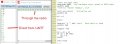
As you can imagine, the combinations of Oscillator, BAUD rate, WAITS-short and long, etc are endless, and I've tried most of them.
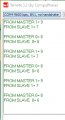
Timings (WAITMS) at different positions, show varied results.
The number of "1111111" in the message showed timing changes, e,g, how much of the message is printed, and what number it starts at.
BAUD shows what might be expected.
OSC -no difference.
RLED or PORTE showed the biggest change.
Adding more HSEROUT didn't explain much.
Next look at PORTE, I know it can be set to Analogue
Hi,
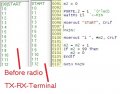
All of this detail when the problem was obvious in hindsight. I hadn't set the radio up, even though it was working.
I always used to post the full program, where I knew everything was in them, but as they got longer, I was advised to make smaller test programs, and this is where I went wrong this time.
Sorry for all of the wasted effort caused.
Anyway today I'm allowed to post the mini test program, as previously, it had underscores in the title and previously wasn't allowed.
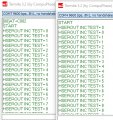
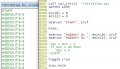
Here is the latest working program and the results, now where was I?
C
Hi,
All of this detail when the problem was obvious in hindsight. I hadn't set the radio up, even though it was working.
I always used to post the full program, where I knew everything was in them, but as they got longer, I was advised to make smaller test programs, and this is where I went wrong this time.
Sorry for all of the wasted effort caused.
Anyway today I'm allowed to post the mini test program, as previously, it had underscores in the title and previously wasn't allowed.
Here is the latest working program and the results, now where was I?
C
Hi,
Stuck again, with a strange problem.
I'm again trying to get the MASTER and SLAVE PICs to talk between themselves via SPI, but for some reason the Chip select isn't working. EDIT: SLAVE CS is RA4 and is stuck LOW.
Here is a small test program, that works in the SIM, but not live.
The LED flashes.
C
Either something else is holding the CS line "on", or you are not seeing the 100ms transition between on and off. The other possibility is that the CS pin is damaged on the chip - try another pin just as an experiment. Also, verify the TRIS state is "output" for the new test pin.
Does rled flash in the CS loop? If so, then the code is working and the CS line is either dead or being held high by something external, as mentioned at the start of my comments. Is the analog/comparator turned off for PortA?
Hi,
Stuck again, with a strange problem.
I'm again trying to get the MASTER and SLAVE PICs to talk between themselves, but for some reason the Chip select isn't working. It is stuck on, so I do get readings, but I want it to switch OFF.
Here is a small test program, that works in the SIM, but not live.
The LED flashes.
C
Hi J,
It's easy to get confused, as I am most of the day, but the encoder is on the PORTA of the SLAVE PIC.
Would you like a clarification post of how it's all connected, including the REMOTE?
C
Either something else is holding the CS line "on", or you are not seeing the 100ms transition between on and off. The other possibility is that the CS pin is damaged on the chip - try another pin just as an experiment. Also, verify the TRIS state is "output" for the new test pin.
Does rled flash in the CS loop? If so, then the code is working and the CS line is either dead or being held high by something external, as mentioned at the start of my comments. Is the analog/comparator turned off for PortA?
Hi S,
First/ In my initial post, I said the CS is ON, which is when the PIN is LOW, I'll clarify it in #1168.
This CS has worked, earlier today, so I'm puzzled about it being held down.
The LED does flash.
I tried a PIN from another PORT and it flashes.
I also tried setting the Analogue/digital PINs in ADCON0 and 1, no change. I think it is PORTA causing the error, as AN0 to 4 include the digital RA4, which is a dyslexic nightmare.
For now, I'll wire the spare PIN that works to be the CS, and move on.
C
Hi J,
It's easy to get confused, as I am most of the day, but the encoder is on the PORTA of the SLAVE PIC.
Would you like a clarification post of how it's all connected, including the REMOTE?
C
Hi S and J,
Found it!
[ Either something else is holding the CS line "on", ]
I fell foul of writing short test programs again. The SLAVE TX TRIS has to be set to '1', as it is now a CS/SS.
Now its working. Thanks.
C
hi C,
It sounds as though you are blaming the problems on writing/using short test programs for debugging.?
I test program will only give the required debug if written correctly.
E
hi C,
It sounds as though you are blaming the problems on writing/using short test programs for debugging.?
I test program will only give the required debug if written correctly.
E
Hi E,
Yes, I am, even though I know the 'A bad workman blames his tools' and 'rubbish in rubbish out' principle, and it's my part I blame. In this case it was the other program that I couldn't see affecting the one I was working on.
It was after I had finished for the day that S's statement, came to mind, and I had to turn the computer on again.
Anyway we've moved forward today, and that's the aim.
Cheers, C
Hi,
Go on, ask me who's pleased
Here's 2x programs, using HSEROUT, ARRAYs and SPI exchange between 2x PICs, phew.
Next and last thing is get the GPS to SPI. EDIT: Ignore some of the odd comments, they're from old programs.
C.
Hi,
I'm Learning ARRAYS and SPI.
I have a (10) ARRAY, (0)=QEIDEG.LB, (1)=QEIDEG.HB, (2)=1st digit of VOLTS, (3)=2nd digit of VOLTS, the rest are empty.
When (0) goes above 2x digits-99 the results get messed up.
Can someone tell me why please?
C
Clip:
For experienced users, it is worth noting that a string variable can actually be treated as a byte array, if needed.
For example:
string_var = "1234567"
string_var(3) = "a"
After the execution of this example, string_var variable will contain the string "123a567".
Update:
When the above link has been clicked and displayed, use File/SaveAs [ top left corner].
This will save the complete document as .html.
So to query any Command double-click the .html Icon and you will have all the Oshonsoft text and examples at a click of the mouse on your desktop.
Clip:
For experienced users, it is worth noting that a string variable can actually be treated as a byte array, if needed.
For example:
string_var = "1234567"
string_var(3) = "a"
After the execution of this example, string_var variable will contain the string "123a567".
Update:
When the above link has been clicked and displayed, use File/SaveAs [ top left corner].
This will save the complete document as .html.
So to query any Command double-click the .html Icon and you will have all the Oshonsoft text and examples at a click of the mouse on your desktop.
Hi E,
I've set them like this: Dim s2m(10) As Byte.
Regarding the experience user section, I saw this and hope to understand it later. I recall, that I've seen VAR in previous programs, and will check later.
Later today, I'm going to my mate's, who is the organiser 'INCLUDES, PROCEDURES ETC. Let's see what he makes of it.
I already have the PHP in the link, and use it sometimes.
Thanks.
C.

 Facebook
 Google
 GitHub
 Linkedin