Remote control by location (PIC in Oshonsoft)

Thread Starter

camerart

Joined Feb 25, 2013
3,831
In your existing code you send string data by one byte. One byte or char can hold decimal value 0-255. Unsigned integer type (in PicBasic PRO named WORD) of data (usually is two bytes long) holds 0-65535, in PicBasic PRO exist also LONG type which is 4 bytes long and holds +/- 2million. This means you can send any value trough SPI by one byte using same method you sent the byte array (string).
Hi T,
I'm familiar with BIT,BYTE,WORD,LONG and STRING, but I'm a bit stuck regarding the formatting of the BYTE I want to send to PIC2.
In the CODE is: msg1 = "1234" + Cr + Lf but the 1234 is typed, and I want to know how to send a BYTE which is constantly being changed, as in incoming DATA.
C
 

Thread Starter

camerart

Joined Feb 25, 2013
3,831
Hi,
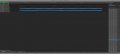
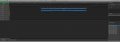
I'm only working on the MASTER at the moment, and this Screen shot show the changover from 359 to 0 which is SIM Compass DATA.
Next I've got to READ a Compass then send it.
C
 

Attachments

Thread Starter

camerart

Joined Feb 25, 2013
3,831
Hi,
Here is the FULL CODE from Jan 21.
I've got to check all of the PINouts etc, then see if I can get the compass working and SEND the resulting DATA to the SLAVE.:eek:
EDIT: I can't find a way to post any CODE?? I tried the TXT method, and the CODE method.
C.
 

trebla

Joined Jun 29, 2019
599
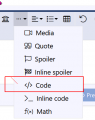
Above text entering window is menu bar, move mouse pointer to one that looks like three points and shows "Insert", Clicking on this item sheows drop-down menu where you can select "Code". It works for me.
 

Thread Starter

camerart

Joined Feb 25, 2013
3,831
Above text entering window is menu bar, move mouse pointer to one that looks like three points and shows "Insert", Clicking on this item sheows drop-down menu where you can select "Code". It works for me.
Hi T,
But not for me?
C.
 

trebla

Joined Jun 29, 2019
599
Testing to upload PBP code:
'Definitsioonid
 
 '@    __CONFIG   _MCLRE_OFF & _CP_OFF & _WDT_OFF & _IntRC_OSC   


'RC = GPIO.1
'MOOTOR = GPIO.4
'SOUND = GPIO.5

B0 var Byte  'siseneva pulsi muutuja  10uS
I selected Insert -> Code and leaved it "general code" type
 

Thread Starter

camerart

Joined Feb 25, 2013
3,831
Code:
18F46K20 16mHz INT SPI PCB7 090421 0900 FULL
'Open up main loop to sequence the various functions
'Add 2 scheduling timers for air data/compass report and $BORI message as main cycles too fast to
'send on each loop.
 

Thread Starter

camerart

Joined Feb 25, 2013
3,831
Testing to upload PBP code:
'Definitsioonid

'@    __CONFIG   _MCLRE_OFF & _CP_OFF & _WDT_OFF & _IntRC_OSC 


'RC = GPIO.1
'MOOTOR = GPIO.4
'SOUND = GPIO.5

B0 var Byte  'siseneva pulsi muutuja  10uS
I selected Insert -> Code and leaved it "general code" type

Hi T,
I use this method, but fails. I copied and posted your and it works.
C


Code:
"trebla, post: 1616886, member: 634177"]

[CODE title="Testing to upload PBP code"]'Definitsioonid


'@    __CONFIG   _MCLRE_OFF & _CP_OFF & _WDT_OFF & _IntRC_OSC


'RC = GPIO.1

'MOOTOR = GPIO.4

'SOUND = GPIO.5


B0 var Byte  'siseneva pulsi muutuja  10uS


I selected Insert -> Code and leaved it "general code" type[/CODE]
 

ericgibbs

Joined Jan 29, 2010
21,451
hi C,
As the listing is over 1000 lines, I would suggest the method you currently use is the best eg~935.

This is just a clip for demo
E

Code:
'18F46K20 16mHz INT SPI PCB7 090421 0901 FULL
'Open up main loop to sequence the various functions
'Add 2 scheduling timers for air data/compass report and $BORI message as main cycles too fast to
'send on each loop.

'------------- TARGET SETUP  ------------------
Const PR2set = 125  'use this for the live board: gets 5ms per interrupt
'Const PR2set = 2  'use this for fast timing to speed up simulator
'Define SIMULATION_WAITMS_VALUE = 1  'Comment in for SIM out for PIC

'----------- SYSTEM CONFIG  --------------------
'PIC Config
Define CONFIG1L = 0x00  'not used
Define CONFIG1H = 0x08  'HS XTL=2 ,HS PLL=6 ,INT=8 (NEEDS CHECKING HFINTOSC)
Define CONFIG2L = 0x1e  'brownout/ power
Define CONFIG2H = 0x00  'defaults cleared
Define CONFIG3L = 0x00  'defaults cleared
Define CONFIG3H = 0x89  '89 PORTB as DIG IN-OUT 'MCLR pin enabled
Define CONFIG4L = 0x80  'no debug
Define CONFIG4H = 0x00  'not used
Define CONFIG5L = 0x0f  'default
Define CONFIG5H = 0xc0  'default
Define CONFIG6L = 0x0f  'default
Define CONFIG6H = 0xe0  'default with a don't care loc added
Define CONFIG7L = 0x0f  'default
Define CONFIG7H = 0x40  'default

AllDigital

''OSH config
'Define SINGLE_DECIMAL_PLACES = 2  '=2 decimal places. Below 5 seems better.  For GPS ETC
'Define STRING_MAX_LENGTH = 20  'long enough
 

Thread Starter

camerart

Joined Feb 25, 2013
3,831
hi,
Explain what you did, so we know why and what has stopped working.

I use Win 10 32bit, with Fire Fox.

E
Hi E,
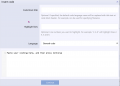
If I use my usual method of opening a notepad.txt copying and pasting the program into it, I get this:
when I post it. (crossed out)

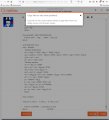
If I use the CODE method, I get this:
C
 

Attachments

Top