Remote control by location (PIC in Oshonsoft)

Thread Starter

camerart

Joined Feb 25, 2013
3,835
03 contains X low byte, 04 X high byte etc.
If you make correctly a function periph_rd()
you can do

X.lb = periph_rd ( 0x83 )
X.hb =periph_rd ( 0x84 )
Y.lb = periph_rd ( 0x85 }
etc...
Testing data ready might be needed.
2's complement conversion, when calculating the angles.
Hi J,
So that I could see all of the relevant CODE at the same time, I removed the FUNCTION, also at the moment I'm not using the calc function.
I'll try X.LB = 0x83 etc next.
I can try testing DRDY_PIN, but it may not be necessary, as it happens as SINGLE READ is WRITEn, after which the DATA is always there, and stays till ST2 is READ. (I think I'm correct)
I can always use DRDY_PIN later if necessary.
Thanks.
C
 
Last edited:
Thread Starter

camerart

Joined Feb 25, 2013
3,835
X,Y,Z 16 bit words.
03 contains X low byte, 04 X high byte etc.
If you make correctly a function periph_rd()
you can do

X.lb = periph_rd ( 0x83 )
X.hb =periph_rd ( 0x84 )
Y.lb = periph_rd ( 0x85 }
etc...
Testing data ready might be needed.
2's complement conversion, when calculating the angles.
Hi J,
We may have got it!

It's possible that #977 had errors, giving strange results (I won't check)

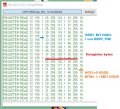
Anyway here are todays results. It's all long hand, to minimise errors, and it's not as the D/S as shows there are no dummy 0x00s.

NOTE: I didn't use 0x83, 0x84 etc, as it increments automatically, so only DUMMY BYTES.

E, I didn't use your 000 RIGHT READ CODE as it got too complicated adding it all 10x section.

Code:
compss_cs = 0  'CHIP SELECT COMPASS ON

            rd_adr = 0x80
            WaitUs 1
            SSPBUF = rd_adr
            While Not SSPSTAT.BF
            Wend
          
            WaitUs 1
            SSPBUF = 0  'Dummy BYTE
            While Not SSPSTAT.BF
            Wend
            wia_raw = SSPBUF
          
            SSPBUF = 0  'Dummy BYTE
            While Not SSPSTAT.BF
            Wend
            info_raw = SSPBUF
          
            WaitUs 1
            SSPBUF = 0  'Dummy BYTE
            While Not SSPSTAT.BF
            Wend
            st1_raw = SSPBUF

            WaitUs 1
            SSPBUF = 0  'Dummy BYTE
            While Not SSPSTAT.BF
            Wend
            xlb_raw = SSPBUF
          
            WaitUs 1
            SSPBUF = 0  'Dummy BYTE
            While Not SSPSTAT.BF
            Wend
            xhb_raw = SSPBUF

            WaitUs 1
            SSPBUF = 0  'Dummy BYTE
            While Not SSPSTAT.BF
            Wend
            ylb_raw = SSPBUF

            WaitUs 1
            SSPBUF = 0  'Dummy BYTE
            While Not SSPSTAT.BF
            Wend
            yhb_raw = SSPBUF

            WaitUs 1
            SSPBUF = 0  'Dummy BYTE
            While Not SSPSTAT.BF
            Wend
            zlb_raw = SSPBUF

            WaitUs 1
            SSPBUF = 0  'Dummy BYTE
            While Not SSPSTAT.BF
            Wend
            zhb_raw = SSPBUF

            WaitUs 1
            SSPBUF = 0  'Dummy BYTE
            While Not SSPSTAT.BF
            Wend
            st2_raw = SSPBUF

compss_cs = 1  'CHIP SELECT COMPASS OFF
 

Attachments

Last edited:

Thread Starter

camerart

Joined Feb 25, 2013
3,835
Hi,
Bear in mind this is the first test of the compass calculation, since changing to SSPBUF READ.
Holding the compass at an angle, which may correct with a calibration?
Here is the first test:
It appears that the deviation is about 5°. this is the best so far, so hopefully the past month of changing over to SSPBUF has been worth it.
C
 

Attachments

Thread Starter

camerart

Joined Feb 25, 2013
3,835
Hi,
I'm using CHIP SELECT in a FUNCTION.
This C/S changes for each peripheral.
Something is wrong with C/S when I write C?S = peripheral, shown attached. How should [ chip_sel ] be set up?
Any ckues please?
C
Code:
'INIT COMPASS (AK8963C) REGISTERS
chip_sel = compss_cs  '!!!!!!!!!!!!!!!!!!
Call init_compss()  'WRITE settings, READ  and PRINT AK8963C
 

Thread Starter

camerart

Joined Feb 25, 2013
3,835
Impossible to say anything, when only three lines of code is shown.
Hi J,
Sorry, trying to keep it short.

Do you want the whole program, or is this ok?
C

Code:
'BMP280 ALTIMETER
Symbol altmtr_cs = LATD.3  'BMP280 BAROMETER/TEMP [NEEDED]

'COMPASS AK8963C
Symbol compss_cs = LATD.0  'AK8963C
Symbol drdy_pin = LATD.1  'AK8963C DRDY PIN
compss_cs = 1
'===================================
Dim chip_sel As Bit  'WRONG!!!!!!!!!!!!!!!!!!
chip_sel = compss_cs  'altmtr_cs  'ALTMTR TEMP GENERAL CHIP SEL.  CHANGES before each CALL
'=================================


___________________________________________________________
Farther down the program
______________________________________________________
main:  '/\/\/\/\/\/\/\/\/\/\/\/\/\/\/\/\/\/\/\/\/\/\/\/\/\/\/\/\/\/\/\/\/\/\/\/\/\/\/\

'chip_sel = altmtr_cs  '!!!!!!!!!!!!!!!!!!!
'Call read_altmtr()  'BMP280
'chip_sel = altmtr_cs  '!!!!!!!!!!!!!!!!!!!
'Call show_altmtr()  'BMP280

chip_sel = compss_cs  '!!!!!!!!!!!!!!!!!!
Call read_compass()

chip_sel = compss_cs  '!!!!!!!!!!!!!!!!!!
Call show_compass()  'output current compass[[ In FULL program, this is in (SCHEDULE COMPASS AND ALTIMETER REPORTS) ]]

Toggle rled
WaitMs 100

Goto main
End         


_____________________________________________________
Farther down the program
______________________________________________________
'-------------------------------SPI FUNCTIONS-------------------------------------------------
Function periph_wr(arg1 As Byte, arg2 As Byte) As Byte
    
    chip_sel = 0
        WaitUs 1
        SSPBUF = wr_adr
        While Not SSPSTAT.BF
        Wend
        WaitUs 1
        SSPBUF = wr_byte
        While Not SSPSTAT.BF
        Wend
    chip_sel = 1
    
End Function                                     

Function periph_rd(arg1 As Byte) As Byte
    
    chip_sel = 0
        WaitUs 1
        SSPBUF = rd_adr
        While Not SSPSTAT.BF
        Wend
    WaitUs 1
        SSPBUF = 0  'Dummy BYTE
        While Not SSPSTAT.BF
        Wend
        periph_rd = SSPBUF
    chip_sel = 1
    
End Function
 

sagor

Joined Mar 10, 2019
1,050
I don't think you can equate a symbol to a variable in Oshonsoft. Symbol defined to a pin, yes. But trying to copy a symbol to a variable after definition seems a bit strange.
Symbol is a "pointer" to a pin or definition. You would normally say something like compss_cs= low or compss_cs = true (or false) to enable or disable the chip select.
I may be wrong about this, but that is my understanding of Oshonsoft "symbol" definition, it is simply a pointer that is fixed once it is compiled. Check the user variable storage locations, to see what your variables are pointing to (locations). Then run the debugger and see if your code actually moves the definition or not.
 

Thread Starter

camerart

Joined Feb 25, 2013
3,835
I don't think you can equate a symbol to a variable in Oshonsoft. Symbol defined to a pin, yes. But trying to copy a symbol to a variable after definition seems a bit strange.
Symbol is a "pointer" to a pin or definition. You would normally say something like compss_cs= low or compss_cs = true (or false) to enable or disable the chip select.
I may be wrong about this, but that is my understanding of Oshonsoft "symbol" definition, it is simply a pointer that is fixed once it is compiled. Check the user variable storage locations, to see what your variables are pointing to (locations). Then run the debugger and see if your code actually moves the definition or not.
Hi S,
Yes, I think you are correct. I must have tried all combinations by now.

What I'm trying to do is: Each C/S is set up using SYMBOL e,g, [ Symbol compss_cs = LATD.0 'AK8963C ]
The FUNCTIONS/PROCEDURES use these SYMBOLS to work, but I want to change the C/S for each different peripheral so I can use one READ FUNCTION with all the peripherals.

Possibly, I can remove C/S from the FUNCTION but set it in the MAIN loop first. I'll try that next.
C.
 

jjw

Joined Dec 24, 2013
823
Hi S,
Yes, I think you are correct. I must have tried all combinations by now.

What I'm trying to do is: Each C/S is set up using SYMBOL e,g, [ Symbol compss_cs = LATD.0 'AK8963C ]
The FUNCTIONS/PROCEDURES use these SYMBOLS to work, but I want to change the C/S for each different peripheral so I can use one READ FUNCTION with all the peripherals.

Possibly, I can remove C/S from the FUNCTION but set it in the MAIN loop first. I'll try that next.
C.
You can use one read function for all the peripherals.
Just make the chip select before calling the function.

For example:
Latd.0=0 // chip select
data=periph_rd(...)
Latd.0=1 // chip select off
 
Last edited:

Thread Starter

camerart

Joined Feb 25, 2013
3,835
You can use one read function for all peripherals.
Just make the chip select before calling the function.

For example:
Latd.0=0 // chip select
data=periph_rd(...)
Latd.0=1 // chip select off
Hi J,
Thanks, but that isn't clear to me. I'll look closer later in the week.
The program is working, with the compass, but as soon as I tidy it as the suggestions, it breaks. I have tried seting the C/S in the MAIN LOOP before calling the FUNCTION too.

A friend of mine is helping me, and is going to alter the FUNCTIONs and C/S in the program. He also explained it, but it's also over my head, so I'll just have to wait till it arrives. I'll let you know.
C
 

Thread Starter

camerart

Joined Feb 25, 2013
3,835
You can use one read function for all the peripherals.
Just make the chip select before calling the function.

For example:
Latd.0=0 // chip select
data=periph_rd(...)
Latd.0=1 // chip select off
Hi J,
I had another look at your suggestion. e,g, [ LATD.0 = 0 ] is the same as I'm using, apart from I use words e,g, SYMBOL COMPSS_CS = LATD.0 then COMPSS_CS = 1, so I can see what's happening.
In other words I am using the same method.

If I explain what I am having difficulty with it would confuse things, so let's wait to see what my mate comes up with.
C
 

Thread Starter

camerart

Joined Feb 25, 2013
3,835
Hi,
The Compass now is working ok, and is much more accurate than previously with the OSH SPI method. (Could have been my programming?)

Next I'm trying to get the BMP280 Altimeter to work.
The Altimeter uses a slightly different routine than the Compass.

I've tried to follow the D/S as much as I can, but so far failed to get it to READ, and I've tried many different timings, e,g, CHIP/SEL ON/OFF.

I'm not sure if 4 WIRE READ is ok?

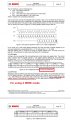
Here is a section of the D/S plus the ALTIMETER READ section from my program, in case anyone has ideas please.
Cheers, C

EDIT: I'm re-checking the set-up e,g, REG 0xF5
 

Attachments

Last edited:

jjw

Joined Dec 24, 2013
823
You try to read something to t.lb ...
then later replace them with b(0)...
Where do you get b(0), b(1), b(2) from?
If you still have the working version with Oshonsoft SPI, you can use it exactly by replacing Oshonsofts
/ SPIsend addr
SPI receive data /
with data = periph_rd( addr )
and removing all the Oshonsofts SPI pin settings etc.

Of course the setup of BMP280 has to be changed too:
/ SPISend addr,
SPISend data/
with periph_wr( addr, data )

If I remember correctly, you had working versions for peripheral read and write?
 

Thread Starter

camerart

Joined Feb 25, 2013
3,835
You try to read something to t.lb ...
then later replace them with b(0)...
Where do you get b(0), b(1), b(2) from?
If you still have the working version with Oshonsoft SPI, you can use it exactly by replacing Oshonsofts
/ SPIsend addr
SPI receive data /
with data = periph_rd( addr )
and removing all the Oshonsofts SPI pin settings etc.

Of course the setup of BMP280 has to be changed too:
/ SPISend addr,
SPISend data/
with periph_wr( addr, data )

If I remember correctly, you had working versions for peripheral read and write?
Hi J,
To answer some of these points:
The Oshonsoft version had a FOR/NEXT loop, which READ each BYTE in turn. I want to apply the BURST READ method, that I hope is possible.

"You try to read something to t.lb ...
then later replace them with b(0)..."
There are 6x Registers to READ, in the normal sequence, but their use is not in the same sequence (I think?). So they are converted to b() in the 'OSH'method using the FOR/NEXT loop (If I'm not mistaken?)

(Again, if I'm correct?)
"/ SPISend addr,
SPISend data/
with periph_wr( addr, data )"

SEND is now replaced by SSPBUF=

C
 

jjw

Joined Dec 24, 2013
823
I would use first the old program where Oshonsofts SpiSend and SpiReceive are replaced perihp_wr () or periph_rd() which use SSPBUF= etc. .... and not try the burst read.
You have to make the correct peripheral functions
If you change many things at the same time, it is difficult to spot the errors.
 

Thread Starter

camerart

Joined Feb 25, 2013
3,835
I would use first the old program where Oshonsofts SpiSend and SpiReceive are replaced perihp_wr () or periph_rd() which use SSPBUF= etc. .... and not try the burst read.
You have to make the correct peripheral functions
If you change many things at the same time, it is difficult to spot the errors.
Hi J,
OK, will do.

I found that using PERIPH_RD doesn't work as I wanted, because I couldn't get it to change for each peripheral, so as suggested switch the C/S before and after the CALS, which appears to work ok. I simply use each peripheral's C/S.
C.
 

jjw

Joined Dec 24, 2013
823
You almost had the peripheral SPI functions, but we're stuck withe the chip selects.
I copied and corrected these from your older post.
When calling these do chip select before and after function.
adr is replaced with the real register address and data with the real data ( when writing)
For example: read from BMP280 address 0xf7
altmeter_cs=0'// this can be for example Symbol altmeter_cs = LATX.0
data= periph_rd( 0xf7)
.....
periph_wr( wr_adr,data)
.....
Reading three bytes of temperature:
t_raw.3B = periph_rd(0xf7)
t_raw.HB = periph_rd(0xf8)
t_raw.LB = periph_rd(0xf9)
t_raw = ShiftRight(t_raw, 4)


______________________________________________________
'-------------------------------SPI FUNCTIONS-------------------------------------------------
Code:
Code:
Function periph_wr(adr As Byte, data As Byte) As Byte
WaitUs 1 '/// maybe not needed
SSPBUF = adr
While Not SSPSTAT.BF
Wend
WaitUs 1
SSPBUF = data
While Not SSPSTAT.BF
Wend

End Function

Function periph_rd(adr As Byte) As Byte
WaitUs 1
SSPBUF = adr
While Not SSPSTAT.BF
Wend
WaitUs 1
SSPBUF = 0 'Dummy BYTE
While Not SSPSTAT.BF
Wend
periph_rd = SSPBUB

End Function
 

Thread Starter

camerart

Joined Feb 25, 2013
3,835
Hi J,
I haven't succeeded yet!

There may be confusion over WRITE and READ. How it should be, after I previously named things incorrectly is:
WRITE is only for initialising, when WRITEing to set the registers, and READ is obviously for e,g, pressure READs
The FUNCTION [periph_wr] uses wr_adr and wr_byte if necessary and [ periph_rd ] uses rd_adr and rd_byte if necessary. Remembering that in [periph_rd] RD_adr is actually a WRITE e,g, 00000001, not 10000001.

EDIT: I kind of got it backwards here. I was trying to say when READing, WRITE a rd-adr to the peripheral.
Let's hope this is correct.

Is this how the above suggestion is written?
C
 
Last edited:

jjw

Joined Dec 24, 2013
823
Hi J,
I haven't succeeded yet!

There may be confusion over WRITE and READ. How it should be, after I previously named things incorrectly is:
WRITE is only for initialising, when WRITEing to set the registers, and READ is obviously for e,g, pressure READs
The FUNCTION [periph_wr] uses wr_adr and wr_byte if necessary and [ periph_rd ] uses rd_adr and rd_byte if necessary. Remembering that in [periph_rd] RD_adr is actually a WRITE e,g, 00000001, not 10000001.

Is this how the above suggestion is written?
C
No, the read address is 1xxxxxxx
Look at the memory map 18
All the read addresses start 0xF.
For examples the pressure 0xFA, 0xFB

Reading does not need a data byte as parameter ( argument ), if that is what you mean.
The periph_rd function returns a value ( byte ) from a read address.
for example:
Xraw.3B= periph_rd ( 0xFA)

Manual:
5.3.2 SPI read
Reading is done by lowering CSB and first sending one control byte. The control bytes consist of the SPI register address (= full register address without bit 7) and the read command ( bit 7 RW = 1 )
 
Last edited:

Thread Starter

camerart

Joined Feb 25, 2013
3,835
No, the read address is 1xxxxxxx
Look at the memory map 18
All the read addresses start 0xF.
For examples the pressure 0xFA, 0xFB

Reading does not need a data byte as parameter ( argument ), if that is what you mean.
The periph_rd function returns a value ( byte ) from a read address.
for example:
Xraw.3B= periph_rd ( 0xFA)

Manual:
5.3.2 SPI read
Reading is done by lowering CSB and first sending one control byte. The control bytes consist of the SPI register address (= full register address without bit 7) and the read command ( bit 7 RW = 1 )
Hi J,
I've got mixed up somewhere, I think it's to do with: What's the purpose of [ periph_wr( wr_adr,data) ] in #997? are we talking about setting up registers here?

My understanding is in periph_RD the RD_ADR is sent e,g, 0xF7 then the RD_BYTES are returned.
In periph_WR the WR_ADR is sent then the WR_BYTE is sent to set the registers.
C
 
Top