Re-using CREE LEDs

Thread Starter

Dnomis

Joined Apr 29, 2023
14
Long term I would love to drive it from the Ender3 v2 Mainboard. I do have a CR touch on it and it has the newer mainboard. 4.2.2 but unsure where to source the 5v on the board and have read all sorts of horror stories about people frying their board. I have had to tape up the 5v line on the USB cable connected to my RPi as it was powering the Ender Mainboard when the printer wasn't on.

As such if I can run the lights with a wall plug power supply I already have it is the safest option for now.
 

Ya’akov

Joined Jan 27, 2019
10,235
I hooked up the 2 panels in series to my PC via USB and they illuminated but only just, they were not bright at all.
Is this because the PC cannot deliver much current? Is the 10ohm resistor on the board enough to protect the LEDs if I connect it up to the 5v 1.5a supply or will the LED's just draw the current they need and no more?
Given the results, try them in parallel.

LEDs will draw as much current as you provide and release the magic smoke. There seems little danger of the in this test case.
 

Thread Starter

Dnomis

Joined Apr 29, 2023
14
I am aware of ohms law but was not aware of the behaviour of LEDs, I also do not really trust my judgement when it comes to electrical circuits, it has a tendency to end in failure.
 

MisterBill2

Joined Jan 23, 2018
27,508
The LEDs were not bright, because 5 volts puts 2.5 volts acrosseach string, which is quite a way down on the light versus current curve. So if you get an adequate six volt supply, such as one of the older transformer types, they will be much brighter.
Like I said in post #13
But probably within the specifications.
 

BobTPH

Joined Jun 5, 2013
11,515
Above the rated Vf of the LED, the current gets high enough to destroy the LED. If the LED is spec’ed ay 3.3V (typical white LED Vf), then supplying 5V directly would instantly kill it.

The resistor limits that current by dropping the voltage as the current increases. The resistor is chosen to give the correct current at Vf, by dropping the 5V to 3.3V at the desired current.

So, to drop 5V to 3.3V, you use Ohms law. The voltage across the resistor need to be 1.7V.

Assuming 40 mA for the two parallel LEDs, you can compute the resistor:

V = I R. or

R = V / I.

R = 1.7 / 0.040 = 42.5Ω

Since the resistor is 10Ω, it is going to pass more current than that, perhaps enough to kill it.

And do not rely on the max current if the power supply! That is the max it can supply without being damaged, and you should never exceed that, in fact you should use a supply that is rated 25 to 50% higher than needed.
 

Ya’akov

Joined Jan 27, 2019
10,235
I am aware of ohms law but was not aware of the behaviour of LEDs, I also do not really trust my judgement when it comes to electrical circuits, it has a tendency to end in failure.
The reason I asked is because most of these issues can be understood with Ohm’s Law. The difference for LEDs from most casual applications is the unknown value.

While it certainly seems reasonable to take the route we usually expect and calculate the current with a known voltage and resistance, in the case of an LED what we know is the current and voltage of the device. That is, we know the \( \mathsf{V_f} \) which is the forward votage of the device. This is the voltage at which the device begins to conduct.

Being a diode, the LED doesn’t conduct (sufficiently) until \( \mathsf{V_f} \) is reached. There is also a current rating which, in general, is 20mA to produce the light output the manufacturer‘s rating specifies. So, we know \( \mathsf{V_f} \) and current, and we also know the supply voltage we want to use.

The formula:
\[ \mathsf{R = \frac{V_s−V_{led} \times N_{led}} {I_{led}}} \]
will get you the current limiting resistor needed to provide the proper voltage, and so the proper current, to the LED.

It’s easy to use an online calculator like this one to play with values.

For things like this, it is very handy to have a variable power supply with a constant current or voltage mode to empirical determine how much current you want the LEDs to have. You can pick one up for about $50USD and you‘ll find it very useful.
 

LesJones

Joined Jan 8, 2017
4,511
If you have the panels in series then you are only applying 2.5 volts to each LED which is not enough to make them draw a reasonable current. the 10 ohm resistors will only protect them if the supply voltage is such that they limit the current to within the ratings of the LEDs. this will be about 4.2 volts which is the voltage from a fully charged lithium ion cell.
I am assuming that the LEDs where driven within their rating in the originl application as we don't have the specification for the LEDs. The calculations were based on this assumption.

Les.
 

Audioguru again

Joined Oct 21, 2019
6,826
You may have answered this already (I could have missed it) but is there a reason you don't want to use the existing PCB to drive the LEDS?
He said the charger never finishes charging and the LEDs do not light when the battery is charging.
I think it never finishes charging because the battery is worn out and needs replacing.
It is normal for a Lithium battery powered product to not be powered when the battery is charging so the charger circuit can detect low charging current then stop the charging.
 

Thread Starter

Dnomis

Joined Apr 29, 2023
14
I'll be totally honest. The more I play with this, the less I understand what is going on...

I do have a bench power supply. It is a circuitspecialists CS1530S I tried it but setting the voltage to 5v and then connecting it and raising the current gently but the power supply keeps switching between constant current and constant voltage and the light goes on and off with different brightness. It seems impossible to control with any level of consistency.
That could be me not fully understanding the power supply or it being faulty itself.

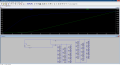
I tried simulating it in LTSpice and even that managed to just confuse me as the voltage never went up even if I put 12v in, the voltage across one of the LED's never goes above 2.7v. #28 suggested that if I was only putting 2.5v across the LED they would not pull any current?
(The second "board" of LED's are not currently connected as I was seeing how to get it to work with 1 board, The 2 inline resistors are currently set at zero each)

1682960246260.png
 

Ya’akov

Joined Jan 27, 2019
10,235
I'll be totally honest. The more I play with this, the less I understand what is going on...

I do have a bench power supply. It is a circuitspecialists CS1530S I tried it but setting the voltage to 5v and then connecting it and raising the current gently but the power supply keeps switching between constant current and constant voltage and the light goes on and off with different brightness. It seems impossible to control with any level of consistency.
That could be me not fully understanding the power supply or it being faulty itself.
Set the power supply to 20mA x the number of LEDs on one of the boards, and hook it up. It doesn’t matter what the voltage is beyond being enough, it will be in constant current mode so long as the voltage is sufficient. Turn on the supply and if the LEDs don’t light or are too dim slowly increase the voltage.

As you do, the current should rise until it reaches the limit you set. 20mA should be the nominal current for each LED, hence 20xn. This should work just fine.

Next, adjust the current down until the brightness is what you want. The voltage on the supply display will be the target.
 

Thread Starter

Dnomis

Joined Apr 29, 2023
14
I set the current to 0.6A (20mA x 30) and increased the voltage. it stopped rising at 3.5v and would not go any higher.
I tried lowering the current and it just dimmed from what was about the right brightness at 0.6A
 

Ya’akov

Joined Jan 27, 2019
10,235
I set the current to 0.6A (20mA x 30) and increased the voltage. it stopped rising at 3.5v and would not go any higher.
I tried lowering the current and it just dimmed from what was about the right brightness at 0.6A
Just to be clear, what was the voltage set to on the supply?
 

Thread Starter

Dnomis

Joined Apr 29, 2023
14
I can't find my manual for the power supply to make sure I am using it properly but I believe you short out the + and -ve to set the max current. then remove the short.

I started with the voltage at zero and raised it slowly, it would not go higher than 3.5v regardless of how far I turned the knob on the supply. the little light on the power supply switch to CC which I think indicates that it was restricting the output based on the max current of 0.6A
 

Ya’akov

Joined Jan 27, 2019
10,235
I started with the voltage at zero and raised it slowly, it would not go higher than 3.5v regardless of how far I turned the knob on the supply. the little light on the power supply switch to CC which I think indicates that it was restricting the output based on the max current of 0.6A
Yes, that would be correct. You seem happy with the 600mA but I would be very curious what sort of current and resulting brightness you see at 3.7V and 4.2V

You can start with the supply set to 3.5V which you know will get you 600mA. Turn the current limit up to, say, 1A then slowly raise the voltage and watch the current. Almost every modern white LED will handle 30mA (they are often driven much harder than that, at the cost of service life but not instant death).

You don’t need it any brighter, it seems, but it would be nice to see how it behaves at the presumed maximum battery voltage. Just watch for heat, that’s what kills them. If they are warm, no harm, but if they repel your finger with their heat, turn it off or down.
 

BobTPH

Joined Jun 5, 2013
11,515
I can't find my manual for the power supply to make sure I am using it properly but I believe you short out the + and -ve to set the max current. then remove the short.

I started with the voltage at zero and raised it slowly, it would not go higher than 3.5v regardless of how far I turned the knob on the supply. the little light on the power supply switch to CC which I think indicates that it was restricting the output based on the max current of 0.6A
To run them at that same current from 5V, then you could add a resistor that drops 1.5V at 0.6A. From Ohm’s law;

R = V / I = 1.5 / 0.6 = 2.5Ω

The power would be 1.5x 0.6 = 0.9W so a 1W resistor would get very hot but not burn up if open to the air. A 2W would be a better choice.
 

MisterBill2

Joined Jan 23, 2018
27,508
Many illumination types of LEDs are rated at a lot more than 20 milliamps. I recently investigated an outdoor light that was quite bright when it was working, which had 3 surface mount LEDs and power supply rated 145 Ma.
My point is that 20mA is no longer the only current that any LED is intended to operate at.

"What is going on"is that the LEDs are behaving exactly like diodes! As the supply voltage is increased the current varies in a very non-linear relation to the forward voltage,and so does the amount of light emitted. This means that if the specifications are unknown, the intended current will need to be found experimentally.
A fair guess at the applied voltage to these assemblies is that the intended voltage would not exceed the nominal battery voltage, which with 4.2 being the maximum battery voltage value, a reasonable guess is whatever the voltage would be during the longest segment of the discharge voltage curve.
So the experiment would be to start the test with about 2.5 volts applied and note the current and the brightness, and measure the forward voltage across an LED. Then increase the supply voltage to 2.6 and repeat. continue increasing in 0.1 volt increments until the LEDs show what looks like the intended brightness.
What you will see is that at some point the forward voltage does not increase as much with the increase in the supply voltage.
That is where the supply increases should stop. Back off a bit and that is a reasonable maximum voltage to operate the LEDs at. Adjusting to a slightly lower voltage than that. if the light output is still adequate, will extend the LED life and reduce power consumption.
If the supply used to power the LEDs is not adjustable, then you will need to use a series resistor to drop the voltage at the terminals to what you had when the desired illumination was found.
 

Thread Starter

Dnomis

Joined Apr 29, 2023
14
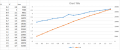
So I ran through the range of Amp settings on the power supply from 0.2A up to 1.6A in 0.1A steps and recorded the voltage that the supply would go up to and the Lux level according to a mobile phone app... the light was in the same place above the phone at all times...

1683050959078.png

I was tempted to go higher but didn't want to let out the magic smoke and the LEDs were more than bright enough!
 

Ya’akov

Joined Jan 27, 2019
10,235
That does look like they would just put the cell voltage across the LEDs. The 50mA or so at the top end is driving hard, but it’s not the worst I have seen on cheap lights. So you can run them at 30mA or so if you need that. I suspect with 60 LEDs and the small be of the E3 you won’t need more than the 20mA or so that should be very kind to the LEDs and extend their life.
 
Top