Facebook
 Google
 GitHub
 Linkedin

Hello everyone. this isnt really a homework but I wanted to get more experience with breadboard implementation since it will be useful in my future studies. Recently my class was on the topic of Digit Counters using BCD decade counters.
I was fascinated by it and wanted to visualize the ABCD output of the 74LS192 as 1 and 0 so I made this in proteus.
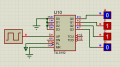
Seeing as the proteus simulation was working fine and dandy, I wanted to implement the circuit to the breadboard to get more experience building things. I used a 555 1hz timer and replaced the logic probes into LED but when I have everything built on the breadboard, the ABCD (the 2,3,6,7 pins) outputs are always in 1 (the LED are always on) regardless of how the 555 timer pulse.
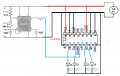
This is how I connected everything in my breadboard, I used a 5v power supply, a 555 timer and a sn74LS192. I have tripled check the conenctions and they are at the same position as the image below. What did I do wrong in the breadboard implementation? Replies are greatly appreciated!
I was fascinated by it and wanted to visualize the ABCD output of the 74LS192 as 1 and 0 so I made this in proteus.
Seeing as the proteus simulation was working fine and dandy, I wanted to implement the circuit to the breadboard to get more experience building things. I used a 555 1hz timer and replaced the logic probes into LED but when I have everything built on the breadboard, the ABCD (the 2,3,6,7 pins) outputs are always in 1 (the LED are always on) regardless of how the 555 timer pulse.
This is how I connected everything in my breadboard, I used a 5v power supply, a 555 timer and a sn74LS192. I have tripled check the conenctions and they are at the same position as the image below. What did I do wrong in the breadboard implementation? Replies are greatly appreciated!