Facebook
 Google
 GitHub
 Linkedin

Still no hardware. I'm starting to regret this whole 30 day turn around thing..
Here is the latest:
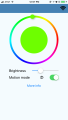
iOS is coming along swimmingly. I have the ability to update configurations on demand by different button inputs. Getting everything to work over bluetooth was a little tricky at first. Lots of little nuances about how react-native works that I’m slowly learning. (Mostly about how to set the state variable)
I ended up writing down some of the tasks that needed to get done. Anything with a + next to it is done. (This works better in Markdown)
For Web
Serial number record: {Serial, Name, Binary Image File}
+ set
+ get
+ database
+ tests on deploy
+ different domain for dev work
- save firmware blob to s3
- upload a firmware object with reference to the firmware blob
- one time only access key for that firmware blob
For App
+ Saving the state so on app load it doesn’t just load the default config.
- On-boarding screen (this could be dual purpose as the same screen as the connection manager screen — on success sets device to connect only to “paired” phone)
+ Help screen
- Name customization - once a device is looked up, it will pull down the persons name and the SVG/image file associated with their light
- Being able to change the name and push it back to the web would be handy too
- SVG image import into the database
- SVG download into the app as part of the serial # record
+ Help icons with popups (contain helpful bits if people don’t know what a feature is)
+ Lock to phone, only advertises to the original phone by default. Disabling this will allow any phone to connect.
+ Copy text from serial # popup for diagnostic debug reasons
+ Connection manager
+ Connection state icon (when clicked brings user to the above — alternatively there would be an options button which would do the same)
+ Color selection
+ Formatting
- Catch potential errors related to bluetooth connection
+ Device release/deletion from app
- App version imported from Git
- OTA
For firmware
- Advertise only to previously connected (when enabled)
- Remove config information on DFU/Reset
- FDS write errors
- Hardware Ver in DIS
- Assemble with button, switch and PIR
Biggest takeaways
1. Handling promises in javascript is a pain in the arrse. Changing them makes things a little bit more sane. Look at the code snippet below:
I basically queue up what needs to be done and chain together the responses. Thus, once one is done, it moves to the next and so on.
2. I’ve been experimenting with the MTU as well. Seem like sometimes the transfer is instantaneous and other’s it slows down to a snails pace. Increasing to 128bytes works for this but in the future when the config > 128 bytes I’ll have the same problem.
3. Device recovery seems straight forward. This stuff has to be chained though. I may rework the section to use the hard-coded UUIDs. TBD though.
4. Protobuf.js seems like more than sufficient for what I need for converting my `config.json` to something useful for the device to consume. The biggest thing was trying to figure out how to encode the data properly so it’s sent by the peripheral correctly.
An aside: The config.json is the configuration of the hardware device itself. So it holds the state and any configuration variables set by the app. It's sent over in a protobuf format to the embedded device, decoded and then saved as a struct -- the struct is far more efficient in terms of the space it takes
PITA.
I’m doing it this way for now:
Whereas I’m making sub-arrays, then converting to buffer object and then to a base64 string. I tried a few other ways but this seemed to work the best out of the box.
Overall, I’m digging the simplicity of the system and I think I’m making some serious progress vs trying to a native design. Plus, it will translate easily to an android app with some tweaking. (Yaaaahhhhhhhhh)
Here is the latest:
iOS is coming along swimmingly. I have the ability to update configurations on demand by different button inputs. Getting everything to work over bluetooth was a little tricky at first. Lots of little nuances about how react-native works that I’m slowly learning. (Mostly about how to set the state variable)
I ended up writing down some of the tasks that needed to get done. Anything with a + next to it is done. (This works better in Markdown)
For Web
Serial number record: {Serial, Name, Binary Image File}
+ set
+ get
+ database
+ tests on deploy
+ different domain for dev work
- save firmware blob to s3
- upload a firmware object with reference to the firmware blob
- one time only access key for that firmware blob
For App
+ Saving the state so on app load it doesn’t just load the default config.
- On-boarding screen (this could be dual purpose as the same screen as the connection manager screen — on success sets device to connect only to “paired” phone)
+ Help screen
- Name customization - once a device is looked up, it will pull down the persons name and the SVG/image file associated with their light
- Being able to change the name and push it back to the web would be handy too
- SVG image import into the database
- SVG download into the app as part of the serial # record
+ Help icons with popups (contain helpful bits if people don’t know what a feature is)
+ Lock to phone, only advertises to the original phone by default. Disabling this will allow any phone to connect.
+ Copy text from serial # popup for diagnostic debug reasons
+ Connection manager
+ Connection state icon (when clicked brings user to the above — alternatively there would be an options button which would do the same)
+ Color selection
+ Formatting
- Catch potential errors related to bluetooth connection
+ Device release/deletion from app
- App version imported from Git
- OTA
For firmware
- Advertise only to previously connected (when enabled)
- Remove config information on DFU/Reset
- FDS write errors
- Hardware Ver in DIS
- Assemble with button, switch and PIR
Biggest takeaways
1. Handling promises in javascript is a pain in the arrse. Changing them makes things a little bit more sane. Look at the code snippet below:
Code:
      // We create the start of a promise chain
      let chain = Promise.resolve();

      index = 0;

      // And append each function in the array to the promise chain
      for (const func of out) {
        console.log("shifing " + out[index]);
        chain = chain.then(
          return this.state.device.config.writeWithResponse(out[index++])
        );
      }

      chain = chain.then(() => {
        this.info("Config transfer complete.");
});2. I’ve been experimenting with the MTU as well. Seem like sometimes the transfer is instantaneous and other’s it slows down to a snails pace. Increasing to 128bytes works for this but in the future when the config > 128 bytes I’ll have the same problem.
3. Device recovery seems straight forward. This stuff has to be chained though. I may rework the section to use the hard-coded UUIDs. TBD though.
4. Protobuf.js seems like more than sufficient for what I need for converting my `config.json` to something useful for the device to consume. The biggest thing was trying to figure out how to encode the data properly so it’s sent by the peripheral correctly.
An aside: The config.json is the configuration of the hardware device itself. So it holds the state and any configuration variables set by the app. It's sent over in a protobuf format to the embedded device, decoded and then saved as a struct -- the struct is far more efficient in terms of the space it takes
PITA.
I’m doing it this way for now:
Code:
        data = this.payload.slice(index, index + offset);
dataEncoded = new buffer.from(data).toString("base64");Overall, I’m digging the simplicity of the system and I think I’m making some serious progress vs trying to a native design. Plus, it will translate easily to an android app with some tweaking. (Yaaaahhhhhhhhh)
Last edited: