Facebook
 Google
 GitHub
 Linkedin
Hi to all,
I work on a Photoplethysmography (PPG) Project with a customised Optoelectronic Sensor to monitor vital signs where I acquire the signals (PPG + Accelerometer) from the sensor to a customised board for all the necessary analogue signal processing and through DAQs to LabVIEW for further processing to perform multi-channel Photoplethysmography (PPG).
I would like to convert this Opto-physiological Measurement System setup to a wireless (Bluetooth) one.
Please see the attached image of the current setup:
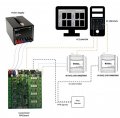
The current system consists of:
Various connectors on the board:
① Power Supply Connectors: There are three power-supply connectors, VDD, -VDD and GND, standard banana plugs, which are colour coded (red = VDD, blue = -VDD, black = GND). The electronic board can be supplied with ±15V(nominal) when connected to the Power Supply Device mentioned above.
② RS232 Master Serial Port Connector: The MASTER connector is used to connect the Electronic Board to a PC. With a Serial-to-USB adapter cable it can be connected directly to a PC USB Port.
③ Probe Connector: The circuit uses a single 9-pin D-type female connector to connect to the Optoelectronic Sensor for the PPG signals capture.
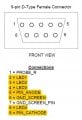
The Accelerometer, on the other hand, is connected to a Data Acquisition USB Device which is in turn connected to a PC USB Port through a USB cable.
④ Processed Outputs:A single 16-way 0.1-inch pitch IDC connector is used as the output for all amplified and filtered output channels.
⑤ Raw Outputs: A single 16-way 0.1-inch pitch IDC connector is used as the output for the unprocessed output channels.
Please see the attached image of the Bluetooth setup:
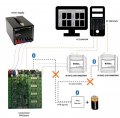
Requirements:
I would appreciate any suggestions and ideas on how to convert my setup into a wireless one by eliminating at this stage the probe cable for more flexibility in order to avoid any disturbances on the acquired signals.
Thank you in advance
Panos
I work on a Photoplethysmography (PPG) Project with a customised Optoelectronic Sensor to monitor vital signs where I acquire the signals (PPG + Accelerometer) from the sensor to a customised board for all the necessary analogue signal processing and through DAQs to LabVIEW for further processing to perform multi-channel Photoplethysmography (PPG).
I would like to convert this Opto-physiological Measurement System setup to a wireless (Bluetooth) one.
Please see the attached image of the current setup:
The current system consists of:
- An Opto-Electronic Sensor ( 7 channels: 4 different wavelengths, 1 photodiode cathode,1 photodiode anode and 1 GND) with 3-axis Accelerometer (5 Channels: 3 axis, 1 Voltage supply and 1 GND)
- an Electronics Board that implements a four-wavelength opto-physiological measurement system that provides all the necessary analogue signal processing to perform multi-channel Photoplethysmography (PPG).
- two Multifunction Data Acquisition USB Devices (DAQ, USB-6009, National Instruments Co., Novato, CA, USA) that provide basic DAQ functionality for the portable measurements and the Analogue-to Digital Conversion (ADC) for the captured PPG signals and the Accelerometer respectively.
- a power supply device, +15V (Dual Rail power supply, Rapid Electronics Ltd, Colchester, Essex, UK)
- a control and measurement software performed by LabVIEW GUI (National Instruments Co., USA)
Various connectors on the board:
① Power Supply Connectors: There are three power-supply connectors, VDD, -VDD and GND, standard banana plugs, which are colour coded (red = VDD, blue = -VDD, black = GND). The electronic board can be supplied with ±15V(nominal) when connected to the Power Supply Device mentioned above.
② RS232 Master Serial Port Connector: The MASTER connector is used to connect the Electronic Board to a PC. With a Serial-to-USB adapter cable it can be connected directly to a PC USB Port.
③ Probe Connector: The circuit uses a single 9-pin D-type female connector to connect to the Optoelectronic Sensor for the PPG signals capture.
The Accelerometer, on the other hand, is connected to a Data Acquisition USB Device which is in turn connected to a PC USB Port through a USB cable.
④ Processed Outputs:A single 16-way 0.1-inch pitch IDC connector is used as the output for all amplified and filtered output channels.
⑤ Raw Outputs: A single 16-way 0.1-inch pitch IDC connector is used as the output for the unprocessed output channels.
Please see the attached image of the Bluetooth setup:
Requirements:
- Bluetooth module on PPG sensor (7 channels)
- Bluetooth module to connect it to the serial probe connector to receive PPG signals from sensor
- Bluetooth module for Accelerometer signals (5 channels) either to DAQ or directly to labVIEW if ADC can be obtained
- Sampling frequency up to 256 Hz
- Battery to support Bluetooth module on sensor, Accelerometer and PPG signals.
I would appreciate any suggestions and ideas on how to convert my setup into a wireless one by eliminating at this stage the probe cable for more flexibility in order to avoid any disturbances on the acquired signals.
Thank you in advance
Panos